
How to Fix Claude Payment Failures: A Troubleshooting Guide for Card Declines, Address Mismatches, and 3D Secure Verification Errors





Claude payment failures are common, but they usually do not mean “this card can never be used.” More often, the cause is a billing address mismatch, a billing region that does not meet processing requirements, an incomplete 3D Secure verification, insufficient balance, or incorrect payment information.
If your Claude payment fails, do not keep submitting the payment repeatedly right away. First verify your billing location, billing address, available card balance, and 3DS verification status, then go back to Claude’s billing page and try again. The troubleshooting directions Anthropic outlines in Why was my card declined? cover the most common reasons behind Claude payment failures.
What to Check First When a Claude Payment Fails

When a Claude payment fails, prioritize these four checks: whether the billing address matches the issuer’s records, whether the billing country or region is supported, whether the card balance is sufficient, and whether 3D Secure verification has been completed.
Anthropic clearly states in Why was my card declined? that the payment method’s billing address and country of origin must meet processing requirements, and that the billing address must match the bank’s records. If the transaction requires 3D Secure, the verification must also be completed. Anthropic’s Supported countries and regions page also makes clear that Claude.ai and related services are subject to regional availability policies.
If you see card declined, first check your balance, billing address, payment method type, and verification status. If you see billing address mismatch, first check whether the street address, postal code, country, and name format match the issuer’s records. If you see verification failed, first confirm that the SMS code, bank app confirmation, and 3DS redirect were all completed successfully. If you see payment method verification required, complete the verification flow first, then decide whether you need to resubmit the payment.
Anthropic explains in Why am I being asked to verify my payment method? that when you see a “Verify now” prompt, you need to complete payment method verification first. If you click “Remind me later,” the system will prompt you again after 24 hours.
Look at the Error First, Then Decide the Troubleshooting Order
When many people run into a Claude payment failure, they immediately switch cards, switch browsers, or keep resubmitting the payment. That does not always make things faster, and it can actually make the issue harder to diagnose. A better approach is to triage based on the error message first:
- Errors related to address information Check the billing address, postal code, country, and name format first.
- Errors related to verification Check whether 3DS verification was completed successfully first.
- Errors related to charging or authorization Check the balance, authorization attempts, and issuer-side declines first.
- Errors related to billing status Go back to Claude’s Billing page first and check the most recent payment status.
What Are the Most Common Reasons for Claude Payment Failures?

The most common reason a Claude payment fails is not that “Claude does not support this card at all,” but that some step in the payment flow failed validation. In Why was my card declined?, Anthropic points to the main causes as supported billing location, billing address matching, 3D Secure verification, accepted payment methods, and sufficient funds.
1. Billing Address Mismatch
If the billing address you enter on Claude’s payment page does not match the billing address registered with the card issuer, the transaction may be declined. This check is not limited to the country. It also includes the street, street number, city, state or province, postal code, and name format. Anthropic specifically notes that even small differences, such as a street name spelling variation or a missing accent mark, may cause the transaction to fail.
2. Billing Location Does Not Meet Processing Requirements
Anthropic requires the payment method’s billing address and country of origin to meet processing requirements. If the billing country or region is not within the supported range, simply changing the address format usually will not solve the problem.
3. 3D Secure Verification Was Not Completed
If the transaction requires 3DS verification but the verification code is not entered successfully, the bank app confirmation is not completed, or the verification page is closed midway, the payment may fail. If you see verification failed or reached the bank verification page but the payment still did not go through, this should be one of your first checks.
4. Insufficient Balance or an Issuer-Side Decline
Anthropic explicitly recommends confirming that sufficient funds are available and contacting your bank if you are unsure about the balance. That means seeing card declined on Claude’s page does not necessarily mean Claude itself rejected the card; the issuer may simply not have completed the authorization.
5. An Unsupported Payment Method Was Used
For individual Pro or Max subscriptions, Anthropic’s current public documentation says they generally accept only credit cards or debit cards, not third-party payment processors such as PayPal or Venmo. The billing FAQ also states that Pro and Max plans are paid for by credit or debit card.
6. Incorrect Payment Information Was Entered
If any of the following do not match—card number, expiration date, CVV, security code, cardholder name, billing postal code, or address format—Claude card setup or payment may fail. This is especially common when adding a card for the first time, or when a user has recently replaced a card or changed their address but is still using old information.
What Does Billing Address Mismatch Mean?
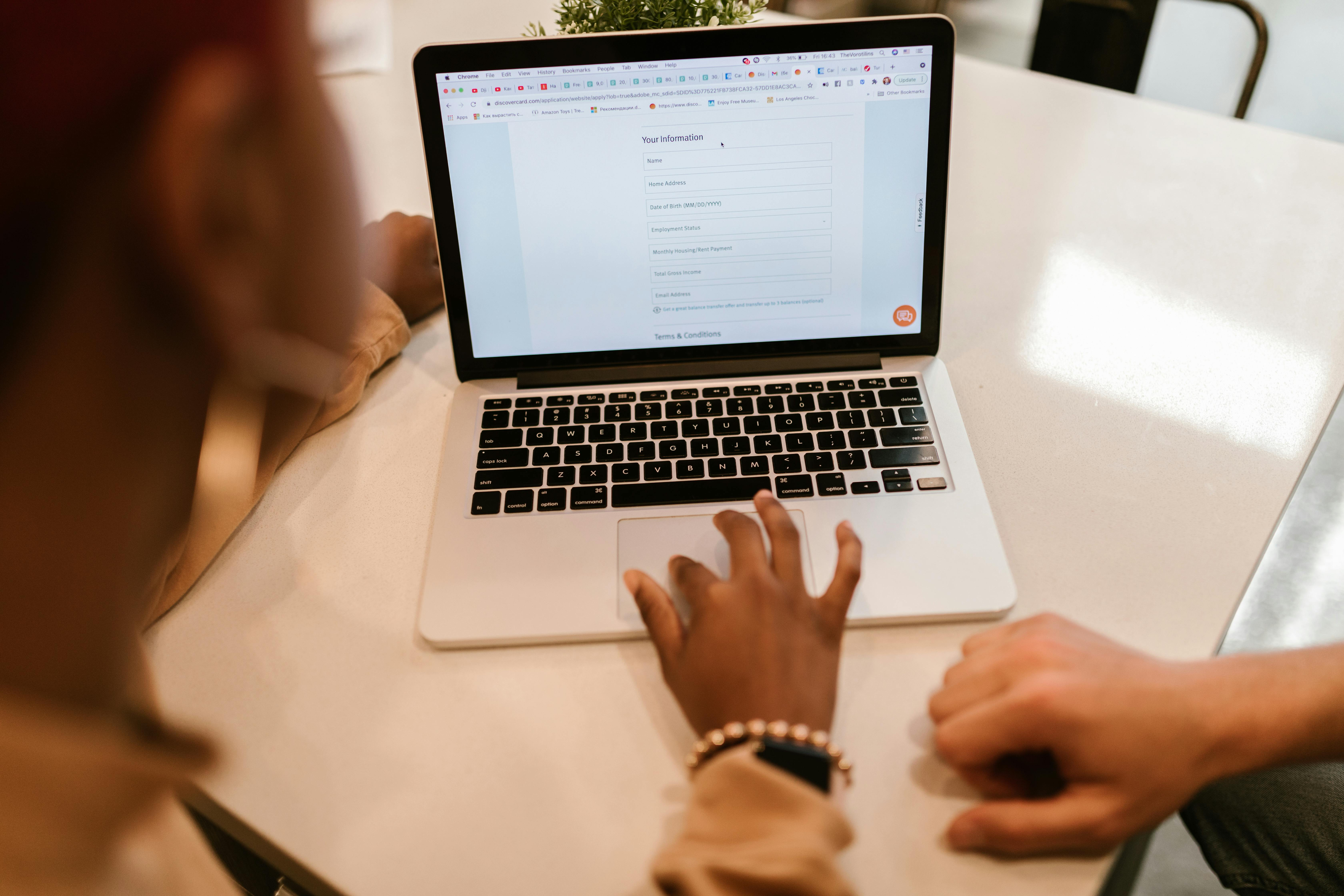
A Claude address mismatch usually means that the billing address you entered on the payment page does not match the billing address on file with the card issuer. It does not mean you entered the shipping address incorrectly, nor does it only mean the wrong country was selected.
Anthropic explains this clearly in Understanding your billing address and tax calculation: for Pro, Max, and self-serve Team plans, the billing address automatically matches the billing address of the payment method, and if you need to update it, you must change the payment method in Settings > Billing.
First, Separate These Three Concepts
- A billing address is not a shipping address In Claude subscription payments, the key address is the billing address associated with the payment method, not the delivery address common in ecommerce.
- Billing location is not just the country name The country, region, street, street number, postal code, and name format can all affect validation. Anthropic clearly states that both the billing address and the country of origin must meet processing requirements.
- Small differences can still cause failures Street spelling, accent marks, spaces in postal codes, and name order may all seem minor, but they can still cause a transaction to fail.
How to Verify the Billing Address
- Check the issuer’s address on file first Open the card issuer’s or card platform’s account details and confirm the exact name, street, city, state or province, postal code, and country associated with the card.
- Then compare that with what you entered on Claude’s payment page Do not compare only the country. Street abbreviations, Room / Apt formatting, postal code format, and name order should match the issuer’s records as closely as possible.
- Confirm that the billing country is supported Before paying, first check Anthropic’s published Supported countries and regions. If the country or region itself is not supported, rewriting the address format usually will not fix the issue.
- Update the payment method directly when necessary Anthropic explains in both Understanding your billing address and tax calculation and Billing FAQs for paid plans that billing details for existing paid subscriptions can be updated in Settings > Billing.
Situations Most Likely to Cause an Address Mismatch
- Adding a card to Claude for the first time
- Recently replacing the card
- Recently changing the billing address
- The issuer’s address on file is in English, but a different address format is entered on the payment page
- Using a virtual card without first checking the billing address associated with that card
How to Handle a 3D Secure Verification Failure
Claude 3DS failures usually do not mean Claude’s page itself is broken. More often, the identity verification required by the issuer was not completed successfully. Anthropic clearly states in Why was my card declined? that if a transaction requires 3D Secure verification, the user must complete the one-time password step or confirm the transaction in the bank app or on the bank’s website.
If Claude 3DS Fails, Do These 5 Things First
- Confirm that the SMS code or bank app can properly receive the verification request Many failures do not happen because the card itself is unsupported, but because the code was never received, the bank app never displayed the prompt, or the authentication timed out.
- Do not close the verification pop-up or redirect page midway If the bank verification page has already opened, going back, refreshing, or closing the window may prevent the verification from being completed.
- Confirm that the card is enabled for online payments This usually needs to be confirmed with the issuer, especially for cross-border online transactions and security authentication settings.
- Fix the problem, then retry once Anthropic notes that trying again later can sometimes help, because temporary technical issues or network interruptions may also cause declines. A safer approach is to confirm the verification issue has actually been resolved before submitting the payment again.
- Contact the issuer or Claude Support if necessary If the code was completed and the address is correct but the payment still fails, the next step is usually to contact the issuer to confirm the reason for the decline, or contact Claude Support for further investigation. Anthropic’s help article also recommends contacting the bank after normal troubleshooting, and contacting support if the problem still cannot be resolved.
What Symptoms Look More Like a 3DS Issue?
- A verification code or bank confirmation appeared after submission, but the payment still failed
- The page showed verification failed
- The bank’s SMS mentioned secure verification, authentication, or a one-time passcode
- The verification flow started, but the payment status never updated
- You were asked to verify your payment method after logging in to Claude
Steps to Check When Using BiyaPay to Pay for Claude
When using BiyaPay to pay for Claude, the key is not to switch cards blindly, but to confirm the payment flow in order. First check whether the card has been activated, whether the balance is sufficient, and whether the statement shows any authorization or charge attempts, then verify the name, billing address, postal code, country, card number, expiration date, and CVV entered on Claude’s payment page.
For Claude web subscription payments, the main logic should always be: confirm the card status first, then verify the address and authentication, and only then go back to Claude and try again.
Step 1: Confirm That You Are Troubleshooting a “Web Subscription Payment”
This section is about Claude Pro / Max web subscription payment failures. If you are troubleshooting API credits, self-serve API top-ups, or Team / Enterprise billing, the path and billing logic are not exactly the same. In Understanding your billing address and tax calculation, Anthropic already distinguishes billing address handling across Pro, Max, Team, and API scenarios.
Step 2: Check the BiyaPay Card Status
First check whether the following are normal:
- Whether the card has been successfully activated
- Whether the card is currently usable
- Whether the balance is sufficient
- Whether there have been any recent charge or authorization records related to the transaction
If you do not have a payment tool yet, you can first apply for a Speed Card. If you already have a card but suspect the issue is related to balance, it is more helpful to check how to top up a BiyaPay Speed Card. If you want to confirm whether the failed transaction actually triggered an authorization, the most direct place to check is how to view your BiyaPay Speed Card statement.
Step 3: Verify the Four Key Fields on Claude’s Payment Page
You mainly need to verify these four items:
- Cardholder name
- Billing address
- Postal code and country / region
- Card number, expiration date, and CVV
The most important items are the billing address and billing region. Anthropic has clearly stated that the billing address must match the bank’s records, and that both the billing address and the country of origin must meet processing requirements.
Step 4: Confirm Whether a 3DS Verification Step Appeared
If an SMS code, a bank app confirmation page, or a 3D Secure verification step appears during the transaction, complete that step first, then decide whether you need to resubmit the payment.
Step 5: Return to Claude’s Billing Page and Check the Status
Anthropic explains in Billing FAQs for paid plans that if you have already subscribed to Pro or Max but your account appears as free, it may be because you logged in with a different email address, or because a failed payment method caused the account to be downgraded. In that case, go to Settings > Billing to check the most recent payment status and update the payment method or billing details if needed.
How to Check Balance, Address, and Verification Information Item by Item
When a Claude payment fails, working through a checklist item by item is usually more effective than repeatedly changing payment methods. In Anthropic’s current public help content, the clearest troubleshooting priorities are supported region, billing address, payment method, 3DS verification, and sufficient funds.
Balance Checklist
- Whether the card balance is sufficient to cover the current charge
- Whether the card has been topped up successfully
- Whether recent failed authorizations are holding part of the limit
- Whether you can see the corresponding charge or authorization attempt
If you need to confirm the cost in more detail, you can also check the Speed Card fee explanation.
Address Checklist
- Whether the country or region is within Anthropic’s supported range
- Whether the city, street, street number, and postal code match the issuer’s records
- Whether the name format matches
- Whether Claude is still using old information after a recent card replacement or address change
Verification Checklist
- Whether your phone can properly receive the bank’s verification codes
- Whether the bank app can successfully confirm the transaction
- Whether the verification redirect page was closed midway
- After fixing the problem, whether you retried only once
If the address matches completely, the balance is sufficient, and 3DS has also been completed, but Claude still keeps declining the payment, the next step is usually to contact the issuer or Claude Support rather than continuing to resubmit blindly. Anthropic’s help article also recommends contacting the bank after standard troubleshooting, and contacting support when necessary.
What to Do Next After a Claude Payment Failure
The correct order after a Claude payment failure is: identify the cause first, fix it, then retry once. For users who already have Pro or Max, Anthropic explains in Billing FAQs for paid plans that you can go to Settings > Billing to check the most recent payment status and update your payment method or billing details. If the payment failed, the account may show as free.
Recommended Order of Action
- Record the error type first Note whether the error was card declined, address mismatch, verification failed, or payment method verification failure.
- Go to Claude’s Billing page and check the most recent status Check whether there is a failed record, whether it prompts you to update the payment method, and whether reverification is required.
- Go back to BiyaPay and check the card status, balance, and statement If you suspect a balance issue, prioritize checking top-ups. If you suspect an authorization issue, prioritize checking the statement.
- Fix the problem, then retry once For example, correct the address, top up the balance, or make sure 3DS verification is ready before submitting again.
- If it still fails, triage by likely cause
- If it looks more like an address issue: continue verifying the billing address and supported region
- If it looks more like a verification issue: contact the issuer to confirm the authentication and authorization status
- If it looks more like a platform billing issue: contact Claude Support and include the failure time, amount, and error message
FAQ
1. Are Claude payment failures common?
Yes. They are common, but they usually do not mean payment is impossible. Anthropic specifically provides Why was my card declined? and Billing FAQs for paid plans to help users handle these situations.
2. Does Claude card declined always mean the card is unsupported?
No. More often, the problem is a billing address mismatch, a billing region that does not meet processing requirements, insufficient balance, or an incomplete 3DS verification.
3. What does a Claude address mismatch mean?
It usually means that the billing address entered on the payment page does not match the billing address on file with the issuer, not that the shipping address was entered incorrectly. Anthropic also explains in Understanding your billing address and tax calculation that the billing address for Pro and Max is tied to the payment method.
4. Should the Claude address be entered in Chinese or English?
The most important thing is not the language itself, but keeping it consistent with the issuer’s records. If your issuer’s records use an English address, you should try to enter the same format on Claude’s payment page as well.
5. What should I do after a Claude 3DS verification failure?
First confirm whether the code was received, whether the bank app confirmation succeeded, and whether the verification page was closed. Then try again once. If it still fails, contact the issuer to confirm the authorization or authentication status. Anthropic also recommends that users contact the bank after normal troubleshooting.
6. Is the troubleshooting order the same for a first-time card setup failure and a renewal failure?
Not exactly. For a first-time card setup failure, you should prioritize checking the card details, billing address, and 3DS. For a renewal failure, you should prioritize the payment status, whether the card has expired, whether the balance is sufficient, and whether the Billing page prompts you to update the payment method. Anthropic notes in Billing FAQs for paid plans that when a payment method fails, the account may appear as free.
7. How long should I wait before trying again after a Claude payment failure?
Anthropic has not published a fixed waiting period. A safer approach is to first verify the address, balance, and verification issues, then retry once, rather than submitting repeatedly before identifying the cause. Anthropic also notes that trying again later can sometimes work because temporary technical issues or network interruptions may also cause declines.
8. Does Claude Pro / Max support PayPal?
According to Anthropic’s current public help documentation, individual Pro and Max payments are made by credit or debit card, and do not support third-party payment processors such as PayPal or Venmo.
9. Why does it still fail after I changed the billing address?
Because in Pro and Max scenarios, the billing address is tied to the payment method. Simply changing the displayed information does not mean the payment method itself has been updated. Anthropic recommends updating the payment method or billing details in Settings > Billing.
10. What happens to the existing subscription after a Claude payment failure?
If the payment method fails, the account may appear as free, and the user needs to go to Settings > Billing to check the latest payment status and update the payment method if needed.
If you can already tell which type of issue it is closer to, take the next step based on that category instead of mixing all possible causes together:
- If you do not have a payment tool yet: first apply for a Speed Card
- If you suspect a balance issue: first check how to top up a BiyaPay Speed Card
- If you want to confirm whether an authorization or charge was actually attempted: first check how to view your BiyaPay Speed Card statement
- If you want to calculate the card cost first: first check the Speed Card fee explanation
- If you have already confirmed the card status, address, and verification are all fine: you can go back to the Claude Pro or Claude Max page on the site and initiate the subscription payment again
The most important thing is not to “just try it again,” but to first determine whether the problem is a balance issue, an address issue, a verification issue, or a billing settings issue. Once you identify the cause, the next step is usually much more effective than blindly resubmitting the payment.
*This article is provided for general information purposes and does not constitute legal, tax or other professional advice from BiyaPay or its subsidiaries and its affiliates, and it is not intended as a substitute for obtaining advice from a financial advisor or any other professional.
We make no representations, warranties or warranties, express or implied, as to the accuracy, completeness or timeliness of the contents of this publication.
Related Blogs of

MACD Crypto Trading Strategy: Settings, Signals, and Risk Management


Crypto-Related Stocks vs Digital Assets: What Investors Actually Own
International Wire Transfer Time: What Affects Delivery?



Choose Country or Region to Read Local Blog
 Australia
 Austria
 Belgium
 Canada
 Cyprus
 Czech Republic
 Denmark
 Estonia
 Finland
 France
 Germany
 Greece
 Hong Kong
 India
India Indonesia
 Ireland
 Italy
Italy Japan
Japan Latvia
 Lithuania
 Luxembourg
 Malaysia
 Malta
Malta Morocco
 Nepal
Nepal Netherlands
 New Zealand
 Norway
 Pakistan
 Philippines
 Poland
 Portugal
 Romania
 Singapore
 Slovakia
 Slovenia
 South Africa
 South Korea
 Spain
Spain Sweden
 Thailand
 United States
 Turkey
 United Arab Emirates
 United Kingdom
 Vietnam