OpenAI Card Frequently Declined (Card Declined)? Virtual Card Tested Solutions




Image Source: unsplash
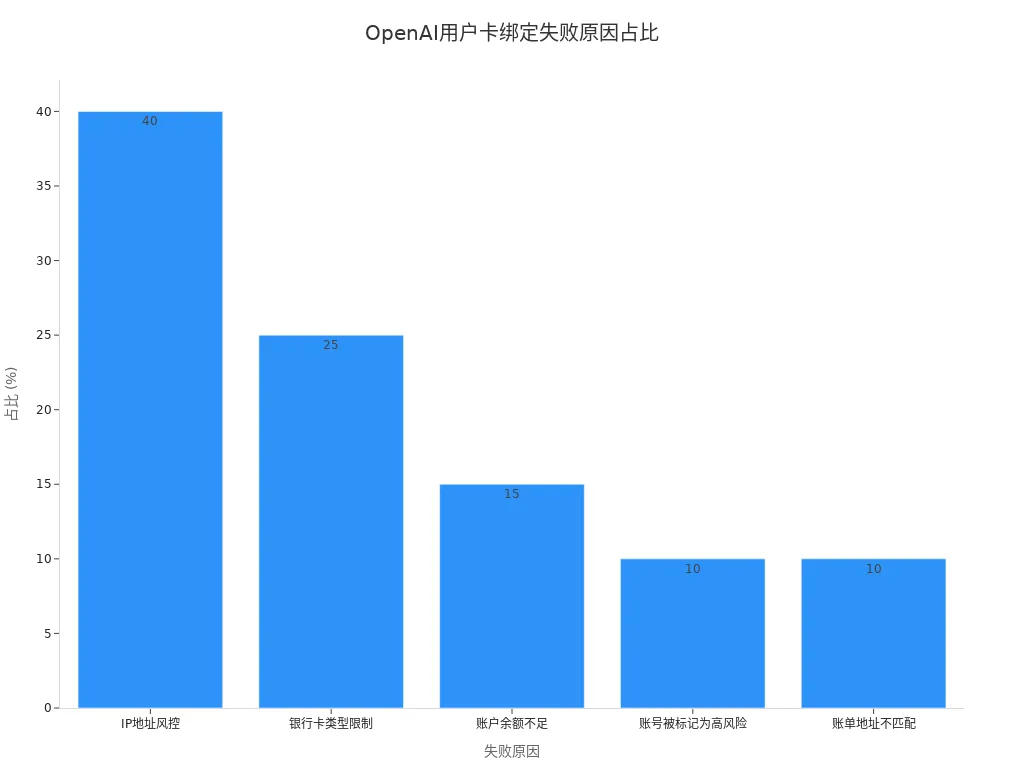
When using OpenAI, frequent card binding rejections can be very frustrating. Many users encounter similar issues, with the main reasons including IP address risk control, card type restrictions, insufficient account balance, account flagged as high-risk, and mismatched billing address. The table below shows the proportion of these reasons:
| Reason | Percentage |
|---|---|
| IP address risk control | ~40% |
| Card type restrictions | ~25% |
| Insufficient account balance | ~15% |
| Account flagged as high-risk | ~10% |
| Mismatched billing address | ~10% |
By understanding these common causes, you can quickly locate the problem. The bar chart below visually presents the various failure reasons and their proportions:
Core Key Points
- Check card information to ensure card number, expiration date, CVC, and billing address are accurate.
- Confirm sufficient balance in the card — it is recommended to reserve at least 20 USD to avoid verification failures.
- Use virtual card platforms that support international payments to improve binding success rate.
- Maintain a stable network environment, preferably using U.S. or Hong Kong IP addresses to reduce risk control triggers.
- Regularly check virtual card balance and transaction details to ensure every deduction is normal and avoid service interruptions.
Solutions for Frequent Card Binding Rejections

Image Source: pexels
Quick Troubleshooting Steps
When you encounter frequent card binding rejections, it is recommended to first follow these self-check and elimination steps:
- Check card information. Carefully verify that your card number, expiration date, CVC security code, and billing address (including postal code) are entered accurately.
- Confirm sufficient balance in the card. Many cases of frequent rejections are caused by insufficient account balance.
- Contact the issuing bank. Some banks block international or online transactions by default. You can proactively contact customer service to confirm any restrictions and request temporary permission for international payments.
- Clear browser cache and cookies. Browser cache may cause identification anomalies — clear it and try binding again.
- Check IP address and card issuing region. OpenAI has risk control restrictions on certain regions. Ensure your current network environment and card issuing location are both within supported areas.
- Contact the bank again to confirm there are no risk control or restriction measures on the account.
- Try alternative payment methods. If the above methods fail, consider using a virtual card or other international credit cards.
Quick tip: Go through the steps above one by one — you can usually quickly identify the specific reason for frequent card declines. Each step is critical; do not skip any.
Recommended Priority Solutions
If you repeatedly encounter frequent card binding rejections, it is recommended to prioritize trying the following solutions:
- Use a virtual card platform. Choose virtual card services that support international online payments (such as BiyaPay, WildCard, etc.), ensuring the platform supports Visa or Mastercard channels and has recurring transaction authorization capabilities. Make sure the account has sufficient USD balance and the platform provides transparent transaction details.
- Switch payment methods. Virtual cards offer high security and allow flexible spending limits, reducing risk to your main account. If one card is declined, you can quickly switch to a new one without affecting normal use of OpenAI services.
- Contact the bank or card issuer. Some banks have strict risk controls on international payments — proactively explain your usage and request temporary removal of restrictions.
- Ensure billing address matches IP environment. Make sure the billing address is consistent with the card issuing region, and use U.S. or Hong Kong IP addresses (supported by OpenAI) to further reduce rejection probability.
- Pay attention to the compliance and service capabilities of virtual card platforms. Taking BiyaPay as an example, the platform supports global payments and multi-currency exchange, making it suitable for users who need to bind OpenAI and other international services. Choose the appropriate virtual card brand according to your needs.
- Advantages of virtual cards include: no need to link main bank account, flexible spending limits, easy to replace, risk isolation, etc. In practice, you will find virtual cards significantly improve binding success rates, especially on platforms with strict risk controls like OpenAI.
Recommendation: When choosing a virtual card platform, prioritize providers holding Hong Kong or international financial licenses to ensure fund security and transaction compliance. It is best to settle all top-ups and spending in USD for easier statement reconciliation and risk management.
If you plan to continue with a virtual card route, it helps to first confirm the card application path and funding method on the BiyaPay official website. For users who need to complete currency conversion before paying for online subscriptions, BiyaPay’s free exchange rate comparison tool can be used to estimate conversion cost, and then a Speedy Card can be applied for subscription-style payments. This makes it easier to verify card details, balance preparation, and the deduction path within one workflow, reducing failures caused by inconsistent setup.
BiyaPay is better understood here as a multi-asset wallet and cross-border payment tool, covering cross-border payments, fund management, and conversion between multiple fiat and digital currencies. When compliance, billing traceability, or ongoing payment management matters, its event center and product pages can also serve as supplementary references when comparing virtual card services.
Through the methods above, you can significantly increase binding success rate and reduce frustration from frequent declines. If problems persist, combine specific error messages, troubleshoot item by item, and adjust strategy promptly.
Reasons for Frequent Card Binding Rejections
Card Type and Regional Restrictions
When binding a bank card, first pay attention to card type and issuing region. OpenAI imposes strict restrictions on cards from certain countries and regions. For example, many cards issued in mainland China cannot be used directly for international online payments. Prioritize Visa or Mastercard credit cards issued in international financial hubs such as Hong Kong or the United States. Some virtual card platforms (e.g. BiyaPay) support global payments and multi-currency settlement, making them suitable for users binding OpenAI. Ensure your IP address matches the card issuing region to avoid frequent rejections due to regional mismatch.
Insufficient Balance and Risk Control
During card binding, the system automatically deducts a small verification amount (usually under 1 USD). If the card balance is insufficient or the bank has risk controls on international payments, the system will directly reject the binding. Top up sufficient USD balance in advance and contact the issuing bank to confirm whether there are international payment restrictions. Some banks trigger risk controls on frequent small transactions — proactively explain your purpose and request temporary removal of restrictions. Regularly check account balance to avoid failures due to insufficient funds or risk control.
Incorrect Information Entry
Any error in the card information you enter will cause binding failure. Common mistakes include card number, expiration date, CVC security code, billing address, postal code, etc. Verify every item to ensure it exactly matches the information on file with the bank. Some platforms are strict about billing address — copy the address directly from your bank statement to avoid format or spelling errors causing rejection.
Browser and Network Issues
Browser cache, cookies, or abnormal network environment during operation can also affect binding success rate. Clear browser cache and cookies, switch to incognito mode, or change browsers and try again. You can also use U.S. or Hong Kong network environments to reduce risk control due to IP anomalies. Some VPN services may be flagged as high-risk by the platform — choose stable, compliant network environments for operation.
You can troubleshoot item by item according to the four aspects above to quickly identify the specific cause of frequent card declines. Every step is crucial — do not skip any.
Virtual Card Tested Solutions
Image Source: unsplash
Virtual Card Principle
A virtual card is a digital payment tool generated based on a real bank card account system. You can apply for a virtual credit card with Visa or Mastercard branding through a virtual card platform. The platform assigns you a unique card number, expiration date, and CVC security code. You can use it like a physical card for online payments, subscriptions, and international transactions. The essence of a virtual card is to isolate the main account from actual spending, reducing financial risk. You can flexibly set spending limits, freeze, or cancel the card, greatly enhancing account security. For international services like OpenAI, virtual cards effectively bypass regional restrictions and improve binding success rate.
Recommended Mainstream Brands
When choosing a virtual card platform, prioritize compliance, fund security, and payment channel diversity. BiyaPay, as a global payment and multi-currency exchange service platform, supports issuance of Visa and Mastercard virtual cards and is suitable for Chinese-speaking users binding OpenAI, overseas SaaS subscriptions, international e-commerce, etc. BiyaPay supports USD top-ups and USDT-to-USD/HKD exchange, meeting diverse funding needs. You can also top up via Alipay, bank cards, and other methods, greatly improving fund flow efficiency. WildCard also supports Alipay top-ups and is compatible with various overseas subscription services, suitable for users needing flexible payment solutions. When selecting a platform, check whether it holds a Hong Kong or international financial license to ensure compliant and secure transactions.
You can prioritize compliant platforms like BiyaPay according to your needs, balancing fund security and ease of operation.
Operation Process and Notes
When using a virtual card to bind OpenAI, follow these steps:
- Log in to your OpenAI account and go to the payment management page.
- Select “Add new card” and enter the virtual card number, expiration date, CVC security code, and billing address. It is recommended to keep the billing address consistent with the information provided by the virtual card platform.
- Set the newly added virtual card as the default payment method to ensure smooth subsequent deductions.
- Check the virtual card balance — it is recommended to reserve at least 15 USD to avoid verification failure due to insufficient funds.
- Enable auto top-up function (if supported by the platform) to ensure continuous OpenAI deductions and reduce service interruption risk.
- Wait for system processing — usually within a few minutes OpenAI will automatically complete small-amount verification and the charge will appear.
- If the charge fails, refresh the page and retry, or check whether the card information was entered correctly.
- If it fails multiple times, contact OpenAI support or try a different virtual card brand.
During operation, also pay attention to the following:
- Billing address must match the information registered with the virtual card platform to avoid rejection due to mismatch.
- Prefer USD for top-ups to reduce exchange losses and fees.
- Avoid frequent IP switching or using high-risk VPNs — keep network environment stable.
- Regularly check virtual card balance to prevent service interruption due to insufficient funds.
- Pay attention to the platform’s terms of service and understand related fees and restrictions.
Through standardized operation process and careful troubleshooting, you can significantly improve binding success rate and reduce unnecessary failed attempts.
Tested Pros and Cons
When actually using virtual cards to bind OpenAI, you will find they have the following advantages and disadvantages:
| Advantages | Disadvantages |
|---|---|
| Enhanced security | Not accepted everywhere |
| Better spending control | Requires balance top-up |
| Higher compatibility with international merchants | Not suitable for high refund/return shopping |
| Suitable for managing multiple shopping accounts | May incur fees |
As you can see, virtual cards excel in security, flexibility, and international compatibility, making them especially suitable for users binding OpenAI and other international services. Note that some platforms may charge service fees and some merchants do not accept virtual cards. When choosing a platform and using it, weigh the pros and cons based on your needs and actual scenarios to select the optimal solution.
Best Practice Guide
Virtual Card + U.S. IP Combination
When binding OpenAI, using the virtual card + U.S. IP combination can significantly increase success rate. Virtual cards provide flexibility and security, isolating main account risk. A U.S. IP helps avoid regional risk controls and reduces rejections due to geographic location. Many Chinese-speaking users choose Visa or Mastercard virtual cards issued by BiyaPay and operate through a stable U.S. IP environment. Prioritize Hong Kong licensed banks or compliant virtual card platforms to ensure fund security and transaction compliance. This combination is suitable for OpenAI, overseas SaaS subscriptions, international e-commerce, etc., balancing efficiency and security.
Detailed Operation Steps
Follow these steps to complete virtual card binding and U.S. IP environment setup:
- Register and log in to BiyaPay or another compliant virtual card platform, apply for a Visa or Mastercard virtual card, and top up USD balance (recommended to reserve more than 20 USD).
- Obtain virtual card details: card number, expiration date, CVC security code, and billing address.
- Configure U.S. IP environment — use stable VPN or dedicated line service and avoid frequent IP switching.
- Log in to OpenAI account, go to payment management page, add virtual card information, and ensure billing address matches platform registration.
- Check virtual card balance to ensure it covers verification and subsequent deductions.
- After successful binding, set the virtual card as default payment method and enable auto top-up (if supported).
- If failure occurs, recheck card information, IP environment, and balance — replace virtual card or contact platform support if necessary.
Tip: During operation, keep network environment stable, avoid high-risk VPNs or proxies, and ensure all information is entered accurately.
Risk Control Avoidance Suggestions
When avoiding risk controls, you can take the following measures:
- Prioritize Hong Kong licensed banks or compliant virtual card platforms to ensure transparent transaction records and fund security.
- Keep U.S. IP environment stable — avoid frequent switching or using public networks to reduce probability of being flagged as high-risk.
- Keep billing address consistent with virtual card platform registration to reduce rejections due to address mismatch.
- Regularly check virtual card balance and reserve sufficient USD to prevent risk control triggers from insufficient funds.
- Avoid multiple binding attempts in a short time — space out operations reasonably to reduce system anomaly alerts.
- Pay attention to platform terms of service, understand fees, limits, and risk control rules, and prepare risk management in advance.
Through standardized operation and careful troubleshooting, you can effectively improve binding success rate, reduce risk control triggers, and ensure continuous use of OpenAI and other international services.
Prevention and Maintenance
Reducing Rejection Risk
When binding an OpenAI payment card, you can take multiple measures to effectively reduce rejection risk. First, regularly check card status to ensure it is active with no abnormal freezes. Monitor card balance — reserve at least 20 USD to avoid verification failure due to insufficient funds. Billing address must match the virtual card platform registration, especially when using BiyaPay and other global payment platforms — copy the billing address provided by the platform directly. Regularly verify IP environment, prioritizing stable U.S. or Hong Kong networks to avoid binding failures due to regional risk control.
Refer to the table below for a quick overview of main preventive measures and corresponding recommendations:
| Preventive Measure | Operation Recommendation |
|---|---|
| Card status | Regularly check activation and freeze status |
| Balance management | Reserve >20 USD to avoid insufficient balance |
| Billing address | Match platform registration, avoid format errors |
| IP environment | Use stable U.S. or Hong Kong network |
| Information verification | Verify card number, expiration, CVC item by item |
Tip: During operation, ensure all information is accurate, avoid frequent IP switching or high-risk VPNs, and maintain stable network environment.
Ongoing Maintenance Recommendations
After successful binding, maintenance is equally important. Regularly log in to the virtual card platform (e.g. BiyaPay) to check account balance and transaction details, ensuring every deduction is a normal authorization. Enable auto top-up function and reserve sufficient USD to prevent service interruption due to insufficient funds. If billing address changes, synchronize to OpenAI account promptly to avoid payment failures due to inconsistency. Stay updated on platform terms of service, understand latest fees, limits, and risk control rules, and prepare risk management in advance.
You can create a monthly maintenance checklist including balance check, billing address verification, IP environment test, transaction detail review, etc. Through standardized maintenance, you can effectively prevent future binding rejections and ensure continuous stable use of OpenAI and other international services.
Recommendation: During maintenance, prioritize compliant platforms, focus on fund security and transaction transparency, regularly communicate with platform support, and resolve potential issues promptly.
By verifying card information, balance, and billing address, combined with the virtual card + U.S. IP approach, you can significantly improve OpenAI binding success rate. Virtual card solutions offer high security — mainstream platforms use device binding and merchant token technology to effectively reduce data theft risk, as shown in the table below:
| Evidence Type | Description |
|---|---|
| Device binding and merchant token binding | For example, tokens used by Apple Pay and Google Pay significantly reduce the value of stolen data through device and domain binding. |
You should also pay attention to OpenAI’s risk control and security measures, plan operations reasonably, and avoid common pitfalls:
| Topic | Key Point |
|---|---|
| Risk prevention | OpenAI does not mention system inconsistency risks in official docs — take proactive precautions. |
It is recommended to follow the troubleshooting process in this article step by step to locate problems. Provide feedback promptly for new situations. The core of this guide is practical, actionable, and fast-acting — helping you efficiently solve card binding issues.
FAQ
How much balance should be reserved when binding a virtual card to OpenAI?
It is recommended to reserve at least 20 USD in the virtual card account. OpenAI performs small-amount verification, and subsequent subscription fees are automatically deducted. Sufficient balance prevents binding failure due to insufficient funds.
Can I try binding multiple times after failure?
You can try multiple times, but it is recommended to wait a few minutes between attempts. Frequent operations may trigger platform risk control. Verify card information, balance, and billing address each time to ensure compliance.
What are the advantages of using Hong Kong licensed bank virtual cards?
Choosing virtual cards issued by Hong Kong licensed banks offers higher international payment success rates, stronger fund security and compliance, making them suitable for binding OpenAI and other global services.
What top-up methods does BiyaPay virtual card support?
You can top up BiyaPay virtual card accounts via USD recharge, USDT-to-USD/HKD exchange, etc. The platform supports global payments and multi-currency exchange, meeting diverse needs of Chinese-speaking users.
How to maintain account security after binding a virtual card?
Regularly check virtual card balance and transaction details. Enable auto top-up to ensure smooth OpenAI deductions. Synchronize any billing address changes promptly to prevent payment failures.
*This article is provided for general information purposes and does not constitute legal, tax or other professional advice from BiyaPay or its subsidiaries and its affiliates, and it is not intended as a substitute for obtaining advice from a financial advisor or any other professional.
We make no representations, warranties or warranties, express or implied, as to the accuracy, completeness or timeliness of the contents of this publication.
Related Blogs of

How Do AI Servers Drive Storage Demand? The Roles of HBM, Server DRAM, Enterprise SSDs, and HDDs


What Is the Difference Between HBM3E and HBM4? What Do They Mean for Micron and AI Servers?


Why Is HDD Supply and Demand Tightening? AI Data Centers, Long-Term Agreements, and Western Digital/Seagate Pricing Power


What Is the Relationship Between ASMPT 0522.HK and HBM? The Role of Advanced Packaging Equipment in the AI Memory Supply Chain

Choose Country or Region to Read Local Blog
 Australia
 Austria
 Belgium
 Canada
 Cyprus
 Czech Republic
 Denmark
 Estonia
 Finland
 France
 Germany
 Greece
 Hong Kong
 India
India Indonesia
 Ireland
 Italy
Italy Japan
Japan Latvia
 Lithuania
 Luxembourg
 Malaysia
 Malta
Malta Morocco
 Nepal
Nepal Netherlands
 New Zealand
 Norway
 Pakistan
 Philippines
 Poland
 Portugal
 Romania
 Singapore
 Slovakia
 Slovenia
 South Africa
 South Korea
 Spain
Spain Sweden
 Thailand
 The United States
 Turkey
 United Arab Emirates
 United Kingdom
 Vietnam
Contact Us




BIYA GLOBAL LLC is registered with the Financial Crimes Enforcement Network (FinCEN), an agency under the U.S. Department of the Treasury, as a Money Services Business (MSB), with registration number 31000218637349, and regulated by the Financial Crimes Enforcement Network (FinCEN).
BIYA GLOBAL LIMITED is a registered Financial Service Provider (FSP) in New Zealand, with registration number FSP1007221, and is also a registered member of the Financial Services Complaints Limited (FSCL), an independent dispute resolution scheme in New Zealand.