How to Register US Ride-Hailing Apps Uber/Lyft Without an SSN? Binding a Virtual Card Solves It Perfectly





Image Source: pexels
You don’t need to worry about not having an SSN to register US ride-hailing apps. You can use a passport or international mobile number for identity verification. By binding a virtual card, you can easily solve the payment issue. Virtual cards support VISA and MASTER, with high security and flexible usage. You don’t need a US local bank card to successfully complete registration for US ride-hailing apps.
You only need to prepare the relevant identity information and a virtual card to quickly experience US ride-hailing services.
Key Takeaways
- You can register Uber and Lyft without an SSN—passport or international mobile number can be used for identity verification.
- Binding a virtual card (such as Biyapay) solves payment issues, supports VISA and MASTER, and is secure and flexible.
- Ensure you enter real and valid contact information and identity details to avoid registration failure due to spelling errors.
- Choose virtual card platforms with low annual fees and convenient application processes to reduce registration costs and improve the experience.
- Regularly check virtual card balance and transaction records to ensure smooth payments and protect account security.
Registration Process for US Ride-Hailing Apps

Image Source: pexels
Alternative Identity Verification Methods
When registering US ride-hailing apps without an SSN, you can choose from various officially accepted identity verification methods. Uber and Lyft allow users to submit multiple government-issued ID documents to ensure you can smoothly complete the registration process. Common alternative identity verification methods include:
- Submitting government-issued ID documents, such as passport, residence card, birth certificate, nationality card, etc.
- Uploading a personal photo for comparison with the ID information
- Providing alternative documents containing necessary information such as name, mailing address, or date of birth
[The table below shows commonly used ID types and examples when registering US ride-hailing apps without an SSN](https://help.lyft.com/hc/en-ca/all/articles/7056371524-Ontario-Driver-Information):
| Document Type |
|---|
| Passport |
| Residence Card |
| Birth Certificate |
| Nationality Card |
| Work Permit |
| Study Permit |
| Indian Status Certificate |
| Canadian Military ID |
You can select the appropriate document to upload based on your situation. Using a passport and international mobile number for identity verification is very effective. Uber and Lyft require you to upload a valid government-issued ID (such as passport or driver’s license) to reduce security risks and improve user experience. The platform will also require you to upload a selfie for comparison with the ID photo, further enhancing the effectiveness of identity verification. Through these measures, the identity review process for registering US ride-hailing apps becomes more reliable and the possibility of duplicate registration is greatly reduced.
Contact Information and Identity Details Entry
When registering US ride-hailing apps, you must enter real and valid contact information and identity details. The platform usually requires you to provide the following:
- A valid international mobile number for receiving verification codes and important notifications
- Real name that must match the submitted ID document
- Date of birth, mailing address, and other basic information
When filling in the information, ensure all data is accurate and error-free. Any spelling mistake or inconsistency may cause registration rejection. For example, errors in social security number or date of birth may pull up unrelated records and affect the review result. You should also note that mixed files, outdated or revoked data, duplicate entries, and license verification issues are common reasons for registration rejection in US ride-hailing apps.
Tip: It is recommended to carefully double-check all content before uploading documents and entering information to ensure it exactly matches the ID details—this will greatly increase the approval rate.
Although the registration process for US ride-hailing apps is detailed, as long as you prepare the required documents and information according to the guidelines, the entire process will be very smooth. You don’t need to worry about not having an SSN—just choose the appropriate identity verification method and carefully fill in all information to successfully enjoy local US ride-hailing services.
Virtual Card Selection and Binding Process

Image Source: unsplash
Virtual Card Platforms and Application Steps
When registering US ride-hailing apps, choosing the right virtual card platform is very important. Biyapay, a commonly used virtual card service platform for Chinese-speaking users, is the first choice for many users due to its convenient application process and good support for international payments. You can quickly apply for a virtual card through the following steps:
- Visit the Biyapay official website and register a personal account.
- Complete identity verification by uploading a passport or other valid ID.
- Choose to open a VISA or MASTER type virtual credit card.
- Top up the account balance—usually supports multiple international payment methods.
- Obtain the virtual card number, expiration date, and CVV information.
In addition to Biyapay, you can also consider other virtual card platforms that support international payments, such as Revolut and Wise. These platforms also support VISA or MASTER brands and are suitable for use in mainstream US ride-hailing apps. When selecting a platform, pay attention to supported currencies, top-up methods, annual fees, and service fees.
The table below compares the main features of common virtual card platforms to help you make a better choice:
| Platform Name | Supported Card Networks | Application Process Convenience | Supported Currencies | Annual/Service Fee | Target Users |
|---|---|---|---|---|---|
| Biyapay | VISA/MASTER | High | Multi-currency | Low | Chinese-speaking users |
| Revolut | VISA/MASTER | Medium | Multi-currency | Medium | International users |
| Wise | VISA/MASTER | Medium | Multi-currency | Medium | International users |
When applying for a virtual card, pay close attention to the fee structure. For Uber and Lyft, virtual cards typically involve service fees, down payments, and periodic payments. Specific fees are as follows:
| Fee Type | Amount |
|---|---|
| Service Fee | $7.49 |
| Annual Percentage Rate (APR) | 45.0% |
| Total Amount Payable | $307.49 |
| Down Payment | $75 |
| Bi-weekly Payment | $75 |
You can intuitively understand the distribution of each fee through the chart below:
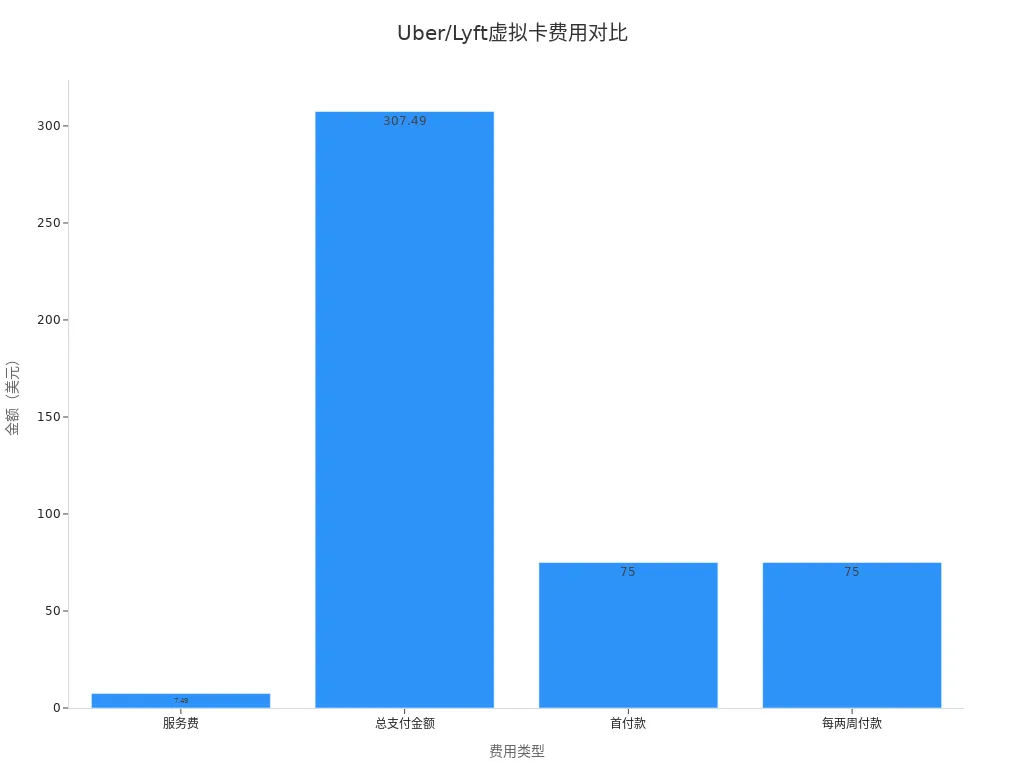
Tip: When choosing a virtual card platform, it is recommended to prioritize services with low annual fees, convenient application processes, and multi-currency support—this can effectively reduce the overall cost of registering US ride-hailing apps.
If your main concern is whether payments will remain stable after registration, you can first review the account and payment setup flow on the BiyaPay website, then apply for a virtual payment card if needed. It is better understood as a multi-asset wallet covering cross-border payments, trading, and fund management scenarios; in apps like Uber and Lyft, its practical value is not replacing local identity requirements, but helping users without a U.S. bank card prepare a usable payment method in advance, making later card binding, funding, and balance management more straightforward.
Binding a Virtual Card to Uber/Lyft
After obtaining the virtual card information, you can directly bind it to your Uber or Lyft account to complete the payment method setup. The specific operation process is as follows:
- Open the Uber or Lyft App and go to the account settings page.
- Select “Payment Methods” or “Add Bank Card.”
- Enter the virtual card number, expiration date, and CVV security code.
- Fill in the billing address. You can use the same billing address provided by the virtual card platform to ensure information consistency.
- Save the settings—the system will automatically verify the card validity.
Both Uber and Lyft support international credit cards with VISA and MASTER brands. When using a virtual card, the platform will automatically recognize it as an international credit card without additional steps. You can use the virtual card to pay for all ride-hailing expenses, including trip fares, tips, and other additional services.
Note: When binding a virtual card, ensure the card has sufficient balance to avoid payment failure due to insufficient funds. Some platforms may perform a small pre-authorization verification; once passed, normal use is possible.
Through the process above, you can successfully complete the payment setup for registering US ride-hailing apps. Virtual cards not only improve account security but also offer greater fund flexibility. You don’t need a US local bank card to enjoy convenient ride-hailing services.
Payment Methods and Precautions
Supported Payment Methods
When using Uber and Lyft, you can choose from multiple officially supported payment methods. The platforms support not only personal credit and debit cards but also allow federal employee procurement cards as payment tools. The table below shows the main payment methods and applicable situations:
| Payment Method | Applicable Situation |
|---|---|
| Federal Employee Procurement Card | When government SmartPay® travel card is not authorized or unavailable |
| Personal Credit Card | When government SmartPay® travel card is not authorized or unavailable |
| Debit Card | When government SmartPay® travel card is not authorized or unavailable |
You can also bind virtual cards (such as VISA or MASTER cards issued by Biyapay), international credit cards, PayPal, Apple Pay, and other methods. For Chinese-speaking users, Biyapay virtual cards support multi-currency top-ups and are suitable for use in mainstream US ride-hailing apps. Uber has introduced a default 1.5% conversion fee for international users and automatically displays the home currency; users can opt out of this policy. Lyft has not clearly stated its policy for international users but supports binding of international credit cards and virtual cards.
- Uber supports virtual cards, international credit cards, PayPal, Apple Pay, and other payment methods.
- Lyft also supports virtual cards and international credit cards; PayPal and Apple Pay are available in some regions.
- Virtual card platforms like Biyapay are suitable for Chinese-speaking users with convenient application processes and multi-currency support.
Tip: When binding payment methods, it is recommended to prioritize virtual cards that support VISA or MASTER to ensure fund safety and smooth payments.
Virtual Card Security and Common Issues
When using a virtual card for payments, security and reliability are the most important considerations. Mainstream virtual card platforms like Biyapay cooperate with Hong Kong licensed banks, have strict fund supervision, and encrypt the transaction process to protect user fund safety. Virtual cards support instant top-up and balance management to avoid payment failure due to insufficient balance. You can view transaction records anytime and promptly detect anomalies.
Common issues include:
- Insufficient virtual card balance causing payment failure. You need to top up in advance to ensure sufficient balance.
- Billing address mismatch possibly affecting successful binding. You should fill in the same billing address provided by the virtual card platform.
- Small pre-authorization verification failure. You need to ensure card information is accurate and avoid input errors.
- International users may encounter currency conversion fees. Uber charges a default 1.5% conversion fee; you can opt out.
When encountering payment anomalies, you can contact the virtual card platform customer service or Uber/Lyft official support to resolve the issue promptly. Virtual cards offer high security and flexibility, making them suitable for Chinese-speaking users in US ride-hailing apps. You don’t need a US local bank card to successfully complete payments and ensure a smooth ride experience.
Recommendation: When using a virtual card, regularly check balance and transaction records to avoid payment interruptions due to oversight and enhance account security.
You can successfully register and use US ride-hailing apps through a virtual card, enjoying convenience and safety. Virtual cards support instant top-up and multi-currency payments, making them suitable for Chinese-speaking users. Lyft Direct and other official services provide drivers with instant payments, mobile banking, and cash-back rewards. You only need to follow the steps and verify the information to efficiently complete registration and payment. It is recommended to regularly check the balance to ensure account security.
FAQ
How to complete Uber/Lyft payment without a mainland China bank card?
You can apply for a virtual card that supports international payments. Many Hong Kong licensed bank–cooperated virtual card platforms provide VISA or MASTER cards for Chinese-speaking users. You only need to bind the virtual card to your Uber or Lyft account to complete payment.
What to do if virtual card binding fails?
Check whether the card number, expiration date, and CVV are entered correctly. Verify that the billing address matches the information provided by the virtual card platform. Insufficient balance can also cause binding failure. You can contact the virtual card platform customer service for assistance.
Will Uber/Lyft charge extra currency conversion fees?
Uber charges a 1.5% conversion fee for international users. You can opt out of this policy in the App. Lyft has not clearly stated, but international credit cards and virtual cards usually involve bank conversion fees. You should pay attention to transaction details.
Is a virtual card safe? How is fund safety ensured?
Hong Kong licensed bank–cooperated virtual card platforms use encryption technology and strict fund supervision. You can view transaction records anytime. The platform supports instant top-up and balance management to protect fund safety. It is recommended to regularly check account status.
What identity verification precautions are needed when registering Uber/Lyft?
You need to upload government-issued documents such as a passport. Name, date of birth, and other information must match the ID exactly. The platform will require a selfie for comparison. You should ensure all information is accurate and error-free to avoid review failure due to inconsistencies.
*This article is provided for general information purposes and does not constitute legal, tax or other professional advice from BiyaPay or its subsidiaries and its affiliates, and it is not intended as a substitute for obtaining advice from a financial advisor or any other professional.
We make no representations, warranties or warranties, express or implied, as to the accuracy, completeness or timeliness of the contents of this publication.
Related Blogs of

HBM/DRAM, NAND, and HDD in AI Storage: A Comparison of Elasticity, Cycles, and Risks


How Is China’s Memory Supply Chain Different from Overseas Memory Leaders? A Comparison with Micron, SanDisk, Western Digital, and Seagate


How to Read Pure Storage and NetApp Earnings? ARR, Cloud Revenue, Gross Margin, and Cash Flow Metrics


How to View HBM Advanced Packaging Equipment Stocks? ASMPT’s Opportunities and Cyclical Risks

Choose Country or Region to Read Local Blog
 Australia
 Austria
 Belgium
 Canada
 Cyprus
 Czech Republic
 Denmark
 Estonia
 Finland
 France
 Germany
 Greece
 Hong Kong
 India
India Indonesia
 Ireland
 Italy
Italy Japan
Japan Latvia
 Lithuania
 Luxembourg
 Malaysia
 Malta
Malta Morocco
 Nepal
Nepal Netherlands
 New Zealand
 Norway
 Pakistan
 Philippines
 Poland
 Portugal
 Romania
 Singapore
 Slovakia
 Slovenia
 South Africa
 South Korea
 Spain
Spain Sweden
 Thailand
 The United States
 Turkey
 United Arab Emirates
 United Kingdom
 Vietnam
Contact Us




BIYA GLOBAL LLC is registered with the Financial Crimes Enforcement Network (FinCEN), an agency under the U.S. Department of the Treasury, as a Money Services Business (MSB), with registration number 31000218637349, and regulated by the Financial Crimes Enforcement Network (FinCEN).
BIYA GLOBAL LIMITED is a registered Financial Service Provider (FSP) in New Zealand, with registration number FSP1007221, and is also a registered member of the Financial Services Complaints Limited (FSCL), an independent dispute resolution scheme in New Zealand.