Instant Wise to Wise Transfers Your 2025 How-To Guide




Image Source: unsplash
Sending money between Wise accounts is instant and often free. A Wise to Wise transfer is incredibly simple. You only need the recipient’s phone number or email address to send money. You join a community of approximately 15.6 million people and businesses who used Wise in fiscal year 2025. Your Wise account makes the process seamless. This guide walks you through the easy steps for your Wise transfer. Wise ensures you have a smooth experience with your Wise account.
Did You Know? Between January and March 2025, 64% of all Wise transfers were instant, arriving in under 20 seconds. Wise is committed to speed.
Key Takeaways
- Wise to Wise transfers are fast and often free. You only need a recipient’s phone number or email.
- Sending money in the same currency between Wise accounts is instant and free. It usually takes less than 20 seconds.
- For different currencies, Wise charges a small fee, starting from 0.43%. These transfers are also very fast.
- You can easily request money using a Wise payment link. This link can be shared with anyone, even if they do not have a Wise account.
- Always double-check recipient details before sending money. Wise to Wise transfers are instant and cannot be canceled once sent.
If you’re using Wise to settle cross-border expenses (freelance invoices, supplier deposits, or travel reimbursements), it’s smart to confirm the “identifier type” before you hit send. A Wise to Wise payment only needs an email/phone, but if the situation shifts to a bank transfer (especially international), you may be asked for SWIFT/BIC instead of a domestic routing format. You can quickly validate that detail via BiyaPay’s SWIFT guide, estimate the real received amount with the currency converter, and check common transfer questions in the Help Center so your payment info stays consistent from start to finish.
How to Send Money on Wise
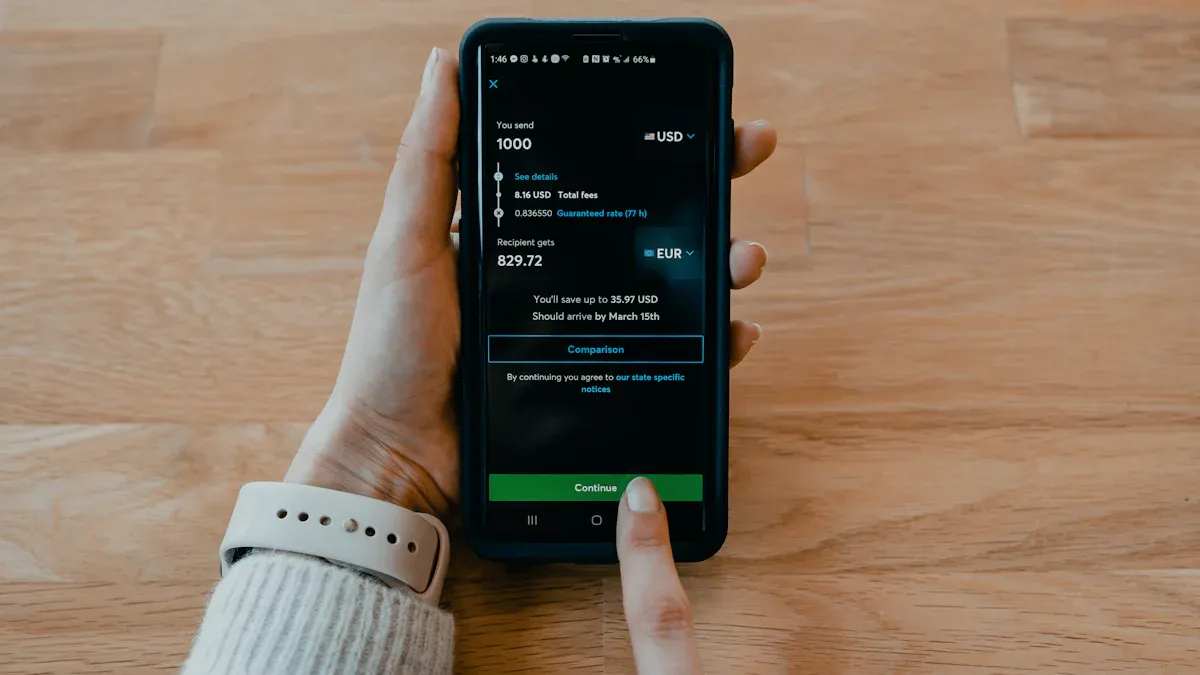
Image Source: unsplash
Sending money to another Wise user is a fast and straightforward process. You can complete the entire transfer in just a few taps from your phone or clicks on the website. This guide breaks down the steps, from starting the payment to finding your recipient.
Initiate a Wise to Wise Transfer
You begin every transfer from the main screen of your Wise account. The interface guides you through each step, ensuring you know exactly what information to provide. Wise makes it simple to transfer money.
Follow these steps to start your payment:
- Open the Wise app or log into your account on the desktop site.
- From the Home screen, tap the Send button.
- Choose the currency you want to send from and the currency your recipient will get.
- Enter the amount you want to send. You can also specify the exact amount the recipient needs to receive, and Wise will calculate the total for you.
- Tap Continue to move to the next step.
Find Recipients by Phone or Email
The easiest way to send to other Wise accounts is by using the recipient’s contact information. If your recipient has enabled discoverability on their Wise account, you can find them using just their phone number or email address.
Privacy Tip: When you find someone using their phone or email, Wise protects their privacy. You will only see their full name and profile picture. You will not see their bank details or any other personal information.
To use this feature, you must first sync your contacts with the Wise app.
- Go to the Recipients tab in your app.
- Tap Find friends on Wise.
- Select Sync contacts.
Once synced, anyone in your contacts who uses Wise will appear automatically when you send money. This method removes the need to ask for bank details, making payments quicker than ever. Both you and the recipient need a Wise multi-currency account for this feature to work.
Add a Recipient Manually
If you prefer not to sync contacts or if your recipient isn’t discoverable, you can add them manually. This option is also perfect for your first Wise to Wise payment to a new person. Wise gives you a few ways to do this.
When you are prompted to choose a recipient, select Add a new recipient. You can then:
- Search by details: Enter their email address associated with their Wise account.
- Enter bank details: If you have their specific Wise account details for a currency, you can input them directly.
After you select or add your recipient, you can add a reference for your payment. The final screen shows you a complete summary of the transfer. You should review all the details, including the amount and recipient. Once you check everything, confirm the payment to complete your Wise to Wise transfer. This final check ensures your sending money experience is secure and accurate.
Wise Transfer Fees and Speeds
You want to know exactly how much your transfer will cost and how quickly it will arrive. Wise builds its service on transparency and speed. You will find that sending money to another Wise account is one of the fastest and most cost-effective ways to make international payments. The speed and fees depend on one key factor: whether you are converting currencies.
Same-Currency: Instant & Free Transfers
When you send money to another Wise user in the same currency, the process is both instant and free. This is the biggest advantage of a Wise to Wise transfer. You do not pay any fees when no currency exchange is needed for your payment.
A same currency transfer is free under these conditions:
- You send money from your Wise account to their Wise account.
- You use the recipient’s email or phone number to find them.
- You receive USD into your Wise account using your local ACH bank details.
Because there is no currency conversion, Wise can process these payments instantly. The funds typically move from your Wise account to the recipient’s in under 20 seconds.
Cross-Currency Money Transfer Fees
You can also transfer money to a Wise account in a different currency. For these cross-currency payments, Wise applies a small, transparent conversion fee. This fee starts from just 0.43% and varies depending on the currencies involved. Wise does not charge hidden cross-border fees; you only pay for the currency conversion itself.
Even with a currency exchange, these transfers are incredibly fast. Most cross-currency payments between Wise accounts are nearly instant. While some less common currency routes might take up to 24 hours, transfers between popular currencies often complete in seconds.
Here is a simple breakdown:
| Transfer Type | Fee | Speed |
|---|---|---|
| Same-Currency (e.g., USD to USD) | Free | Instant (under 20 seconds) |
| Cross-Currency (e.g., USD to EUR) | Small conversion fee (from 0.43%) | Nearly Instant |
How to Check Fees Before Sending
Wise ensures you see all costs before you commit to a payment. You never have to worry about surprise charges. The platform is designed to give you full control and visibility over your money.
Wise is committed to radical transparency. The fee you see on the final confirmation screen is exactly what you will pay.
Before you finalize your payment, Wise presents a detailed summary. On this screen, you will see:
- The total amount you are sending.
- The guaranteed exchange rate for your transfer.
- The low Wise fee for the conversion.
- The exact amount your recipient will get.
You can also use the pricing page on the Wise website to check costs for any currency route before you even start a transfer. This allows you to compare Wise with other providers and confirm you are getting a great deal.
How to Request Money on Wise
Image Source: unsplash
Requesting money on Wise is just as simple as sending it. Instead of asking for bank details, you can generate a secure payment link. This link makes it easy for anyone, even non-Wise users, to pay you. Your Wise account streamlines the entire process for receiving payments.
Create a Wise Payment Link
You can create a payment request from several places within your Wise account. Wise gives you the flexibility to start where it is most convenient for you.
Follow these steps to generate your link:
- From the Home screen, select Request. Alternatively, go to a specific currency balance and choose Receive.
- Select an existing contact if they are a Wise user.
- If the person is not on Wise, choose the Anyone option. This creates a shareable payment link that includes a QR code.
- Enter the amount and currency for the payment.
- Review all the details and confirm. Wise will then generate your unique link.
Share Your Payment Request
Once you have your link, sharing it is effortless. The link contains all the information someone needs to complete the payment. You can incorporate these links into emails, invoices, or simple messages. This flexibility makes receiving payments quick and professional.
You can send the link to your customer through whichever channel works best. Share it via email, SMS, social media, or even on paper as a printed QR code. Wise makes getting paid simple.
This method is perfect whether you need to send money requests to friends or issue invoices for your business. The Wise platform supports a variety of needs for incoming payments.
Paying a Received Request
When you request a payment from another Wise user, they receive a notification. The request appears as a ‘Task’ on their Home page for 30 days. If the recipient does not have a Wise account, the link directs them to a secure page. This page shows the amount, currency, and details needed to make the payment.
People paying you do not need a Wise account. For most currencies, they can complete the payment using a debit or credit card. Wise accepts Visa and Mastercard, making it convenient for everyone. This feature ensures you can receive your funds without hassle, regardless of how the sender chooses to pay.
The Wise to Wise transfer is your fastest and most cost-effective option for sending money to other users. You are part of a trusted platform that handled over $181 billion in international payments last fiscal year. For any same-currency transfer, the process is instant and entirely free. Wise empowers you to send money in just a few taps using only a phone number or email, simplifying your financial life.
FAQ
What if I send a payment to someone without a Wise account?
If you send a payment to an email or phone number not linked to an account, Wise sends an invitation. The recipient has one week to open an account and claim the payment. If they do not, the payment is automatically canceled and refunded to you.
Can I cancel a Wise to Wise payment?
You cannot cancel a completed payment to another Wise account because these transfers are instant.
Always double-check the recipient’s details before you confirm the payment. If you make a mistake, you must ask the recipient to return the payment.
Is a Wise to Wise payment always instant?
Yes, a same-currency payment between two accounts is almost always instant, arriving in under 20 seconds. A cross-currency payment is also nearly instant. Rare currency routes might cause a slight delay, but this is uncommon for a standard payment.
Do I need the recipient’s bank details for a payment?
No, you do not need bank details. The easiest method only requires the recipient’s phone number or email address. This makes the payment process faster and simpler. You can find them easily if they have enabled discoverability in their account settings.
*This article is provided for general information purposes and does not constitute legal, tax or other professional advice from BiyaPay or its subsidiaries and its affiliates, and it is not intended as a substitute for obtaining advice from a financial advisor or any other professional.
We make no representations, warranties or warranties, express or implied, as to the accuracy, completeness or timeliness of the contents of this publication.
Related Blogs of

What Is the AI Storage Sector? Understanding GPU, HBM, and Data Center Hard Drives


SNDK Stock Analysis: NAND and Flash Opportunities After the Western Digital Spin-Off


Western Digital WDC vs Seagate STX: Financials, Technology, and Risks of the Two AI HDD Leaders


What Is DRAM? Investment Logic Behind Server Memory, PC Memory, and Mobile Memory

Choose Country or Region to Read Local Blog
 Australia
 Austria
 Belgium
 Canada
 Cyprus
 Czech Republic
 Denmark
 Estonia
 Finland
 France
 Germany
 Greece
 Hong Kong
 India
India Indonesia
 Ireland
 Italy
Italy Japan
Japan Latvia
 Lithuania
 Luxembourg
 Malaysia
 Malta
Malta Morocco
 Nepal
Nepal Netherlands
 New Zealand
 Norway
 Pakistan
 Philippines
 Poland
 Portugal
 Romania
 Singapore
 Slovakia
 Slovenia
 South Africa
 South Korea
 Spain
Spain Sweden
 Thailand
 The United States
 Turkey
 United Arab Emirates
 United Kingdom
 Vietnam
Contact Us




BIYA GLOBAL LLC is registered with the Financial Crimes Enforcement Network (FinCEN), an agency under the U.S. Department of the Treasury, as a Money Services Business (MSB), with registration number 31000218637349, and regulated by the Financial Crimes Enforcement Network (FinCEN).
BIYA GLOBAL LIMITED is a registered Financial Service Provider (FSP) in New Zealand, with registration number FSP1007221, and is also a registered member of the Financial Services Complaints Limited (FSCL), an independent dispute resolution scheme in New Zealand.