Master Global Gaming with Digital Wallets: Optimal Fiat Exchange Rate Method for Recharging US/Argentina Steam Accounts




Image Source: unsplash
When you choose a digital wallet to recharge US or Argentina Steam accounts, you can enjoy better fiat exchange rates and lower fees. Digital wallets provide you with a fast and secure payment experience. According to the 2025 Worldpay Global Payments Report, digital wallets already accounted for 53% of global e-commerce transactions in 2024, far surpassing traditional payment methods. You will find that alternatives such as mobile payments and prepaid cards also offer global gamers more convenient options. Digital wallets support multiple currencies and are ideal for Chinese users participating in global game recharges.
Digital wallets not only help you save money, but also improve recharge security and operational convenience.
Core Key Points
- Using a digital wallet to recharge Steam offers better exchange rates and low fees, helping you save money.
- Digital wallets provide strong security through multi-layer encryption technology, protecting your financial information.
- Choosing a multi-currency supported digital wallet allows you to easily bypass payment restrictions and increase recharge success rate.
- Pre-recharging during Steam sales lets you capture the best discounts and avoid missing out on desired games.
- Monitor real-time exchange rates and choose low points for recharging to further reduce game purchase costs.
Advantages of Recharging Steam with Digital Wallets
Image Source: pexels
Exchange Rates & Cost Savings
When you choose a digital wallet for Steam recharges, you can effectively reduce costs. Products like BiyaPay support multi-currency payments, helping you obtain better exchange rates when recharging US or Argentina Steam accounts. You can settle directly in USD, avoiding bank foreign currency fees. Digital wallets typically charge very low service fees — for example, BiyaPay charges only 0.5 USD per recharge transaction. Using a digital wallet during Steam seasonal sales (such as Summer Sale, Holiday Sale) allows instant purchases without repeatedly entering payment information, helping you seize the best discount opportunities. This way, you not only save on exchange rate differences but also avoid transaction failures caused by restricted payment methods.
Recharging Steam with a digital wallet delivers noticeable savings. You can check exchange rates in real time, choose the optimal recharge timing, and maximize your discounts.
Security & Convenience
Digital wallets offer high-level security protection for your Steam recharges. BiyaPay uses multi-layer encryption technology, with all transactions protected by SSL/TLS standards to prevent sensitive data leakage. After recharging your Steam Wallet, purchasing games requires no further interaction with banks or card issuers, reducing the risk of financial loss. The digital wallet acts as a buffer, limiting overspending and lowering fraud risk. Even if the account is maliciously accessed, attackers can only use the existing balance and cannot initiate new charges. You can also recharge your Steam Wallet via PayPal and other methods without storing card information, increasing flexibility and security.
- Simplified recharge process — no need to repeatedly enter payment details
- Fast fund arrival, supports instant purchases
- High account security, protection against fraud and unauthorized charges
Multi-Currency Support
Digital wallets support multi-currency payments, making them ideal for Chinese-speaking users participating in global Steam regional recharges. Products such as BiyaPay, Buvei, and CoinGate Gift Cards allow you to recharge Steam Wallet using USD, EUR, and other currencies. You can bypass Steam’s payment method and currency restrictions, easily accessing international stores. Digital wallets help you avoid foreign currency transaction failures and improve recharge success rates. When recharging different regions such as US and Argentina, choosing a multi-currency supported digital wallet delivers a more flexible payment experience.
| Digital Wallet Product | Supported Currencies | Recharge Fee (USD) | Applicable Regions |
|---|---|---|---|
| BiyaPay | USD, EUR | 0.5 | US, Argentina |
| Buvei | USD, EUR | 0.7 | Global regions |
| CoinGate | USD, EUR | 0.6 | Global regions |
Multi-currency support allows you to easily participate in the global gaming market and enjoy regional Steam discounts and exclusive content.
Recharging US Steam Region with Digital Wallet
US Region Account Registration Process
If you want to experience the rich game content and unique discounts of the US Steam region, you first need to register a US Steam account. Follow these steps to complete registration:
- Visit the official Steam website and click “Create New Account”.
- Enter your email address, set a password, and select United States as the registration region.
- Verify via email to activate the account.
- After logging in, go to account settings, complete your profile, and ensure the region is set to United States.
- If you need to bind a US address, you can use a local US virtual address service and fill in zip code and city information.
After completing the steps above, you will have a US Steam account. During registration, it is recommended to use a frequently used email address for easier password recovery and receiving important notifications.
US Region Recharge Process
When recharging a US Steam account, you have multiple options. Common recharge methods include:
- Steam Wallet Codes: You can purchase prepaid codes in denominations of $5, $10, $20, $50, or $100 from US retailers such as Walmart, Best Buy, and GameStop. Log in to the Steam client or website, enter the code, and funds will be instantly added.
- Credit/Debit Cards: You can bind Visa, Mastercard, American Express, or Discover cards issued in the United States. Enter card details on first recharge; subsequent operations are more convenient.
- PayPal Integration: You can choose PayPal as the payment method without entering card information, improving security and flexibility.
- Gift Cards and Digital Gifts: You can recharge yourself or others using Steam Wallet gift cards. After logging in, enter the code to redeem.
If you are located in a Chinese-speaking region, it is recommended to use digital wallet products such as BiyaPay. Simply select US Steam recharge on the BiyaPay platform, enter your Steam account information, choose the recharge amount, and confirm payment. BiyaPay supports multi-currency settlement, with funds usually arriving within minutes, eliminating complicated foreign currency payment processes.
Recharging US Steam with a digital wallet offers a simple process, fast arrival, and is ideal for players seeking efficient experiences.
Exchange Rates & Fees
When recharging US Steam, what concerns you most is likely exchange rates and fees. Different payment methods have significant cost differences:
- Credit/Debit Cards: Globally available and convenient for recharging, but typically incur 2–3% foreign transaction fees.
- PayPal: Protects your bank information; may not be available in some regions; fees vary depending on bank and region.
- Mobile Payments: Such as American Express, Skrill, etc.; limited applicability; fees vary.
- Gift Cards: Suitable for small recharges; purchase channels must be verified for legitimacy.
- Digital Wallets (e.g. BiyaPay): You can settle directly in USD with only $0.5 per recharge transaction on BiyaPay. You can also check exchange rates in real time and choose the optimal timing to further reduce costs.
Choosing a digital wallet to recharge US Steam effectively avoids high foreign transaction fees and delivers better exchange rates. Platforms like BiyaPay display real-time exchange rates and detailed fees before payment, helping you make informed decisions.
Important Notes
When recharging in the US region, pay attention to the following points:
- Account Information Security: Properly safeguard your Steam account and email password to prevent leaks.
- Legitimate Recharge Channels: Choose officially recognized or reputable digital wallet platforms to avoid account bans caused by purchasing illegal gift cards.
- Recharge Amount Limits: Steam imposes limits on single and daily recharge amounts. It is recommended to recharge in batches to avoid triggering risk controls.
- Fund Arrival Time: Most digital wallet platforms support instant arrival, but in rare cases there may be delays due to network or platform maintenance.
- Risk Warning: Frequent region switching or logging in with non-US IP may cause account lockout. Keep your login environment stable and reduce abnormal operations.
Before recharging, it is recommended to carefully read Steam’s official policies and the digital wallet platform’s terms of service to ensure fund security and account compliance.
Recharging Argentina Steam Region with Digital Wallet
Argentina Region Account Registration
If you want to experience the low-priced games and rich discounts of the Argentina Steam region, you first need to register an Argentina Steam account. Follow these steps:
- Open the official Steam website, click “Create New Account”, and select Argentina as your country of residence.
- Complete registration using an email address not associated with any existing account.
- After logging in, check the wallet region, click the button in the top right corner and select “View my wallet”.
- Confirm the currency is set to Argentine Peso.
- Purchase Argentina region top-up cards for recharging; international platforms such as G2A are recommended.
After completing the steps above, your Argentina Steam account will be ready for normal use. It is recommended to use a frequently used email during registration for easier management and security verification.
Argentina Region Recharge Process
When recharging an Argentina Steam account, you can use digital wallet platforms such as BiyaPay. The specific process is as follows:
- Log in to your Steam account.
- Go to the Redeem Steam Wallet Code page.
- Click “Redeem a Steam Gift Card or Wallet Code”.
- Enter the Steam Wallet code obtained from BiyaPay or other international platforms, then click Continue.
- Funds will be instantly added to your account, and you can use the balance to purchase games on Steam.
Digital wallet platforms like BiyaPay support multi-currency settlement with fast fund arrival, ideal for Chinese-speaking users seeking efficient recharge experiences.
Exchange Rates & Money-Saving Tips
Game prices in the Argentina Steam region are far lower than in the US region. By recharging with a digital wallet, you can take advantage of exchange rate benefits and low fees to significantly save costs. The table below shows price comparisons and savings percentages for popular games in the US and Argentina regions:
| Game Title | US Price (USD) | Argentina Price (USD equivalent) | Savings |
|---|---|---|---|
| Elden Ring | $59.99 | $19.40 | 68% |
| Cyberpunk 2077 | $59.99 | $17.80 | 70% |
| Baldur’s Gate 3 | $59.99 | $20.10 | 66% |
| Factorio | $35.00 | $10.20 | 71% |
You can clearly see that after recharging in the Argentina region, game prices drop significantly. Digital wallets like BiyaPay support real-time exchange rate checks, helping you choose the best recharge timing to further enhance savings. Before recharging, it is recommended to monitor USD to Argentine Peso exchange rate fluctuations and recharge at low points.
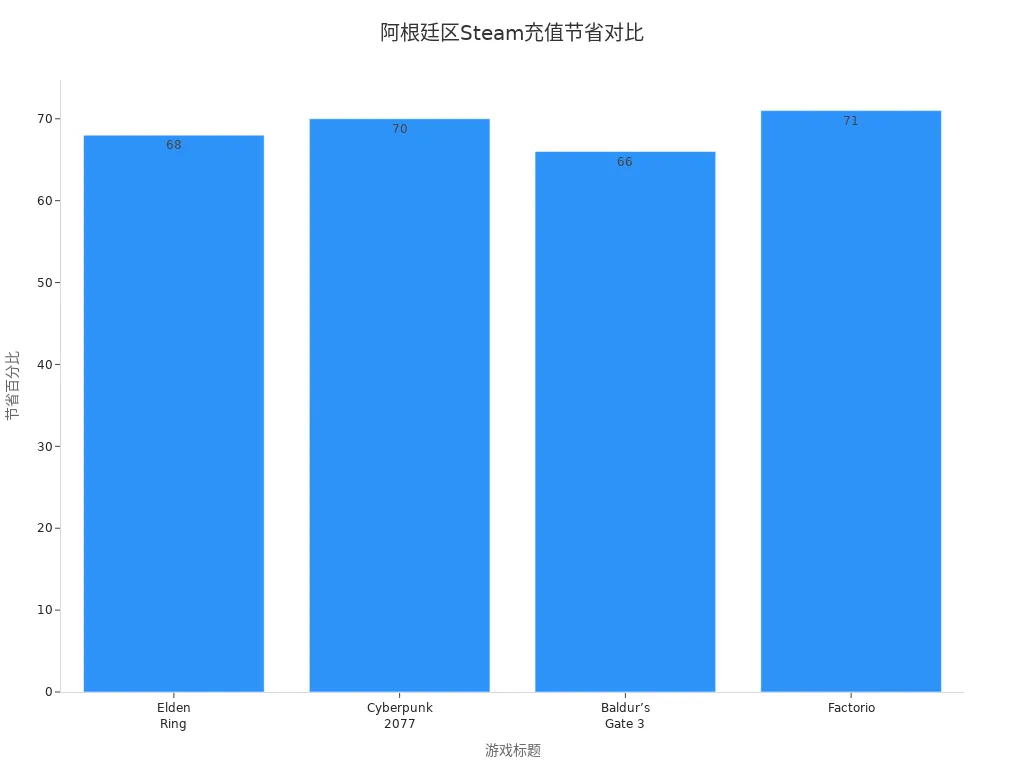
Recharging Argentina Steam with a digital wallet allows you to maximize exchange rate and price advantages, significantly reducing game purchase costs.
Using Recharge Cards & Gift Cards
Common methods for recharging in the Argentina region include recharge cards and gift cards. Pay attention to the following when operating:
- Check current wallet region: Log in to Steam, go to settings, view account wallet region, and ensure it is Argentina.
- Verify gift card source: Confirm the card issuing region — physical cards must indicate the country, digital codes must specify the store.
- Match currency and country: Even if the currency is the same, cards issued in different countries cannot be used cross-region.
- Redeem immediately: Delaying redemption may cause region changes or accidental consumption — redeem promptly.
- Use only official retailers: Recommended trusted channels include Amazon, Best Buy, or official Steam partners.
- Test with small denomination first: If compatibility is uncertain, first purchase a $5 card to test before buying larger amounts.
The table below summarizes common mistakes, consequences, and preventive measures:
| Mistake | Consequence | Preventive Measure |
|---|---|---|
| Buying gift cards while traveling | Code binds to temporary region, cannot redeem at home | Only buy cards matching permanent account region |
| Using gray market resellers | Card may be stolen, expired, or region-locked | Only purchase from authorized retailers |
| Cross-region gifting | Recipient cannot redeem foreign currency card | Send digital gifts directly through Steam |
| Assuming USD = universal compatibility | US card fails on Canadian account | Confirm country and currency match completely |
| Not prepared for region change | Cannot access previous balance for 30 days | Carefully plan region switch and ensure no pending redemptions |
When using recharge cards and gift cards, ensure the card fully matches the account region to avoid funds becoming unusable due to region lock.
Important Notes
During Argentina region recharging, pay attention to these common issues:
- Region lock issues: Steam gift cards are typically bound to a specific region and cannot be redeemed in other countries.
- Redemption failure: When entering the code, you may receive a message that the card is invalid in this region.
- Account mismatch: Even if the card is successfully added, the account must match the gift card region to use the funds.
- Resale scams: Third-party sellers sometimes offer “no region restriction” gift cards that are often fraudulent or already used.
- Currency confusion: Cards priced in USD may not convert correctly or be rejected in non-US stores.
- Recommendation: Before purchasing gift cards, always verify the recipient’s Steam account region.
Choosing a digital wallet platform such as BiyaPay for Argentina region recharges effectively avoids high fees and exchange losses. During operation, prioritize official channels to ensure fund security and account compliance. Regularly check for Steam policy updates to avoid recharge experience issues due to policy changes.
Recharging Argentina Steam with a digital wallet lets you enjoy low-priced games while ensuring fund security and improving overall experience.
Exchange Rate Comparison & Money-Saving Methods
Image Source: unsplash
Real-Time Exchange Rate Check
Real-time exchange rate checking is very important when recharging US or Argentina Steam. The BiyaPay platform displays the current USD to Argentine Peso exchange rate on the payment page, allowing you to clearly see the actual cost of each recharge. You can intuitively compare US and Argentina recharge prices based on different Steam Wallet code amounts. For example, Argentina region Steam Wallet code USD prices are as follows:
| Steam Wallet Code | Argentina Price (USD) |
|---|---|
| 5 USD | 5.50 |
| 10 USD | 11.00 |
| 20 USD | 21.10 |
| 25 USD | 27.82 |
| 30 USD | 31.65 |
| 50 USD | 52.74 |
You can further understand price change trends for different recharge amounts through the bar chart:
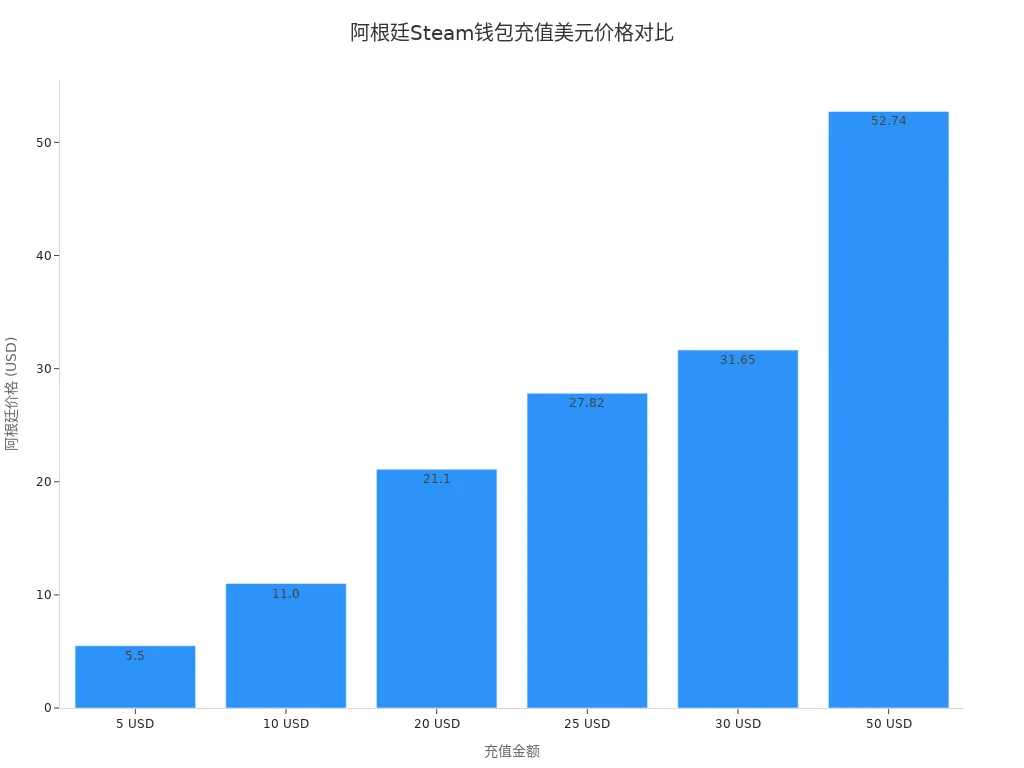
If you care more about the actual landed cost than the headline price alone, it helps to use BiyaPay’s exchange rate comparison tool to check how different fiat currencies convert into USD, then evaluate that number together with the fee. In cross-region purchases like this, the real cost gap often comes less from the face value itself and more from the combined effect of conversion path, payment friction, and settlement speed.
From that perspective, BiyaPay functions as a multi-asset wallet covering cross-border payments, remittance, trading, and fund management, while supporting conversion between multiple fiat and digital currencies. If your needs extend beyond Steam top-ups and into broader cross-border spending, you can review the relevant entry points on its official website. For users who also pay attention to platform trust and account safety, its public compliance background and the information shown in the event center can serve as a basic reference before use.
Choosing the Right Recharge Timing
Choosing the right recharge timing can significantly improve savings. Steam holds multiple major sales events each year, such as Summer Sale, Black Friday, and Winter Sale. By pre-recharging your Steam Wallet balance with a digital wallet, you can purchase desired games immediately when sales begin and avoid missing limited-time offers. You can also monitor USD to Argentine Peso exchange rate fluctuations and recharge when rates are lower to further reduce costs.
- During major Steam sales, pre-recharging your wallet helps you immediately capture limited-time offers.
- Monitor exchange rate changes and recharge at low points to save more money.
Avoiding Hidden Fees
During the recharge process, beware of hidden fees. Some payment channels charge high foreign transaction fees or additional service fees. The BiyaPay platform clearly displays all fees before payment, helping you avoid unnecessary expenses. Avoid opaque third-party channels and prioritize legitimate digital wallet platforms. Also pay attention to Steam’s recharge amount limits and recharge in reasonable batches to prevent account risk control due to excess amounts.
By using digital wallets to check exchange rates in real time, choose optimal recharge timing, and avoid hidden fees, you can maximize savings and improve the Steam recharge experience.
Common Recharge Issues & Solutions
Reasons for Recharge Failure
When using a digital wallet to recharge Steam, you may encounter various failure situations. Common reasons include:
- Invalid or unactivated code: The Steam Wallet code you entered may be incorrect or from an unverified seller, making it unusable.
- Insufficient balance: Your Steam Wallet balance is not enough to cover the required amount — check account balance in advance.
- Region lock issues: Steam gift cards are usually only valid in the issuing country; cross-region use will be rejected by the system.
- Technical errors or app glitches: Unstable network connections or browser compatibility issues may cause recharge failure.
- Payment method not accepted: Some banks or payment platforms may restrict international transactions — contact the payment provider to confirm policies.
The table below summarizes common issues and corresponding solutions:
| Issue | Solution |
|---|---|
| Incorrect billing information | Ensure name, address, etc. exactly match the payment method records to avoid small errors causing rejection. |
| Insufficient funds | Check digital wallet or credit card balance to ensure sufficient funds. |
| Payment method not accepted | Contact bank or payment platform to understand restrictions and try alternative methods. |
| Steam server issues | Visit Steam status page or community forums to check for maintenance; try again after waiting patiently. |
| VPN or proxy issues | Disable VPN/proxy and use real region network for recharging to avoid blocking due to region mismatch. |
| Contact Steam support | If above methods fail, prepare detailed information and error messages and contact official Steam support. |
Account Security & Risk Control
Account security is critical during the recharge process. Steam performs risk control reviews based on operation frequency, region changes, and payment methods. Frequent region switching or using abnormal IP addresses may trigger system alerts and cause temporary account lockout. Avoid changing account information multiple times in a short period and keep your login environment stable. It is recommended to enable Steam two-factor authentication and change passwords regularly to prevent account theft.
Choosing legitimate digital wallet platforms for recharges effectively reduces risk. Do not use gray-market channels or gift cards from unknown sources to avoid account bans due to non-compliant operations.
Fund Arrival Time
After completing recharge, funds usually arrive within minutes. Digital wallet platforms, especially those partnered with Hong Kong licensed banks, support real-time arrival. In rare cases, funds may be delayed due to network latency or platform maintenance. You can check balance changes on the Steam Wallet page. If funds have not arrived for a long time, first verify payment records, then contact digital wallet customer service or official Steam support.
- Fast fund arrival: Most digital wallets support instant arrival, ideal for grabbing games during sales.
- Network delay: If delayed, wait patiently and monitor platform announcements.
- Customer service assistance: If abnormal, contact platform support promptly and provide transaction proof for processing.
Once you master these common issues and solutions, you can complete Steam recharges more efficiently and securely, enjoying the fun of global gaming.
When choosing a digital wallet to recharge US or Argentina Steam accounts, prioritize low fees and favorable exchange rates. Here are the optimal recharge methods:
- Purchase Wallet codes directly from the official Steam store for maximum security and compatibility.
- Choose valid Steam Wallet codes from regional retailers, paying attention to region restrictions.
- When regions do not match, gifting games is more flexible and avoids Wallet code lock issues.
- Use Steam Family Sharing to transfer cross-region value.
- Reasonably use third-party currency conversion services to meet special needs.
During actual operation, it is recommended to:
- Verify the recipient’s Steam region to ensure compliance.
- Purchase gift cards only through authorized retailers to protect fund security.
- Avoid sharing login credentials and using unauthorized third-party transfer sites to prevent account risks.
Choose the right solution based on your needs to save money while safely enjoying global gaming fun.
FAQ
How to choose the right digital wallet for Steam recharges?
Prioritize platforms that support multiple currencies and low fees. Digital wallets partnered with Hong Kong licensed banks usually offer better exchange rates. Check whether the platform displays real-time exchange rates and all fees to ensure fund security.
What to do if funds have not arrived after Steam recharge?
First check payment records. Most digital wallets support instant arrival. If delayed, contact platform customer service and provide transaction proof. In rare cases, network maintenance may extend arrival time.
What are the risks of recharging US and Argentina Steam regions?
Frequent region switching or logging in with non-local IP may trigger Steam risk controls. Keep login environment stable and avoid non-compliant operations. Choose legitimate channels to purchase Wallet codes to prevent account bans.
How to avoid hidden fees when recharging with a digital wallet?
Choose transparent platforms and review all fee details before payment. Digital wallets partnered with Hong Kong licensed banks usually display fees and exchange rates clearly. Avoid unknown channels to prevent additional expenses.
How to handle Steam gift card redemption failures?
Confirm the gift card fully matches the account region. If redemption fails, contact official Steam support and provide card information and error messages. Avoid using gray-market cards to protect fund security.
*This article is provided for general information purposes and does not constitute legal, tax or other professional advice from BiyaPay or its subsidiaries and its affiliates, and it is not intended as a substitute for obtaining advice from a financial advisor or any other professional.
We make no representations, warranties or warranties, express or implied, as to the accuracy, completeness or timeliness of the contents of this publication.
Related Blogs of

Why Is HDD Supply and Demand Tightening? AI Data Centers, Long-Term Agreements, and Western Digital/Seagate Pricing Power


What Is the Difference Between HBM3E and HBM4? What Do They Mean for Micron and AI Servers?


What Is the Relationship Between ASMPT 0522.HK and HBM? The Role of Advanced Packaging Equipment in the AI Memory Supply Chain


Why Does AI Compute Growth Drive Storage Demand? The Difference Between Training, Inference, and Data Retention

Choose Country or Region to Read Local Blog
 Australia
 Austria
 Belgium
 Canada
 Cyprus
 Czech Republic
 Denmark
 Estonia
 Finland
 France
 Germany
 Greece
 Hong Kong
 India
India Indonesia
 Ireland
 Italy
Italy Japan
Japan Latvia
 Lithuania
 Luxembourg
 Malaysia
 Malta
Malta Morocco
 Nepal
Nepal Netherlands
 New Zealand
 Norway
 Pakistan
 Philippines
 Poland
 Portugal
 Romania
 Singapore
 Slovakia
 Slovenia
 South Africa
 South Korea
 Spain
Spain Sweden
 Thailand
 The United States
 Turkey
 United Arab Emirates
 United Kingdom
 Vietnam
Contact Us




BIYA GLOBAL LLC is registered with the Financial Crimes Enforcement Network (FinCEN), an agency under the U.S. Department of the Treasury, as a Money Services Business (MSB), with registration number 31000218637349, and regulated by the Financial Crimes Enforcement Network (FinCEN).
BIYA GLOBAL LIMITED is a registered Financial Service Provider (FSP) in New Zealand, with registration number FSP1007221, and is also a registered member of the Financial Services Complaints Limited (FSCL), an independent dispute resolution scheme in New Zealand.