Walmart Money Orders Made Easy: Filling Out, Fees, and Limits




Image Source: pexels
When you fill out a Walmart money order, you need to write the recipient’s name clearly and check every detail for accuracy. More than 25% of Americans use money orders for payments each year, which shows their popularity for secure transactions. Walmart offers low fees, often under $1, and clear limits for each transaction. However, consumer protection agencies have reported that Walmart’s money order services face more security complaints than other providers. You can avoid common mistakes and protect your payments by following the right steps and keeping your receipt.
Key Takeaways
- Fill out Walmart money orders carefully by writing the recipient’s full name, your details, and signing only the front to avoid payment problems.
- Walmart charges low fees, usually under $1, and sets clear limits like a $1,000 max per money order and $3,000 daily purchase limit.
- Use cash or debit cards to buy money orders at Walmart and bring a valid ID for purchases of $1,000 or more.
- Keep your receipt safe to track, cancel, or get a refund for your money order if needed.
- If you make a mistake, do not alter the money order; return to Walmart quickly to cancel and replace it to protect your payment.
How to Fill Out a Walmart Money Order
Image Source: pexels
Steps to Fill Out a Money Order
You can complete a Walmart money order in just a few minutes if you follow the right steps. Accuracy is very important because mistakes can cause delays or even make your payment invalid. Here are the steps to fill out a money order at Walmart:
- Write the recipient’s full legal name in the “Pay to the Order of” field. Make sure you spell the name exactly as it appears on their ID or business documents.
- Fill in the recipient’s address if the form asks for it. Some payments, like those to government agencies, require a specific address.
- Enter your own information in the “Purchaser” section. This usually means your full name and address.
- Add any important details in the memo field. For example, if you are paying a bill, write the account number here.
- Sign the front of the money order where it says “Purchaser’s Signature.” Do not sign the back. The back is for the recipient when they cash or deposit the money order.
Tip: Always use a black or blue ballpoint pen when filling out a money order. Avoid pens that bleed or fade.
If you need to make a payment to a government agency, such as USCIS, follow these extra steps:
- Make the money order payable to the full name “U.S. Department of Homeland Security.” Do not use abbreviations.
- If the form asks for the recipient’s address, use the correct USCIS address from their official website.
- For your address, use the one listed on your official documents, such as Form I-765.
- In the memo section, write “USCIS I-765” and include your SEVIS number if required.
- Never sign the back of the money order.
Note: Keep your receipt after you fill out a money order. You will need it to track your payment or request a refund if something goes wrong.
Required Information
When you fill out a Walmart money order, you need to provide certain details. Missing or incorrect information can cause your payment to be rejected. Here is what you must include:
- Recipient’s name (person or business)
- Recipient’s address (if required)
- Your name (purchaser)
- Your address
- The exact amount in numbers and words
- Your signature on the front
- Account number in the memo field if you are paying a bill
- Writing your own name in the recipient field
- Misspelling the recipient’s name
- Leaving your name or address blank
- Signing the back of the money order
- Making corrections or using white-out
- Losing your receipt
If you make a mistake while filling out a money order, you usually cannot fix it. Most providers, including Walmart, do not allow corrections. You will need to cancel the money order and buy a new one. This protects both you and the recipient from fraud.
Providing the correct information is very important. If you enter the wrong recipient or amount, the paying agent may reject your payment. Walmart will try to help you correct the information or issue a refund if the money order has not been cashed. Always double-check every detail before you sign.
Tip: Read the terms and conditions before you fill out a money order. This helps you understand your rights and what to do if you need to cancel or track your payment.
By following these steps to fill out a money order, you can avoid common errors and make sure your payments reach the right person or business. Walmart money orders offer a secure way to send money, but only if you fill out every section correctly.
Walmart Money Order Fees and Limits
Image Source: pexels
Money Order Fees
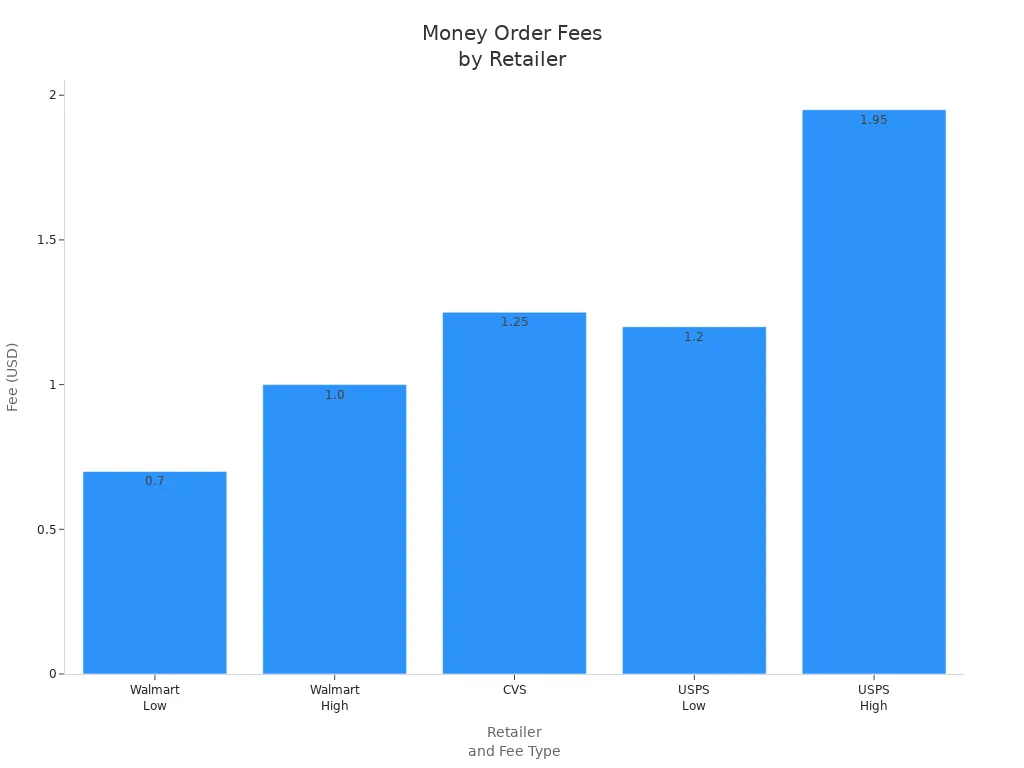
You can save money by choosing a Walmart money order for your payments. Walmart charges a maximum fee of $1 per money order. In some locations, you may pay as little as $0.70, but the fee never goes above $1. This low cost makes Walmart one of the most affordable places to buy a money order in the United States. The money order fees at Walmart apply whether you use Western Union or MoneyGram at their stores.
When you compare Walmart to other major retailers, you see a clear difference in money order fees. For example, CVS charges $1.25 for each money order, and the United States Postal Service (USPS) charges between $1.20 and $1.95, depending on the amount. The table below shows how Walmart stacks up against these other providers:
| Retailer | Money Order Fee | Maximum Limit |
|---|---|---|
| Walmart | $1.00 (sometimes as low as $0.70) | $1,000 |
| CVS | $1.25 | $500 |
| USPS | $1.20 to $1.95 | $1,000 |
Tip: Always check the posted fee at your local Walmart before you buy, as it may vary slightly by location.
Limits on Money Orders
Walmart sets clear limits on money orders to help you plan your payments. The maximum amount for a single Walmart money order is $1,000. If you need to send more than that, you can buy more than one money order. However, you cannot exceed the daily purchase limit of $3,000 per customer. This means you can buy up to three $1,000 money orders in one day, but not more.
These limits on money orders protect you and help prevent fraud. If you try to buy more than the allowed amount, Walmart will not process your request. Always keep your receipts for each transaction. If you need to send a larger amount, consider using a different payment method or splitting your payment over several days.
Note: The limits on money orders may change based on store policy or government rules. Always ask the customer service desk if you have questions about current limits.
Buying a Walmart Money Order
Where to Buy
You can get a money order at almost any Walmart store in the United States. Look for the customer service desk or the MoneyCenter. These areas handle many types of payments and financial services. Staff members will help you with how to purchase a money order. If you are unsure where to go, ask an employee for directions. Most Walmart stores offer this service during regular business hours, but some locations may have different schedules. Always check the hours before you visit to get a money order.
Payment Methods
When you purchase a money order at Walmart, you need to know which payment methods are accepted. Walmart does not allow you to use a credit card to get a money order. You must use cash or a debit card. This rule helps keep the process simple and secure. If you only have a credit card, you can take a cash advance, but this will cost extra fees. Using cash or a debit card is the best way to get a money order quickly. Many people choose Walmart because it makes payments easy and affordable.
Tip: Bring enough cash or make sure your debit card has enough funds before you go to Walmart. This will help you avoid delays when you purchase a money order.
ID Requirements
You may need to show identification when you get a money order at Walmart. For most amounts, you do not need ID. If you want to purchase a money order for $1,000 or more, Walmart will ask for a valid government-issued photo ID. This can be a driver’s license, passport, or state ID card. The ID requirement helps protect you and prevent fraud. Always bring your ID if you plan to get a money order for a large amount. If you are not sure about the rules, ask the staff how to purchase a money order safely.
Note: Always keep your receipt after you get a money order. This will help you track your payments and solve any problems if they come up.
Fixing, Cancelling, and Tracking
Correcting Mistakes
Mistakes on a Walmart money order can cause problems. You cannot simply cross out or change information on the form. Banks and processors often reject money orders with scratches or scribbles because they worry about fraud. If you spot an error before the money order is cashed, you should take these steps:
- Return to Walmart with your original receipt and the incorrect money order.
- Ask the staff about cancelling the money order and getting a replacement.
- Avoid making any edits on the money order. Even small changes can lead to rejection.
- Remember, most issuers, including MoneyGram and Western Union, do not allow corrections. They recommend cancellation and replacement.
Tip: Always double-check every detail before you sign and submit your money order. Careful filling helps you avoid extra fees and delays.
Cancelling a Money Order
If you need to cancel a Walmart money order, you must act quickly. Walmart uses MoneyGram for most money orders, so you will need to contact MoneyGram directly. Here is how you can cancel:
- Gather your original receipt, money order number, amount, and payee information.
- Fill out a cancellation request form from MoneyGram.
- Pay the cancellation fee, which is $18 USD (about 130 CNY at a 1 USD ≈ 7.2 CNY exchange rate).
- Make sure the money order has not been cashed. If it has, you cannot get a refund.
- Wait several days or weeks for MoneyGram to process your request and issue a refund or replacement.
Note: The fee you paid to buy the money order is non-refundable. If you lose your receipt, the cancellation process may take longer and cost more.
Tracking a Money Order
Tracking your Walmart money order helps you know if it has been cashed or lost. Always keep your receipt and the serial number safe. To track your money order:
- Visit the Walmart Money Services website or call customer service.
- Contact MoneyGram directly using your money order details.
- Use the serial number and amount to check the status online or by phone.
- If your money order is lost or delayed, file a trace request with Walmart or MoneyGram.
- For extra security, you can request a photocopy of a cashed money order from MoneyGram.
Tip: Tracking your money order gives you peace of mind and helps you act fast if something goes wrong. Always store your receipt in a safe place until the money order is cashed.
You can fill out and buy a Walmart money order by following a few simple steps. Write the recipient’s name and your details clearly, sign the front, and keep your receipt safe. To protect your money order:
- Store your receipt in a secure place or use the Walmart app for digital copies.
- Use tracking services when mailing your money order.
Walmart money orders offer a secure, low-cost way to pay without high fees or a bank account. Choose this method for safe and flexible payments.
FAQ
How long does it take for a Walmart money order to clear?
Most Walmart money orders clear within one business day after the recipient deposits them. Some banks, such as Hong Kong banks, may take longer to process the payment.
Can you use a Walmart money order for international payments?
You cannot use a Walmart money order to send money directly to another country, including China. Walmart money orders work only for payments within the United States.
What should you do if you lose your Walmart money order receipt?
If you lose your receipt, contact MoneyGram or Walmart right away. You will need to provide details about your transactions. Without a receipt, tracking or cancelling your money order may take longer and cost more.
Can you get a refund for an unused Walmart money order?
Yes, you can get a refund if the money order has not been cashed. Bring your original receipt and the unused money order to Walmart. You may need to pay a small processing fee.
Is there a limit to how many Walmart money orders you can buy in one day?
You can buy multiple money orders in one day, but the total amount cannot go over USD 3,000. This daily limit helps keep your transactions safe and secure.
While Walmart money orders offer a low-cost, secure way to pay within the U.S., their limitation to domestic transactions can be a hurdle for international needs. For seamless global payments, try BiyaPay. BiyaPay provides transfer fees as low as 0.5%, far below the $35-$50 charged by traditional bank wire transfers like SWIFT. With real-time exchange rate transparency, you can convert over 30 fiat currencies or 200+ cryptocurrencies, perfect for international travel, shopping, or remittances. Unlike Walmart money orders, BiyaPay supports same-day transfers across 100+ countries, ensuring your funds arrive quickly. Registration takes just minutes with simple identity verification, making it ideal for urgent payments abroad. Secured by U.S. and New Zealand financial licenses, BiyaPay guarantees safe transactions. Whether you’re paying for a Canadian hotel or sending money overseas, BiyaPay simplifies cross-border finances. Join BiyaPay today for fast, affordable, and reliable global payment solutions.
*This article is provided for general information purposes and does not constitute legal, tax or other professional advice from BiyaPay or its subsidiaries and its affiliates, and it is not intended as a substitute for obtaining advice from a financial advisor or any other professional.
We make no representations, warranties or warranties, express or implied, as to the accuracy, completeness or timeliness of the contents of this publication.
Related Blogs of

How Should You Prepare Funds Before Buying U.S. or Hong Kong Stocks? FX Conversion, Deposits, and Trading Paths Explained


Is It Safe to Fund Hong Kong and U.S. Stock Accounts? What to Know About Fund Arrival, Platform Risk Controls, and Account Security


How to Prepare Money for Living Abroad? A Checklist for Multi-Currency Accounts, Transfers, and Virtual Card Payments



Choose Country or Region to Read Local Blog
 Australia
 Austria
 Belgium
 Canada
 Cyprus
 Czech Republic
 Denmark
 Estonia
 Finland
 France
 Germany
 Greece
 Hong Kong
 India
India Indonesia
 Ireland
 Italy
Italy Japan
Japan Latvia
 Lithuania
 Luxembourg
 Malaysia
 Malta
Malta Morocco
 Nepal
Nepal Netherlands
 New Zealand
 Norway
 Pakistan
 Philippines
 Poland
 Portugal
 Romania
 Singapore
 Slovakia
 Slovenia
 South Africa
 South Korea
 Spain
Spain Sweden
 Thailand
 The United States
 Turkey
 United Arab Emirates
 United Kingdom
 Vietnam
Contact Us




BIYA GLOBAL LLC is registered with the Financial Crimes Enforcement Network (FinCEN), an agency under the U.S. Department of the Treasury, as a Money Services Business (MSB), with registration number 31000218637349, and regulated by the Financial Crimes Enforcement Network (FinCEN).
BIYA GLOBAL LIMITED is a registered Financial Service Provider (FSP) in New Zealand, with registration number FSP1007221, and is also a registered member of the Financial Services Complaints Limited (FSCL), an independent dispute resolution scheme in New Zealand.