What are the types of digital currency trading orders?




There are six main types of orders when trading digital currencies: limit orders, market orders, advanced limit orders, take profit and stop loss, bidirectional take profit and stop loss, and mobile take profit and stop loss.
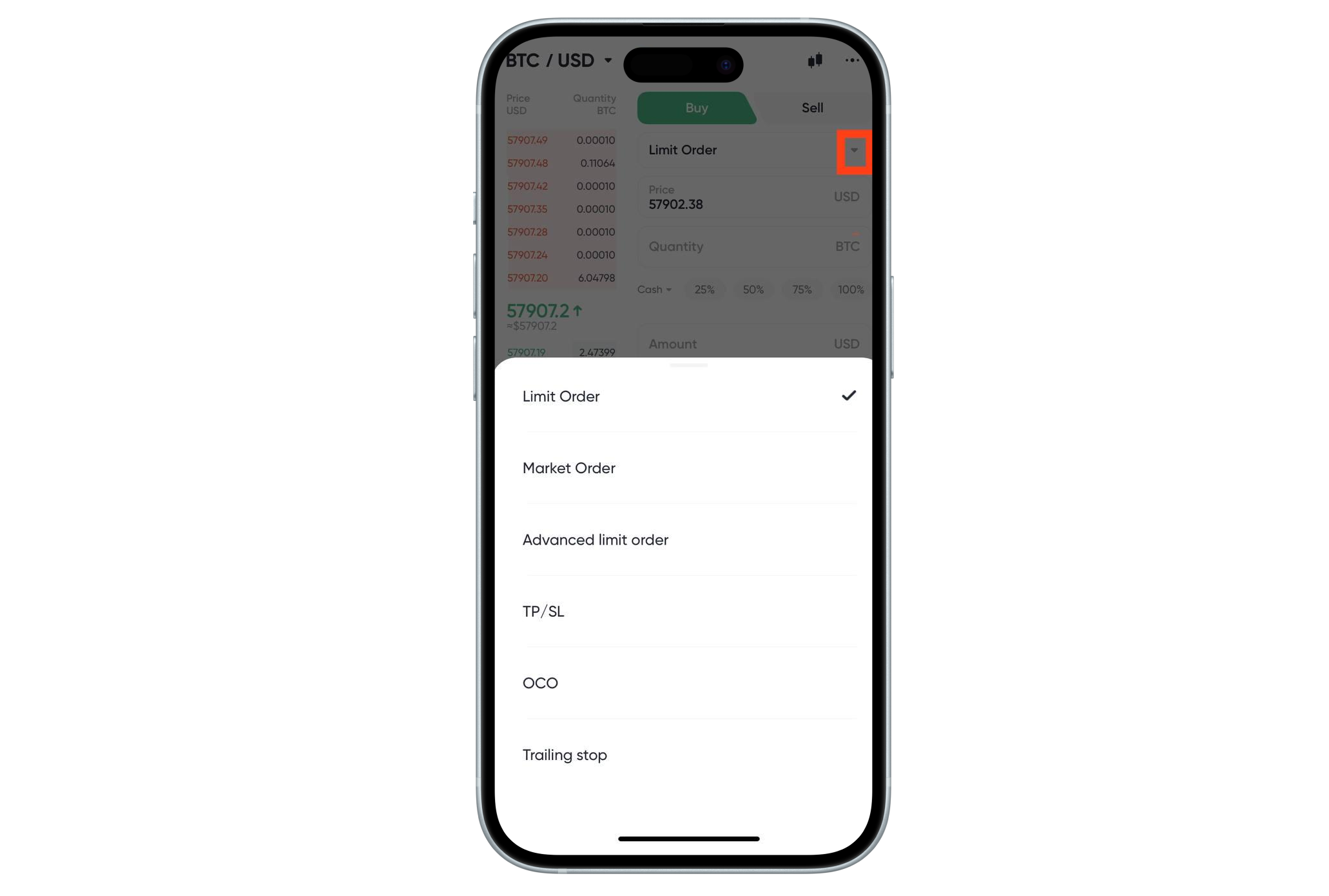
Below are the specific rules for these six types of orders:
一、Limit order
Limit orders are orders that are executed after reaching a specific or better price.
二、Market Order
A limit order is an order to buy or sell an asset immediately at the current market price.
三、Advanced Price Limit
Freeze orders according to limit orders
1.Only do Maker
Can only place orders, cannot accept orders. Entrustment enters the order book. If it is directly matched with an existing order, the order will be cancelled.
2.All transactions or immediate cancellation
Check the order quantity. If the order quantity is less than the current transferable quantity, it will be executed. If the order quantity is greater than the current transferable quantity, it will be cancelled.
3.Close the deal immediately and cancel the remaining items
If the order is triggered, cancel the remaining quantity in the order directly after partial transactions.
四、Take Profit and Stop Loss
Take Profit and Stop Loss "orders refer to pre-set trigger prices, order prices, and order quantities after triggering. When the latest price reaches the trigger price, an order will be placed at the pre-set order price, which can be a market order or a limit order. It can be a separate take profit or stop loss order, or a take profit + stop loss order.
1.Buy with stop loss and take profit. You can choose to trade with amount or quantity
After placing an order, assets will be frozen. If the order price is the market price and the transaction is made with quantity, the trigger price will be frozen by the amount of quantity. If the order price is the limit price and the transaction is made with quantity, the amount of the order price will be frozen by the amount of quantity. If the order price is the market price and the transaction is made with the amount, the frozen amount will be used to buy at the take-profit trigger price or buy at the stop-loss trigger price, and then the order will be sold. If the available balance at the end of the take-profit and stop-loss is insufficient, the order cannot be bought.
2.Sell with stop loss and take profit. Only trade with quantity
After placing an order, freeze the amount of assets entered. Sell at the take-profit trigger price or sell at the stop-loss trigger price, whichever price is reached first, triggers the order first. After triggering, sell the order. If the available balance at the end of the take-profit and stop-loss is insufficient, the order cannot be sold.
五、Two-way take profit and stop loss
1.Two-way stop-profit and stop-loss buying. You can choose to trade with amount or quantity
The take-profit trigger price needs to be lower than the market price, and the stop-loss trigger price needs to be higher than the market price. After placing an order, the assets will be frozen. If the order price is the market price and the transaction is made with quantity, the trigger price of the higher price will be taken as the standard, and the amount of the trigger price quantity will be frozen. If the order price is the market price and the transaction is made with quantity, the frozen amount will be triggered first at the price of buying at the take-profit trigger price or buying at the stop-loss trigger price. After triggering, the order will be sold. If the available balance at the end of the take-profit and stop-loss is insufficient, the purchase cannot be made.
2.Two-way take-profit and stop-loss sell. Can only trade with quantity
The take-profit trigger price needs to be higher than the market price, and the stop-loss trigger price needs to be lower than the market price. After placing an order, the amount of assets lost will be frozen. Which price is reached first when selling at the take-profit trigger price or selling at the stop-loss trigger price will trigger the order first. After triggering, the order will be sold. If the available balance at the end of the take-profit stop-loss is insufficient, the order cannot be sold.
六、Mobile Take Profit and Stop Loss
Mobile stop loss is a type of stop loss that tracks market prices. It sets a price distance or ratio in advance and automatically executes a Market Order when the market price reaches the preset level.
Mobile take-profit and stop-loss can only be used in Market Order. It can only take-profit or stop-loss, not take-profit + stop-loss.
You can choose the activation price or not. If you don’t choose the activation price, the order will be activated after placing it. If you choose the activation price, the order will be activated when the market price reaches or exceeds the activation price. Without activation, there is no trigger price.
Activate
If the activation price set = the latest transaction price at the time of placing an order, it will be activated immediately when placing an order.
If the activation price is greater than the latest transaction price at the time of placing the order, activate the order when the new latest transaction price is greater than or equal to the activation price.
If the activation price is less than the latest transaction price at the time of placing the order, activate the order when the new latest transaction price is less than or equal to the activation price.
Trigger
Buy: Latest price ≥ trigger price
Sell: Latest price ≤ trigger price, where the trigger price is calculated
Buy: lowest price + callback distance; lowest price * (1 + callback range)
Sell: highest price - callback distance; highest price * (1 - callback range)
Mobile stop-profit and stop-loss buying can only be in amount, and selling can only be in quantity. Both buying and selling do not freeze assets.
The trigger price changes with the price after placing an order.
Buy trigger price = historical low - pullback range
Sell trigger price = historical high price - pullback range
If the quantity and amount of buying and selling are sufficient, follow the order quantity. If the assets sold are insufficient, sell them all. If the amount of buying is insufficient, buy them all.
For example, if the user sets to sell 1 BTC, but only 0.5 BTC is triggered when the order is placed, then sell 0.5
If the user sets to buy 1000U of BTC, but only 500USDT is triggered when the order is placed, then 500USDT is bought.
Example 1 (Rising to the Top): The user wants to sell BTC, but has not selected the activation price. The latest transaction price is 30,000. The following parameters can be set: [Rebound Amplitude] 2,000 [Quantity] 1 BTC. If BTC continues to rise to the highest point of 40,000 after placing an order, and then retraces to 38,000, reaching the retracement condition (40,000 - 2,000 = 38,000), the system helps the user sell at the market price of 38,000.
Example 2 (plummeting bottom fishing): The user wants to buy BTC, and the latest transaction price is 40,000. The following parameters can be set: [Callback amplitude] 5% [Activation price] 30,000 [Quantity] 1 BTC. If BTC continues to fall to 30,000 after placing an order, the order is activated, and then it falls all the way to 20,000, rebounds to 20,000 * (1 + 5%) = 21,000, and reaches the drawdown condition (5%), the system helps the user buy at the market price of 21,000.

Contact Us




BIYA GLOBAL LLC is a licensed entity registered with the U.S. Securities and Exchange Commission (SEC No.: 802-127417); a certified member of the Financial Industry Regulatory Authority (FINRA) (Central Registration Depository CRD No.: 325027); regulated by the Financial Industry Regulatory Authority (FINRA) and the U.S. Securities and Exchange Commission (SEC).
BIYA GLOBAL LLC is registered with the Financial Crimes Enforcement Network (FinCEN), an agency under the U.S. Department of the Treasury, as a Money Services Business (MSB), with registration number 31000218637349, and regulated by the Financial Crimes Enforcement Network (FinCEN).
BIYA GLOBAL LIMITED is a registered Financial Service Provider (FSP) in New Zealand, with registration number FSP1007221, and is also a registered member of the Financial Services Complaints Limited (FSCL), an independent dispute resolution scheme in New Zealand.