- More
- Download




Step 1: Accessing the Regular Investment Portal
-
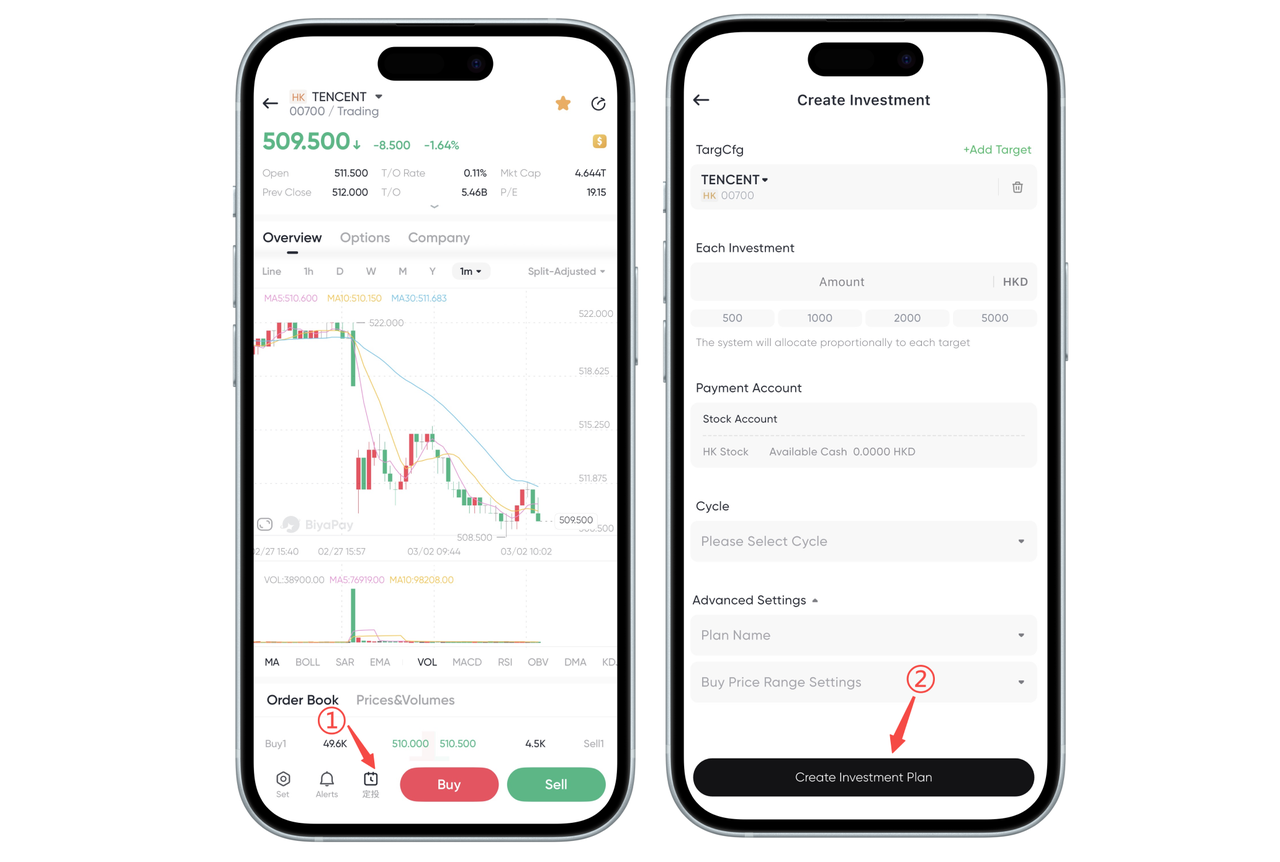
On the market data or trading page, select the target Hong Kong stock (e.g., Tencent Holdings) to access the stock details page.
-
Click the "Regular Investment" button in the bottom navigation bar to directly access the regular investment creation page for that stock.
Step 2: Setting Core Parameters for Regular Investment
-
Target Configuration: Confirm the current target (e.g., Tencent Holdings). You can also click "+ Add Target" to configure a portfolio of multiple Hong Kong stocks to diversify risk.
-
Each Investment: Enter a fixed amount (e.g., 500/1000/2000 USD). The system will allocate the funds proportionally to each target.
-
Payment Account: Select the deduction account (e.g., stock account) and ensure there are available funds in the account.
-
Investment Period: Select the investment frequency (e.g., every Monday/1st of every month). The system will automatically execute the investment periodically.
-
Advanced Settings (Optional):
① Plan Name: Customize the name of your regular investment plan for easy management of multiple strategies.
② Set Purchase Price Range: Set a price range to automatically buy only within that range, further optimizing holding costs.
Step 3: Complete Creation After confirming all parameters are correct, click the "Create Dollar-Cost Averaging" button at the bottom. The system will automatically execute the US stock dollar-cost averaging plan.
Risk Warnings:
-
The Hong Kong stock market is subject to volatility risk due to multiple factors including the global economy, policies, and exchange rates. Dollar-cost averaging (DCA) cannot eliminate market risk.
-
Do not use essential living funds or borrowed funds for Hong Kong stock DCA to avoid financial crisis due to market fluctuations.
-
Historical returns displayed on the platform do not represent future returns. Please fully understand the fundamentals and risks of the Hong Kong stock target before investing.

Contact Us



