




How to perform simulated trading on App
The App currently does not have simulated trading functionality
How to perform simulated trading on Web?
Simulated trading can help you familiarize yourself with trading processes and product features without using real funds, suitable for beginners to practice operations or experience different trading categories. You can quickly enter simulated trading mode through the BiyaPay official website.
Step 1: Enter Trading Entry
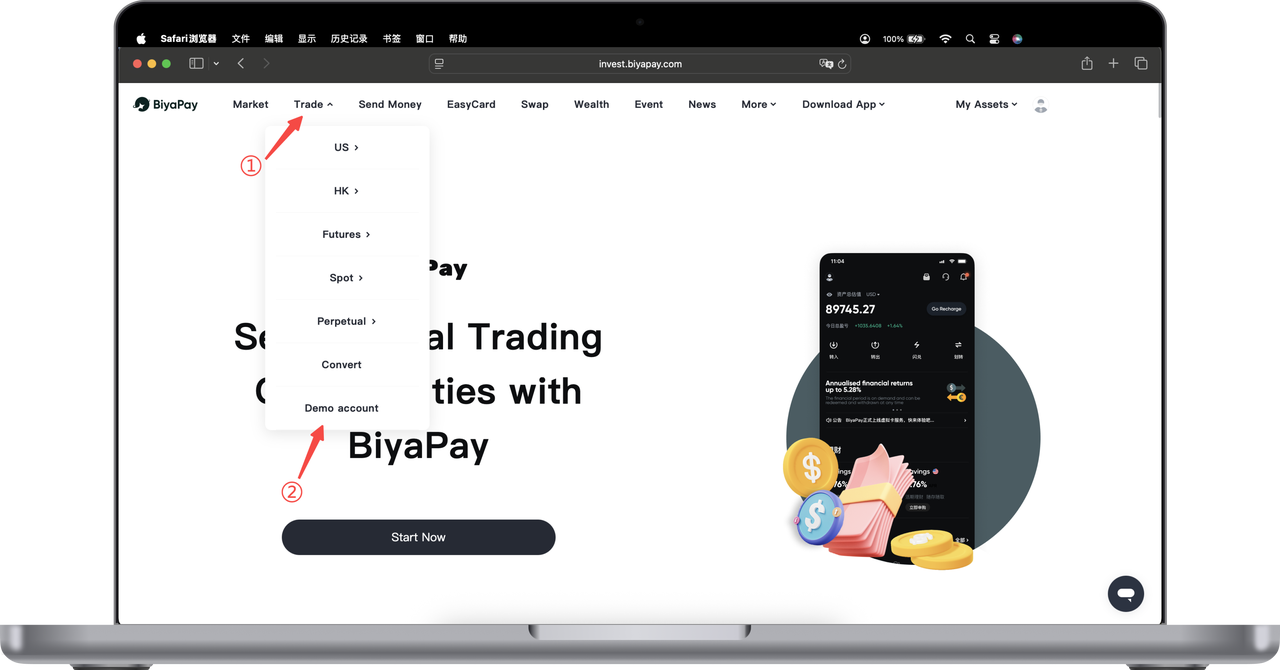
Open the BiyaPay official website, move your mouse to the "Trading" menu in the top navigation bar.
In the dropdown menu, you can see different trading types, including US stocks, Hong Kong stocks, futures, spot, contracts, etc.
Step 2: Select Simulated Trading
In the "Trading" dropdown menu, click "Simulated Trading" to enter the simulated trading page.
After entering, you will use the simulated funds provided by the system for operations. All trades are only for experience and learning, and will not generate real profits or losses.
What can simulated trading do?
In simulated trading mode, you can: experience the complete order placement and execution process, familiarize yourself with the operation methods of different trading categories, test trading strategies and risk control logic, understand the platform interface and function layout.
The simulated trading environment is consistent with the real trading process, helping you prepare before formal trading.
Differences Between Simulated Trading and Real Trading
Simulated trading is only for learning and experience. The funds used are virtual assets provided by the system, cannot be withdrawn, and will not affect your real account assets.
Market quotes may differ from the real market to some extent, and simulated trading results are for reference only.
Warm Tips
Simulated trading is suitable for beginners and feature experience, but does not constitute any investment advice. Before engaging in real trading, it is recommended to fully understand the relevant product rules and risks.