




How to view 'Stock' market quotes and their features on App
Click the "Market Quotes" page in the bottom navigation bar of the App, select [Stocks] to view the overall performance and popular symbols of US stocks, Hong Kong stocks, ETFs, and options.
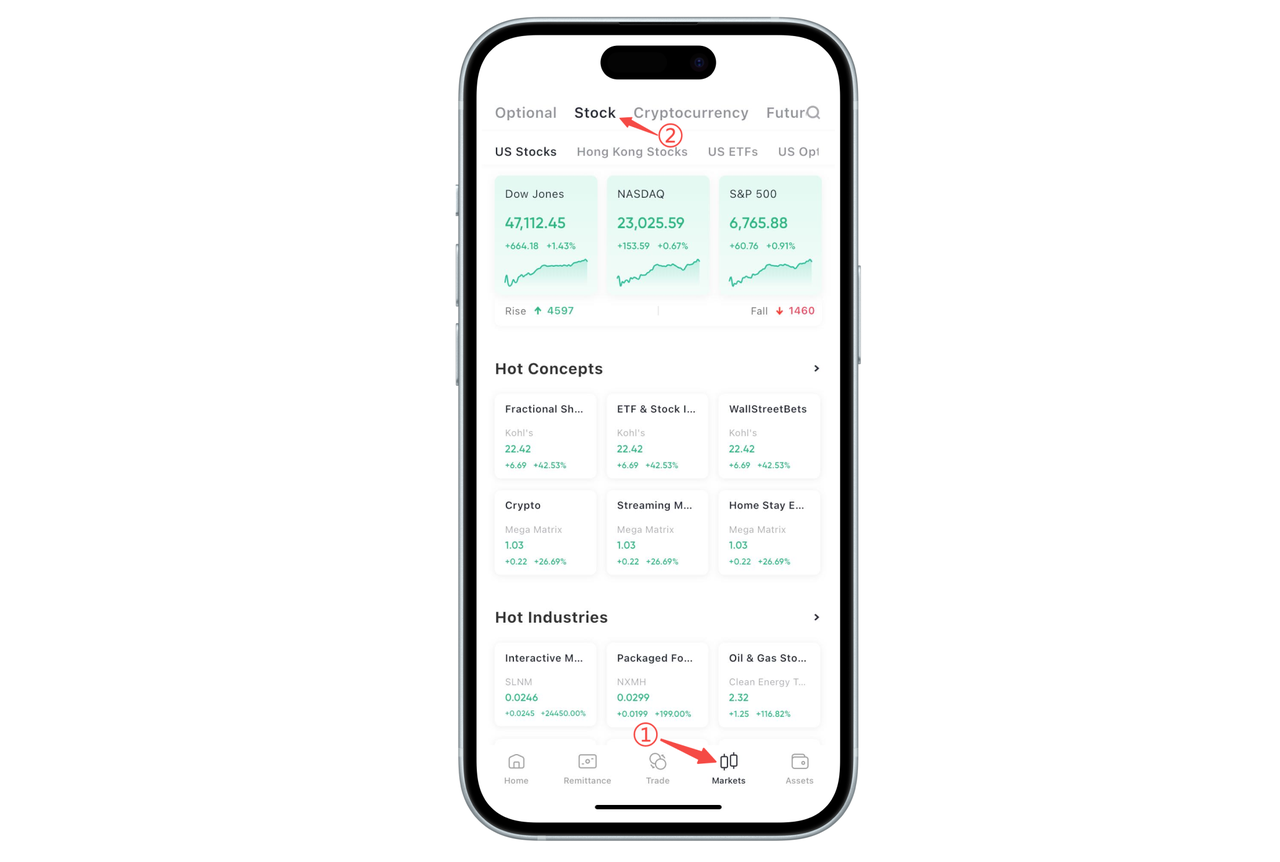
I. Top Market Switching
At the top of the "Stocks" page, you can switch between the following markets:
US Stocks
Hong Kong Stocks
US Stock ETFs
US Stock Options
Hong Kong Stock Options
The modules displayed under different tags are slightly different, as explained below.
II. US Stocks / Hong Kong Stocks: Indices and Individual Stock Opportunities
After entering "US Stocks" or "Hong Kong Stocks", it includes:
Major Indices The top displays Dow Jones, Nasdaq, S&P 500, or Hang Seng Index, H-Share Index, Hang Seng Tech Index, etc., showing the latest points, point changes, and percentage changes, helping to quickly judge the overall market conditions of the day.
Hot Concepts Displays themes such as cryptocurrency, NFT concepts, SaaS, 5G, etc. Each concept card shows representative stocks and their daily price changes, making it convenient to find opportunities by theme.
Hot Industries Such as medical equipment, financial exchange data, research consulting services, construction engineering, consumer finance, etc., making it easy to filter symbols from an industry perspective.
Real-time Rankings Provides intraday gainers, intraday decliners, extended hours rankings, active rankings, etc., helping you quickly discover the strongest, weakest, and most active stocks of the day.
Fractional Share Rankings (US Stocks) Displays popular US stock symbols that support fractional share trading, suitable for small-amount diversified investment.
Fixed Investment Rankings Displays the price changes in the past 52 weeks and 3-year fixed investment returns, helping you select stocks/Hong Kong stocks suitable for long-term fixed investment.
III. US Stock ETFs: Multi-category Indices and Leverage Tools
Under the "US Stock ETFs" tag, it mainly includes:
Hot ETFs Such as Nasdaq 3x Long, S&P 500, Gold, Silver, Crude Oil, etc., displaying prices and daily price changes.
ETF Categories Divided into broad-based index type, single stock leverage type, commodity type, bond ETFs, etc., making it convenient to filter according to strategy and risk preference.
Thematic ETFs Industry-themed such as semiconductors, gold mining, biotechnology, etc., supporting viewing corresponding prices and price changes.
Leverage / Inverse ETFs You can choose leveraged ETFs with 1x, 2x, 3x, 4x long or short positions to amplify returns or hedge.
IV. US Stock Options: Hot Symbols and Active Contracts
Under the "US Stock Options" tag, there are mainly two parts:
Hot Stocks Displays the option activity of popular symbols such as S&P 500 ETF, Nasdaq 100 ETF, NVIDIA, Tesla, etc., from two dimensions: "Option Trading Volume" and "Option Open Interest".
Option Rankings Sorted by trading volume or open interest, lists specific contracts (such as NVDA CALL, SPY CALL, etc.), displaying contract codes (including expiration date and strike price), latest price, price change, and trading volume, making it convenient for you to quickly identify the most active US stock options of the day.
V. Hong Kong Stock Options: Hot Hong Kong Stock Option Positions
Under the "Hong Kong Stock Options" tag, the layout is similar to US stock options:
Hot Stocks Displays the option trading volume/open interest of symbols such as Xiaomi Group, Alibaba, Tencent Holdings, Meituan, China Ping An, Hong Kong Exchanges, etc.
Option Rankings Also sorted by trading volume or open interest, displays specific CALL/PUT contracts such as MIU.HK, JDC.HK, etc. strike price, expiration date, latest price, price change, and trading volume, helping you track hot contracts in the Hong Kong stock options market.
VI. Search and Watchlist Entry
In the upper right corner of any market quotes page, you can search for stocks, ETFs, or option codes/names through the magnifying glass;
Click the star icon in the list to add to watchlist, click the symbol to enter the details page to view more complete K-lines, order book, and information, and jump to the trading page to place orders.