- More
- Download




To ensure user fund safety and market stability, BiyaPay has a forced liquidation (forced close) mechanism in futures trading. The specific rules are as follows:
I. Forced Liquidation Trigger Conditions
-
When the account's remaining liquidity is less than 0, the system will automatically trigger forced liquidation until the current remaining liquidity returns to a positive value.
-
Based on the "First Notice Day" and "Last Trading Day" in the contract information, the system will gradually force close positions before expiration until the position is 0.
II. Forced Liquidation Rules
- Physical Delivery Products
Long positions: Starting from T-7 calendar days before (First Notice Day, Last Trading Day), the system will check daily at market open whether there are still long positions, and if so, force close them (if there is no "First Notice Day", the "Last Trading Day" will be used).
Short positions: Starting from T-7 calendar days before the Last Trading Day, the system will check daily at market open whether there are still short positions, and if so, force close them.
- Cash Settlement Products
No forced liquidation is performed, supporting expiration settlement.
III. Reminders
Users are advised to close positions themselves before the contract approaches the "First Notice Day" or "Last Trading Day" to avoid forced liquidation.
The forced liquidation process will be executed at real-time market prices, and there may be slippage risks.
How to View Remaining Liquidity on the App:
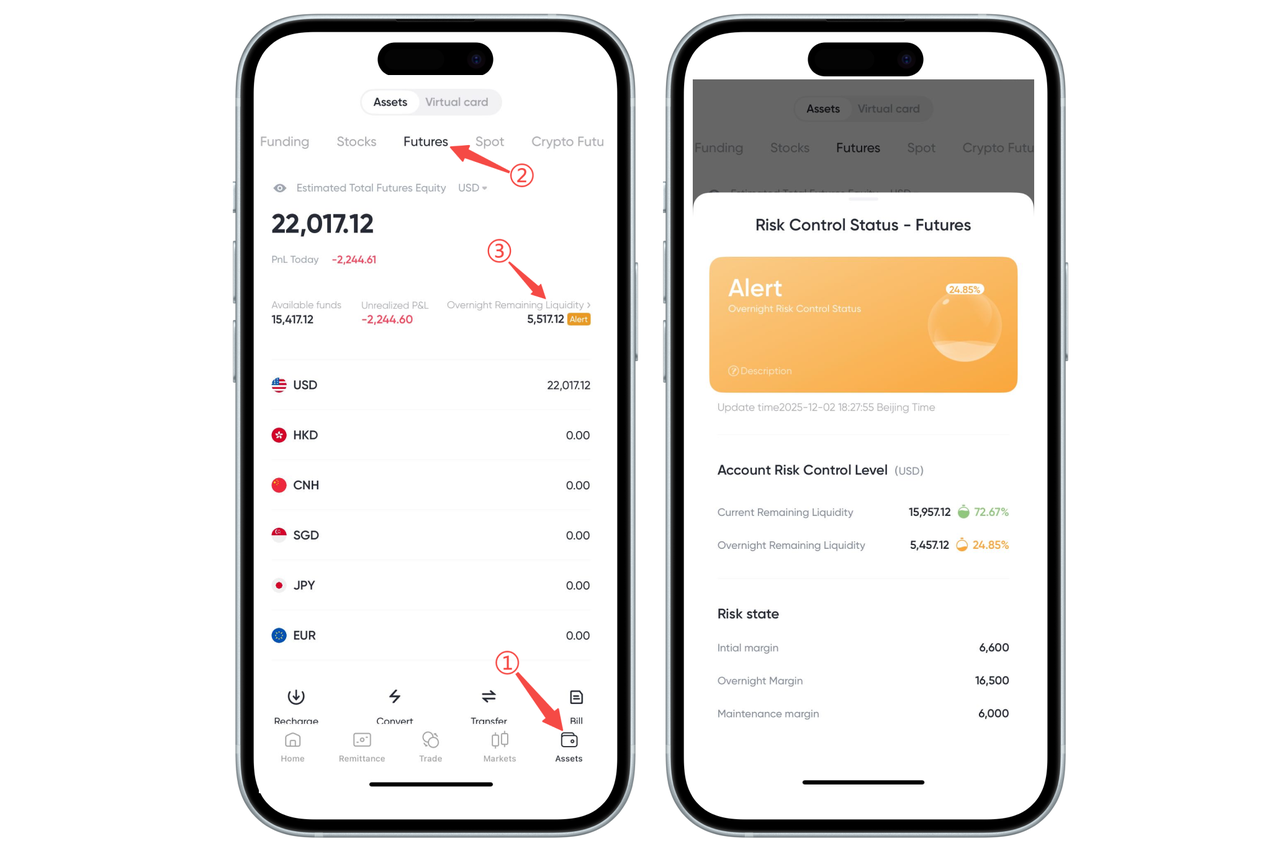
You can view your remaining liquidity on the futures assets page of the BiyaPay App to understand your account risk level and available margin situation. Please follow these steps:
Step 1: Enter the Assets Page
Click [Assets] in the bottom navigation bar to enter the assets overview page.
Step 2: Switch to Futures Account
Click [Futures] at the top of the page to enter your futures account.
Step 3: View Remaining Liquidity
On the futures assets homepage, find [Overnight Remaining Liquidity] and click the value to pop up the Risk Control Status page, where you can view complete information, including:
Current Remaining Liquidity
Overnight Remaining Liquidity
Risk Level
Initial Margin
Overnight Margin
Maintenance Margin
And other detailed data.
How to View Remaining Liquidity on the Web:
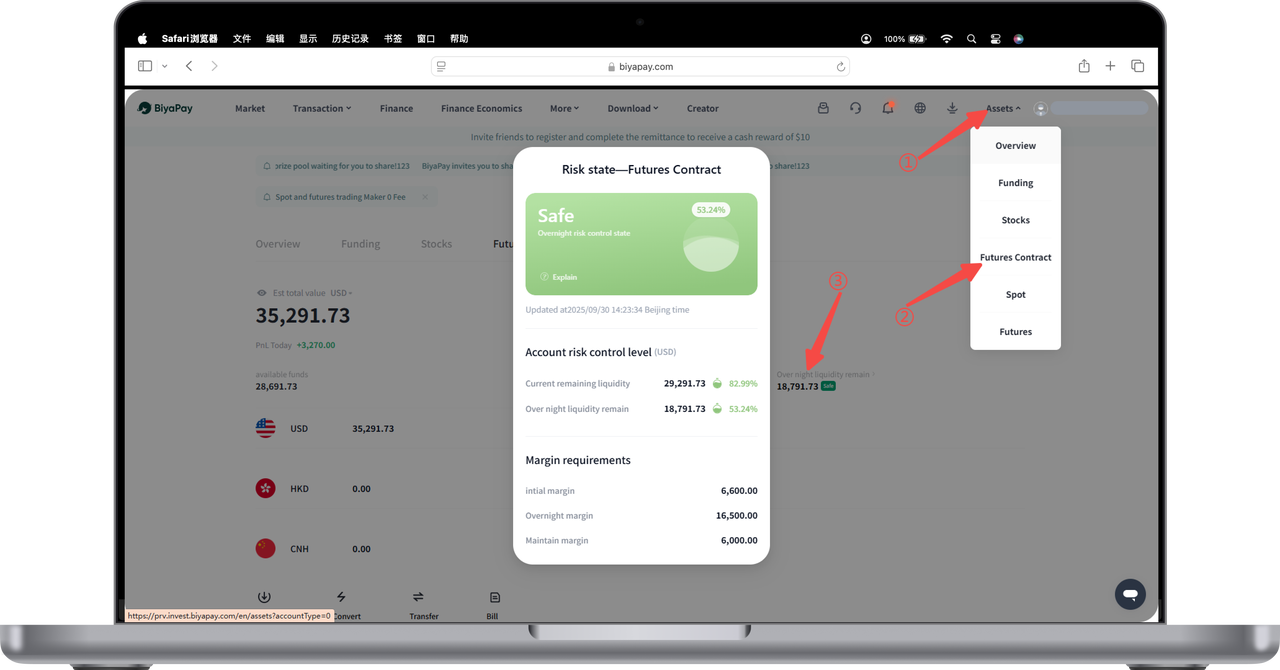
You can view the current remaining liquidity in your futures account on the BiyaPay Web. Please follow these steps:
Step 1: Enter Asset Center
Click [My Assets] in the upper right corner of the webpage to expand the asset category menu.
Step 2: Select Futures Account
Click [Futures] in the dropdown menu to enter the futures assets page.
Step 3: View Remaining Liquidity
On the futures assets homepage, you can see Remaining Liquidity displayed in the asset overview area. Click this data to expand the complete Risk Control Status popup, where you can view:
Account Risk Level
Current Maintenance Margin
Remaining Liquidity
Margin Requirements (Initial/Maintenance/Overnight)
And other detailed information.

Contact Us



