- More
- Download




Realized profit and loss refers to the realized profit and loss of contracts that have been reduced.
Calculation formula: Realized P&L = (Average Closing Price (including fees) - Average Opening Price (including fees)) × Closing Quantity × Contract Multiplier Realized profit and loss only occurs when closing positions.
Average Closing Price (including fees):
When selling: Average Closing Price (including fees) = (Closing Price × Closing Quantity × Contract Multiplier - Closing Fees) / (Closing Quantity × Contract Multiplier);
When buying: Average Closing Price (including fees) = (Closing Price × Closing Quantity × Contract Multiplier + Closing Fees) / (Closing Quantity × Contract Multiplier);
Average Opening Price (including fees):
When buying: Average Opening Price (including fees) = (Opening Price × Opening Quantity × Contract Multiplier + Opening Fees) / (Opening Quantity × Contract Multiplier);
When selling: Average Opening Price (including fees) = (Opening Price × Opening Quantity × Contract Multiplier - Opening Fees) / (Opening Quantity × Contract Multiplier);
Through the above formulas, you can clearly calculate the realized profit and loss of each transaction.
How to View Realized Profit and Loss on the App:
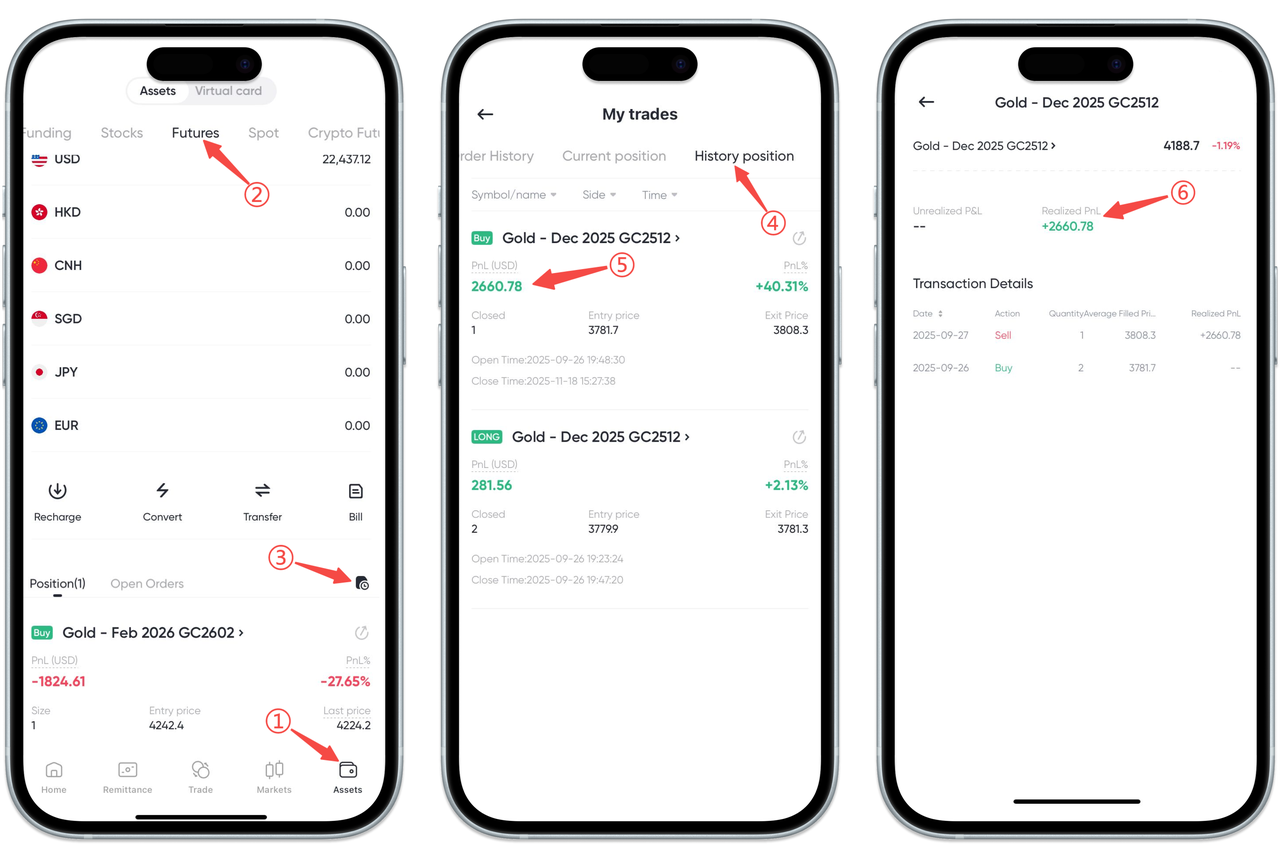
You can view the realized profit and loss of each futures transaction in the Historical Positions of the BiyaPay App, including actual profit amount and profit rate. Please follow these steps:
Step 1: Enter the Assets Page
Open the App and click [Assets] in the bottom navigation bar.
Step 2: Switch to Futures Account
Select [Futures] in the top category.
Step 3: Enter Transaction Records
Click the [Transaction Records] icon at the bottom of the futures page to enter the records page.
Step 4: View Historical Positions
Switch to [Historical Positions] at the top of the page.
Step 5: Select the Position to View
In the historical positions list, click [Profit (USD)] or Profit Rate of the corresponding position to enter the details page.
Step 6: View Realized Profit and Loss
On the details page, you can see the Realized Profit and Loss of the position and view transaction details.
If you need to view the realized profit and loss in positions, please return to [Current Positions] on the [Transaction Records] page to view.
How to View Realized Profit and Loss on the Web:
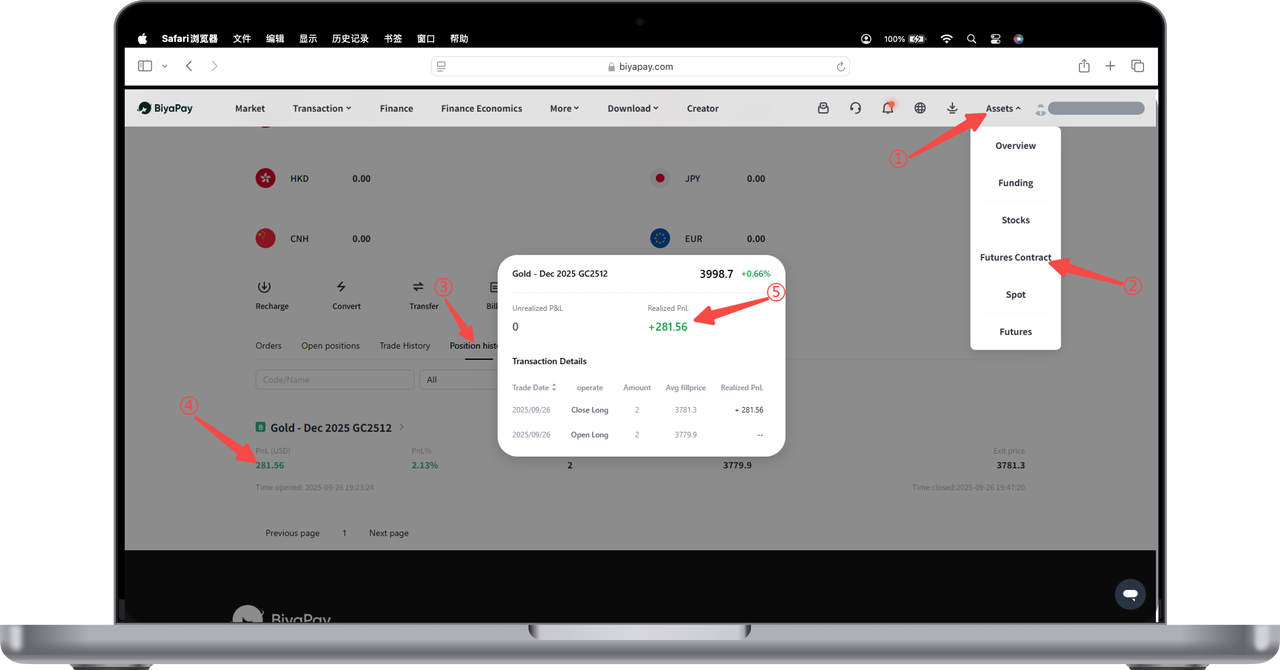
You can view the realized profit and loss of your futures account on the BiyaPay Web, including the actual profit and profit rate after each position closing. Please follow these steps:
Step 1: Enter Asset Center
After logging into the official website, click [My Assets] in the upper right corner.
Step 2: Select Futures Account
Click [Futures] in the asset category to enter the futures assets page.
Step 3: View Historical Positions
Switch to [Historical Positions] on the futures page.
Step 4: Click to View Profit Details
In the historical positions list, click [Profit] or [Profit Rate] to view the realized profit and loss details of the corresponding position.

Contact Us



