- More
- Download




How to View Futures Order Types on the App:
In the BiyaPay App, you can view all futures order types (such as Limit Order, Market Order, Take Profit & Stop Loss, Trailing Stop Loss, etc.) on the order placement page. Please follow these steps:
Step 1: Enter the Trading Page
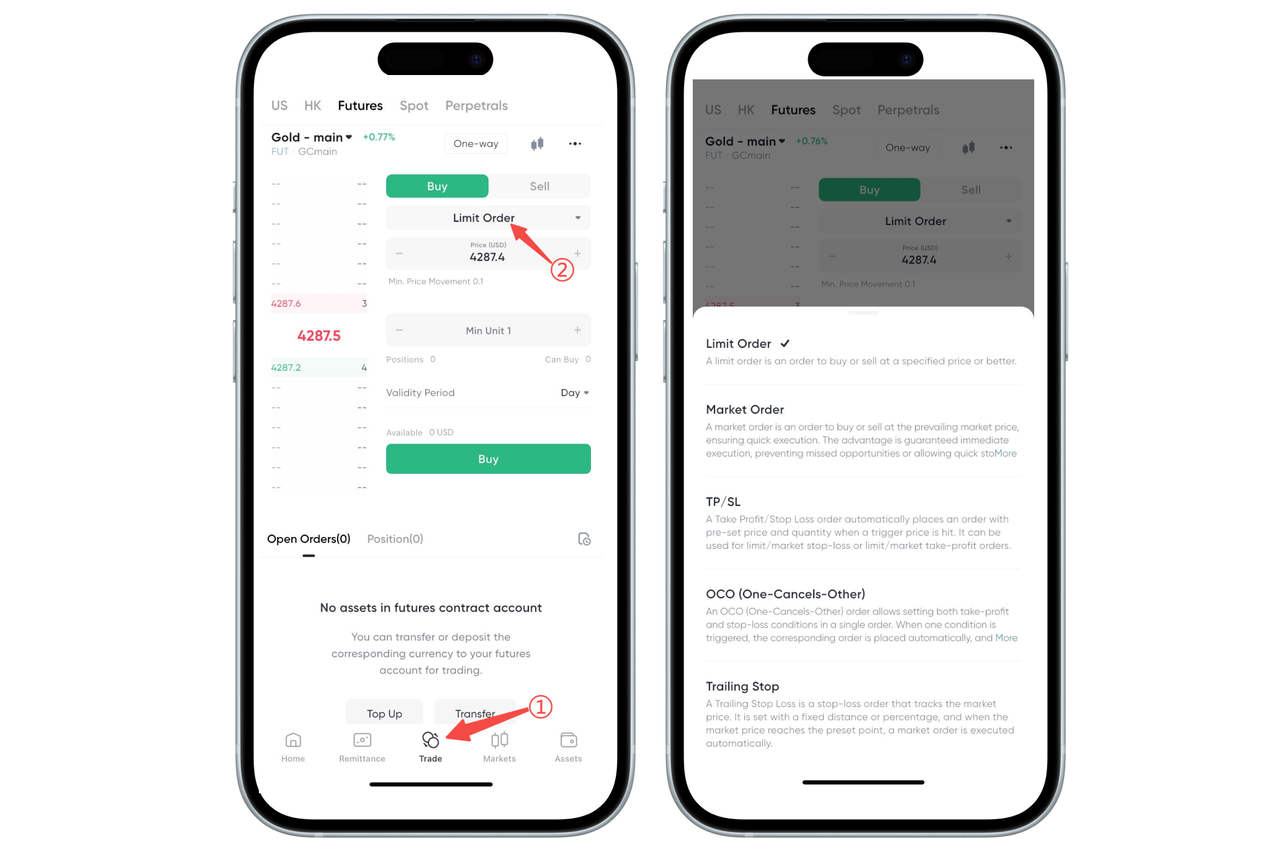
Open the BiyaPay App, click [Trade] in the bottom navigation bar, and switch to the Futures channel.
Step 2: Click the Order Type Option
On the futures order placement interface, click the order type bar in the order placement area, which defaults to "Limit Order".
Step 3: View All Order Type Descriptions
After clicking, the system will pop up an order type description window, where you can view:
Limit Order: Place an order at a specified price
Market Order: Execute quickly at the current market's best price
Take Profit & Stop Loss: Set trigger price to automatically take profit or stop loss
Two-Way Take Profit & Stop Loss: Set both take profit and stop loss protection simultaneously
Trailing Stop Loss: Dynamically adjust take profit position based on price changes
(Actual available types are subject to the platform.)
How to View Futures Order Types on the Web:
You can quickly view all available futures order types (Limit, Market, Take Profit & Stop Loss, Two-Way Take Profit & Stop Loss, Trailing Stop Loss, etc.) on the BiyaPay Web. Please follow these steps:
Step 1: Enter the Futures Trading Page
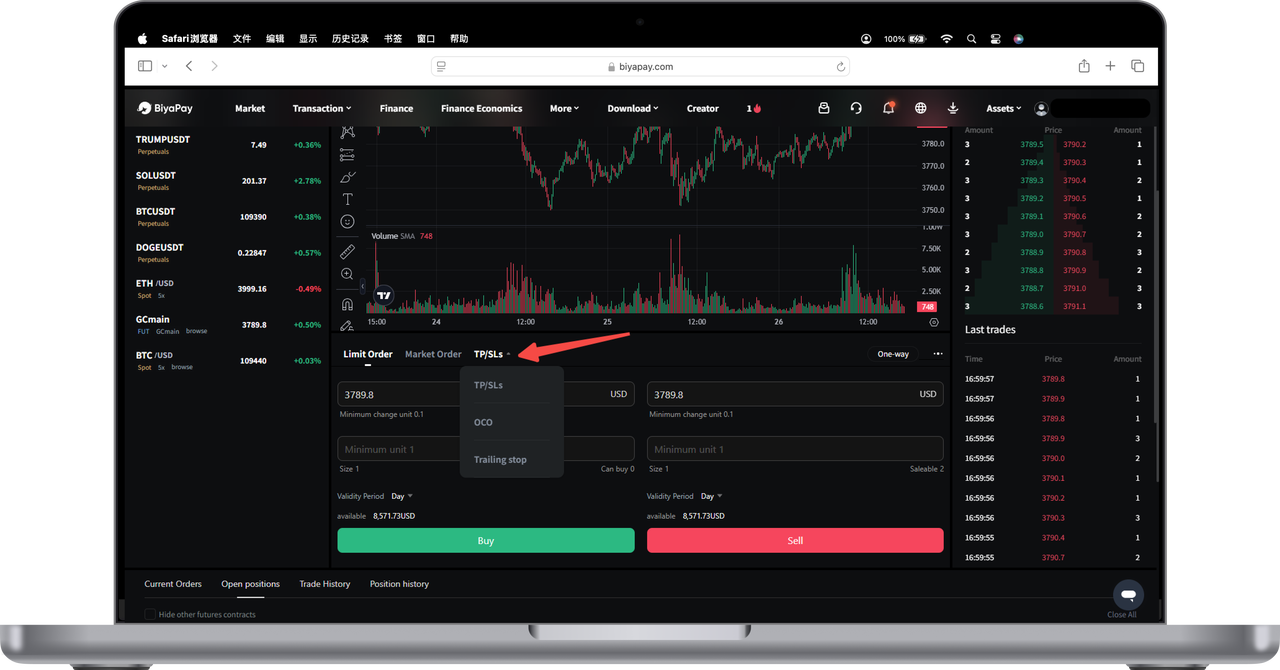
Select [Trade] in the top navigation bar → Switch to the Futures channel.
Step 2: Enter the Order Placement Area
In the trading interface, the order panel is located below the price chart, including price input, quantity, order type and other settings.
Step 3: Click the Order Type Selection Bar
Above the order panel, click the order type label (as shown by the arrow in the figure, default is "Limit" or "Market"), and the system will expand the order type selection menu.
Step 4: View All Order Type Descriptions
After expanding, you can view optional order types:
Limit Order: Place an order at a specified price
Market Order: Execute immediately at the best price
Take Profit & Stop Loss: Automatically close position when trigger price is reached
Two-Way Take Profit & Stop Loss: Set both take profit and stop loss protection simultaneously
Trailing Stop Loss: Dynamically adjust take profit position based on market conditions
Select the order type you need to continue setting the price, quantity and complete the order.
Below is a detailed introduction to the rules of these five order types:
I. Limit Order
A limit order is executed only when the price reaches a specified or better price.
II. Market Order
A limit order is an order to buy or sell an asset immediately at the current market price.
III. Take Profit & Stop Loss
A "Take Profit & Stop Loss" order refers to pre-setting a trigger price, the order price after triggering, and the order quantity. When the latest price reaches the trigger price, an order will be placed at the preset order price. This can be either a market order or a limit order. You can set take profit only, stop loss only, or both take profit + stop loss.
- Take Profit & Stop Loss Buy Orders. You can choose to execute by amount or by quantity.
After placing the order, the assets are immediately frozen. If the order price is a market price and executed by quantity, the frozen amount equals trigger price × quantity. If the order price is a limit price and executed by quantity, the frozen amount equals order price × quantity. If the order price is a market price and executed by amount, the frozen amount is used to buy at the take profit trigger price or stop loss trigger price, whichever triggers first, then the order is placed. If the available balance is insufficient after take profit & stop loss ends, buying is not possible.
- Take Profit & Stop Loss Sell Orders. Can only be executed by quantity.
After placing the order, the specified quantity of assets is immediately frozen. The order will be triggered and sold at whichever price is reached first: the take profit trigger price or the stop loss trigger price. After triggering, the order is placed. If the available balance is insufficient after take profit & stop loss ends, selling is not possible.
IV. Two-Way Take Profit & Stop Loss
- Two-Way Take Profit & Stop Loss Buy Orders. You can choose to execute by amount or by quantity.
The take profit trigger price needs to be lower than the market price, and the stop loss trigger price needs to be higher than the market price. After placing the order, assets are immediately frozen. If the order price is a market price and executed by quantity, the higher trigger price is used as the standard, freezing trigger price × quantity × amount. If the order price is a limit price and executed by quantity, the higher order price is used as the standard, freezing order price × quantity amount. If the order price is a market price and executed by amount, the frozen amount will be used to buy at whichever price is reached first: the take profit trigger price or the stop loss trigger price. After triggering, the order is placed. If the available balance is insufficient after take profit & stop loss ends, buying is not possible.
- Two-Way Take Profit & Stop Loss Sell Orders. Can only be executed by quantity.
The take profit trigger price needs to be higher than the market price, and the stop loss trigger price needs to be lower than the market price. After placing the order, the specified quantity of assets is immediately frozen. The order will be triggered and sold at whichever price is reached first: the take profit trigger price or the stop loss trigger price. After triggering, the order is placed. If the available balance is insufficient after take profit & stop loss ends, selling is not possible.
V. Trailing Take Profit & Stop Loss
Trailing take profit & stop loss is a type of take profit and stop loss that tracks market prices. It pre-sets price distance or ratio, and automatically executes market orders when the market price reaches the preset point.
Trailing take profit & stop loss can only use market orders and can only take profit or stop loss, not both take profit + stop loss.
You can choose to set an activation price, or not set an activation price. If no activation price is set, the order is activated immediately after placement. If an activation price is set, the order is activated when the market price reaches or exceeds the activation price. When not activated, there is no trigger price.
Activation
If the set activation price = the latest transaction price when placing the order, the order is activated immediately when placed.
If the activation price > the latest transaction price when placing the order, the order is activated when the new latest transaction price >= the activation price.
If the activation price < the latest transaction price when placing the order, the order is activated when the new latest transaction price <= the activation price.
Trigger
Buy: Latest price ≥ Trigger price
Sell: Latest price ≤ Trigger price. The trigger price calculation:
Buy: Lowest price + Callback price distance; Lowest price × (1 + Callback ratio)
Sell: Highest price - Callback price distance; Highest price × (1 - Callback ratio)
Trailing take profit & stop loss buy orders can only be executed by amount, and sell orders can only be executed by quantity. Neither buy nor sell orders freeze assets.
After placing the order, the trigger price changes with price movements.
Buy trigger price = Historical lowest price - Callback range
Sell trigger price = Historical highest price - Callback range
If the buy/sell quantity and amount are sufficient, the order will be executed according to the order quantity. If the sell assets are insufficient, all available assets will be sold. If the buy amount is insufficient, all available amount will be used to buy.
Examples
Insufficient Funds Executed Proportionally
A user sets to sell 1 gold contract, but the account only has 0.5 contracts. When triggered, only 0.5 contracts will be sold.
A user sets to buy 10,000 USD worth of gold contracts, but the account only has 5,000 USD. When triggered, only 5,000 USD worth of gold will be bought.
Rapid Rise Exit (Short Take Profit)
A user wants to sell Gold Main (short take profit) without selecting an activation price.
Current latest transaction price: 1,800 USD/ounce, set callback range 50 USD, quantity 1 contract.
If the gold price rises to 2,000 USD/ounce and then retraces to 2,000 - 50 = 1,950 USD/ounce, the system will automatically sell at market price at 1,950 USD/ounce.
Rapid Fall Bottom Fishing (Long Take Profit)
A user wants to buy Gold Main (long take profit), set activation price 1,750 USD/ounce, callback range 3%, quantity 1 contract.
The gold price drops to 1,750 USD/ounce to activate the order, then the price drops to 1,600 USD/ounce, and then rebounds to 1,600 × (1 + 3%) = 1,648 USD/ounce. The system will automatically buy at market price at 1,648 USD/ounce.

Contact Us



