How to Choose a Futures Trading Pair

BiyaPay
Published on 2026-02-26 Updated on 2026-02-26

How to Choose a Futures Trading Pair on the App:

Choosing a futures trading pair in the BiyaPay App is very simple. Whether you are a beginner or an experienced user, you can quickly find the variety you want to trade by following these steps.

1. Enter the Futures Page

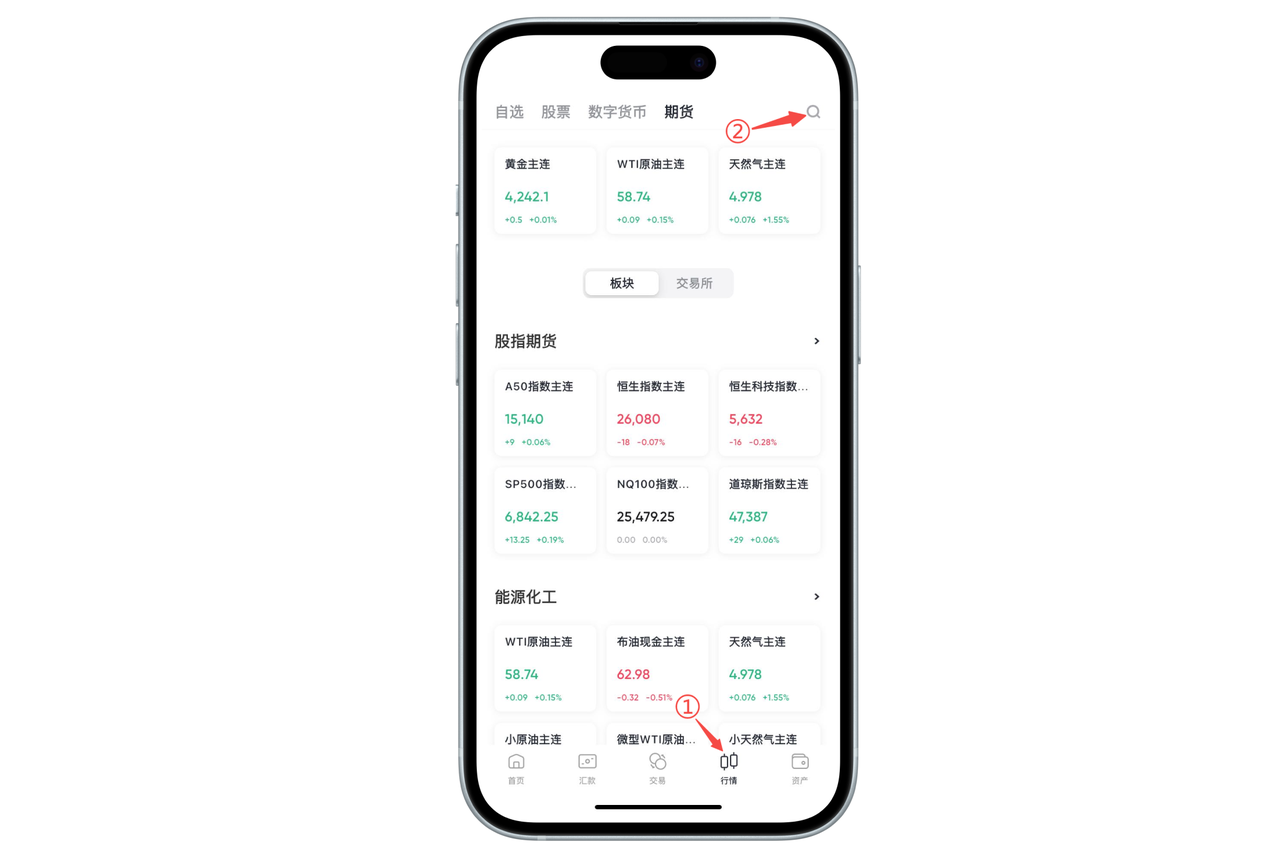
Open the App's bottom navigation bar and click the "Futures" entry to enter the futures market page. This will display the most popular and actively traded futures products.

2. Directly Select Popular Trading Pairs from the Homepage

On the futures homepage, you can see common varieties, such as:

Gold Main

WTI Crude Oil Main

Natural Gas Main

Various stock index futures (such as A50, Nasdaq, S&P 500, etc.)

Click on any trading pair card to enter the trading page for that variety.

3. Use the Search Function to Quickly Find (Recommended)

If you want to find a specific futures variety, you can click the search icon in the upper right corner.

Enter keywords in the search box, such as:

"WTI"

"Gold"

"Hang Seng Index"

"Crude Oil"

You can accurately locate the trading pair you need.

4. Browse More Futures Varieties from Categories

The futures homepage also displays categories by type:

Stock Index Futures

Energy and Chemicals

Precious Metals

Other Popular Varieties

Click on the category area to view more related targets and select the appropriate trading variety.

5. Tips

If you cannot find a trading pair, it may be due to:

The variety is currently not listed

The exchange trading hours have not started

The contract is temporarily not open for trading

You can consult with online customer service, and we will provide you with the latest trading support information.

image_0042.png

How to Choose a Futures Trading Pair on the Web:

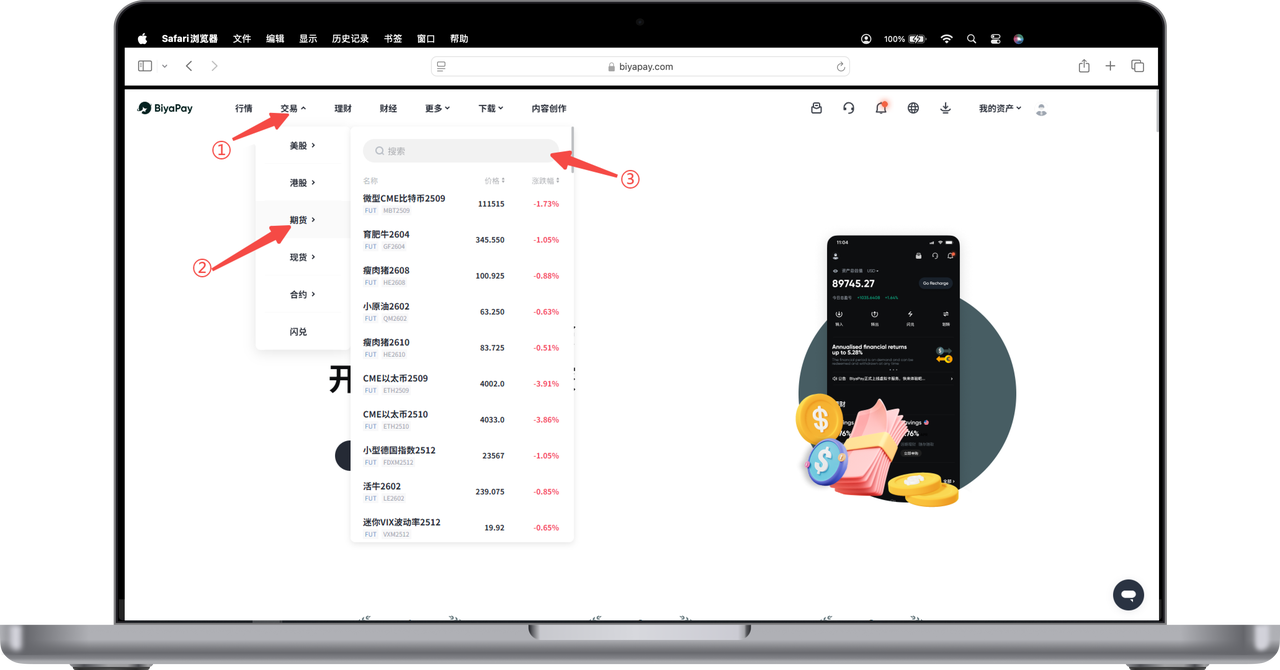
You can quickly enter the futures market and select trading pairs through the top navigation bar. Follow these steps:

  1. Click [Trade] at the top of the webpage

  2. Select [Futures] from the dropdown menu

  3. In the expanded futures list on the right, browse or enter keywords in the search bar to select the futures trading variety you need and enter the order interface

After completing the selection, you will enter the market and trading page for that variety, where you can perform buy, sell, view K-line, and other operations.

image_0044.png

BiyaPay
BiyaPay makes crypto more popular!

Contact Us

Mail: service@biyapay.com
Customer Service Telegram: https://t.me/biyapay001
Telegram Community: https://t.me/biyapay_ch
Digital Asset Community: https://t.me/BiyaPay666
BiyaPay的电报社区BiyaPay的Discord社区BiyaPay客服邮箱BiyaPay Instagram官方账号BiyaPay Tiktok官方账号BiyaPay LinkedIn官方账号
Regulation Subject
BIYA GLOBAL LLC
BIYA GLOBAL LLC is a licensed entity registered with the U.S. Securities and Exchange Commission (SEC No.: 802-127417); a certified member of the Financial Industry Regulatory Authority (FINRA) (Central Registration Depository CRD No.: 325027); regulated by the Financial Industry Regulatory Authority (FINRA) and the U.S. Securities and Exchange Commission (SEC).
BIYA GLOBAL LLC
BIYA GLOBAL LLC is registered with the Financial Crimes Enforcement Network (FinCEN), an agency under the U.S. Department of the Treasury, as a Money Services Business (MSB), with registration number 31000218637349, and regulated by the Financial Crimes Enforcement Network (FinCEN).
BIYA GLOBAL LIMITED
BIYA GLOBAL LIMITED is a registered Financial Service Provider (FSP) in New Zealand, with registration number FSP1007221, and is also a registered member of the Financial Services Complaints Limited (FSCL), an independent dispute resolution scheme in New Zealand.
©2019 - 2026 BIYA GLOBAL LIMITED