- More
- Download




Currently, BiyaPay contracts have two types of take profit/stop loss orders: Limit Take Profit/Stop Loss orders and Market Take Profit/Stop Loss orders.
How to set take profit and stop loss orders on the App:
On the trading page, click the default limit order type to select take profit/stop loss
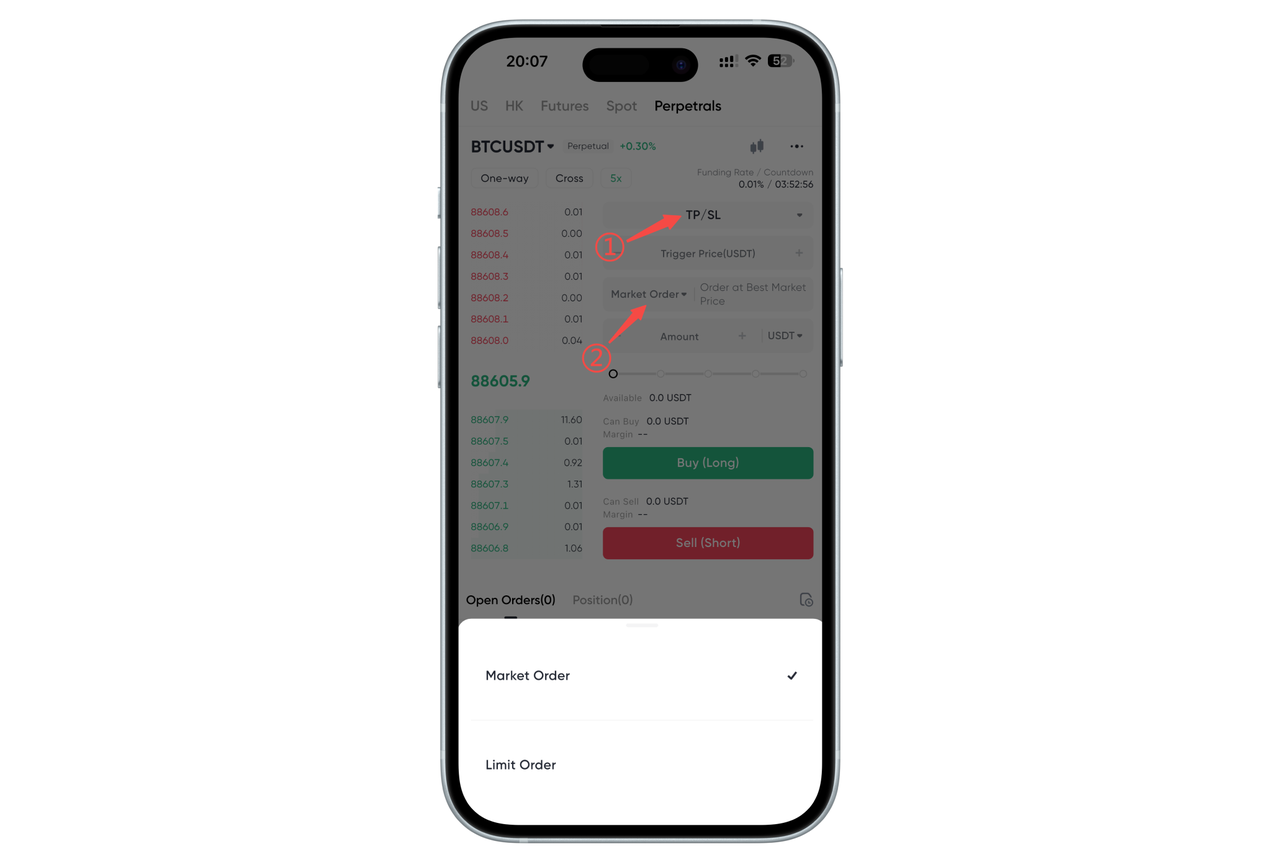
Limit Take Profit/Stop Loss Order
- What is a Limit Take Profit/Stop Loss Order?
A limit take profit/stop loss order can be decomposed into a take profit/stop loss order and a limit order. The take profit/stop loss price is the price that triggers the limit order, and the limit price is the price that triggers the limit order. This means that once your take profit/stop loss price is triggered, your limit order will be immediately placed on the order book.
Although the take profit/stop loss price and limit price can be the same, it is recommended to set a take profit/stop loss price higher than the limit price (for short orders) or a stop loss price lower than the limit price (for long orders), which can increase your limit order execution rate.
- How to place a Limit Take Profit/Stop Loss Order?
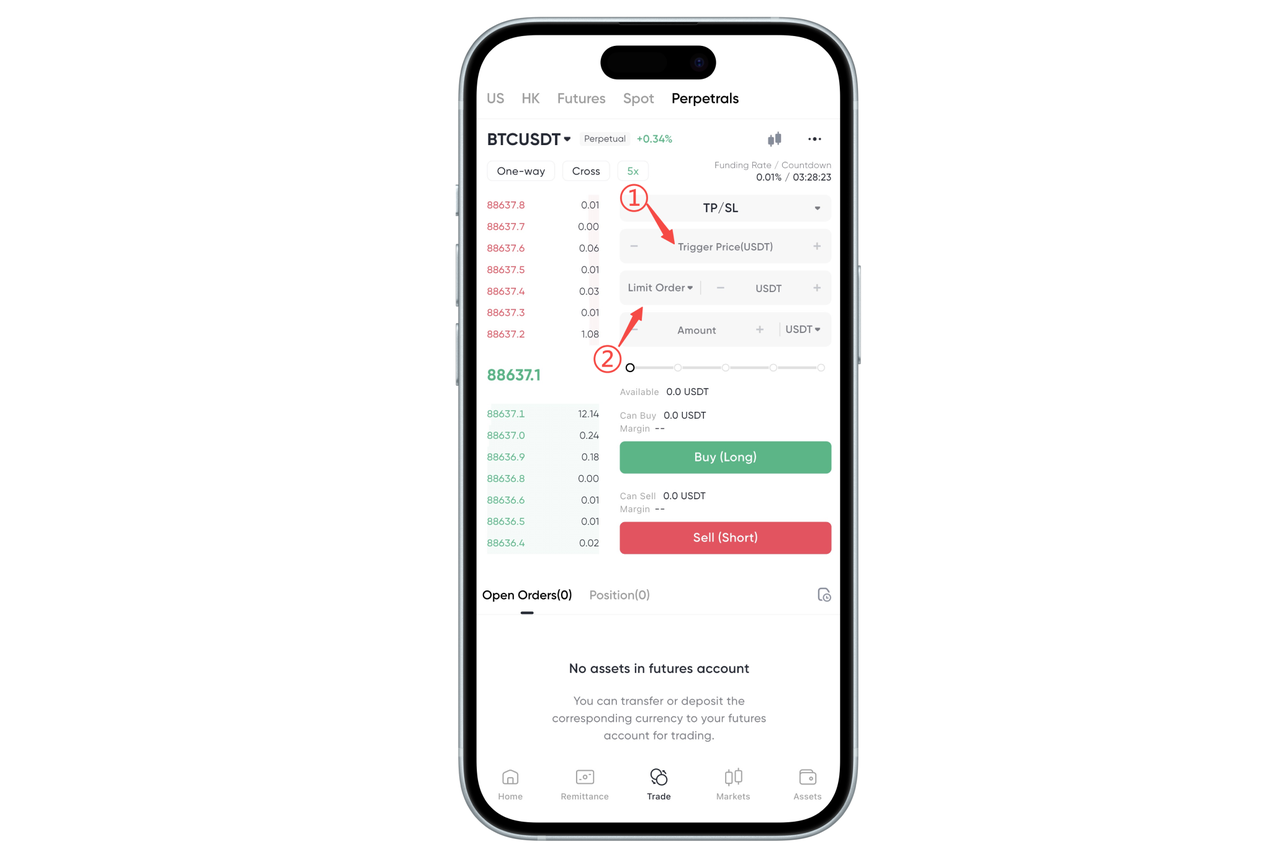
To place a limit take profit/stop loss order, you must ensure that you select the correct trigger price and order price.
Please enter your trading quantity, then click "Buy/Go Long" or "Sell/Go Short".
Market Take Profit/Stop Loss Order
- What is a Market Take Profit/Stop Loss Order?
Market take profit/stop loss orders operate the same way as limit take profit/stop loss orders, with the difference that after a market take profit/stop loss order is triggered, it will become effective as a market order and execute immediately.
When market conditions fluctuate significantly and prices rise or fall sharply, the final execution price of a market order may be higher/lower than the current latest transaction price that the user sees on the page when actually placing the order. Users need to pay attention to market depth and price volatility.
- How to place a Market Take Profit/Stop Loss Order?
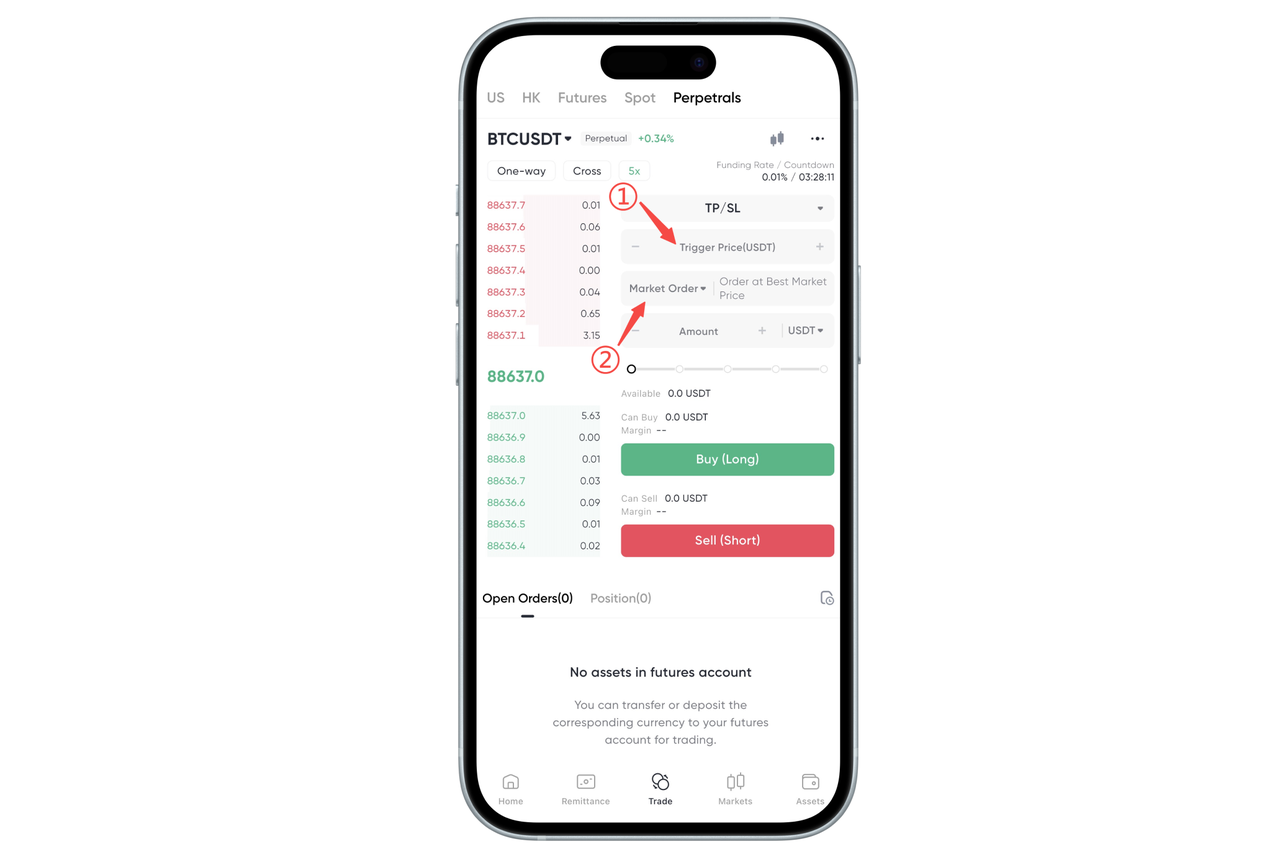
To place a market take profit/stop loss order, you must ensure that you select the correct limit trigger price.
Please enter your trading quantity, then click "Buy/Go Long" or "Sell/Go Short".
How to set take profit and stop loss orders on the Web:
On the trading page, click the default advanced limit order type to select take profit/stop loss
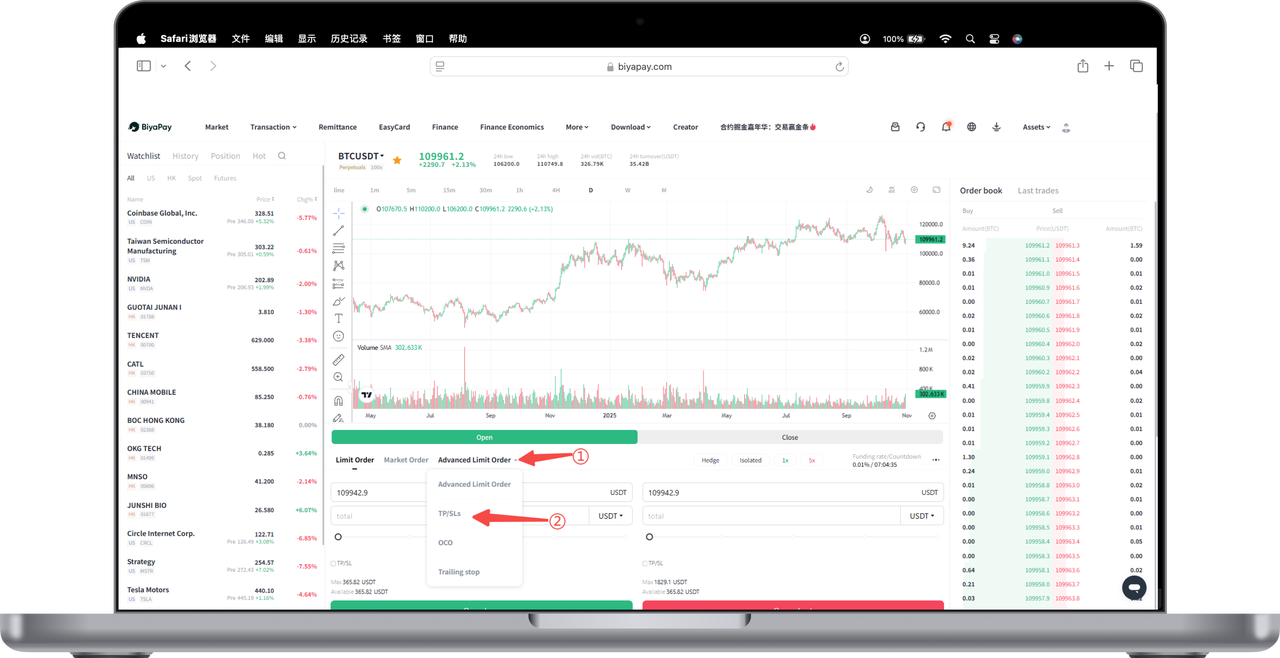
Limit Take Profit/Stop Loss Order
- What is a Limit Take Profit/Stop Loss Order?
A limit take profit/stop loss order can be decomposed into a take profit/stop loss order and a limit order. The take profit/stop loss price is the price that triggers the limit order, and the limit price is the price that triggers the limit order. This means that once your take profit/stop loss price is triggered, your limit order will be immediately placed on the order book.
Although the take profit/stop loss price and limit price can be the same, it is recommended to set a take profit/stop loss price higher than the limit price (for short orders) or a stop loss price lower than the limit price (for long orders), which can increase your limit order execution rate.
- How to place a Limit Take Profit/Stop Loss Order?
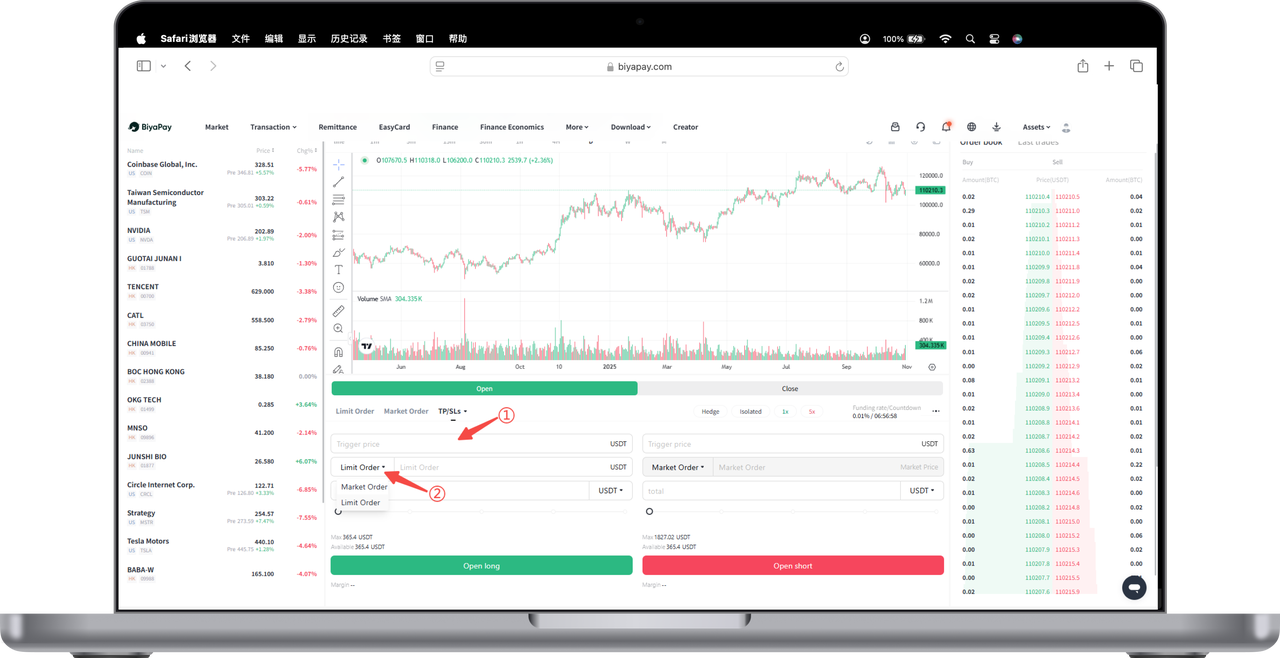
To place a limit take profit/stop loss order, you must ensure that you select the correct trigger price and limit order price.
Please enter your trading quantity, then click "Buy/Go Long" or "Sell/Go Short".
Market Take Profit/Stop Loss Order
- What is a Market Take Profit/Stop Loss Order?
Market take profit/stop loss orders operate the same way as limit take profit/stop loss orders, with the difference that after a market take profit/stop loss order is triggered, it will become effective as a market order and execute immediately.
When market conditions fluctuate significantly and prices rise or fall sharply, the final execution price of a market order may be higher/lower than the current latest transaction price that the user sees on the page when actually placing the order. Users need to pay attention to market depth and price volatility.
- How to place a Market Take Profit/Stop Loss Order?
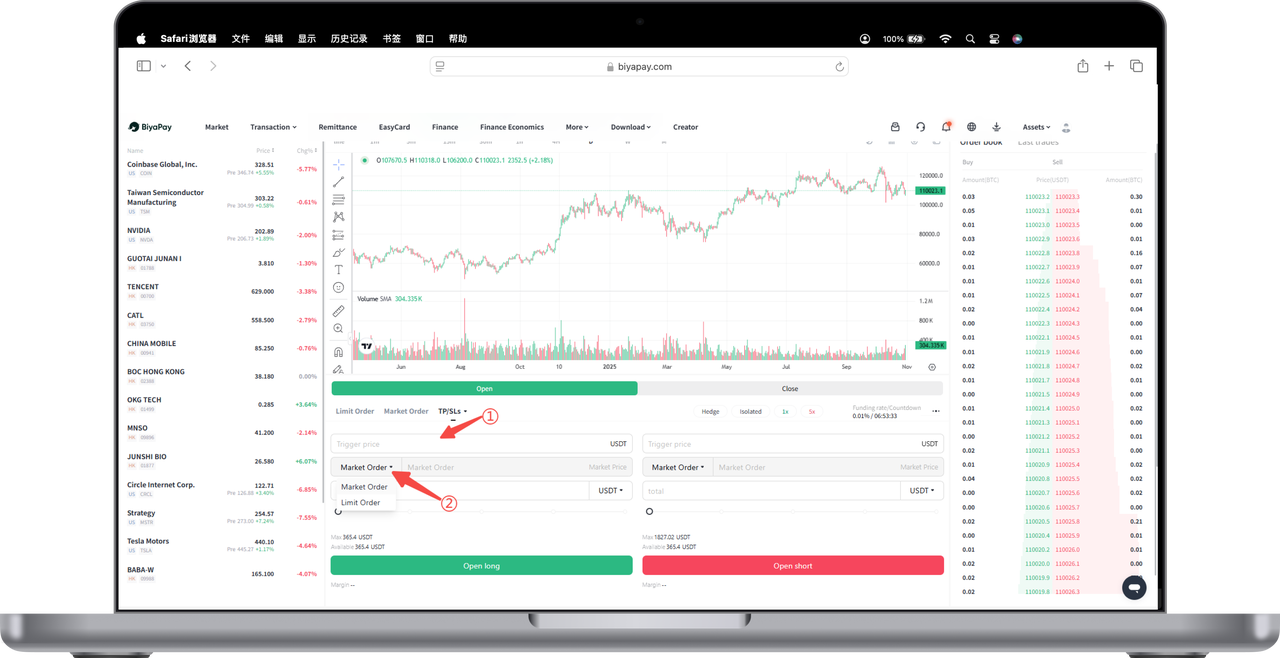
To place a market take profit/stop loss order, you must ensure that you select the correct trigger price.
Please enter your trading quantity, then click "Buy/Go Long" or "Sell/Go Short".
Note:
The system will conduct two margin reviews, one before placing the order and one before execution. Take profit/stop loss orders may fail to place or execute during the margin review process due to position limits and insufficient margin.

Contact Us



