- More
- Download




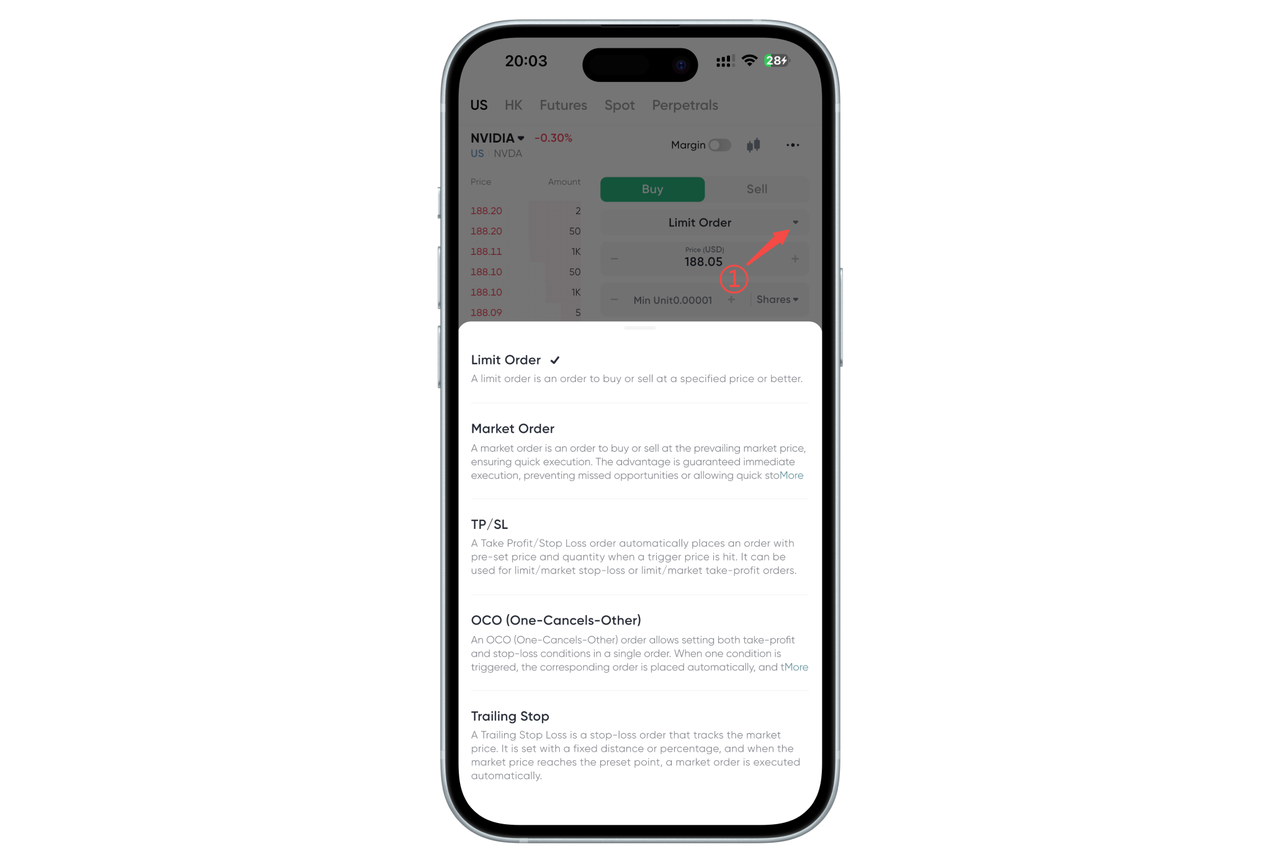
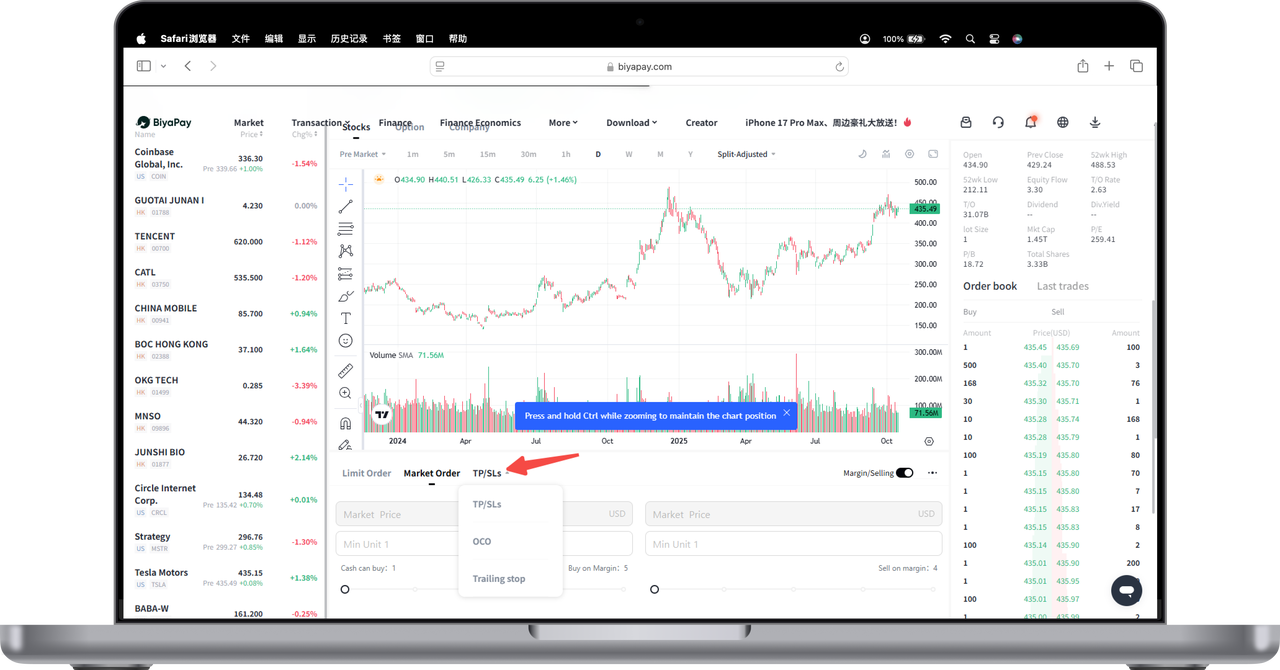
BiyaPay supports five types of orders for US stock trading: Limit Order, Market Order, Take Profit/Stop Loss, Bidirectional Take Profit/Stop Loss, and Trailing Stop.
How to view US stock order types in the App:
On the trading page, click Limit or Market Order to display the order types
How to view US stock order types on the Web:
On the trading page, to the right of Limit and Market, click [Take Profit/Stop Loss] to display other order types
Below are the detailed rules for these five order types:
1. Limit Order
A limit order is an order that executes at a specific price or better.
2. Market Order
A market order is an order to buy or sell an asset immediately at the current market price.
3. Take Profit/Stop Loss
A "Take Profit/Stop Loss" order refers to pre-setting a trigger price, order price after trigger, and order quantity. When the latest price reaches the trigger price, an order is placed at the pre-set order price, which can be a market order or a limit order. You can set take profit only, stop loss only, or both take profit and stop loss.
- Take Profit/Stop Loss Buy. Can choose to transact by amount or quantity
Assets are frozen after placing the order. If the order price is market price and transact by quantity, freeze the trigger price * quantity amount. If the order price is limit price and transact by quantity, freeze the order price * quantity amount. If the order price is market price and transact by amount, freeze the amount. Buy at the take profit trigger price or buy at the stop loss trigger price. After triggering, place the order. If available balance is insufficient when take profit/stop loss ends, cannot buy.
- Take Profit/Stop Loss Sell. Can only transact by quantity
Assets of the entered quantity are frozen after placing the order. Sell at the take profit trigger price or sell at the stop loss trigger price. Whichever price is reached first triggers first. After triggering, place the order. If available balance is insufficient when take profit/stop loss ends, cannot sell.
4. Bidirectional Take Profit/Stop Loss
- Bidirectional Take Profit/Stop Loss Buy. Can choose to transact by amount or quantity
Take profit trigger price needs to be lower than market price, stop loss trigger price needs to be higher than market price. Assets are frozen after placing the order. If the order price is market price and transact by quantity, use the higher trigger price as standard, freeze trigger price * quantity amount. If the order price is limit price and transact by quantity, use the higher order price as standard, freeze order price * quantity amount. If the order price is market price and transact by amount, freeze the amount. Buy at the take profit trigger price or buy at the stop loss trigger price. Whichever price is reached first triggers first. After triggering, place the order. If available balance is insufficient when take profit/stop loss ends, cannot buy.
- Bidirectional Take Profit/Stop Loss Sell. Can only transact by quantity
Take profit trigger price needs to be higher than market price, stop loss trigger price needs to be lower than market price. Assets of the entered quantity are frozen after placing the order. Sell at the take profit trigger price or sell at the stop loss trigger price. Whichever price is reached first triggers first. After triggering, place the order. If available balance is insufficient when take profit/stop loss ends, cannot sell.
5. Trailing Stop
A trailing stop is a type of take profit/stop loss that tracks market price. Pre-set a price distance or percentage, and when the market price reaches the preset level, a market order is automatically executed.
Trailing stop can only use market orders and can only set take profit OR stop loss, not both.
You can choose an activation price or not. If no activation price is selected, the order is activated immediately after placing. If an activation price is selected, the order is activated when the market price reaches or exceeds the activation price. When not activated, there is no trigger price.
Activation
If the set activation price = the latest transaction price when placing the order, it activates immediately
If activation price > the latest transaction price when placing the order, the order activates when the new latest transaction price >= activation price
If activation price < the latest transaction price when placing the order, the order activates when the new latest transaction price <= activation price
Trigger
Buy: Latest price ≥ Trigger price
Sell: Latest price ≤ Trigger price. Trigger price calculation:
Buy: Lowest price + Callback price distance; Lowest price * (1 + Callback percentage)
Sell: Highest price - Callback price distance; Highest price * (1 - Callback percentage)
Trailing stop buy can only use amount, sell can only use quantity. Neither buy nor sell freeze assets.
After placing the order, the trigger price changes with price.
Buy trigger price = Historical lowest price - Callback percentage
Sell trigger price = Historical highest price - Callback percentage
If buy/sell quantity and amount are sufficient, proceed according to the order quantity. If sell assets are insufficient, sell all. If buy amount is insufficient, buy all.

Contact Us



