How to set stock price alerts?




How to set stock price alerts on the App:
1. On the [Market] page, click on the stock you need to trade, and after entering the stock chart page, click the [Alert] button at the bottom left of the chart,
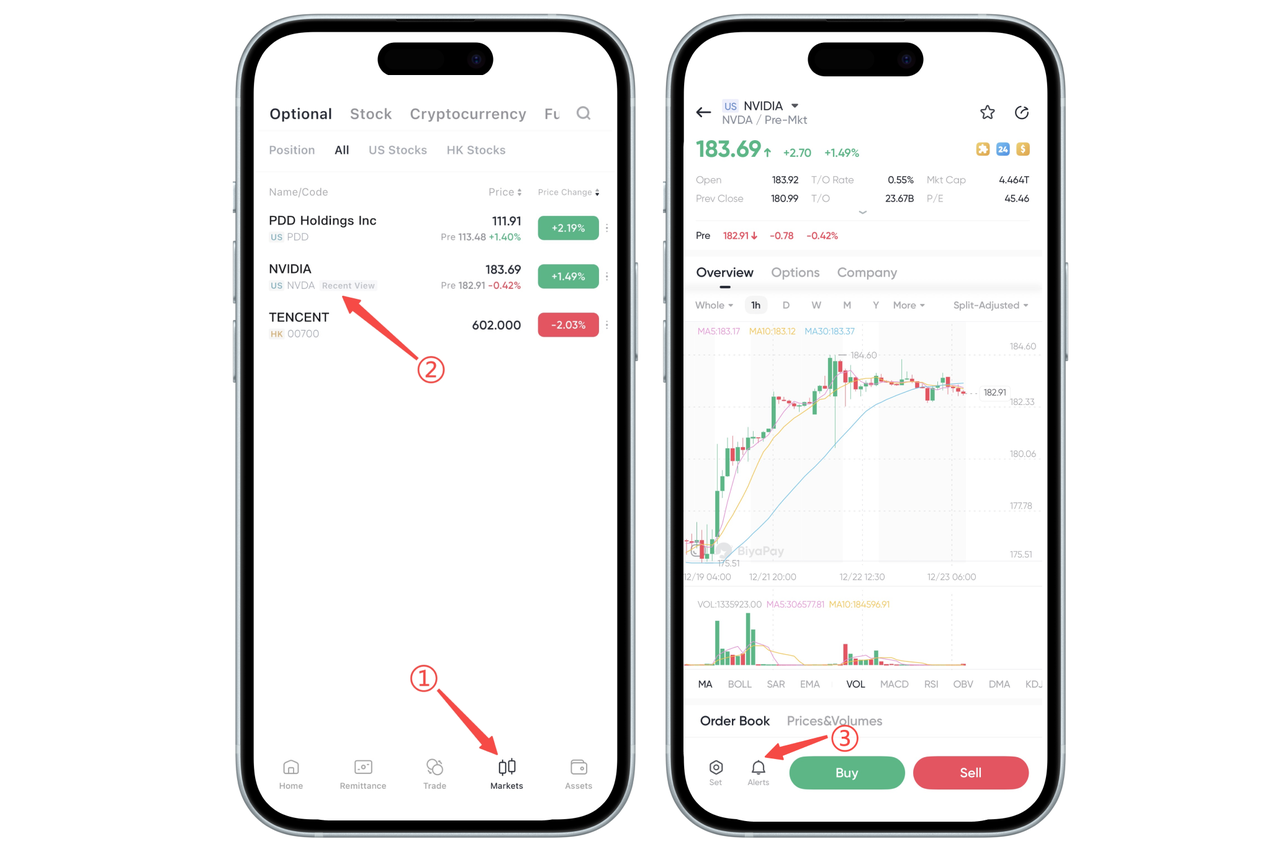
2. Set the [Alert Type] first, then set the [Alert Frequency].
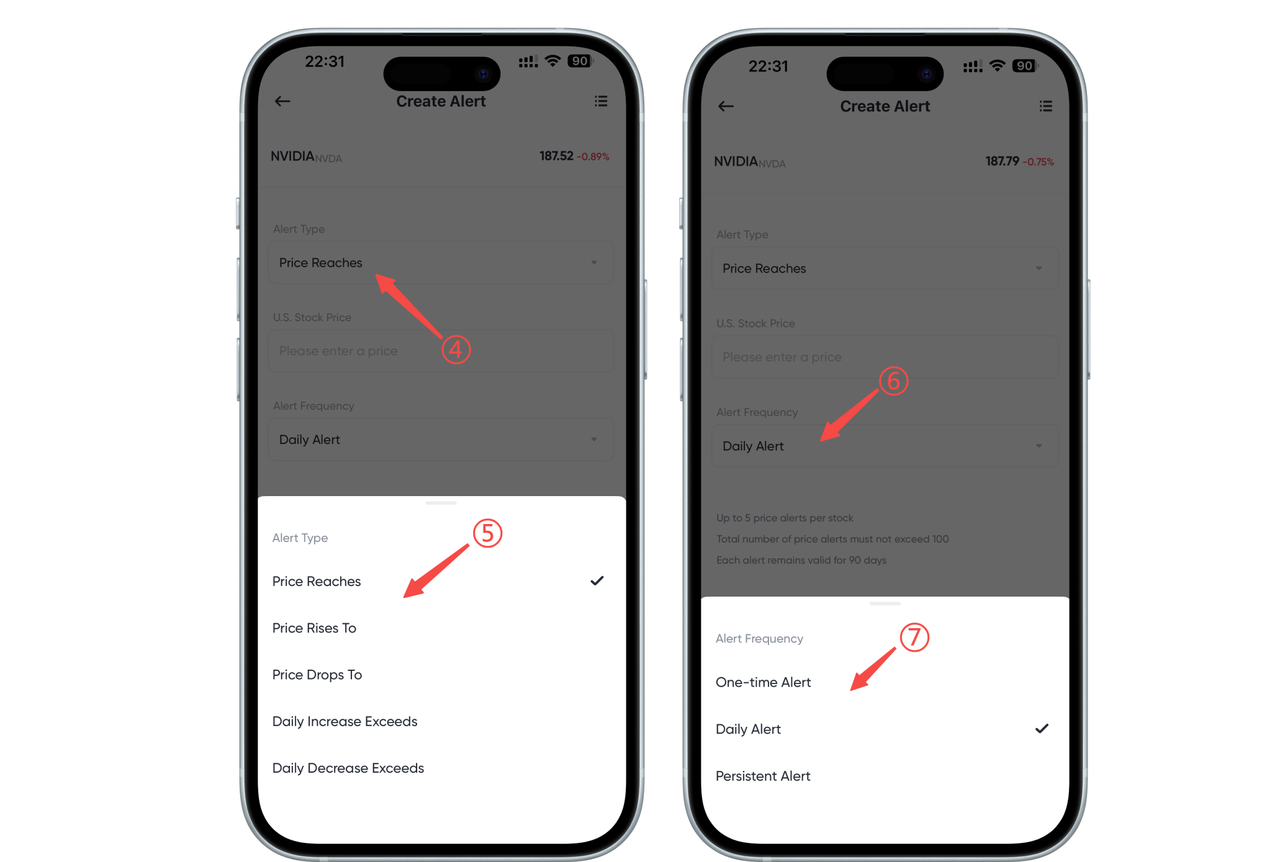
Here is a detailed explanation of the alert type and alert frequency options:
Alert Type (Select the alert condition you want)
When setting alerts, you need to select an alert type first. You can set conditions according to different trading needs. Specific options include:
Price reaches: When the price of a stock reaches the price you set, the platform will send an alert. For example, you can set that when the stock price of Tesla reaches $300, the system will automatically alert you.
Price exceeds: When the stock price exceeds the value you set, you will receive an alert. For example, when the stock price exceeds $500, you will receive an alert.
Price falls to: When the stock price falls to or below the price you set, the system will alert you. For example, when the stock price falls to $200, the system will notify you.
Daily increase exceeds: When the daily increase of a stock exceeds the percentage you set, you will receive an alert. For example, if you set 10%, when the daily increase of the stock reaches or exceeds 10%, the system will alert you.
Daily decrease exceeds: When the daily decrease of a stock exceeds the percentage you set, you will receive an alert. For example, if you set 10%, when the daily decrease of the stock reaches or exceeds 10%, the system will alert you.
Alert Frequency (Set the sending frequency of alerts)
Next, you can set the alert frequency, that is, decide how often to receive an alert. Specific options include:
Alert only once: After this option is set, when your price condition is met for the first time, the system will send a one-time alert. After the alert is sent, the system will not notify you again until you manually adjust the settings.
Daily alert: If you select this option, the system will check whether your price condition is met every day and send an alert until you manually cancel or modify the alert. Even if the same condition is met multiple times, the system will alert you once a day.
Continuous alert: If you select this option, the system will continue to send alerts, and whenever your price condition is met, it will send a notification. It is suitable for situations where you want to continuously pay attention to the fluctuations of a stock.
Summary:
Alert Type: You set the conditions that trigger the alert, such as the price reaching, exceeding or falling to a certain value, or the daily rise and fall of the stock price.
Alert Frequency: You set the sending frequency of alerts. You can choose to alert only once, daily, or continuously.
Through these options, you can flexibly set stock price alerts according to your personal needs to help you better manage your investments.

Contact Us




BIYA GLOBAL LLC is a licensed entity registered with the U.S. Securities and Exchange Commission (SEC No.: 802-127417); a certified member of the Financial Industry Regulatory Authority (FINRA) (Central Registration Depository CRD No.: 325027); regulated by the Financial Industry Regulatory Authority (FINRA) and the U.S. Securities and Exchange Commission (SEC).
BIYA GLOBAL LLC is registered with the Financial Crimes Enforcement Network (FinCEN), an agency under the U.S. Department of the Treasury, as a Money Services Business (MSB), with registration number 31000218637349, and regulated by the Financial Crimes Enforcement Network (FinCEN).
BIYA GLOBAL LIMITED is a registered Financial Service Provider (FSP) in New Zealand, with registration number FSP1007221, and is also a registered member of the Financial Services Complaints Limited (FSCL), an independent dispute resolution scheme in New Zealand.