How to submit feedback?

BiyaPay
Published on 2026-02-04 Updated on 2026-02-08



How to Submit Feedback on the APP
If you encounter any issues while using BiyaPay or have suggestions for feature optimization, you can submit them through the Feedback function. Below is a guide to accessing the feedback page.
Step 1: Go to Personal Center
Open the BiyaPay App, click on the avatar icon in the upper left corner of the homepage to enter the Personal Center page.
Step 2: Enter Feedback
In the Personal Center page, scroll down the menu, find and click "Feedback" to enter the feedback page.
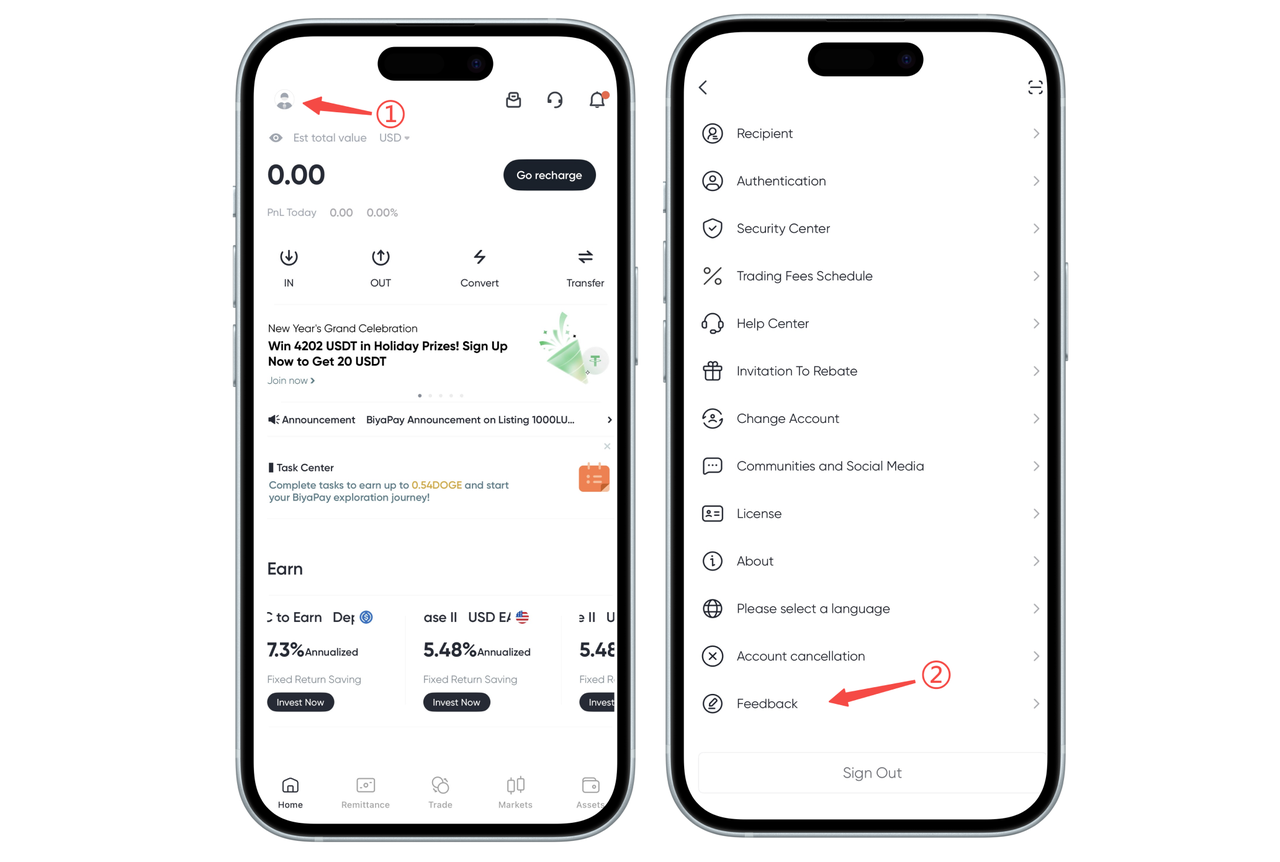
After entering, you can select the feedback type, fill in the feedback content, and upload relevant images as needed.
Tips
- Feedback is mainly used to collect user suggestions and issues. Some feedback may take time to process.
- If you encounter urgent issues or situations that affect normal use, it is recommended to contact online customer service first for help.
How to Submit Feedback on the Web
Currently, the Web does not support the feedback function.

BiyaPay makes crypto more popular!
Contact Us
Mail: service@biyapay.com
Customer Service Telegram: https://t.me/biyapay001
Telegram Community: https://t.me/biyapay_ch
Digital Asset Community: https://t.me/BiyaPay666
Community




Regulation Subject
BIYA GLOBAL LLC
BIYA GLOBAL LLC is registered with the Financial Crimes Enforcement Network (FinCEN), an agency under the U.S. Department of the Treasury, as a Money Services Business (MSB), with registration number 31000218637349, and regulated by the Financial Crimes Enforcement Network (FinCEN).
BIYA GLOBAL LLC is registered with the Financial Crimes Enforcement Network (FinCEN), an agency under the U.S. Department of the Treasury, as a Money Services Business (MSB), with registration number 31000218637349, and regulated by the Financial Crimes Enforcement Network (FinCEN).
BIYA GLOBAL LIMITED
BIYA GLOBAL LIMITED is a registered Financial Service Provider (FSP) in New Zealand, with registration number FSP1007221, and is also a registered member of the Financial Services Complaints Limited (FSCL), an independent dispute resolution scheme in New Zealand.
BIYA GLOBAL LIMITED is a registered Financial Service Provider (FSP) in New Zealand, with registration number FSP1007221, and is also a registered member of the Financial Services Complaints Limited (FSCL), an independent dispute resolution scheme in New Zealand.
©2019 - 2026 BIYA GLOBAL LIMITED