What remittance methods are supported? 【Web Version】 (Completed)




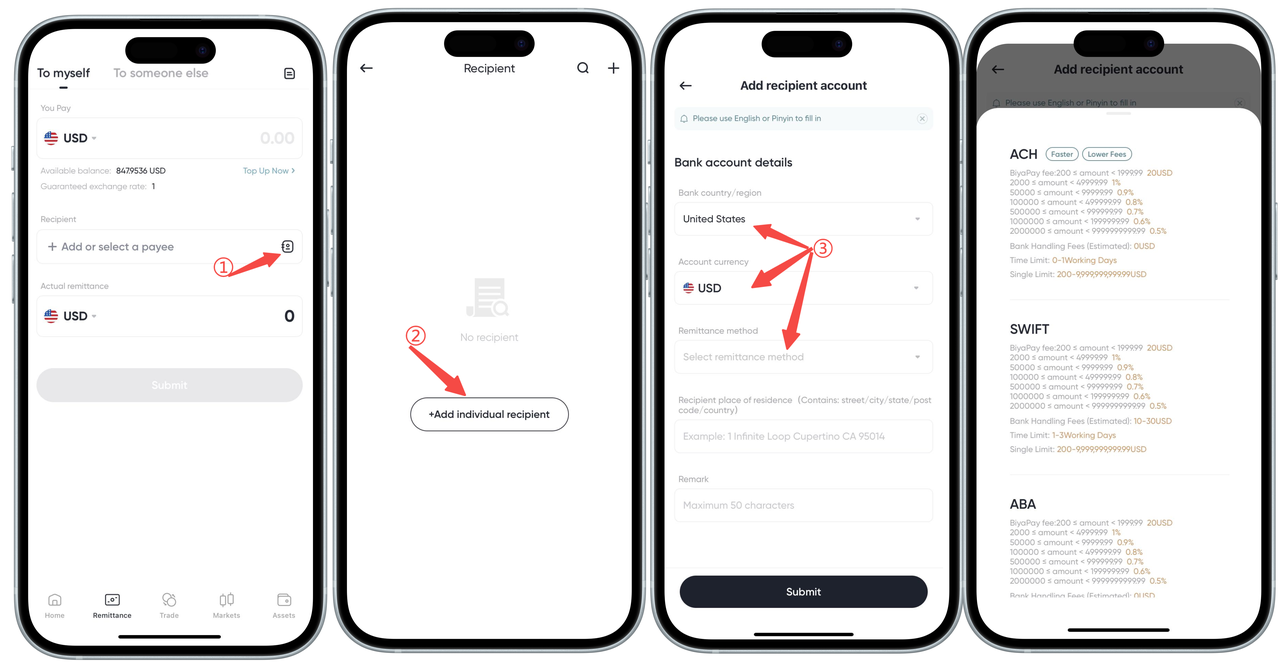
How to check supported remittance methods on the App:
BiyaPay supports both local and international remittances. When you link a recipient bank account, you can view the specific supported remittance methods. The exact information is based on what is displayed during the linking process.
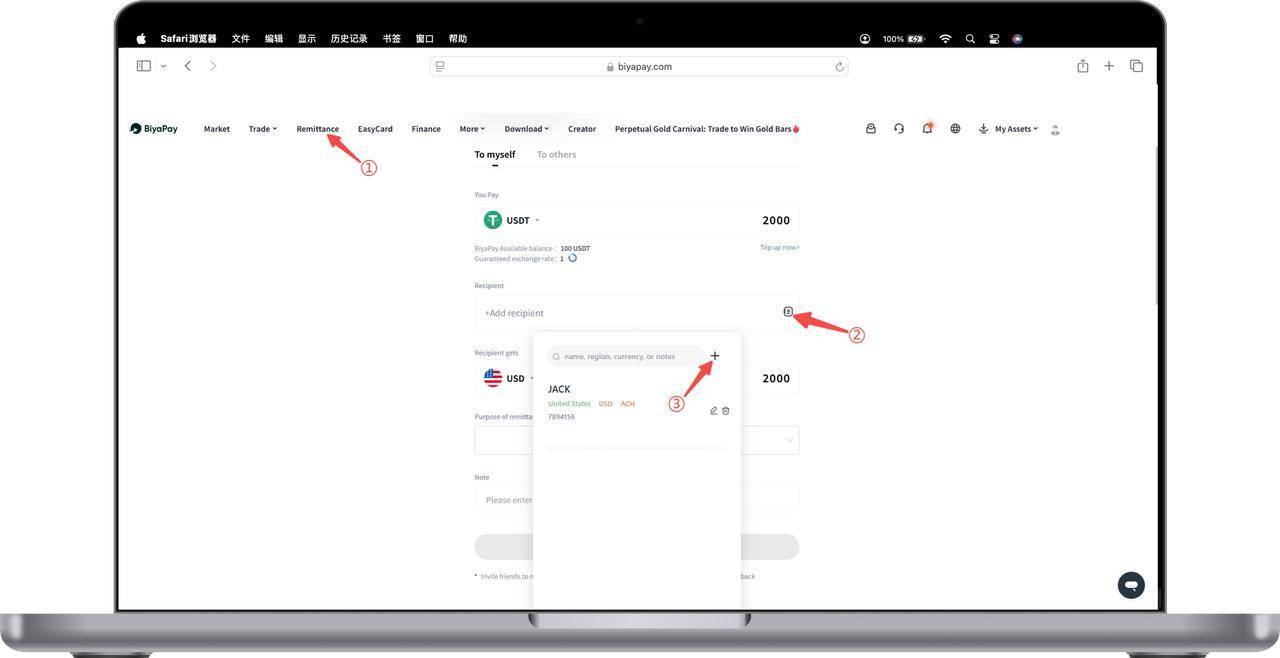
How to check supported remittance methods on the Web:
1. On the 【Remittance】 page, add a recipient bank account
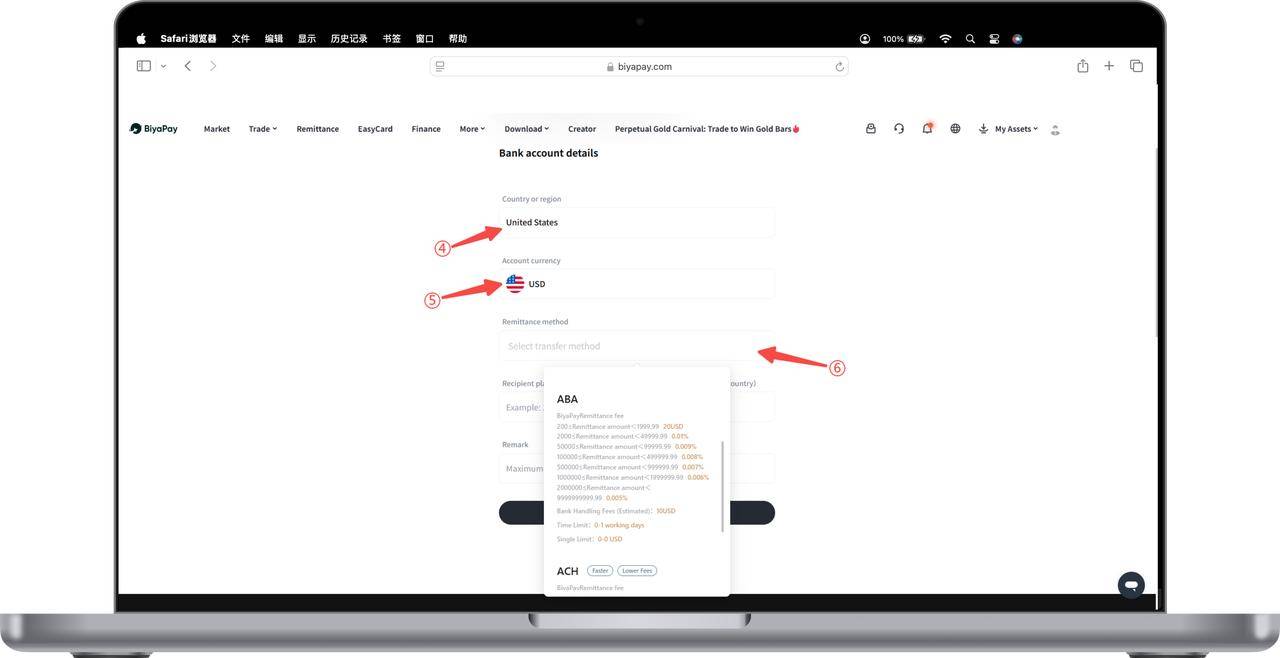
2. After selecting the country and currency, you can view the currently supported payment methods under the "Payment Methods" option.
Local Remittance
-
Local Transfer
-
Scope: Transfer of funds between bank accounts within the same country or region.
- Features:
- Low fees: Usually low fees, some banks even offer free services.
- Fast: Funds typically arrive within minutes to a few hours, sometimes may take 1-2 business days.
- Remittance method: Transfers are made via wire transfer.
-
Security: Protected by the bank’s security systems to ensure transaction safety.
-
Singapore FAST Transfer
-
Scope: Instant fund transfers between Singapore bank accounts.
- Features:
- Instant transfer: Funds usually arrive within seconds.
- 24/7 service: Operates 24 hours a day, all year round.
- Low or no fees: Specific fees depend on bank policies.
-
Security: Uses advanced security technologies and protocols to ensure fund and information safety.
-
Hong Kong FPS Transfer
-
Scope: Instant fund transfers between Hong Kong bank accounts and stored-value payment instruments.
- Features:
- Instant transfer: Usually completed within seconds.
- 24/7 service: Operates 24 hours a day, all year round.
- Currency support: Supports Hong Kong Dollar (HKD).
-
Security: Uses advanced security technologies and protocols to ensure fund and information safety.
-
US ACH Transfer
-
Scope: Electronic fund transfers between domestic US bank accounts.
- Features:
- Low cost: Lower cost compared to wire transfers.
- Widely used: For payroll, bill payments, person-to-person transfers, etc.
-
Transaction time: Usually takes 1-2 business days to complete.
-
US ABA Transfer
-
Scope: Domestic US bank transfers using ABA routing numbers.
- Features:
- ABA number: Identifies specific US banks or financial institutions.
- Main uses: Used for check processing, ACH transfers, and wire transfers.
- Identification function: Ensures accuracy and efficiency of fund transfers.
International Remittance
-
SWIFT Transfer
-
Scope: International remittances between bank accounts in over 200 countries and regions worldwide.
- Features:
- Global coverage: Connects tens of thousands of financial institutions worldwide.
- High security: Uses strong encryption and strict security protocols.
- High efficiency: Usually completed within 1-5 business days, depending on bank processing speed.
-
Fees: May include fees from the sending bank, receiving bank, and intermediary banks.
-
SEPA Transfer
-
Scope: Euro payments between countries in the Eurozone.
- Features:
- Coverage: Applicable to all member states of the European Economic Area and some other European countries.
- Unified standard: Uses standardized payment formats and processes.
- Fast and efficient: Usually completed within 1-2 business days.
- Low fees: Transparent fees, usually low or sometimes free.

Contact Us




BIYA GLOBAL LLC is a licensed entity registered with the U.S. Securities and Exchange Commission (SEC No.: 802-127417); a certified member of the Financial Industry Regulatory Authority (FINRA) (Central Registration Depository CRD No.: 325027); regulated by the Financial Industry Regulatory Authority (FINRA) and the U.S. Securities and Exchange Commission (SEC).
BIYA GLOBAL LLC is registered with the Financial Crimes Enforcement Network (FinCEN), an agency under the U.S. Department of the Treasury, as a Money Services Business (MSB), with registration number 31000218637349, and regulated by the Financial Crimes Enforcement Network (FinCEN).
BIYA GLOBAL LIMITED is a registered Financial Service Provider (FSP) in New Zealand, with registration number FSP1007221, and is also a registered member of the Financial Services Complaints Limited (FSCL), an independent dispute resolution scheme in New Zealand.