It's Finally Here: Mainland China Users Can Now Register Wise with ID Card Only





Image Source: pexels
Yes, you read that right! Mainland users can now complete Wise account registration and verification using only an ID card.
You no longer need a passport or address proof. More importantly, activating multi-currency accounts no longer requires mandatory fund deposit.
Are you excited yet? This detailed illustrated guide will walk you through every step of the process.
Key Takeaways
- Mainland China users can now register a Wise account with an ID card.
- When registering a Wise account, all information must be filled in Pinyin.
- Wise accounts require a small deposit to activate collection features.
- Wise personal accounts can only be used for personal purposes, not commercial collections.
- Wise provides real market exchange rates with no hidden fees.
Wise Account Opening: Mainland Users ID Card Registration Guide

Image Source: unsplash
Prepare your ID card and phone — let’s get started right away. The entire process is very quick and usually completes in 10 minutes.
Step 1: Create Personal Account on Official Site or App
First, start registration through official channels. Choose the most convenient method for you:
- Mobile App:
- Download the Wise app from App Store
- Get the Wise app from Google Play
- Official Website:
- Visit the Wise official registration page
Tip: Use your most frequently checked email for registration. All verification information and account notifications will be sent to this email — ensure you can receive them promptly.
Step 2: Fill in Personal Information and Address
At this step, how you fill information is crucial. Strictly follow these guidelines to ensure smooth subsequent verification.
Key Operation: Use Pinyin Throughout
- Name: Fill using Pinyin, ensuring it exactly matches the Pinyin on your ID card.
- Address: Your residential address must also be filled in Pinyin. You do not need to provide address proof at this stage — just fill truthfully.
Using Pinyin name improves cross-border account matching accuracy, making future collections and transfers smoother.
Step 3: Select “National ID Card” for Verification
After filling basic information, you enter the identity verification step. This is the core change in this update.
On the verification page, the system asks you to select your country or region of residence.
Be sure to select Mainland China here.
After selection, the document type below will show National ID Card. Select it without hesitation.
This option is specifically opened for mainland users — choosing it enables the ID card verification process.
Step 4: Photograph and Upload ID Documents
Next, the app requires you to take live photos of your ID documents. The system currently does not support uploading existing photos from your album — prepare your original ID card in advance.
To ensure photos pass review on the first try, follow these best practices:
- Adequate Lighting: Find a well-lit environment but avoid direct light causing glare on the ID surface.
- Keep Steady: Place the ID on a flat surface for shooting — avoid shaking when holding the phone. Any blurry photo will be rejected.
- Complete and Clear: Ensure all four corners of the ID are fully in frame — do not cover any information with fingers. All text (name, number, validity period) on the photo must be clearly readable.
Professional Tip: Technical Specifications Although you don’t need manual adjustment, understanding Wise’s photo requirements helps you take qualified photos. The system prefers high-definition, non-overcompressed images, usually under 4.4MB in size.
If your ID verification fails, it may be because the system has difficulty automatically recognizing Chinese characters. In this case, using a passport with English information as backup usually completes review faster.
Step 5: Complete Facial Recognition as Prompted
After uploading ID photos, the final step is facial recognition selfie.
The app activates your front camera and displays an oval frame. Align your face with this frame and follow on-screen instructions to complete actions, such as slowly turning your head or blinking.
- Ensure your full face is visible — do not wear hats or sunglasses.
- Ensure even lighting on your face — avoid half bright, half dark.
After submitting all information, you complete all verification steps. You usually receive a confirmation email from Wise soon, informing you that identity verification is approved. Congratulations — a fully functional Wise account is successfully activated!
Wise Account Deposit and Usage Beginner Guide
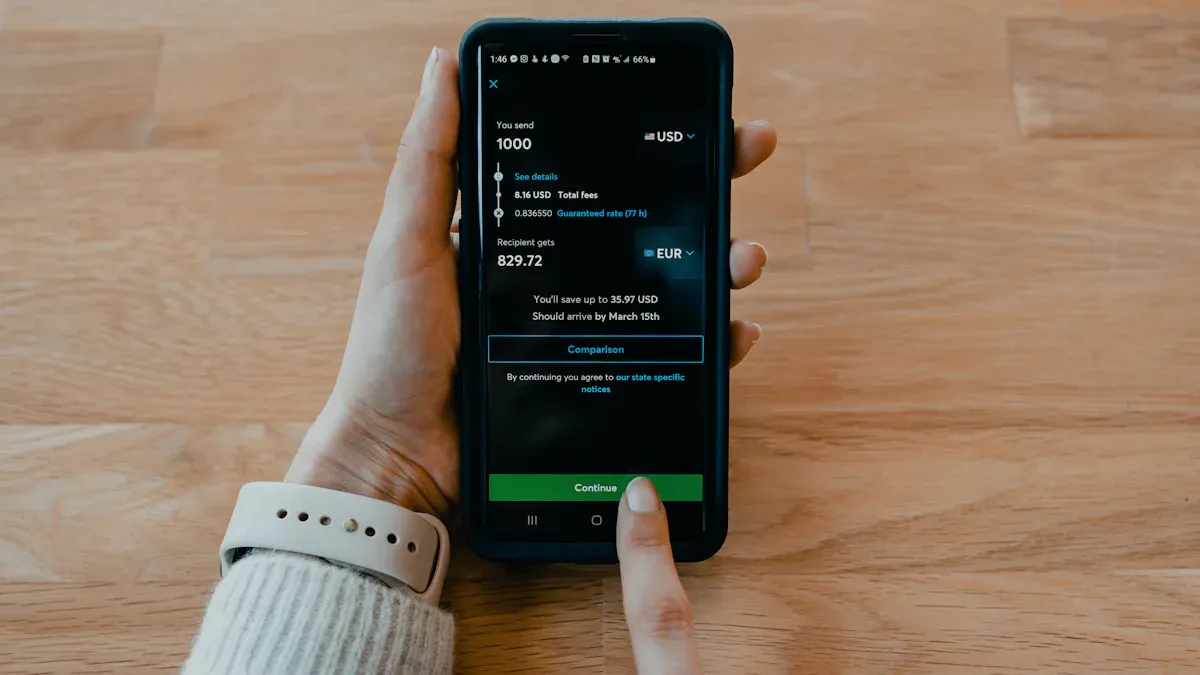
Image Source: unsplash
Congratulations on successful account opening! Now your Wise account is like an empty global wallet ready to receive funds from around the world. While registration no longer requires mandatory deposit, to fully unlock core features like obtaining collection bank details, you still need to complete the first deposit.
Account Feature Activation You need to deposit a small amount (usually equivalent to about USD 25) to activate full collection features. This money becomes your available balance and can be used anytime for transfers or spending.
Open Your Multi-Currency Accounts
One of Wise account’s most powerful features is holding and managing over 40 different currencies simultaneously. This means you can receive and pay in USD, EUR, HKD, and more like a local — without opening traditional bank accounts in multiple countries.
Obtain Wise Collection Bank Details
Having a local bank account is key to receiving overseas payments. Wise makes this process extremely simple. You can generate exclusive collection account details for major currencies like USD, EUR, GBP, HKD.
To obtain these details, simply:
- On the Wise app or official site homepage, select the currency you want to receive from the list, e.g., “USD”.
- Click “Get account details”.
- Follow prompts to complete first fund deposit to activate.
After activation, you receive a complete set of local bank account details, such as:
- USD Account: With a US bank routing number and account number.
- EUR Account: With a European universal IBAN number.
- HKD Account: With a Hong Kong local FPS (Faster Payment System) ID.
You can share this information with others for local transfers, avoiding high international wire fees.
How to Deposit into Wise Account
Depositing into your Wise account is very flexible. The most common method is transferring from another bank account in your name. For example, transfer from your Hong Kong bank account to Wise’s HKD account — funds usually arrive quickly.
Apply for Wise Physical or Virtual Card
Wise card lets you spend your account balance worldwide. However, regarding physical cards, note the following important information:
Physical Card Availability Regions Currently, Wise physical debit cards are not mailed to users with registered address in mainland China. It mainly serves Europe, North America, Australia, Japan, Singapore, and other countries/regions.
Nevertheless, you can still apply for a virtual card. Ordering a virtual card requires a one-time fee of about USD 9.00, after which you can immediately add it to Apple Pay or Google Pay for online payments or contactless offline payments. For mainland users, although physical cards are unavailable, Wise account’s global collection and low-fee remittance features remain highly valuable.
Wise Usage Must-Read: Notes and Tips
You have successfully opened your account, but to truly maximize its value and ensure long-term safe use, you need to understand some key rules and tips.
Account Type: Personal Use Only
Always remember that the Wise account you registered with ID card is a personal account. Wise clearly states that personal accounts cannot be used for any commercial transactions. If you need to receive commercial payments, open a separate Wise business account.
Fund Safety and Compliance Reminder Misusing a personal account not only violates your agreement with Wise but may involve you in serious legal risks. Ensure all your fund transactions are legal and compliant — avoid using the account for high-risk or illegal activities like purchasing cryptocurrencies. Potential consequences are very serious and may include:
- Bank account freeze
- Bad records
- Legal action
Document Upload: Ensure Clear and No Glare
Although official support exists for ID verification, automatic system recognition may still fail. To maximize success rate, we strongly recommend:
- Passport as Backup: If you have a passport, prioritize using it for verification. Since passports contain international standard machine-readable codes and English information, review is usually faster and smoother.
- Keep Documents Updated: If your document is nearing expiration, update it promptly in the Wise system to avoid affecting account functions.
For users of different nationalities, Wise has different document requirements.
| Citizenship | Required Documents |
|---|---|
| US Citizen | Social Security Number. If verification fails, may need photo ID and address proof. |
| Non-US Citizen | Valid document issued by non-US country, such as passport, national ID card, or driver’s license. |
This table clearly shows verification needs for different users — for mainland users, national ID card is one of the officially supported options.
Currency Selection: Prioritize Common Currencies
Wise allows opening accounts for over 40 currencies, but this does not mean you need to activate all at once. The smart approach is to prioritize opening the few currencies you use most, such as USD, HKD, or EUR. This keeps your account interface clean and easier to manage. Add others anytime when needed.
Exchange Rate Advantage: Make Good Use of Wise Real-Time Rates
One of Wise’s biggest advantages is its exchange rates. Unlike traditional banks, Wise uses the mid-market exchange rate — the real-time rate you see on Google, with no hidden markups.
| Feature | Wise | Traditional Banks |
|---|---|---|
| Exchange Rate | Uses mid-market rate | Rate includes hidden markup |
| Fee Transparency | All fees clearly listed | Extra fees hidden in rate |
| Overall Cost | Usually lower | May be higher |
Many traditional institutions claim “free” or “low-fee” exchange services, but they actually profit by setting unfavorable rates. Wise was founded to solve this problem — it lets you clearly know the true cost of every transaction, no complex calculations, no hidden tricks.
If you want a more concrete way to judge whether an exchange rate is truly “good,” a practical approach is to add one extra check outside Wise: validate the conversion result with a separate real-time calculator before you confirm the exchange. For example, you can use BiyaPay’s free currency rate comparison tool to quickly convert common currencies and sanity-check whether the implied cost is within your acceptable range, then decide whether to exchange inside Wise or settle through a different route.
When you also need to move funds across borders and prefer to evaluate the total cost of “FX + transfer” in one view, you can compare against BiyaPay’s remittance service to review estimated fees and typical settlement pacing, then return to Wise to execute. These entry points are available via the official website and the event center; and if you later need an additional payment instrument for online checkout or subscriptions, you can assess whether submitting a virtual card application fits your usage scenario.
You now understand that Wise account’s core advantage lies in its excellent cost-effectiveness and convenience. It lets you easily receive commissions or royalties from overseas platforms, as if having a local bank account. Compared to services like PayPal, Wise’s fee structure is more transparent, saving you more money.
| Feature | PayPal | Wise |
|---|---|---|
| Transfer Fee | 5% (max $4.99) | Starting from 0.57% |
| Exchange Rate | Includes markup | No markup |
| Currency Conversion Fee | 3% to 4% | No extra currency conversion fee |
Having a globalized digital bank account is no longer difficult for mainland China users.
What are you waiting for? Say goodbye to high cross-border fees — take just ten minutes now to start your Wise journey!
FAQ
My ID verification failed — what should I do?
Did your ID verification fail? Try resubmitting once. If it still fails, using a passport is a higher success rate backup. Since passports contain standard machine-readable codes, the system’s review is usually faster.
Registration is free — why do I still need to deposit money?
Registering the account itself is free. But you need to deposit a small amount (about $25.00 USD) to activate collection features, such as obtaining USD bank details. This money becomes your available balance and can be used anytime.
Can I apply for a Wise physical card?
Currently, Wise physical cards are not mailed to users with registered address in mainland China.
But you can pay about $9.00 USD to apply for a virtual card. This virtual card can be added to Apple Pay or Google Pay for online payments or contactless offline payments.
Can I use this account to receive company payments?
No. The account you registered with ID card is a personal account for personal use only. Receiving commercial payments requires registering a separate Wise business account — otherwise your account may face restriction risks.
*This article is provided for general information purposes and does not constitute legal, tax or other professional advice from BiyaPay or its subsidiaries and its affiliates, and it is not intended as a substitute for obtaining advice from a financial advisor or any other professional.
We make no representations, warranties or warranties, express or implied, as to the accuracy, completeness or timeliness of the contents of this publication.
Related Blogs of

Virtual Card Binding to AWS/GCP for AI Agent Deployment Frequently Flagged by Risk Control? Compliance Card Opening Guide to Avoid Pitfalls


Pay for Perplexity Pro Subscription with USDT: Bypass Regional Payment Restrictions


How to Write Remittance Notes to Avoid Bank Risk Control Interception? 2026 Cross-Border Remittance Compliance Guide & Sensitive Words Avoidance

Patreon/OnlyFans and Other Overseas Creator Platforms Payout: Ultimate Tricks to Bypass Domestic Bank Forex Review for Withdrawal

Choose Country or Region to Read Local Blog
 Australia
 Austria
 Belgium
 Canada
 Cyprus
 Czech Republic
 Denmark
 Estonia
 Finland
 France
 Germany
 Greece
 Hong Kong
 India
India Indonesia
 Ireland
 Italy
Italy Japan
Japan Latvia
 Lithuania
 Luxembourg
 Malaysia
 Malta
Malta Morocco
 Nepal
Nepal Netherlands
 New Zealand
 Norway
 Pakistan
 Philippines
 Poland
 Portugal
 Romania
 Singapore
 Slovakia
 Slovenia
 South Africa
 South Korea
 Spain
Spain Sweden
 Thailand
 The United States
 Turkey
 United Arab Emirates
 United Kingdom
 Vietnam
Contact Us




BIYA GLOBAL LLC is registered with the Financial Crimes Enforcement Network (FinCEN), an agency under the U.S. Department of the Treasury, as a Money Services Business (MSB), with registration number 31000218637349, and regulated by the Financial Crimes Enforcement Network (FinCEN).
BIYA GLOBAL LIMITED is a registered Financial Service Provider (FSP) in New Zealand, with registration number FSP1007221, and is also a registered member of the Financial Services Complaints Limited (FSCL), an independent dispute resolution scheme in New Zealand.