BiyaPay
发布于 更新于

Realized profit and loss refers to the realized profit and loss of contracts that have been reduced.

Calculation formula: Realized P&L = (Average Closing Price (including fees) - Average Opening Price (including fees)) × Closing Quantity × Contract Multiplier Realized profit and loss only occurs when closing positions.

Average Closing Price (including fees):

When selling: Average Closing Price (including fees) = (Closing Price × Closing Quantity × Contract Multiplier - Closing Fees) / (Closing Quantity × Contract Multiplier);

When buying: Average Closing Price (including fees) = (Closing Price × Closing Quantity × Contract Multiplier + Closing Fees) / (Closing Quantity × Contract Multiplier);

Average Opening Price (including fees):

When buying: Average Opening Price (including fees) = (Opening Price × Opening Quantity × Contract Multiplier + Opening Fees) / (Opening Quantity × Contract Multiplier);

When selling: Average Opening Price (including fees) = (Opening Price × Opening Quantity × Contract Multiplier - Opening Fees) / (Opening Quantity × Contract Multiplier);

Through the above formulas, you can clearly calculate the realized profit and loss of each transaction.

How to View Realized Profit and Loss on the App:

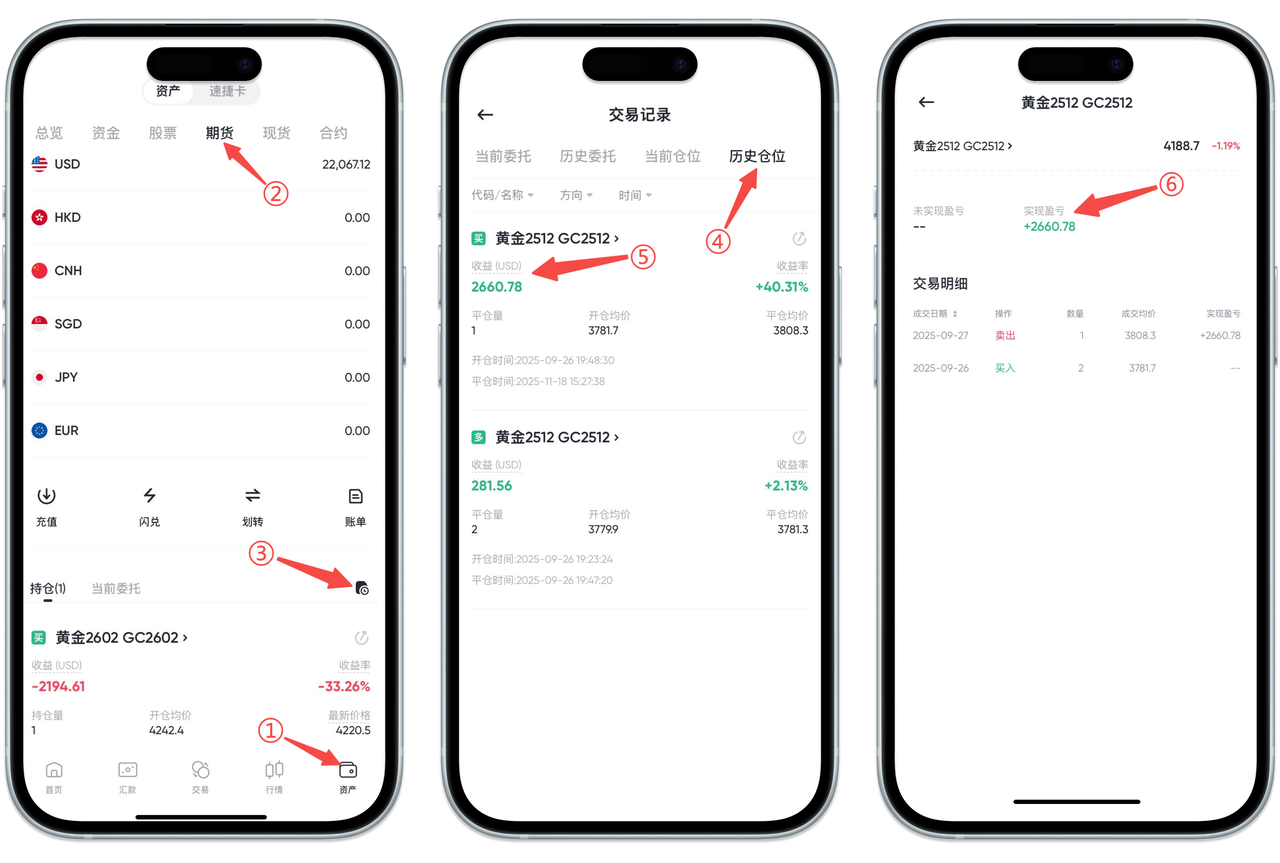
You can view the realized profit and loss of each futures transaction in the Historical Positions of the BiyaPay App, including actual profit amount and profit rate. Please follow these steps:

Step 1: Enter the Assets Page

Open the App and click [Assets] in the bottom navigation bar.

Step 2: Switch to Futures Account

Select [Futures] in the top category.

Step 3: Enter Transaction Records

Click the [Transaction Records] icon at the bottom of the futures page to enter the records page.

Step 4: View Historical Positions

Switch to [Historical Positions] at the top of the page.

Step 5: Select the Position to View

In the historical positions list, click [Profit (USD)] or Profit Rate of the corresponding position to enter the details page.

Step 6: View Realized Profit and Loss

On the details page, you can see the Realized Profit and Loss of the position and view transaction details.

If you need to view the realized profit and loss in positions, please return to [Current Positions] on the [Transaction Records] page to view.

image_0160.png

How to View Realized Profit and Loss on the Web:

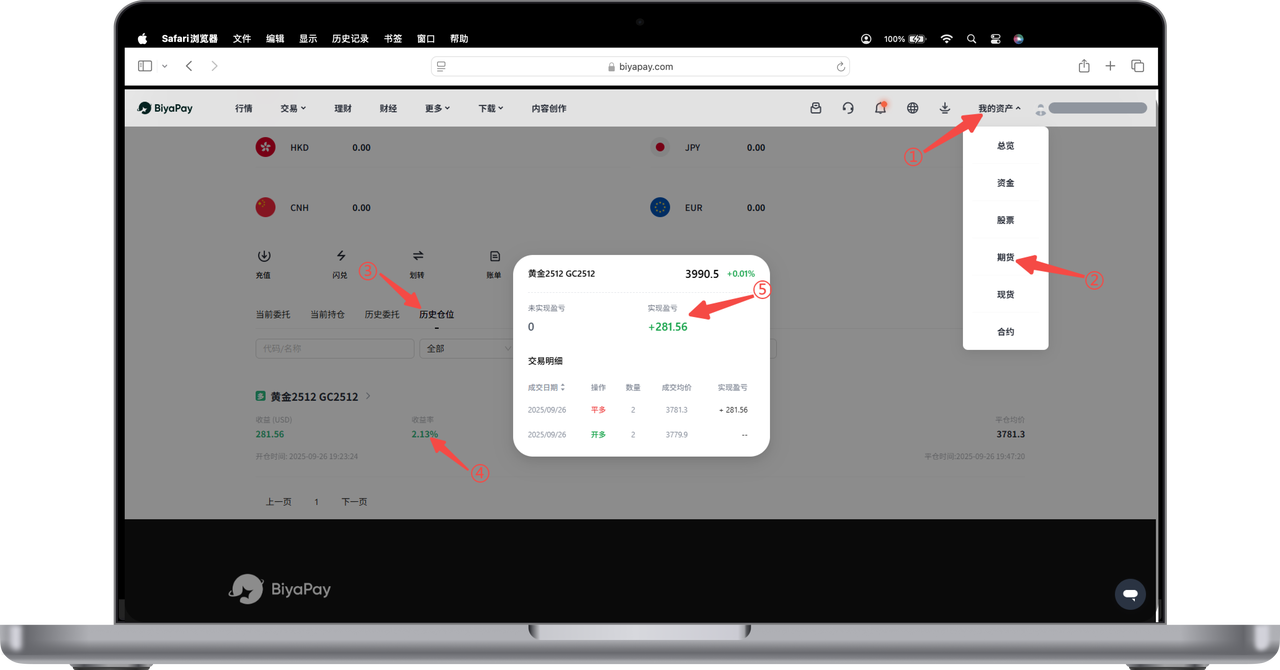
You can view the realized profit and loss of your futures account on the BiyaPay Web, including the actual profit and profit rate after each position closing. Please follow these steps:

Step 1: Enter Asset Center

After logging into the official website, click [My Assets] in the upper right corner.

Step 2: Select Futures Account

Click [Futures] in the asset category to enter the futures assets page.

Step 3: View Historical Positions

Switch to [Historical Positions] on the futures page.

Step 4: Click to View Profit Details

In the historical positions list, click [Profit] or [Profit Rate] to view the realized profit and loss details of the corresponding position.

image_0162.png

BiyaPay
BiyaPay 让数字货币流行起来

联系我们

客服邮箱: service@biyapay.com
客服Telegram: https://t.me/biyapay001
Telegram社群: https://t.me/biyapay_ch
Telegram数字货币社群: https://t.me/BiyaPay666
BiyaPay的电报社区BiyaPay的Discord社区BiyaPay客服邮箱BiyaPay Instagram官方账号BiyaPay Tiktok官方账号BiyaPay LinkedIn官方账号
合规主体
Biya Global LLC 为美国注册有限责任公司,已依据《银行保密法》向 FinCEN 完成 MSB 联邦登记,(注册号:31000218637349)受 FinCEN 监管;
Biya Global Limited 为新西兰注册企业,已依据《2008 金融服务提供商(注册与纠纷解决)法案》在 FSPR 完成 FSP 登记,(注册编号FSP1007221)受新西兰 FMA 监管;
©2019 - 2026 BIYA GLOBAL LIMITED