BiyaPay
发布于 更新于

How to Switch Between Open/Close Position Mode and Buy/Sell Mode on the App:

In the BiyaPay App, you can freely switch between "Open/Close Position Mode" and "Buy/Sell Mode" according to your trading habits.

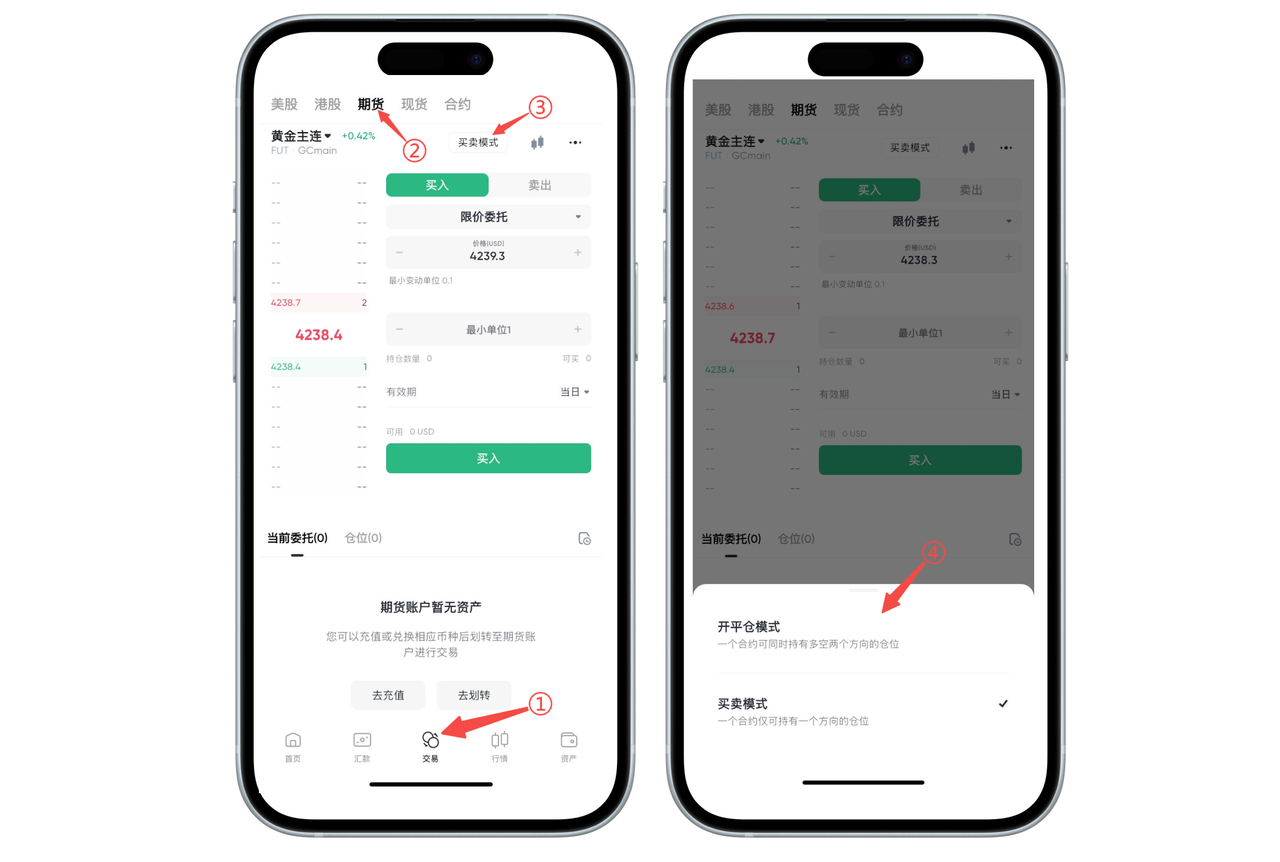
Step 1: Enter the Futures Trading Page

Click "Trade" in the bottom navigation bar. Select "Futures" in the top variety category and enter the futures contract page you want to trade.

Step 2: Open the Mode Switch Entry

Above the order area, click the currently displayed "Buy/Sell Mode" / "Open/Close Position Mode" button, and the system will pop up a mode selection window.

Step 3: Select Trading Mode

In the window that pops up at the bottom, select the mode you need to use:

Open/Close Position Mode: The same contract can hold both long and short positions simultaneously, suitable for hedging or multi-strategy management;

Buy/Sell Mode: The same contract only maintains one direction of position, making operations simpler and more intuitive.

After clicking the corresponding mode, the switch is complete, and subsequent orders will be executed according to the selected mode.

image_0054.png

How to Switch Between Open/Close Position Mode and Buy/Sell Mode on the Web:

When trading futures on the BiyaPay Web, you can freely switch between Buy/Sell Mode and Open/Close Position Mode according to your trading needs. The detailed steps are as follows:

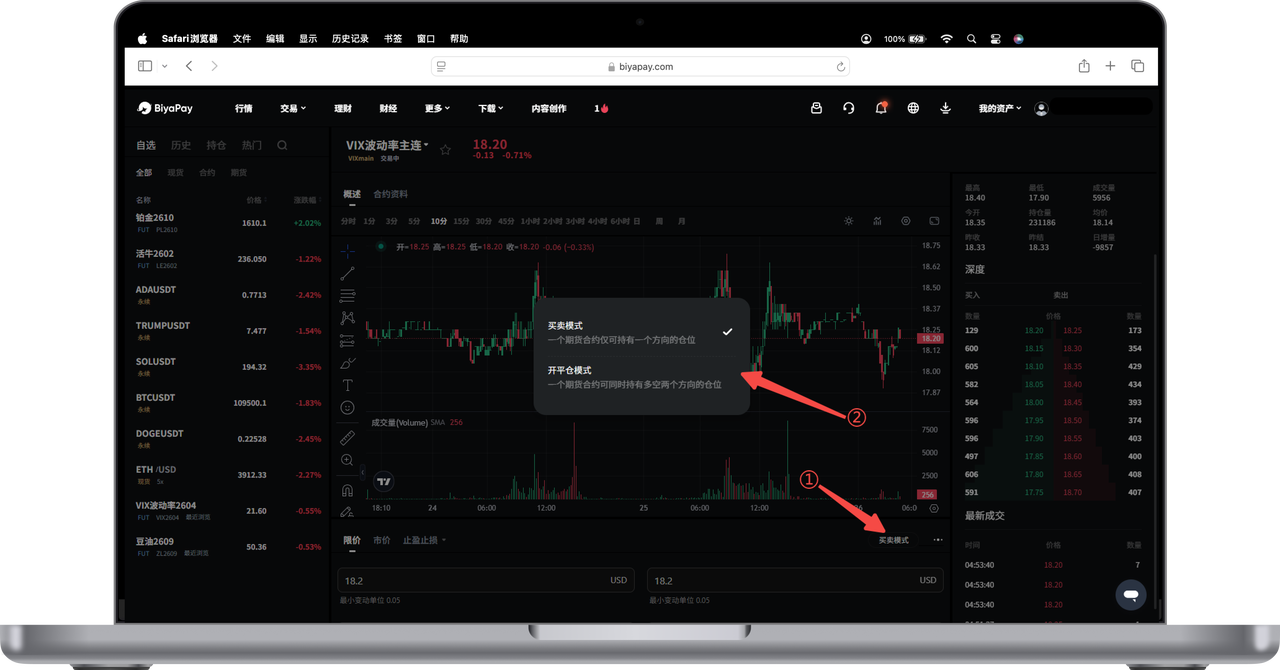
Step 1: Click the Mode Switch Button

In the order area below the trading page, find the mode button on the right, such as "Buy/Sell Mode" or "Open/Close Position Mode".

Click this button to open the mode selection popup.

Step 2: Select the Desired Mode

In the popup, you can choose:

Buy/Sell Mode

A trading variety only maintains one direction of position

The system automatically opens or closes positions based on direction

More suitable for simple and intuitive trading needs

Open/Close Position Mode

The same trading variety can hold multiple groups of long and short positions simultaneously

Suitable for users who need hedging, simultaneous long and short positions, or more precise position management

Click any mode to complete the switch.

image_0056.png

Tips

Switching modes will not affect existing positions, but will affect subsequent order logic.

If the button is not clickable, please check if you are logged in or if the trading page has finished loading.

If you are not familiar with the mode differences, you can consult online customer service at any time for more information.

BiyaPay
BiyaPay 让数字货币流行起来

联系我们

客服邮箱: service@biyapay.com
客服Telegram: https://t.me/biyapay001
Telegram社群: https://t.me/biyapay_ch
Telegram数字货币社群: https://t.me/BiyaPay666
BiyaPay的电报社区BiyaPay的Discord社区BiyaPay客服邮箱BiyaPay Instagram官方账号BiyaPay Tiktok官方账号BiyaPay LinkedIn官方账号
合规主体
Biya Global LLC 为美国注册有限责任公司,已依据《银行保密法》向 FinCEN 完成 MSB 联邦登记,(注册号:31000218637349)受 FinCEN 监管;
Biya Global Limited 为新西兰注册企业,已依据《2008 金融服务提供商(注册与纠纷解决)法案》在 FSPR 完成 FSP 登记,(注册编号FSP1007221)受新西兰 FMA 监管;
©2019 - 2026 BIYA GLOBAL LIMITED