How to Quickly Log in to the MoneyGram Account for Remittance: Simple Process and Security Assurance




Image Source: unsplash
You can quickly log into your MoneyGram account to easily complete remittance. For first-time use, you need to register a new account. It’s recommended to set a strong password, enable two-factor authentication, and avoid operating on public networks. This effectively protects account information and enhances fund security.
Key Points
- When registering a MoneyGram account, ensure accurate personal information, set a strong password, and enable two-factor authentication to enhance account security.
- Before remitting, carefully verify recipient information to ensure the name matches their ID, avoiding delays due to errors.
- When using MoneyGram, regularly check account information and transaction records to promptly detect and address suspicious activities, ensuring fund security.
Quickly Logging into a MoneyGram Account
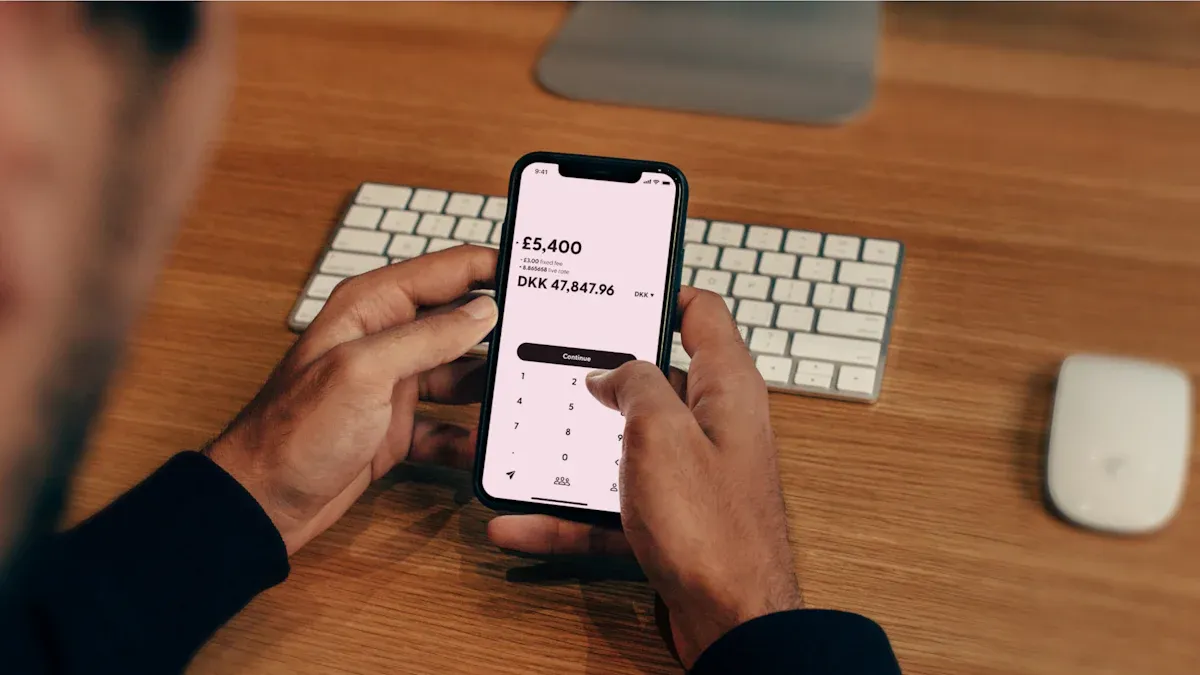
Image Source: unsplash
Accessing the Website or App
You can quickly log into your MoneyGram account through the official website or by downloading the official app. Regardless of the method chosen, the platform uses encryption technology to protect your personal and financial information. Both the app and website feature multi-factor authentication to effectively prevent unauthorized access.
Tip: It’s recommended to use a trusted network environment in mainland China and avoid operating on public WiFi. This further ensures your account security.
If you’re using MoneyGram services for the first time, you need to click the “Register” button to create a new account. During registration, the system requires you to provide your full legal name, residential address, phone number, and email address. You may also need to provide your date of birth or valid identification (such as a passport or driver’s license) for the platform to verify your identity.
- The registration process includes:
- Providing personal information (name, address, contact details)
- Creating a username and password
- Linking a payment source (such as a credit or debit card)
- Uploading identification documents (such as a passport or driver’s license)
Ensure the information you provide matches your government-issued ID to avoid delays in future remittances.
Entering Account Information
When logging into your MoneyGram account, you need to enter the username and password set during registration. It’s recommended to set a strong password and change it regularly. A strong password typically includes uppercase and lowercase letters, numbers, and special characters, with a minimum length of 8 characters.
- Password security tips:
- Avoid using easily guessable information like birthdays or phone numbers
- Update your password regularly to prevent information leaks
- Do not use the same password across multiple platforms
If you forget your password, you can reset it using the “Forgot Password” function. The system will send a verification code to your registered email or phone to help you securely recover your account.
Common login issues and solutions are as follows:
| Issue Type | Resolution Steps |
|---|---|
| Technical Issues | Use a supported browser (e.g., Chrome, Edge, Firefox, Safari) or try a different device |
| Error Messages | Open the website in an incognito window and clear browser cookies |
| Device Issues | Switch to a different network environment or use the app to log in |
| Feedback Issues | Fill out the contact form, describe the issue in detail, and attach screenshots |
If you encounter unresolved issues, you can get help through MoneyGram’s “Contact Us” form or online chat. The platform also provides a dedicated help page covering account security, fraud prevention, and more.
Two-Factor Authentication
When quickly logging into your MoneyGram account, the system requires you to complete two-factor authentication (2FA). This step significantly enhances account security.
- Two-factor authentication process:
- After logging in, the system sends a one-time verification code to your phone or email
- You need to enter this code on the page to access your account
Both the app and website support multi-factor authentication and monitor transactions in real-time to detect suspicious activities. If the system detects an abnormal login, it will promptly send you an alert to take action.
Reminder: You can enable or manage two-factor authentication in your account settings. It’s recommended to keep this feature enabled to ensure every login undergoes multiple verifications.
By following these steps, you can achieve a quick login to your MoneyGram account and enjoy a secure, convenient remittance experience. If you encounter any issues, MoneyGram’s customer service team will provide timely support.
Remittance Process

Image Source: unsplash
Choosing a Remittance Service
After quickly logging into your MoneyGram account, you can directly access the “Send Money” page. You need to select the destination country and receiving method. MoneyGram supports various service types, including online transfers, domestic transfers, and international transfers. You can choose to withdraw to a bank account (such as a Hong Kong-licensed bank) or mobile wallet. Different service types have different remittance limits. Refer to the table below:
| Service Type | Single Transaction Limit (USD) |
|---|---|
| Online Transfer | 10,000 |
| Online Transfer (30-Day Total) | 10,000 |
| Domestic Transfer | 15,000 |
| International Transfer | 10,000/day |
| Chile (Special Limit) | 5,000 |

You can choose the appropriate service type and receiving method based on your needs. MoneyGram automatically prompts available options based on the regulatory requirements of different countries.
Entering Recipient Information
You need to accurately enter the recipient’s detailed information. The recipient’s full name must exactly match the name on their ID. The system also requires you to enter a reference number for the recipient to collect funds. When entering information, note:
- The name must exactly match the recipient’s ID
- Enter the recipient’s reference number
- Provide the recipient’s contact details (such as phone number or email)
- Select the receiving bank or mobile wallet type
Tip: It’s recommended to confirm recipient information in advance to avoid delays or failures due to errors.
Entering Amount and Currency
You can enter the amount to be sent and select the remittance currency on the page. MoneyGram supports multiple currencies, and the system automatically displays real-time exchange rates and fees. You can see the remittance amount, fees, and the actual amount received by the recipient. Some countries and service types have amount restrictions, so plan your remittance amount according to the table above.
| Processing Time | Description |
|---|---|
| 10 Minutes or Less | Most MoneyGram payments are processed within 10 minutes. |
| Hours to Days | Some transfer types may take longer, especially for countries in South America or Africa. |
You can reasonably estimate delivery time based on the destination country and service type.
Confirming Payment
You need to carefully review all transaction details on the final page, including the recipient’s name, reference number, remittance amount, currency, and receiving method. MoneyGram conducts multiple security checks to ensure the transaction is legal and compliant. You need to complete the following steps:
- Verify recipient information to ensure its legitimacy
- Check the transaction amount, currency, and destination country
- Keep all receipts and transaction records for future reference
- Be cautious of scams and avoid remitting under pressure
MoneyGram requires you to provide valid identification to prevent fraud and identity theft. For transfers exceeding USD 15,000, the system prompts additional verification. The platform uses encryption technology to protect your sensitive data and continuously monitors transactions to identify suspicious activities. You need to complete identity verification to ensure the authenticity of both sender and recipient identities.
Reminder: After completing the remittance, you can download or save the electronic receipt for easy future reference and tracking.
Remittance Confirmation and Tracking
Checking Status
After completing the remittance, you can check the transaction status at any time. You can log into your MoneyGram account, go to the “Transaction History” page, and view the processing progress of each transfer. If you don’t have an account, you can check the status on the MoneyGram website or app by entering the reference number, sender’s last name, date of birth, and recipient’s name. MoneyGram also notifies you and the recipient via SMS or email, indicating when funds are available for collection.
It’s recommended to save all transaction information for easy reference and verification.
Obtaining the Reference Number
Each remittance generates a unique reference number. This number is a critical credential for tracking remittance progress. You can find the reference number on the remittance completion page, electronic receipt, or transaction history. Both the MoneyGram website and app support checking transfer status, estimated delivery time, fees, and exchange rates using the reference number.
- Uses of the reference number include:
- Tracking remittance progress
- Checking fees and exchange rates
- Assisting the recipient in collecting funds
Tracking Progress
You can use MoneyGram’s online tracking feature to monitor remittance progress in real-time. Simply enter the reference number and related information, and the system displays whether the funds have arrived. Fund availability is affected by the destination country, payment method, and receiving method. Common reasons for delays include inaccurate recipient information, additional security checks for large amounts, regulatory requirements in different countries, and technical issues.
To avoid delays, carefully verify recipient information before remitting and maintain a stable network connection. For ongoing issues, contact MoneyGram customer service promptly.
Security Assurance
Information Encryption
When logging into and remitting through the MoneyGram platform, the system automatically encrypts all sensitive data. MoneyGram uses industry-standard encryption technology to ensure the security of your personal and transaction information. The platform does not store your credit or debit card information, and all data transmission is encrypted. You can confidently remit using accounts from mainland China or Hong Kong-licensed banks.
| Evidence Type | Description | Source Link |
|---|---|---|
| Encryption Technology | MoneyGram uses industry-standard encryption to protect data transmitted through its app. | Exclusive Insight |
| Multi-Factor Authentication | MoneyGram also implements multi-factor authentication to enhance security. | Exclusive Insight |
Identity Verification
When logging into your MoneyGram account, the system requires multiple identity verifications. The platform sends dynamic verification codes to your phone or email, adding an extra layer of protection to your account. MoneyGram regularly evaluates and updates security protocols to address the latest cyber threats.
- MoneyGram uses multi-factor authentication to enhance account security
- This measure provides an additional layer of protection
- The system continuously monitors to prevent potential threats
- Security protocols align with industry standards and technological advancements
Anti-Fraud Measures
During the remittance process, you may encounter risks like identity theft, card skimming, account takeover fraud, or credit card refund fraud. MoneyGram employs multiple security measures to prevent these issues. You can take the following steps to protect yourself:
- Use strong passwords and change them regularly
- Enable two-factor authentication
- Install security software
- Monitor transactions to identify suspicious activities promptly
User Self-Protection
You need to proactively protect your account security. If you suspect unauthorized access to your data, contact MoneyGram customer service immediately. You can monitor transactions at any time and take action promptly if anomalies are detected. If you notice suspicious transactions, contact MoneyGram immediately, as timely action can effectively prevent fund losses.
Reminder: Timely action is key to ensuring account security. You can check transaction status anytime through the MoneyGram platform to ensure fund security.
By following MoneyGram’s recommended process, you can experience the following benefits:
- Fast fund delivery, covering over 200 countries globally, ideal for urgent remittances
- Multiple receiving methods to meet diverse needs
- Strong encryption and strict identity verification to ensure account and fund security
It’s recommended to regularly check account information, ensure sufficient funds, and avoid remittance failures due to information errors or expired identity verification.
FAQ
How can I use MoneyGram for remittances in mainland China?
You can use the MoneyGram website or app, select a Hong Kong-licensed bank account for receipt, settle in USD, and enjoy a simple and secure process.
What should I do if I forget my MoneyGram account password?
You can click “Forgot Password,” and the system will send a verification code to your phone or email to help you reset your password quickly.
How long does it take for a remittance to arrive?
You can typically complete a remittance within 10 minutes. Some countries may take hours, depending on MoneyGram’s prompts.
When quickly logging into MoneyGram for remittances, you may value its website/APP instant access, multi-factor authentication (2FA), and 10-minute processing, yet encounter drawbacks: the 2024 data breach exposing customer names/contacts/SSNs risking identity theft, name field limits ignoring middle/second surnames causing multiple rejections and long queues, 10-business-day refund delays for cancellations, higher credit card fees, and 2025’s remittance growth heightening phishing risks on public WiFi for frequent transfers.
BiyaPay stands out as a premier cross-border finance platform, addressing these issues comprehensively. Our real-time exchange rate query delivers instant mid-market rates to eliminate markups. With fees as low as 0.5%, it supports conversions across 30+ fiat currencies and 200+ digital assets, covering multiple global destinations with same-day delivery. Uniquely, BiyaPay’s single platform supports direct US and Hong Kong stock trading without separate overseas accounts, with zero fees on contract orders, seamlessly turning remittances into investment opportunities. Licensed under US MSB and equivalents, fortified by 256-bit encryption and real-time fraud detection for unmatched compliance and security.
Sign up at BiyaPay today for low-rate, rapid transfers and integrated investing, elevating your MoneyGram alternative remittances to greater efficiency and safety!
*This article is provided for general information purposes and does not constitute legal, tax or other professional advice from BiyaPay or its subsidiaries and its affiliates, and it is not intended as a substitute for obtaining advice from a financial advisor or any other professional.
We make no representations, warranties or warranties, express or implied, as to the accuracy, completeness or timeliness of the contents of this publication.
Related Blogs of

2025 Taiwan Stock Market Year-End Review and 2026 Outlook: Can the AI Boom Continue?

Ultimate Guide to Applying for a Schengen Visa in the USA in 2025: Understand the Process, Documents, and Timeline in One Article


Want to Invest in the Chinese Stock Market? Start by Understanding the Shanghai Composite Index

The Relationship Between Fed Rate Cuts and New York Stock Market Fluctuations Is No Longer a Simple Cause-and-Effect

Choose Country or Region to Read Local Blog
 Australia
 Austria
 Belgium
 Canada
 Cyprus
 Czech Republic
 Denmark
 Estonia
 Finland
 France
 Germany
 Greece
 Hong Kong
 India
India Indonesia
 Ireland
 Italy
Italy Japan
Japan Latvia
 Lithuania
 Luxembourg
 Malaysia
 Malta
Malta Morocco
 Nepal
Nepal Netherlands
 New Zealand
 Norway
 Pakistan
 Philippines
 Poland
 Portugal
 Romania
 Singapore
 Slovakia
 Slovenia
 South Africa
 South Korea
 Spain
Spain Sweden
 Thailand
 The United States
 Turkey
 United Arab Emirates
 United Kingdom
 Vietnam
Contact Us




BIYA GLOBAL LLC is a licensed entity registered with the U.S. Securities and Exchange Commission (SEC No.: 802-127417); a certified member of the Financial Industry Regulatory Authority (FINRA) (Central Registration Depository CRD No.: 325027); regulated by the Financial Industry Regulatory Authority (FINRA) and the U.S. Securities and Exchange Commission (SEC).
BIYA GLOBAL LLC is registered with the Financial Crimes Enforcement Network (FinCEN), an agency under the U.S. Department of the Treasury, as a Money Services Business (MSB), with registration number 31000218637349, and regulated by the Financial Crimes Enforcement Network (FinCEN).
BIYA GLOBAL LIMITED is a registered Financial Service Provider (FSP) in New Zealand, with registration number FSP1007221, and is also a registered member of the Financial Services Complaints Limited (FSCL), an independent dispute resolution scheme in New Zealand.