Can a U.S. Phone Number Register for Alipay? A Comprehensive Analysis of Alipay's Use and Cross-Border Transfer Advantages




Image Source: unsplash
You can register for Alipay with a US phone number. You only need to download the Alipay International App from the app store and complete real-name verification with authentic identity information. Registering with a US phone number makes living, studying, or working in China/Mainland China more convenient. You will find the registration process simple, with clear steps, suitable for users of different age groups.
Key Points
- Registering for Alipay with a US phone number is very simple. Just download the International App and complete real-name verification.
- Before registering, prepare a valid passport and a US phone number capable of receiving SMS to ensure a smooth registration process.
- After completing real-name verification, Alipay’s payment and transfer limits will significantly increase, while unverified users have lower limits.
- Bind a bank card that supports international payments, preferably one issued by a licensed Hong Kong bank, to facilitate smooth binding.
- When using Alipay for cross-border transfers, pay attention to handling fees and exchange rates, and choose the most suitable service to reduce costs.
US Phone Number Registration Process
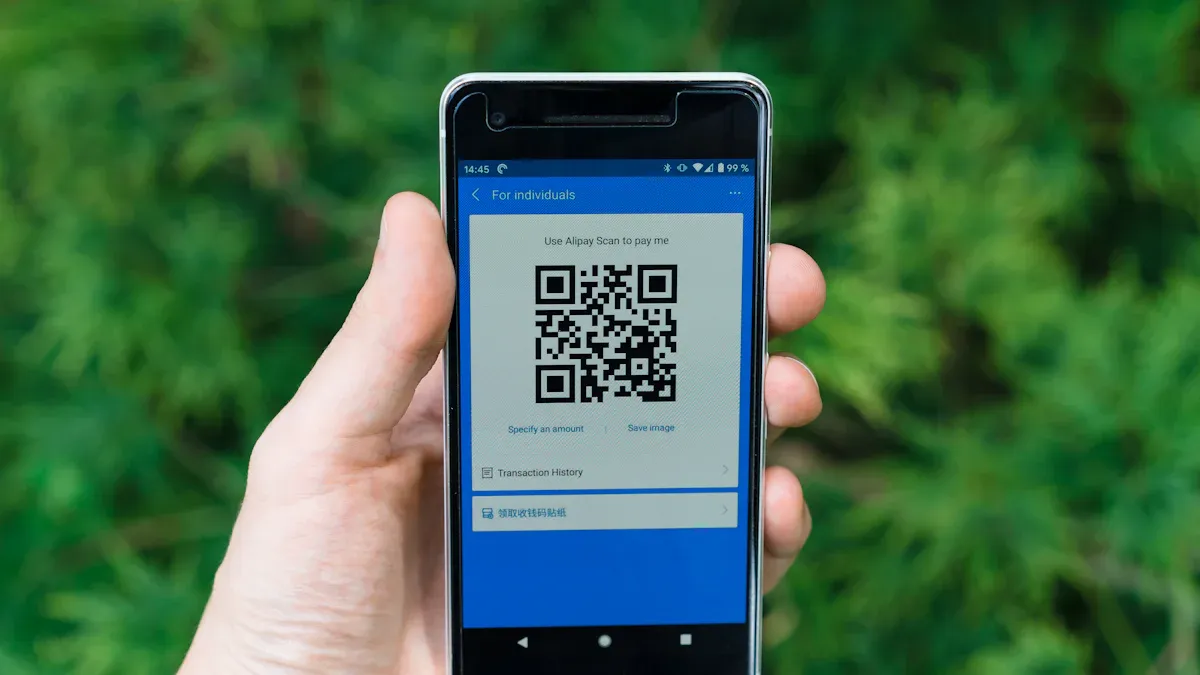
Image Source: unsplash
Pre-Registration Preparation
Before registering for Alipay with a US phone number, you need to prepare some materials and conditions in advance. This will make the entire process smoother. You need:
- A mobile phone with a US phone number that can send and receive SMS normally.
- A valid passport (a US passport is recommended, though passports from other countries may also be supported in some cases).
- A clear photo or scan of the passport.
- A stable network environment, preferably Wi-Fi.
- If you plan to bind a bank card, prepare a bank card that supports international payments (such as one issued by a licensed Hong Kong bank).
Tip: When registering with a US phone number, ensure the number has not been previously used to register an Alipay account. If you have previously registered with the number but did not complete real-name verification, it’s recommended to deregister the original account before re-registering.
Registration Steps
You can follow these steps to complete registration with a US phone number:
- Search for and download the Alipay International App from the App Store or Google Play.
- After opening the app, select “Register New Account.”
- In the country/region selection, choose “United States” and enter your US phone number.
- The system will send a verification code to your phone number. You need to enter the received code within the specified time.
- Set a login password and agree to the relevant service agreement.
- After successful registration, you will enter the main interface. You can see your personal center under “Me.”
Note: During the registration process with a US phone number, phone number verification is a critical step. Ensure your phone can receive SMS normally. If you don’t receive the verification code for a long time, try switching networks or restarting your phone.
Real-Name Verification
After completing registration with a US phone number, you need to perform real-name verification. Real-name verification is a prerequisite for using Alipay’s various functions. You can follow these steps:
- Log in to the Alipay App and go to the “Me” user center.
- Click the “Settings” icon in the top right corner.
- Select “Account and Security” from the dropdown menu.
- Find “Identity Information” and click it; the system will prompt you to “Verify Now.”
- In the top right corner, select your country/region as “United States.”
- Scan your passport with your phone; the system will automatically read the full name, passport number, date of birth, and passport expiry date. You can also manually enter this information and click “Submit.”
- Fill in basic identity information, including gender, occupation type, and address.
- Proceed to the “Face Verification” step, where the system will require a face scan.
- On the face recognition page, click “Verify” and complete the scan.
- Wait for the system to review your identity information. Once approved, your Alipay personal account will have completed real-name verification.
During real-name verification, all information must match your passport. When filling in the address, use English and ensure it matches your passport information. During face recognition, ensure adequate lighting and avoid wearing hats or glasses.
The registration process for a US phone number is relatively straightforward. By following the steps above, you can successfully complete registration and real-name verification. This allows you to use Alipay’s various services in China/Mainland China, including payments, receipts, and cross-border transfers.
Function Usage
Payments and Receipts
After completing registration with a US phone number, you can use Alipay for various payment and receipt operations. When shopping at physical stores in China/Mainland China, you can scan the merchant’s QR code or have the merchant scan your payment code to complete contactless payments. You can also make online payments on e-commerce websites that support Alipay, enjoying a convenient shopping experience.
Alipay provides multiple security measures, such as fingerprint recognition and PIN codes, to ensure the safety of every transaction. You can also receive payments through Alipay by having others scan your receipt QR code.
Tip: Not all US local merchants support Alipay payments, but merchants in China/Mainland China generally accept it. When using it, check if the merchant displays the Alipay logo.
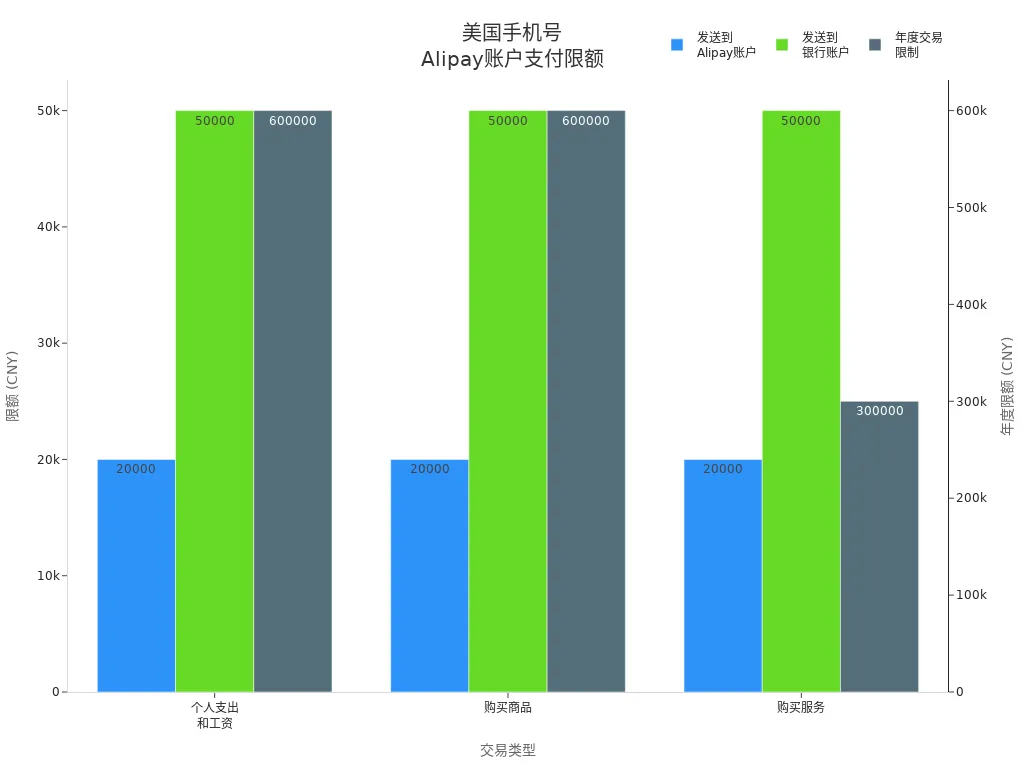
The table below shows the main payment limits for Alipay accounts registered with a US phone number:
| Transaction Type | Sending to Another Alipay Account | Sending to Linked Bank Account | Annual Transaction Limit |
|---|---|---|---|
| Personal Expenses and Salaries | Daily $1.4 - $2,800 | Daily $1.4 - $7,000 | Annual $84,000 |
| Purchasing Goods | Daily $1.4 - $2,800 | Daily $1.4 - $7,000 | Annual $84,000 |
| Purchasing Services | Daily $1.4 - $2,800 | Daily $1.4 - $7,000 | Annual $42,000 |
For users who have not completed real-name verification, the maximum single payment is $500, with an annual limit of $2,000. After completing real-name verification, the single transaction limit increases to $5,000, with an annual maximum of $50,000.
Binding a Bank Card
You can bind a bank card within the Alipay App to facilitate fund top-ups and spending. It’s recommended to prioritize bank cards issued by licensed Hong Kong banks, as they are more likely to pass system verification. The binding process is as follows:
- Open the Alipay App and go to the “Me” page.
- Select “Bank Cards” or “Add Bank Card.”
- Enter bank card information, including card number, cardholder name, and expiration date.
- The system will require identity verification; enter ID information consistent with the bank.
- After successful binding, you can use the bank card to top up or spend directly from your Alipay account.
Note: Some US local banks may not support direct binding. It’s recommended to try international bank cards or those issued by licensed Hong Kong banks first.
International Payments
You can use the Alipay International App for cross-border payments, especially suitable for traveling, studying, or short-term work in China/Mainland China. The process is as follows:
- Download and open the Alipay International App.
- Register an account with a US phone number.
- Select the “Tour Pass” function.
- Enter the amount you want to top up (in USD).
- Add your bank card, preferably one that supports international payments.
- Follow the prompts to fill in identity information, ensuring it matches the bank information.
- After completing the top-up, you can scan to pay at any merchant in China/Mainland China that supports Alipay.
When using international payments, transaction limits vary based on your real-name verification status. Unverified users can only make small daily payments, while verified users have significantly higher limits. Note that some transactions may involve currency conversion fees, subject to Alipay’s real-time exchange rate.
Reminder: The international payment function is mainly designed for short-term visitors and cross-border users. Some features may be restricted when used locally in the US.
Cross-Border Transfer Advantages

Image Source: unsplash
Handling Fees and Exchange Rates
When using Alipay for cross-border transfers, handling fees and exchange rates are the most important cost factors. Alipay charges a 3% fixed fee for international credit card transactions and a 0.1% fee for bank transfers exceeding a certain amount. You can refer to the table below to understand the fee structures of different international remittance services:
| Service | Fee Structure |
|---|---|
| Alipay | 3% fixed fee for international credit card transactions, 0.1% for bank transfers exceeding a certain amount |
| Remitly | Small fixed fee + exchange rate markup |
| OFX | No fixed transfer fee, exchange rate spread of about 0.4% |
When transferring from USD to RMB, Alipay will convert based on real-time exchange rates. You should compare exchange rates and fees from different providers before transferring. Bank transfers generally have lower fees, but some banks may hide additional costs in the exchange rate. You can check the exchange rate in real-time via the Alipay App’s exchange rate query to ensure transparent fund conversion.
Reminder: For small transactions, Alipay’s handling fees may be higher than some international remittance platforms. You can choose the most suitable service based on the transfer amount.
Foreign Exchange Quota Policy
When using Alipay for cross-border remittances in China/Mainland China, the foreign exchange quota policy is crucial. According to regulations, foreign nationals can transfer up to USD 5,000 per transaction, with an annual cumulative limit of USD 50,000. The table below shows the specific limits:
| Type | Single Transaction Limit | Annual Transaction Limit |
|---|---|---|
| Foreign Nationals | USD 5,000 | USD 50,000 |
If you are paying for US tuition and can provide relevant proof, some remittances may not count toward the annual foreign exchange purchase limit. You can flexibly arrange funds to meet needs such as studying abroad or family support.
Applicable Scenarios
You can use Alipay cross-border transfers in various scenarios. Common scenarios include:
- When shopping in China/Mainland China, scan the merchant’s QR code to quickly complete transactions.
- Bind an international bank account or credit card to Alipay for convenient cross-border fund transfers.
- Through Alipay’s partnerships with international financial institutions, support multi-currency payments to simplify international remittance processes.
The table below summarizes the main usage scenarios:
| Usage Scenario | Description |
|---|---|
| QR Code Payment | Merchants generate a QR code, customers scan and confirm payment, fast and secure. |
| International Bank Account Linking | Users can link international bank accounts or credit cards to Alipay for convenient cross-border transfers. |
| Partnerships | Alipay collaborates with international financial institutions, supporting multiple currencies to simplify international payment processes. |
When using Alipay for cross-border transfers, you can enjoy robust security measures and diverse financial services. However, note that some transaction fees may be high, and the process of transferring directly from the US to individual Alipay accounts in China/Mainland China can be complex. You can choose the most suitable method based on your actual needs to improve fund transfer efficiency.
Common Issues
Reasons for Registration Failure
When registering for Alipay with a US phone number, you may encounter registration failures. Common reasons include the phone number already being registered, failure to receive the verification code, unstable network, or incorrect information entry. You can try the following solutions:
- Wait 5-10 minutes before attempting to register again.
- Check if the phone’s SMS function is working properly and ensure a stable network.
- If the system prompts “You have made too many attempts, please try again later,” contact Alipay customer service promptly.
- Confirm that the phone number has not been used to register another Alipay account.
Tip: When filling in identity information, ensure it matches your passport to avoid verification failure due to discrepancies.
Restricted Functions
After registering with a US phone number, some functions may be restricted. For example, some local services in China/Mainland China (such as wealth management or credit scores) are not available to international users. When binding a bank card, prioritize those issued by licensed Hong Kong banks for easier verification. Accounts without real-name verification have lower payment and receipt limits, and some cross-border transfer functions are unavailable. After completing real-name verification, you can enjoy higher limits and more services.
Note: When using Alipay outside China/Mainland China, some merchants and services may not support international accounts.
Customer Service and Appeals
If you encounter issues during registration or usage, you can contact Alipay customer service through various channels. The table below lists the main customer service contact methods and service hours:
| Service Type | Contact Method | Service Hours |
|---|---|---|
| Aliexpress | Online Chat | 24×7 |
| Alibaba | Hotline: +86 400-600-2688 | Monday to Friday, 9:00-18:00 (Beijing Time) |
| Alipay China E-Wallet | Hotline: +86 57195188 | Monday to Sunday, 8:00-24:00 (Beijing Time) |
You can also get help through the following methods:
- Visit the Help Center in the Alipay International App to submit a service request.
- Use email support or online chat support.
- Submit detailed issues through the service request page and wait for a customer service response.
It’s recommended to prepare your registered phone number, passport information, and a description of the issue when contacting customer service to improve handling efficiency.
You can successfully register for Alipay with a US phone number. You only need to prepare your passport and phone number and follow the steps to complete real-name verification. After registration, you can enjoy convenient payment, receipt, and cross-border transfer services in China/Mainland China.
It’s recommended to prioritize binding a bank card issued by a licensed Hong Kong bank and pay attention to the annual USD 50,000 limit. If you encounter issues, contact Alipay customer service promptly to ensure account security.
FAQ
What should I do if I don’t receive the verification code during registration?
You can first check your phone’s signal and SMS function. Try switching networks or restarting your phone. If you still don’t receive the code, you can switch to another phone number or contact customer service.
Why does binding a bank card keep failing?
You should prioritize bank cards issued by licensed Hong Kong banks. Ensure the bank card information matches your identity information. Check if the bank card supports international payments.
Why does my Alipay account have usage limits?
After registering with a US phone number, Alipay sets limits based on your real-name verification status. Completing real-name verification increases single and annual transaction limits. You can check account details for specific limits.
What should I do if some functions are unavailable in China/Mainland China?
Accounts registered with a US phone number may not have access to some local services. You can prioritize using main functions like payments, receipts, and cross-border transfers. Check Alipay’s announcements for the latest information.
How do I handle account security issues?
You can immediately change your login password. Use the “Account and Security” function in the app to make changes. Contact Alipay customer service, provide your registered phone number and passport information, and request assistance.
Registering Alipay with a US phone number often hits snags like verification delays, card binding failures, and limits (unverified $250/week), plus high cross-border fees (3% for credit cards) and rate swings. As a convenience-driven user, you need a low-cost, clear, and globally compatible platform to streamline payments and transfers.
BiyaPay delivers the perfect fix, with real-time exchange rate queries to track USD-to-RMB rates and convert fiat to crypto, dodging exchange risks. Remittance fees start at just 0.5%, with zero-cost contract orders and global same-day delivery. Plus, you can invest in US and Hong Kong stocks on BiyaPay without an overseas account, optimizing your funds.
Sign up for BiyaPay now to unlock seamless cross-border finance! From daily payments to study remittances, cut costs and boost limits for smoother global living. Don’t let binding hassles and high fees slow your experience—join BiyaPay today for effortless fund management worldwide!
*This article is provided for general information purposes and does not constitute legal, tax or other professional advice from BiyaPay or its subsidiaries and its affiliates, and it is not intended as a substitute for obtaining advice from a financial advisor or any other professional.
We make no representations, warranties or warranties, express or implied, as to the accuracy, completeness or timeliness of the contents of this publication.
Related Blogs of

Understand the Core Differences Between the Nasdaq Composite Index and Nasdaq 100 Index in One Article


Say Goodbye to Panic: Master the Winning Rules for Stock Investing in a Bear Market

2026 China Stock Market Investment Guide: Spotlight on 5 Must-Watch Leading Tech Stocks


What Does Price-to-Earnings Ratio (PE) Mean? Master It to Navigate the Chinese Stock Market

Choose Country or Region to Read Local Blog
 Australia
 Austria
 Belgium
 Canada
 Cyprus
 Czech Republic
 Denmark
 Estonia
 Finland
 France
 Germany
 Greece
 Hong Kong
 India
India Indonesia
 Ireland
 Italy
Italy Japan
Japan Latvia
 Lithuania
 Luxembourg
 Malaysia
 Malta
Malta Morocco
 Nepal
Nepal Netherlands
 New Zealand
 Norway
 Pakistan
 Philippines
 Poland
 Portugal
 Romania
 Singapore
 Slovakia
 Slovenia
 South Africa
 South Korea
 Spain
Spain Sweden
 Thailand
 The United States
 Turkey
 United Arab Emirates
 United Kingdom
 Vietnam
Contact Us




BIYA GLOBAL LLC is a licensed entity registered with the U.S. Securities and Exchange Commission (SEC No.: 802-127417); a certified member of the Financial Industry Regulatory Authority (FINRA) (Central Registration Depository CRD No.: 325027); regulated by the Financial Industry Regulatory Authority (FINRA) and the U.S. Securities and Exchange Commission (SEC).
BIYA GLOBAL LLC is registered with the Financial Crimes Enforcement Network (FinCEN), an agency under the U.S. Department of the Treasury, as a Money Services Business (MSB), with registration number 31000218637349, and regulated by the Financial Crimes Enforcement Network (FinCEN).
BIYA GLOBAL LIMITED is a registered Financial Service Provider (FSP) in New Zealand, with registration number FSP1007221, and is also a registered member of the Financial Services Complaints Limited (FSCL), an independent dispute resolution scheme in New Zealand.