Top Tips for Protecting Yourself on Cash App




Image Source: pexels
If you have concerns about using Cash App, you might ask, is cash app safe? The answer depends on how you use it. Cash app safety relies not just on technology but also on your actions. Many users wonder, is cash app safe for sending money? Staying alert helps you avoid scams.
- Verify contacts before you send money.
- Avoid suspicious links and offers that seem too good to be true.
- Use VPNs and enable two-factor authentication.
- Report suspicious activity quickly.
These steps help protect your money and information.
Key Takeaways
- Always verify the person before sending money to avoid scams and unauthorized payments.
- Use strong, unique passwords and enable two-factor authentication to secure your account.
- Regularly check your transaction history and set up notifications to spot suspicious activity early.
- Adjust your privacy settings to hide transactions and limit who can see your activity.
- If you suspect a scam, act fast by changing your password, reporting the issue, and contacting support.
Cash App Safety
Image Source: pexels
Is Cash App Safe
You might wonder, is cash app safe for your money and information. Cash app safety starts with strong technology and continues with your own careful actions. The app uses advanced encryption to protect your data when you send or receive money. Cash App follows Level 1 of the PCI Data Security Standard (PCI-DSS), which is the highest level of compliance for payment apps. This means your financial and personal data stays secure during every transaction.
Cash App also uses real-time fraud detection systems. These systems watch for unusual activity and help stop unauthorized transactions. If you report a problem quickly, Cash App may cover your loss after checking your claim. Is cash app safe for everyone? The answer depends on how you use it. You should only send money to people you know and trust. Transactions with strangers carry more risk because payments are hard to reverse.
Tip: Always double-check the recipient before sending money. Never share your sign-in code or PIN with anyone.
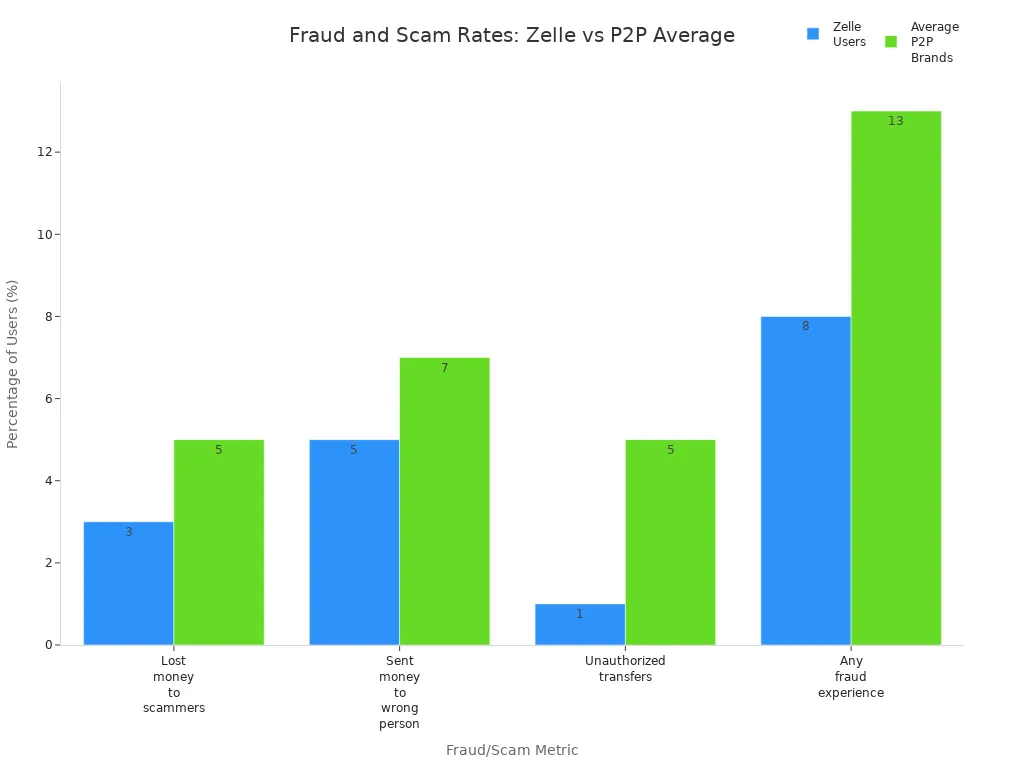
Is cash app safe compared to other payment apps? The scam rate for Cash App is close to the industry average. Zelle has a lower scam rate, but Cash App still offers strong security features.
Security Features
Cash App safety features protect you in many ways. The app uses encryption, fraud detection, and 24/7 monitoring to keep your account safe. You can turn on two-factor authentication and set up a security lock with a passcode, Touch ID, or Face ID for every payment. Cash App also sends notifications for every transaction, so you can spot suspicious activity right away.
| Security Feature | Description |
|---|---|
| Encryption | Protects your data during every transaction |
| Fraud Detection | Uses AI and human review to spot and stop suspicious activity |
| 24/7 Monitoring | Keeps watch on your account at all times |
| Two-Factor Authentication | Adds an extra layer of security for payments and withdrawals |
| Security Lock | Requires passcode, Touch ID, or Face ID for every payment |
| Notifications | Alerts you to every transaction |
Is cash app safe for storing money? FDIC protection only applies if you have a Cash App Card or a Sponsored Account. Not all balances are insured, so you should know these limits. Cash App is safest when you use it with trusted contacts and follow all security steps.
Safety Risks
Cash App Scams
You face several safety risks when using Cash App. Many cash app scams target users every day. Scammers use many tricks to steal your money or personal information. You should know the most common scams so you can spot them early. Here are some examples:
- Cash flipping scams: Scammers promise to multiply your money but disappear after you send funds.
- Loan scams: Fraudsters offer fake loans and ask for upfront fees or personal details.
- Accidental payment scams: Someone claims they sent you money by mistake and asks for a refund.
- Charity scams: Fake charities ask for donations, often after disasters or big events.
- QR code scams: Scammers use fake QR codes to steal your login details.
- Customer support scams: Someone pretends to be Cash App support and asks for your sign-in code or PIN.
- Social engineering scams: Scammers pretend to be friends or family and ask for emergency funds.
- Overpayment scams: A scammer sends you extra money and asks for the difference back. The original payment often turns out to be fake.
You should always stay alert for these cash app scams. Never share your sign-in code or PIN with anyone, even if they claim to be from support.
Common Threats
You also face other safety risks, such as phishing, impersonation, and identity theft. Scammers may send fake payment requests or pose as vendors. They might use urgent messages to pressure you into sending money quickly. If you receive money from strangers, your risk of financial fraud and identity theft increases. Always verify the sender before taking any action.
Cash App has limited customer service and minimal chargeback protection. If you fall for a scam, you must act fast. In 2024, Cash App started a reimbursement program. If you report a scam within 60 days, you have a high chance of getting your money back. This program has helped reduce scam rates by nearly 70%. Still, best practices for avoiding scams include staying alert and reporting suspicious activity right away. Your awareness is the best defense against identity theft and other safety risks.
Protecting Your Account
Keeping your Cash App account secure should be your top priority. You can take several user protection measures to reduce the risk of scams and unauthorized access. By following these steps, you help protect your money and personal information.
Strong Passwords and PINs
A strong password and PIN form the foundation of your account security. Many users make the mistake of using simple or repeated passwords, which makes accounts easier to hack. To create a secure cash app experience, follow these best practices:
- Choose a password that is at least 8 characters long. Mix uppercase and lowercase letters, numbers, and special characters.
- Avoid using personal information, such as your birthday or common words.
- Use a unique password for Cash App. Never reuse passwords from other accounts.
- Change your password every few months or immediately if you notice suspicious activity.
- Use a password manager to generate and store complex passwords. Password managers use strong encryption to keep your data safe.
- Set a unique PIN for your Cash App account. Do not use easy-to-guess numbers like “1234” or your birth year.
- Enable security locks, such as PIN or biometric authentication, for every payment.
Tip: Never share your password, PIN, or sign-in code with anyone. Scammers often pretend to be support agents and ask for this information.
Two-Factor Authentication
Two-factor authentication adds another layer of security to your account. When you enable this feature, you must enter your PIN or a one-time code in addition to your password. This step makes it much harder for someone to access your account, even if they know your password.
- Two-factor authentication acts like having two locks on your door. It blocks most unauthorized access attempts.
- Experts recommend using the most secure methods, such as authenticator apps or biometric verification, instead of SMS codes. SMS codes can be intercepted through SIM swapping attacks.
- Always enable two-factor authentication and security features like Security Lock and biometric security (face or fingerprint recognition) for the best protection.
Note: Scammers may try to trick you into giving them your two-factor authentication code. Only enter codes on the official Cash App and never share them with anyone.
Monitor Activity
Regularly checking your account activity helps you spot problems early. Many users overlook this step, but it is essential for security.
- Review your transaction history often. Look for payments you did not make or requests from unknown users.
- Set up notifications for every transaction. This way, you get alerts if someone tries to access your account.
- If you see anything suspicious, act quickly. Change your password and PIN, and contact Cash App support right away.
- Keep your app updated to get the latest security features and bug fixes.
Setting up account recovery options also helps you regain access if you lose your password or device. Here is a simple guide:
| Step | Action |
|---|---|
| 1 | Open Cash App and tap the profile icon. |
| 2 | Select “Personal” and enter your email or phone number. |
| 3 | Confirm the sign-in code sent to your email or phone. |
| 4 | If you cannot access your old number, create a new account and link your bank account to Cash App. |
| 5 | Contact support, verify your identity, and request to merge accounts if needed. |
Remember: Never share your sign-in code or PIN, even if someone claims to be from Cash App support. Scammers often use this trick to steal accounts.
By following these steps, you strengthen your security and protect your money. Always use the latest security features and stay alert for suspicious activity. These habits help you maintain a secure cash app experience and keep your funds safe.
Privacy Settings
Adjust Privacy
You have several ways to control your privacy on Cash App. Start by reviewing the privacy settings in your app. You can enable Privacy Mode to keep your transactions private. This setting hides your activity from others. Turn off the social feed feature so no one can see your transaction history. You can also hide your contacts within the app. This step prevents others from viewing your connections.
Cash App lets you disable location tracking. When you do this, the app cannot access your precise location. Some features may not work, but your privacy increases. You can also opt out of targeted advertising and promotional messages. If you want to stop using the app, you can deactivate or close your account at any time. This gives you control over your personal information.
Tip: Never share personal details or respond to suspicious transaction requests. Scammers may try to steal your information for identity theft.
Limit Visibility
Limiting who can see your activity helps protect your security. You can disable the “Nearby” feature to stop others from finding you based on your location. Set up a PIN or fingerprint lock for extra security when you open the app. Cash App uses technical and administrative safeguards to protect your data, but you should always stay alert.
If you are a teen or sponsor, Cash App offers special safety features. Sponsors can check a teen’s activity, balance, and transactions. They receive real-time alerts when a teen sends money to a new contact. Sponsors can set spending limits and approve or block payments. These steps help teens learn safe money habits and protect against scams.
| Privacy Feature | How It Helps You Stay Safe |
|---|---|
| Privacy Mode | Keeps your transactions hidden |
| Social Feed Off | Stops others from seeing your activity |
| Hide Contacts | Prevents contact visibility |
| Location Tracking Off | Stops precise location sharing |
| PIN/Fingerprint Lock | Adds another layer of security |
| Sponsor Alerts | Notifies sponsors of new contacts and payments |
Always review your privacy settings after you link my bank account to cash app. This habit helps you spot changes and keep your information secure. Stay aware of new features and update your settings often to reduce the risk of identity theft.
If You’re Scammed
Image Source: pexels
Act Fast
If you notice a scam or unauthorized transaction on Cash App, you need to act quickly. Fast action can help you limit the damage and improve your chances of recovering your money. Here are the steps you should take right away:
- Change your PIN and password to lock down your account. This step helps stop further unauthorized access.
- Report the scam payment through the Cash App app. Use the official support channels only.
- Gather details about the scam. Write down times, dates, and how the scammer contacted you. Take screenshots if possible.
- Contact your bank or financial institution. Ask them to freeze your account or issue new cards if needed.
- Report the scam to law enforcement and the Federal Trade Commission (FTC), especially if you lost a large amount of money.
Tip: Immediate action creates a record of the scam and helps you recover funds or stop more fraud.
Cash App and its partner banks must investigate your report within 10 days. If they need more time, they should give you a provisional refund while they continue the investigation. The full process can take up to 45 days, but you should hear back within 3 days after the investigation ends.
Report and Recover
You should always use official Cash App support channels to report scams. Never trust unsolicited messages or emails that ask for your sign-in code or PIN. Real Cash App support will never ask for this information. Verified emails come only from @cash.app, @square.com, or @squareup.com.
Follow these steps to report and recover from a scam:
- Contact Cash App support through the app or the official website.
- Secure your account by changing your PIN and reviewing linked accounts.
- Alert your bank to watch for suspicious activity.
- Monitor your Cash App and bank accounts for new or unusual transactions.
- Update your security settings, such as enabling two-factor authentication and using biometric ID.
Note: Always verify any communication with Cash App support through the app or by calling the official number (800) 969-1940.
Stay alert for further issues after a scam. Regularly check your account activity and update your security settings to keep your money safe. Cash App works to educate users and improve security, but your awareness is the best defense.
You can protect yourself on Cash App by following expert advice.
- Always verify identities before sending money.
- Avoid offers that seem too good to be true.
- Use strong passwords and enable two-factor authentication.
- Check your transaction history often and never share your PIN.
Stay alert for new scam trends, such as charity scams, QR code scams, and fake customer support. Regularly review your privacy settings. Practicing cash app safety helps you keep your money and information secure. Stay informed about new threats and updates.
FAQ
How do you know if a Cash App message is a scam?
Scam messages often ask for your sign-in code or PIN. Real Cash App support never requests this information. Always check the sender’s email address. Only trust messages from @cash.app, @square.com, or @squareup.com.
What should you do if you send money to the wrong person?
Open Cash App and tap the payment. Use the “Request” button to ask for your money back. Contact Cash App support if you do not get a response. Act quickly to improve your chances of recovery.
How can you make your Cash App account more secure?
You can use these steps to boost security:
| Step | Action |
|---|---|
| Set strong password | Use unique, complex words |
| Enable 2FA | Turn on two-factor login |
| Update app | Install latest version |
Never share your sign-in code or PIN.
Can you get your money back after a scam on Cash App?
You should report the scam right away. Cash App may refund your money if you act fast and provide details. The support team reviews each case. Quick action gives you the best chance for recovery.
While Cash App can be safe when used carefully, scams and limited refund protections still create risks — especially if you rely on it for sending money abroad or handling larger transfers.
That’s why many users turn to BiyaPay. With bank-level security, real-time fraud monitoring, and global coverage, BiyaPay ensures your money moves quickly and securely. You’ll also save more with transfer fees as low as 0.5%, compared to higher charges from traditional banks and many payment apps.
Protect your money and your peace of mind — choose BiyaPay for safer, smarter international payments.
*This article is provided for general information purposes and does not constitute legal, tax or other professional advice from BiyaPay or its subsidiaries and its affiliates, and it is not intended as a substitute for obtaining advice from a financial advisor or any other professional.
We make no representations, warranties or warranties, express or implied, as to the accuracy, completeness or timeliness of the contents of this publication.
Related Blogs of

2025 Year-End Outlook: Can the Nasdaq Continue Its Growth Legend Amid Volatility?


Want to Invest in US Stocks from Taiwan? Complete Guide to Popular Brokers: Account Opening Process & Pros/Cons Analysis


Data-Driven Analysis: Shanghai Stock Index 2026 Earnings Growth Forecast
Say Goodbye to Currency Exchange Hassles: In-Depth Review of the Best Channels for Converting RMB to USD

Choose Country or Region to Read Local Blog
 Australia
 Austria
 Belgium
 Canada
 Cyprus
 Czech Republic
 Denmark
 Estonia
 Finland
 France
 Germany
 Greece
 Hong Kong
 India
India Indonesia
 Ireland
 Italy
Italy Japan
Japan Latvia
 Lithuania
 Luxembourg
 Malaysia
 Malta
Malta Morocco
 Nepal
Nepal Netherlands
 New Zealand
 Norway
 Pakistan
 Philippines
 Poland
 Portugal
 Romania
 Singapore
 Slovakia
 Slovenia
 South Africa
 South Korea
 Spain
Spain Sweden
 Thailand
 The United States
 Turkey
 United Arab Emirates
 United Kingdom
 Vietnam
Contact Us




BIYA GLOBAL LLC is a licensed entity registered with the U.S. Securities and Exchange Commission (SEC No.: 802-127417); a certified member of the Financial Industry Regulatory Authority (FINRA) (Central Registration Depository CRD No.: 325027); regulated by the Financial Industry Regulatory Authority (FINRA) and the U.S. Securities and Exchange Commission (SEC).
BIYA GLOBAL LLC is registered with the Financial Crimes Enforcement Network (FinCEN), an agency under the U.S. Department of the Treasury, as a Money Services Business (MSB), with registration number 31000218637349, and regulated by the Financial Crimes Enforcement Network (FinCEN).
BIYA GLOBAL LIMITED is a registered Financial Service Provider (FSP) in New Zealand, with registration number FSP1007221, and is also a registered member of the Financial Services Complaints Limited (FSCL), an independent dispute resolution scheme in New Zealand.