Remitly fees and transfer costs: complete guide [2025]



![Remitly fees and transfer costs: complete guide [2025]](https://public.hxdsmy.com/static/MTc1NDI5MDE3NTEwMjQyODI3OA==_1754290414321.png)
Image Source: pexels
You might wonder how much Remitly fees cost to send money to India in 2025. Remitly charges between $0.00 and $50 for international transfers, but most people pay around $3.00 to $7.00 per transfer. If you send money to India, you may see a $3.99 fee, which Remitly sometimes waives for your first transfer or for amounts over $1,000. The exchange rate markup usually ranges from 1% to 2.5%. Over 3 million people use this money transfer service each year to send money online, especially for usd to inr transfers. Always check for hidden fees before you transfer money or send money to India.
Key Takeaways
- Remitly charges fees based on the country, amount, and speed of transfer, with most fees ranging from $0 to $50, and often around $3 to $7 for typical transfers.
- Choosing Economy service saves money but takes 3 to 5 days, while Express service delivers money within minutes but costs more.
- Remitly shows all fees and exchange rates upfront, helping you avoid hidden costs and compare with other providers like Wise.
- For transfers over $1,000 to India, Remitly often waives the flat fee, but you still pay a small exchange rate markup that affects how much your recipient gets.
- To save money, use bank transfers instead of credit cards, watch for promotions, and compare Remitly’s rates with other services before sending money.
Remitly fees overview

Image Source: pexels
Flat fees by country
When you send money with Remitly, you will notice that the transaction fee is not the same for every country. Remitly fees change based on where you send money from and where your recipient lives. The amount you pay depends on the country pair, the amount you send, and the payment method you choose. For example, sending money from the United States to India may cost you $3.99, but sending the same amount to Mexico or South Africa could have a different fee.
Remitly does not use a single flat fee for all international transfers. Instead, the company uses a flexible, tiered fee structure. You will see lower fees if you use the Economy option, but this method takes longer. If you need to send money quickly, the Express option costs more. The payment method also matters. Paying with a credit card can add a 3% transaction fee, while bank transfers usually cost less.
Here is a sample table showing how Remitly fees can vary:
| Sending Country | Receiving Country | Economy Fee (USD) | Express Fee (USD) | Credit Card Fee |
|---|---|---|---|---|
| United States | India | $0 - $3.99 | $3.99 - $7.99 | +3% |
| United States | Mexico | $3.99 - $19.89 | $7.99 - $16.99 | +3% |
| United States | South Africa | $3.99 - $7.99 | $7.99 - $16.99 | +3% |
Note: Remitly often offers promotions for new users. Sometimes, you can send your first transfer with no transaction fee or get a discount for sending larger amounts. Always check Remitly’s website for the latest fee schedule before you send money.
Percentage-based and additional fees
Besides flat fees, Remitly charges other costs that affect the total amount you pay. One of the most important is the exchange rate margin. When you send money abroad, Remitly gives you a specific exchange rate. This rate includes a small markup, usually between 0.5% and 3%. This margin is much lower than what some other companies, like PayPal, charge. PayPal can add up to 4% in hidden fees through exchange rate markups and currency conversion fees.
Remitly stands out because it tells you all costs upfront. You will see the total transaction fee, the exchange rate, and any extra charges before you confirm your transfer. This transparency helps you avoid hidden fees and makes it easier to compare Remitly fees with other providers. If you use a credit card, you will pay an extra 3% fee. This charge is on top of the regular transaction fee and exchange rate margin.
Here are some key points to remember about Remitly’s percentage-based and additional fees:
- Exchange rate markup: 0.5% to 3% added to the mid-market rate.
- Credit card payment: 3% extra transaction fee.
- No hidden fees: Remitly shows all costs before you send money.
- Promotions: New customers may get discounts or fee waivers.
Remitly’s fee structure is usually lower than the industry average, especially for Economy transfers. However, Express transfers and credit card payments can cost more. Wise, another popular provider, sometimes offers lower fees and better exchange rates, but Remitly remains competitive for many international transfers.
How transfer costs are calculated
Exchange rate markup
When you send money with Remitly, you pay more than just the transfer fee. The exchange rate also affects how much your recipient gets. Remitly sets its own exchange rate, which is usually lower than the mid-market rate you see on financial news sites. This difference is called the exchange rate markup.
For example, if the mid-market rate for USD to PHP is 1 USD = 58.37 PHP, Remitly might offer you a rate of 1 USD = 56.83 PHP. This means Remitly keeps a small percentage as part of its business model. The markup usually ranges from 0.5% to 3.0%, depending on the country and the service option you choose. If you use the Express service, you may see a higher markup than with the Economy service.
This markup acts as a hidden fee. You do not see it listed as a separate charge, but it reduces the amount your recipient receives. The exchange rate markup is one of the most important parts of transfer costs, so you should always compare Remitly’s rate to the mid-market rate before sending money.
Total cost transparency
Remitly wants you to know what you will pay before you send money. The company shows you all the fees and the exchange rate before you confirm your transfer. You can find the exact fees by visiting Remitly’s pricing page and choosing your destination country. This information covers both bank deposit and cash pickup options.
Here is a table that shows how Remitly calculates the total cost of a transfer:
| Fee Component | Description |
|---|---|
| Transfer Fee | Varies by destination (e.g., $3.99 to the UK, $1.99 to Mexico). Charged upfront on the transfer amount. |
| Card Fees | Extra fees for some payment methods (e.g., 3% credit card fee in the US). |
| Exchange Rate Markup | Remitly adds a markup over the mid-market rate. Promotional rates may apply for first-time users. |
| Service Type Impact | Economy service gives a better rate but is slower. Express is faster but has a less favorable rate. |
| Intermediary Fees | Transfers using the SWIFT network may have extra bank fees not controlled by Remitly. |
You see the total cost before you finish your transfer. Remitly does not hide any fees. New customers may also get special offers or fee waivers, and these are shown upfront. This clear approach helps you avoid surprises and makes it easier to compare Remitly with other services.
Tip: Always check the exchange rate and total fees on Remitly’s website before you send money. This helps you understand the full cost and avoid hidden fees.
Service options: Economy vs Express

Image Source: unsplash
Fee differences
When you send money with Remitly, you can choose between Economy and Express service options. Each option has its own transaction fee. Economy is the best choice if you want low cost transfers. Express is faster but costs more. The table below shows how the fees change based on the amount you send:
| Send Amount (USD) | Economy Fee (USD) | Express Fee (USD) |
|---|---|---|
| Below $100 | $1.99 | $3.99 |
| $100 to $299.99 | $3.99 | $5.99 |
| $300 to $499.99 | $4.99 | $7.99 |
| $500 to $999.99 | $5.99 | $9.99 |
| $1,000 to $1,999.99 | $7.99 | $14.99 |
| $2,000 to $2,999.99 | $9.99 | $19.99 |
| $3,000 to $4,999.99 | $14.99 | $29.99 |
| $5,000 or more | $24.99 | $49.99 |
You can see that Express fees are almost double those of Economy for the same send amount. If you want to save money, choose Economy. If you need to transfer money quickly, Express is the better option, but you will pay a higher fee.
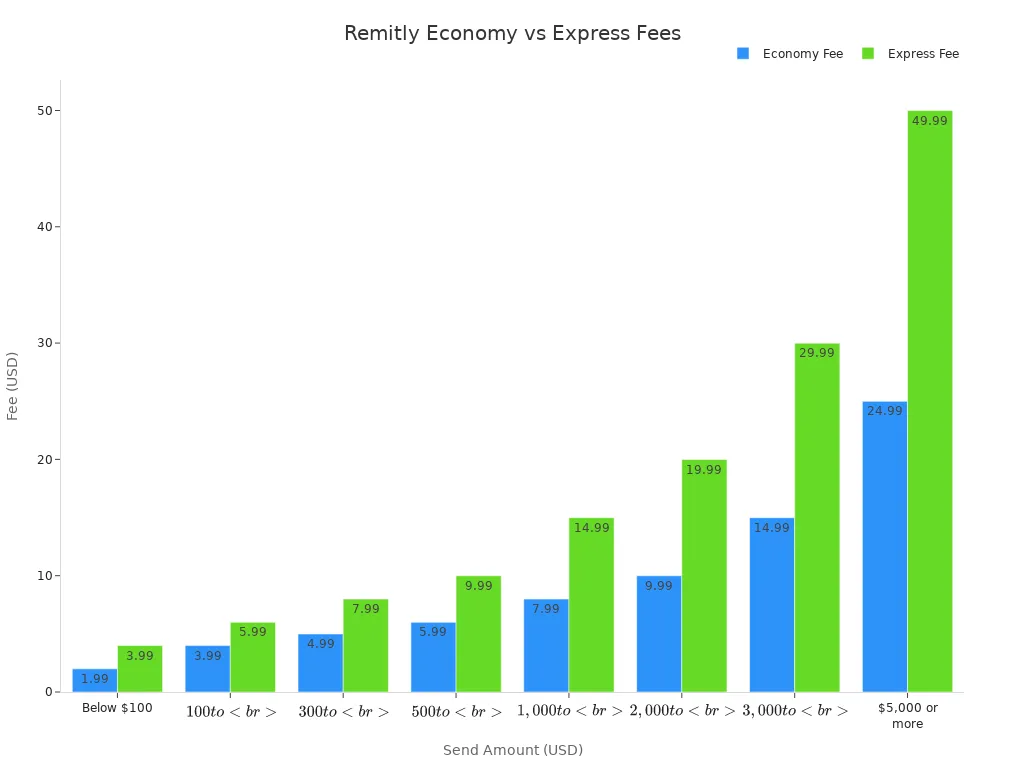
Note: Remitly sometimes offers free transfers for your first time or for sending over $1,000. Always check for the latest promotions before you send money.
Speed and delivery
The main difference between Economy and Express is how fast your recipient gets the money. Express delivers funds within minutes. This is helpful if your recipient needs the money right away. Economy takes longer, usually 3 to 5 business days. You can use the table below to compare the two options:
| Factor | Economy Service | Express Service |
|---|---|---|
| Speed | 3 to 5 business days | Within minutes |
| Fees | Lower fees | Higher fees |
| Funding Method | Bank account | Debit or credit card |
If you use Express, you pay more but your recipient gets the money fast. If you use Economy, you wait longer but pay less. Both options let you send money to many countries, including India, Mexico, and the Philippines. Remitly gives you a clear choice between speed and cost. This helps you pick the best money transfer service for your needs.
Real example: send money to India
Fee breakdown for $1,000 transfer
When you send money to india, you want to know exactly what you will pay and what your recipient will get. Remitly makes it easy to see the costs before you send money. If you send $1,000 from the United States to india in 2025, Remitly applies a clear fee structure. For transfers of $1,000 or more, Remitly waives the transaction fee. This means you do not pay a flat fee to send money to india if your transfer is $1,000 or above. However, you still need to watch the exchange rate markup, which ranges from 0.4% to 1.4% above the mid-market rate for usd to inr transfers.
Here is a simple table showing the fee breakdown for a $1,000 transfer to india:
| Fee Component | Details for $1,000 Transfer to India via Remitly (2025) |
|---|---|
| Transaction Fee | $0 (waived for transfers over $1,000) |
| Exchange Rate Markup | 0.4% to 1.4% above mid-market rate |
| Transfer Speed Options | Economy: up to 5 days, better exchange rate; Express: faster, less favorable exchange rate |
| Promotional Rates | First-time users get lower fees and better rates for their first transfer |
| Total Fees for $1,000 | Only the exchange rate markup applies; no other explicit fees |
Note: Remitly often gives first-time users a free transfer and a better exchange rate when they send money to india. You should check Remitly’s website for the latest offers before you send money.
What the recipient receives
The amount your recipient in india gets depends on the exchange rate Remitly offers for usd to inr transfers. The exchange rate markup lowers the number of Indian rupees your recipient receives. For example, if the mid-market rate is 1 USD = 84.4 INR, your $1,000 would convert to 84,400 INR. If Remitly applies a markup and offers 1 USD = 83.5 INR, your recipient gets 83,500 INR instead. Even a small difference in the exchange rate can mean your family or friends in india receive less money.
When you send money to india, always compare the rate Remitly gives you with the current mid-market rate. This helps you see how much the exchange rate markup affects the total received. Remitly shows you the exact amount your recipient in india will get before you confirm the transfer. You can choose between Economy and Express options. Economy gives a better rate but takes up to 5 days. Express is faster but uses a less favorable rate, so your recipient in india may get fewer rupees.
Remitly sometimes offers promotional free transfers for first-time users who send money to india. You can also reduce costs by choosing a bank transfer instead of a credit or debit card. These offers change, so check Remitly’s official website for the latest deals before you send money to india.
Remitly vs Wise: transfer costs compared
Fees and exchange rates
When you compare Remitly and Wise, you see clear differences in how each provider handles fees and exchange rates. Remitly uses a flat fee for transfers under $1,000 and waives the fee for larger amounts. Wise charges a small percentage fee for every transfer. The biggest difference comes from the exchange rate. Remitly adds a markup to the rate, while Wise uses the real mid-market rate with no extra charges. This means your recipient often gets more money with Wise, especially for low cost transfers.
| Feature | Remitly | Wise |
|---|---|---|
| Transaction Fee | $3.99 flat fee for transfers under $1,000; no fee for transfers over $1,000 | Starts at 0.48% per transfer (transparent fee) |
| Exchange Rate | Markup of 0.4% to 1.4% above mid-market rate, hidden in rate | Uses mid-market exchange rate with no markup |
| Amount Received (for $1,000 transfer) | Approx. 84,565.76 INR via Economy service (up to 5 days) | More INR received due to fair mid-market rate (about 550 INR more) |
| Transfer Speed | Economy: up to 5 days; Express: instant but with worse exchange rate | Over 60% instant, 95% within 24 hours |
Note: Wise usually gives you a better exchange rate, so your recipient receives more money for the same amount sent.
Transparency and user experience
You want to know exactly what you pay before you send money. Wise shows you all fees and uses the mid-market exchange rate, so you see the true cost upfront. Remitly also shows fees before you confirm, but it hides some costs in the exchange rate markup. This makes Wise more transparent for international transfers.
| Aspect | Remitly | Wise |
|---|---|---|
| Fee Structure | Variable fees by route, amount, and speed; fees shown upfront but vary | Transparent fees shown upfront; clear percentage fees |
| Exchange Rates | Includes a markup over the mid-market rate | Uses the mid-market exchange rate with no markup |
Many users find Wise easier to understand. You see the exact fee and rate, and you know how much your recipient will get. Remitly offers more payout options, like cash pickup, but Wise focuses on bank transfers and online payments.
- Wise generally offers cheaper international transfers in 2025.
- Wise uses the mid-market exchange rate, so you avoid hidden costs.
- Remitly may suit you if you need cash payouts or instant delivery.
- Both providers let you compare quotes before you send money.
Limits and delivery times
Transfer limits
When you use Remitly, you need to know how much money you can send at one time. Remitly sets transfer limits based on your account tier and the country you send money from. You start at Tier 1, but you can move to higher tiers by providing more information about yourself. Each tier gives you higher limits.
Here is a table that shows the limits for each account tier in USD:
| Account Tier | 24-hour Limit (USD) | 30-day Limit (USD) | 180-day Limit (USD) |
|---|---|---|---|
| Tier 1 | 2,999 | 10,000 | 18,000 |
| Tier 2 | 6,000 | 20,000 | 36,000 |
| Tier 3 | 10,000 | 30,000 | 60,000 |
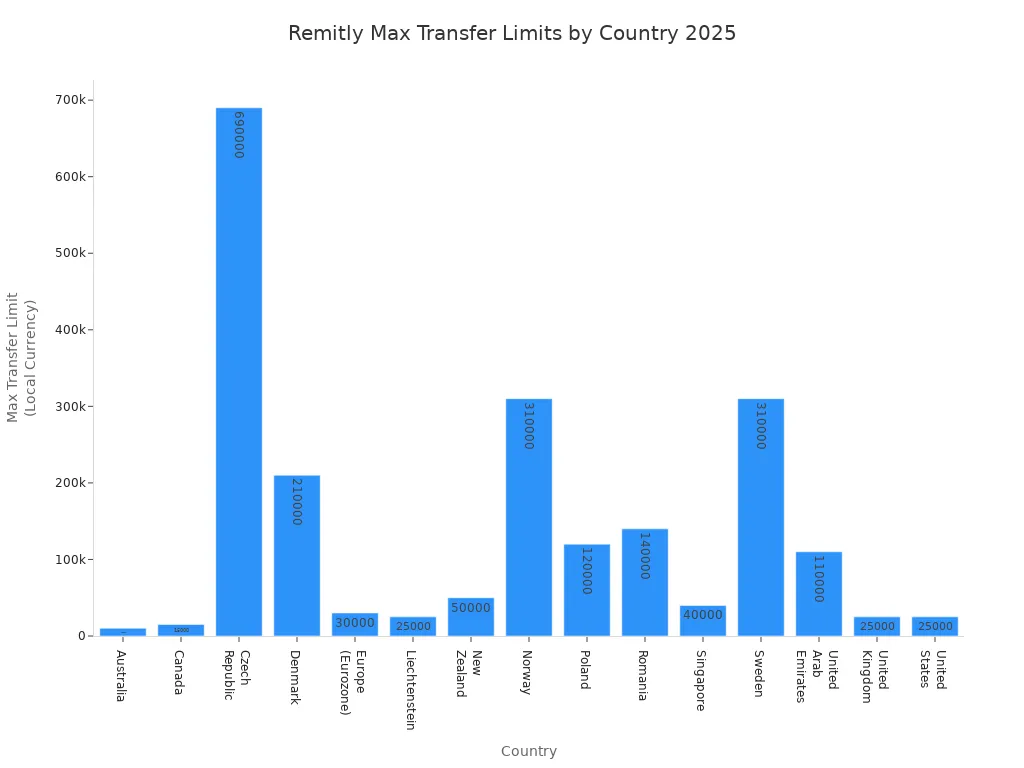
You also need to check the maximum transfer limit for your country. For example, if you send money from the United States, your maximum is $25,000 per transfer. Other countries have different limits. Here is a table with some examples:
| Country | Maximum Transfer Limit (USD equivalent) |
|---|---|
| United States | 25,000 |
| United Kingdom | 25,000 |
| Europe (Eurozone) | 32,000 |
| Canada | 11,000 |
| Australia | 6,600 |
| Singapore | 29,000 |
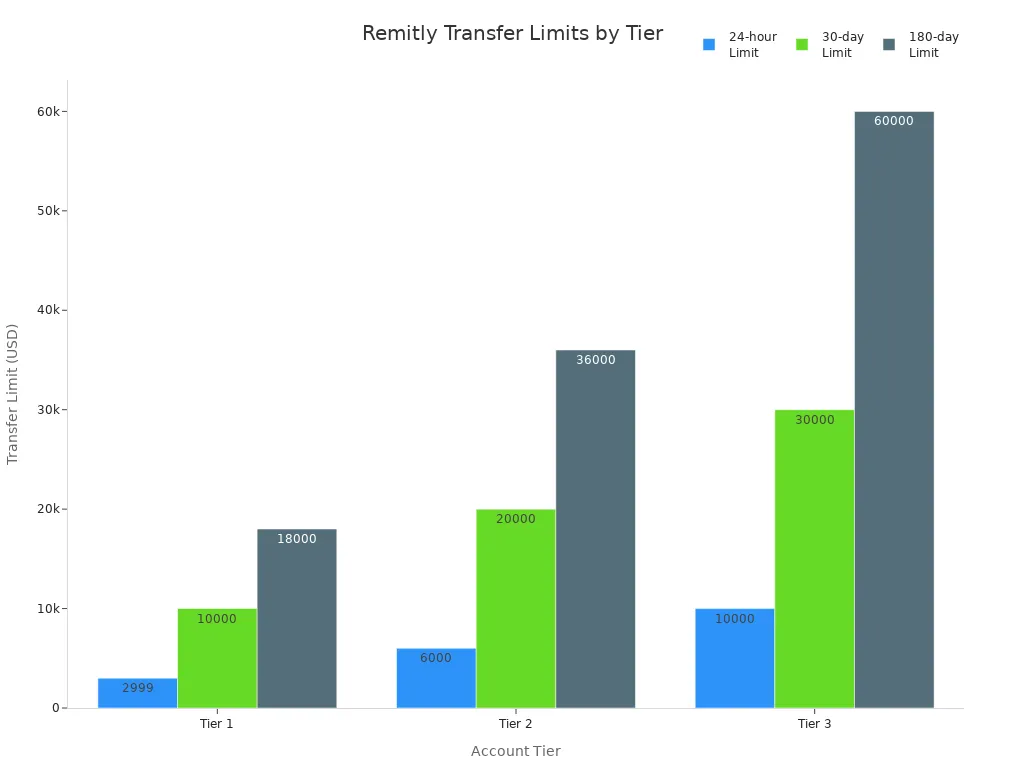
You should always check your account tier and country limit before you transfer money. This helps you avoid delays or failed transfers.
Delivery speed by country
Remitly gives you two main options for delivery speed: Express and Economy. Express uses a debit or credit card and sends money within minutes. Economy uses a bank transfer and takes longer, usually 1 to 5 days. The speed depends on the country and the payment method you choose.
Here is a table that shows the average delivery speeds:
| Delivery Option | Funding Method | Average Delivery Speed | Notes |
|---|---|---|---|
| Express | Debit or Credit Card | Within minutes | Fastest option; small fee for transfers under $1,000 |
| Economy | Bank Transfer | 1 to 5 days | Cheaper but slower; depends on bank processing times |
If you need to send money fast, choose Express. If you want to save on fees, pick Economy. Some countries may have faster or slower processing times, so always check the estimated delivery time before you confirm your transfer.
Note: Remitly shows you the estimated delivery time for your transfer before you pay. This helps you plan and make sure your recipient gets the money when they need it.
You now understand how Remitly fees work when you send money to india. Always check the total cost, including the exchange rate, before you transfer funds to india. To save more when sending money to india, try these strategies:
- Compare Remitly with other providers to find the best rates for india.
- Choose low-cost methods like ACH transfers instead of credit cards.
- Watch exchange rates and send money to india when rates are strong.
Remember to look for fee waivers and promotions before each transfer.
FAQ
How do you find the current Remitly fees for your country?
You can visit Remitly’s official website and select your sending and receiving countries. Remitly shows you the exact fee, exchange rate, and total cost before you send money.
Does Remitly charge hidden fees?
Remitly does not charge hidden fees. You see all costs upfront, including the transfer fee and exchange rate markup. Always check the final amount before you confirm your transfer.
Can you cancel a Remitly transfer after sending?
You can cancel your transfer if Remitly has not delivered the money yet. Log in to your Remitly account, find your transfer, and select “Cancel.” Remitly refunds your money if the transfer has not completed.
What payment methods does Remitly accept?
Remitly accepts bank transfers, debit cards, and credit cards. Credit card payments include an extra 3% fee. You can choose the method that works best for you.
Comparing Remitly’s tiered fees and exchange rate markups shows how small percentages can cost your family hundreds of dollars a year. With BiyaPay, you skip the hidden markups: get real-time transparent FX rates, multi-currency & crypto conversion, and fees as low as 0.5%.
Unlike services that make you choose between speed and cost, BiyaPay delivers same-day transfers to most countries worldwide, so your recipient gets more — faster.
Take control of your transfer costs today. Register at BiyaPay.
*This article is provided for general information purposes and does not constitute legal, tax or other professional advice from BiyaPay or its subsidiaries and its affiliates, and it is not intended as a substitute for obtaining advice from a financial advisor or any other professional.
We make no representations, warranties or warranties, express or implied, as to the accuracy, completeness or timeliness of the contents of this publication.
Related Blogs of

From the Frenzy at 6124 Points to the Darkness Before Dawn: Memory Fragments of China's Shanghai A-Shares


Beginner’s Guide: Easily Understand the Shanghai Composite Index and Its Investment Value


Want to Invest in US Stocks from Taiwan? Complete Guide to Popular Brokers: Account Opening Process & Pros/Cons Analysis

Data-Driven Analysis: Shanghai Stock Index 2026 Earnings Growth Forecast

Choose Country or Region to Read Local Blog
 Australia
 Austria
 Belgium
 Canada
 Cyprus
 Czech Republic
 Denmark
 Estonia
 Finland
 France
 Germany
 Greece
 Hong Kong
 India
India Indonesia
 Ireland
 Italy
Italy Japan
Japan Latvia
 Lithuania
 Luxembourg
 Malaysia
 Malta
Malta Morocco
 Nepal
Nepal Netherlands
 New Zealand
 Norway
 Pakistan
 Philippines
 Poland
 Portugal
 Romania
 Singapore
 Slovakia
 Slovenia
 South Africa
 South Korea
 Spain
Spain Sweden
 Thailand
 The United States
 Turkey
 United Arab Emirates
 United Kingdom
 Vietnam
Contact Us




BIYA GLOBAL LLC is a licensed entity registered with the U.S. Securities and Exchange Commission (SEC No.: 802-127417); a certified member of the Financial Industry Regulatory Authority (FINRA) (Central Registration Depository CRD No.: 325027); regulated by the Financial Industry Regulatory Authority (FINRA) and the U.S. Securities and Exchange Commission (SEC).
BIYA GLOBAL LLC is registered with the Financial Crimes Enforcement Network (FinCEN), an agency under the U.S. Department of the Treasury, as a Money Services Business (MSB), with registration number 31000218637349, and regulated by the Financial Crimes Enforcement Network (FinCEN).
BIYA GLOBAL LIMITED is a registered Financial Service Provider (FSP) in New Zealand, with registration number FSP1007221, and is also a registered member of the Financial Services Complaints Limited (FSCL), an independent dispute resolution scheme in New Zealand.