What to Know About MoneyGram The Good and the Bad




Image Source: unsplash
You might wonder if MoneyGram is the right choice for your money transfer needs. With a network in over 200 countries and more than 380,000 agent locations, MoneyGram stands out in the world of financial services. Take a look at how it compares:
| Service Provider | Countries Served | Agent Locations |
|---|---|---|
| MoneyGram | Over 200 | More than 380,000 |
| Western Union | Over 200 | Over 500,000 |
| PayPal | Over 200 | N/A |
You can send payments quickly, often with digital options or cash pickup. Many people trust MoneyGram for its security features, but some worry about higher fees or slow customer service. If you want a quick moneygram overview, you will see both strengths and weaknesses in the way it handles payments and money transfer services.
Key Takeaways
- MoneyGram offers fast money transfers with cash pickups often available within minutes and serves over 200 countries with a large global network.
- You can send money using the app, website, or local agents, with flexible options like cash pickup, bank deposits, and mobile wallets.
- MoneyGram uses strong security measures, including encryption and fraud prevention, to keep your money and information safe.
- Fees vary based on payment method, amount, and delivery type; using a bank account is usually cheaper than credit cards.
- Customer service can be slow or unhelpful at times, so tracking your transfer online and double-checking details helps avoid problems.
MoneyGram Overview
Image Source: unsplash
What Is MoneyGram
When you look for a reliable way to send money across the world, MoneyGram often comes up. This company has built a strong reputation in financial services, helping people move money quickly and safely. In this moneygram overview, you will see that MoneyGram operates in more than 200 countries and has over 400,000 retail locations. You can use their services for personal remittances, business payments, and even to access new digital payment business options.
MoneyGram offers more than just simple money transfers. You can send single or mass payments for business needs, and the company supports different payout methods. These include cash pickup, direct deposit to bank accounts, mobile wallets, and cards. Many businesses use MoneyGram to reduce costs by tapping into its global network and advanced technology. The company also focuses on strong compliance, fraud prevention, and anti-money laundering programs. This means you get a secure experience every time you use their financial services.
MoneyGram keeps up with new technology. They have a direct-to-consumer app and work with partners like Plaid and Mastercard to make payments faster and safer. You can even use their services to move between cash and cryptocurrencies, thanks to partnerships with the Stellar Development Foundation. This moneygram overview shows how the company blends traditional and digital payment business models to serve you better.
How It Works
You might wonder how a money transfer with MoneyGram actually happens. Here’s a simple step-by-step guide:
- You start your money transfer using the MoneyGram app, website, or by visiting a local agent.
- You pick your payment method and enter the recipient’s details.
- MoneyGram processes your request, taking into account the fees, amount, and where you want to send the money.
- The recipient gets the money in one of several ways: cash pickup, direct deposit to a bank account, deposit to a debit card, or transfer to a mobile wallet.
- If the recipient uses a mobile wallet or debit card, they may need to access the MoneyGram app or website.
- Both you and the recipient can track the status of the money transfer online or through the app.
This process gives you flexibility and control. You can choose the best way to send and receive payments, whether you need to help family, pay for services, or manage business financial services. MoneyGram’s focus on technology and security makes it a strong choice for many types of money transfers.
Strengths
Speed
You want your money to reach your loved ones or business partners fast. MoneyGram stands out for its quick money transfer options. If you send cash, the recipient can often pick it up within minutes. This speed is a big reason many people choose MoneyGram for urgent payments. When you send money to a bank account or debit card, it usually takes 1 to 3 business days. Some other companies might move money to bank accounts a little faster, but MoneyGram’s cash pickup service is almost instant. Many customers say the service is fast and reliable, which gives you peace of mind when time matters.
- Cash transfers: Usually available within minutes.
- Bank or debit card transfers: Typically take 1–3 business days.
- Many users rate MoneyGram highly for speed and ease of use.
Global Network
MoneyGram has built one of the largest networks in the world for money transfers. You can find agent locations in more than 200 countries and territories. This global reach means you can send or receive money almost anywhere. The company’s network is especially strong in regions like Asia-Pacific, Eastern Europe, Central America, Africa, and the UAE.
| Region/Scope | Number of Agent Locations | Additional Details |
|---|---|---|
| Worldwide | About 400,000 | Operates in more than 200 countries and territories |
| Asia-Pacific, Eastern Europe, Central America | Over 96,000 | Data from 2006 |
| Africa | 25,000 | Includes agreement with Mauritius Post Office |
| UAE | Over 350,000 walk-in locations | Through partnerships and mobile wallet providers |
You can use MoneyGram’s online locator to find the nearest agent. This wide network helps you send money to family, friends, or business contacts almost anywhere in the world.
Convenience
MoneyGram makes sending and receiving money simple. You have both digital and in-person options. If you like using your phone or computer, you can send money through the MoneyGram app or website. If you prefer face-to-face service, you can visit one of the many agent locations. The process is straightforward:
- Find a nearby agent or use the app.
- Prepare your ID and the recipient’s details.
- Complete the transaction and pay the amount plus fees.
- Share the reference number with the recipient for cash pickup, or send money directly to a bank account or mobile wallet.
You can pay with cash at agent locations, and some places accept debit cards. For receiving money, your recipient can pick up cash or get the funds in their bank account or mobile wallet. MoneyGram also provides tools to track your transfer and find agent locations. This flexibility helps you choose the best way to send payments, whether you need to help with a remittance or pay for services.
Security
You want your money and personal information to stay safe. MoneyGram takes security seriously. The company uses advanced encryption technology to protect your data during every money transfer. You will find multi-factor authentication, which means you need more than just a password to access your account. MoneyGram also monitors transactions all the time to spot anything suspicious.
- MoneyGram follows strict anti-money laundering and fraud prevention rules.
- Agents get special training to help stop fraud.
- The company works with law enforcement and regulators to fight scams and illegal activity.
- You get tips on how to avoid scams and keep your account safe.
- MoneyGram uses secure technology like PCI DSS standards and advanced encryption.
- You must show a government-issued ID for in-person transactions.
If you ever notice something strange, you can report it right away. MoneyGram’s dedicated fraud prevention team works to keep your money safe. You can also help by using strong passwords, enabling two-factor authentication, and staying alert for scams. This focus on security makes MoneyGram a trusted choice for financial services and money transfers.
Drawbacks

Image Source: unsplash
Fees
When you send money, you want to know exactly how much it will cost. With moneygram, the fees can sometimes surprise you. The amount you pay depends on where you send the money, how much you send, and how you pay for the transfer. If you use a credit card, you usually pay more than if you use a bank account. Cash pickups also cost more than sending money to a bank account.
Here’s a table that shows how moneygram’s fees compare to other popular services:
| Transfer Type | MoneyGram Fees (USD) | PayPal Fees (USD) | Xoom Fees (USD) |
|---|---|---|---|
| Within U.S. (bank account → bank account) | Starts at $1.89 | No fee | 1% up to $999; $10 for $1,000 or more |
| Within U.S. (debit/credit card → bank account) | Starts at $1.89, can go up to $6.49+ | 2.9% of transaction + $0.30 | Typically 2%; $5.99 for cash pickup |
| International ($100 from U.S. to Mexico) | $1.99 (debit card), $6.49 (credit card); cash pickup fees higher ($3.99 debit, $8.49 credit) | 5% fee with $0.99 minimum and $4.99 max | Free to $4.49 depending on payment method |
| Within U.S. (sending $100 via bank account) | $1.89 | No fee | 1% fee |
| Within U.S. (sending $100 via debit card) | $6.59 (credit card funding example) | 2.9% + $0.30 | $0.39 to $0.99 |
| Within U.S. (sending $100 via credit card) | $6.59 | 2.9% + $0.30 | $2.99 to $4.49 |
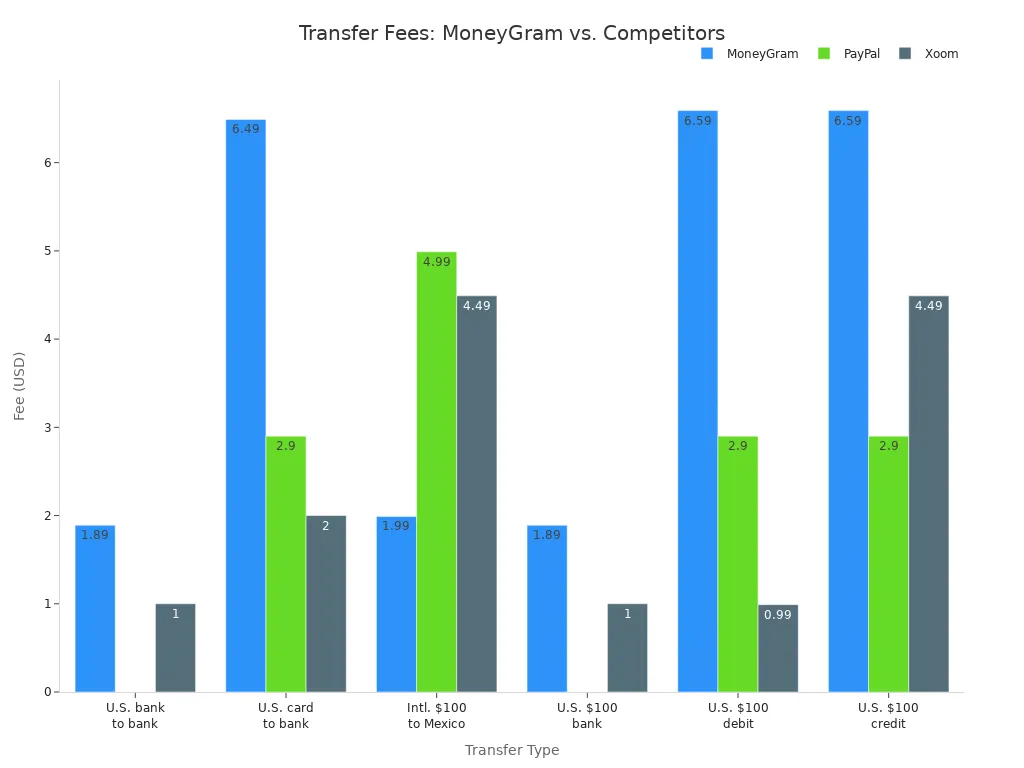
Note: Fees can change based on the payment method, where you send the money, and how the recipient gets it. Always check the fee estimator on the moneygram website before you send money.
You might notice that moneygram’s fees are sometimes lower than Western Union, but they can be higher than PayPal or Xoom for some transfers. If you use a credit card, you may also pay extra fees from your card company, like cash advance charges or interest.
Here are some things that affect the cost of your transfer:
- Where you send the money
- How much you send
- How you pay (bank account, debit card, or credit card)
- How the recipient gets the money (cash pickup, bank deposit, mobile wallet)
- Exchange rates, which can change daily
- Special promotions or discounts
If you want to save money, try sending larger amounts less often, and use a bank account instead of a credit card. Always check the total cost, including exchange rates, before you send.
Limits
You might want to send a large amount of money, but moneygram has limits on how much you can transfer. For most countries, you can send up to $10,000 USD per online transaction. You can also send up to $10,000 USD in a 30-day period. These limits help prevent fraud and keep your money safe.
Your bank or card provider might also set their own limits. If you need to send more than $10,000 USD, you may have to look for another service or contact moneygram customer support for help. There is no clear information about the minimum amount you can send, but most people send at least a few dollars.
Tip: Always check the latest limits before you start your transfer, especially if you plan to send a large amount.
Customer Service
When you have a problem with your transfer, you want help right away. Some users say that moneygram’s customer service can be slow or unhelpful. You might have trouble reaching an agent, or you may talk to someone who does not speak your language well. Sometimes, it takes a long time to solve your problem or get a refund.
Here’s a look at the most common complaints about customer service:
| Complaint Category | Number of Complaints | Common Issues Described |
|---|---|---|
| Product Issues | 323 | Lost processing fees due to system errors, money sent to wrong recipients or accounts |
| Service or Repair Issues | 86 | Delays or failures in money delivery, difficulties in obtaining refunds |
| Customer Service Issues | 62 | Unhelpful agents, language barriers, unresolved disputes |
| Billing Issues | 46 | Charges for fraudulent transactions, disputed fees |
| Delivery Issues | 12 | Money not delivered or delayed |
| Sales and Advertising | 8 | Misleading information or advertising complaints |
| Order Issues | 7 | Problems with money order replacements and refunds |
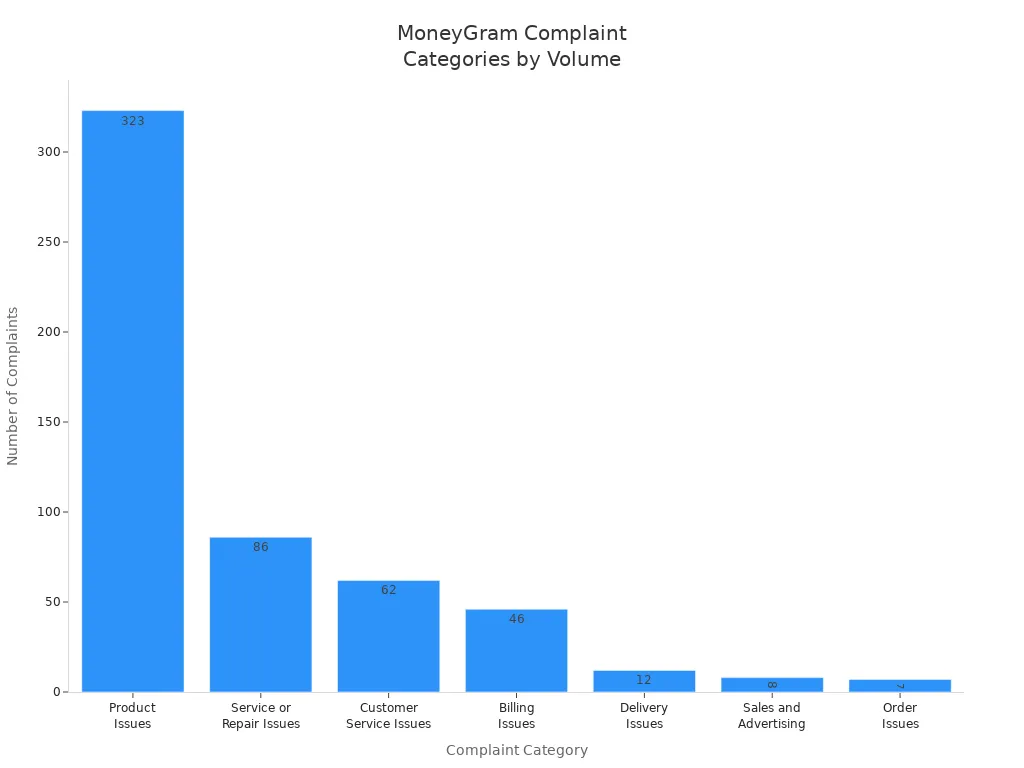
If you run into trouble, try using the tracking number to check your transfer status online. If you still need help, contact customer service, but be ready for possible delays.
Issues
You want your money to arrive safely and on time. Sometimes, things do not go as planned. Here are some common problems you might face with moneygram:
- Transfers can get delayed if you enter the wrong recipient name or address.
- Extra checks for security or rules in some countries can slow things down.
- Technical problems or network issues may stop your transfer.
- Sending money to remote places can take longer than sending to big cities.
- Local holidays or bank closures can delay when your recipient gets the money.
- Exchange rates can change, which might affect how much your recipient gets.
If you want to avoid delays, double-check all the details before you send. Use the “Money in Minutes” service if you need the money to arrive fast. Always track your transfer and contact support if something goes wrong.
Note: Moneygram does not take responsibility if you send money to the wrong person by mistake. Always make sure you have the correct information before you send.
Money Transfers Comparison
Fees and Rates
When you send money, you want your recipient to get as much as possible. Wise usually gives you the best deal. Wise uses the real exchange rate and often charges no transfer fee. Western Union and MoneyGram both add a markup to the exchange rate and charge a fee. Here’s a quick look at how much your recipient gets if you send USD to PHP:
| Provider | Exchange Rate | Transfer Fee (USD) | Amount Received (PHP) |
|---|---|---|---|
| Wise | 57.7337 | 0.00 | 57,733.70 |
| Western Union | 57.0345 | 4.80 | 56,760.75 |
| MoneyGram | 55.0965 | 5.00 | 54,821.02 |
Wise gives the highest amount. MoneyGram has the highest fee and the least competitive exchange rate. Western Union sits in the middle. If you want to save on money transfer costs, Wise is often the best choice. MoneyGram’s fees can change based on how fast you want the money to arrive and where you send it. Always check the total cost before you send payments.
Speed and Delivery
You want your money transfer to arrive fast. MoneyGram and Western Union both offer cash pickup in minutes. Wise also moves money quickly, often within a few hours. If you send to a bank account, MoneyGram and Western Union may take up to two days. Wise usually completes transfers in minutes to a few hours, but the exact time can depend on the country and bank.
| Transfer Partner | Transfer to Bank Account | Transfer for Cash Pickup |
|---|---|---|
| Western Union | Up to 2 days | 15-30 minutes or same/next day |
| MoneyGram | Few hours or next day | Within minutes |
| Wise | Minutes to a few hours | Not always available |
If you need urgent cash, MoneyGram and Western Union are strong options. Wise works best for fast bank transfers.
Safety
You want your money and information to stay safe. All three services—MoneyGram, Western Union, and Wise—use strong security. They use encryption and follow strict rules to protect your money transfers. MoneyGram and Western Union have large agent networks, so you can get help in person if you need it. Wise focuses on digital service and is also regulated for cross-border money transfers.
MoneyGram and Western Union both offer phone, email, live chat, and in-person support. Wise gives you digital support. If you like face-to-face help, MoneyGram or Western Union may suit you better. If you prefer online service, Wise is a good fit.
Tip: Always double-check the recipient’s details and use secure passwords for your accounts. This helps keep your payments safe.
User Tips
What to Watch For
When you use moneygram for a money transfer, you want to avoid surprises. The fees you pay depend on how much you send, the payment method, and how your recipient gets the money. If you send $500 or more, the fee can jump. Cash pickup usually costs more than sending to a bank account. The good news is that moneygram does not have hidden fees beyond these visible charges, transfer limits, and speed options. Always check the fee estimator before you send money.
You also need to know about identification requirements. Here is what you should have ready:
- Bring a government-issued photo ID, like a passport, driver’s license, or national ID card.
- Make sure the name on your ID matches the name on the money transfer record.
- Some agents may ask for proof of address if your ID does not show it.
- You will need the transaction reference number from the sender to pick up money.
- Requirements can change by country or agent, so check with your local moneygram agent before you go.
If you want to save money, compare fees and exchange rates with other services. Try to use online services and pay from your bank account instead of a credit card. Sending money in the same currency as your recipient can help you avoid extra charges.
Tip: Avoid sending money during weekends or holidays. Fees can be higher at those times.
Safe Transfers
You want your money transfer to be safe. Here are some steps you can take:
- Use the moneygram app or website. These use encryption and fraud prevention tools.
- Avoid public Wi-Fi when sending money. If you must use it, try a VPN.
- Check that the website address starts with “https” and keep your device’s security software updated.
- Only send money to people you know. Double-check all details before you confirm the transfer.
- Enable two-factor authentication on your moneygram account for extra security.
- If you see anything suspicious, report it to moneygram right away.
- Learn about moneygram’s refund policies and fraud prevention measures.
Note: Once your recipient picks up the money, you cannot reverse the transfer. Always make sure you trust the person you are sending money to.
You have a lot to think about when sending money. Here’s a quick look at the main pros and cons:
| Pros | Cons |
|---|---|
| Wide global reach | Fees and exchange rates can be high |
| Fast cash pickups | Not all services in every country |
| Many agent locations | Customer support varies |
| Secure and regulated | Complex fee structure |
You should compare fees, speed, and convenience before you choose a provider. Always check security tips and make sure you trust the person you send money to.
FAQ
How long does a MoneyGram transfer usually take?
You can send cash for pickup in minutes. If you send to a bank account, it may take a few hours or up to three business days. Always check the estimated delivery time before you confirm your transfer.
Can you cancel a MoneyGram transfer after sending?
You can cancel a transfer if the recipient has not picked up the money. Log in to your MoneyGram account or visit an agent. If the money is already collected, you cannot reverse the transaction.
What identification do you need to send or receive money?
You need a government-issued photo ID, such as a passport or driver’s license. Some Hong Kong banks may ask for extra proof of address. Make sure your name matches the transfer details.
Does MoneyGram have hidden fees?
MoneyGram shows all fees before you pay. You may see extra costs from exchange rates or your card provider. Always review the total cost and use the fee estimator on the MoneyGram website.
What should you do if your transfer gets delayed?
First, track your transfer online or in the app. Double-check the recipient’s information. If you still have problems, contact MoneyGram customer support for help. Delays can happen because of holidays, bank hours, or extra security checks.
MoneyGram offers speed and global reach, but many users still face higher fees, exchange rate markups, and customer service delays. If you want a more transparent and cost-efficient alternative, BiyaPay gives you full control over your transfers.
With BiyaPay, you can enjoy multi-currency and cryptocurrency conversions, real-time transparent exchange rates, and fees as low as 0.5%. The platform also supports same-day settlement, and its coverage extends to most countries and regions worldwide. This makes it easier to move money quickly, securely, and without hidden costs.
Upgrade your remittance experience today — register with BiyaPay and make every transfer faster and smarter.
*This article is provided for general information purposes and does not constitute legal, tax or other professional advice from BiyaPay or its subsidiaries and its affiliates, and it is not intended as a substitute for obtaining advice from a financial advisor or any other professional.
We make no representations, warranties or warranties, express or implied, as to the accuracy, completeness or timeliness of the contents of this publication.
Related Blogs of

Master US Stock Trading Hours in One Article: Never Miss Pre-Market and After-Hours Opportunities

Micro Dow, Micro Nasdaq, Micro S&P Futures Comprehensive Comparison – Helping You Find the Best Trading Choice

A Blessing for Small Investors: Finding the Lowest Trading Cost US Stock Brokers


US-China Trade War Enters New Phase: How the Tech Industry Can Respond to Supply Chain Impacts

Choose Country or Region to Read Local Blog
 Australia
 Austria
 Belgium
 Canada
 Cyprus
 Czech Republic
 Denmark
 Estonia
 Finland
 France
 Germany
 Greece
 Hong Kong
 India
India Indonesia
 Ireland
 Italy
Italy Japan
Japan Latvia
 Lithuania
 Luxembourg
 Malaysia
 Malta
Malta Morocco
 Nepal
Nepal Netherlands
 New Zealand
 Norway
 Pakistan
 Philippines
 Poland
 Portugal
 Romania
 Singapore
 Slovakia
 Slovenia
 South Africa
 South Korea
 Spain
Spain Sweden
 Thailand
 The United States
 Turkey
 United Arab Emirates
 United Kingdom
 Vietnam
Contact Us




BIYA GLOBAL LLC is a licensed entity registered with the U.S. Securities and Exchange Commission (SEC No.: 802-127417); a certified member of the Financial Industry Regulatory Authority (FINRA) (Central Registration Depository CRD No.: 325027); regulated by the Financial Industry Regulatory Authority (FINRA) and the U.S. Securities and Exchange Commission (SEC).
BIYA GLOBAL LLC is registered with the Financial Crimes Enforcement Network (FinCEN), an agency under the U.S. Department of the Treasury, as a Money Services Business (MSB), with registration number 31000218637349, and regulated by the Financial Crimes Enforcement Network (FinCEN).
BIYA GLOBAL LIMITED is a registered Financial Service Provider (FSP) in New Zealand, with registration number FSP1007221, and is also a registered member of the Financial Services Complaints Limited (FSCL), an independent dispute resolution scheme in New Zealand.