Business Bank Accounts for Startups in 2025





Image Source: pexels
If you want the best business bank accounts for your start-up in 2025, you have great choices. Top picks like Chase, Mercury, Brex, Bluevine, Rho, and American Express make startup banking simple and smart. These financial institutions stand out for low fees, digital-first features, and strong customer support. Take a look at what matters most when picking the best startup banks:
| Criteria | Explanation |
|---|---|
| Safety and capitalization | Protects your funds with strong financial backing. |
| Online banking and user interface | Easy-to-use platforms help you manage bank accounts for startups. |
| Customer service quality | Fast support for urgent business needs. |
| Low to no fees | Keeps costs low for your business bank account. |
| Software integration | Works with tools like QuickBooks for your startup business account. |
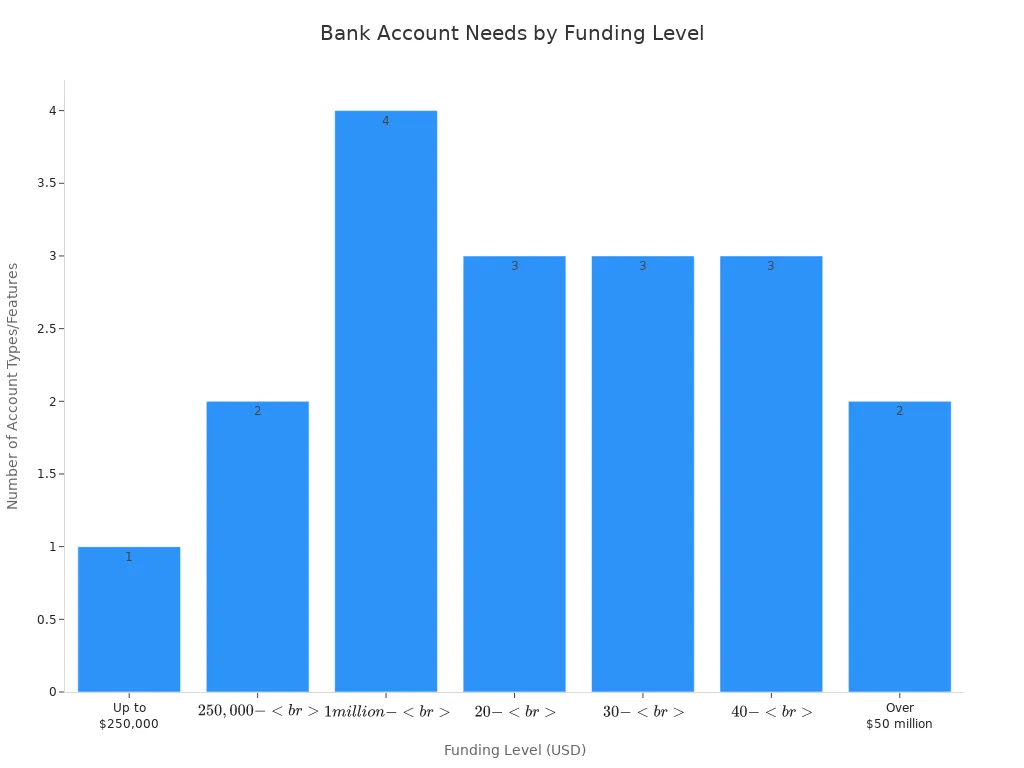
You need business bank accounts for start-ups that match your growth. The best startup banks help you handle more than just payments—they offer startup accounts with advice, security, and room to grow. Use the reviews below to find the best business bank accounts for your start-up.
Key Takeaways
- Choose a business bank account that fits your startup’s needs, focusing on low fees, easy online access, and helpful features like software integration.
- Digital banks offer fast setup, no monthly fees, and great tools for tech-savvy startups, while traditional banks provide cash handling and in-person support.
- Look for banks that offer free business checking, strong customer service, and security features like fraud protection and FDIC insurance.
- Consider your startup’s growth plans and banking style to pick accounts with useful perks like credit options, rewards, and automation tools.
- Switching to a business bank account helps separate your personal and business money, making your startup more professional and easier to manage.
Quick Comparison

Image Source: pexels
Features & Fees
When you look for the best business bank accounts for your start-up, you want to know what you get and what you pay. Here’s a quick table to help you compare the top choices for 2025. You can see how each business banking platform stacks up on fees, deposits, and digital features. This makes it easier to spot the best banks for startups and find free business checking that fits your needs.
| Bank | APY | Monthly Fee | Minimum Opening Deposit | Cash Deposit Policy | Overdraft Fees | Integrations | Notes |
|---|---|---|---|---|---|---|---|
| Chase | None | $15-$95 (varies by balance) | $2,000 | First $20,000 free per month; fees above that | $34 if overdrawn > $50 | QuickBooks Online | Many branches and ATMs; fees can add up unless you meet waivers |
| Mercury | None | None | None | No cash deposits | None | Limited QuickBooks, Xero | No fees; no overdraft; best for digital-first startups |
| Brex | None (money market funds) | None | None | No cash deposits; no debit card or ATM access | None | NetSuite, QuickBooks | Needs $25,000 cash balance for credit; offers corporate cards |
| Bluevine | Up to 2.0% (with activity) | None | None | Cash deposits allowed but fees charged | None | QuickBooks Online/Desktop | Low-cost; fees for cash deposits; limited debit cards |
| Rho | N/A | No platform fees | N/A | Integrated treasury management; no platform fees | N/A | Integrated platform | No fees; treasury, expense, corporate cards; great for scaling startups |
| American Express (via Brex) | None (money market funds) | None | None | No cash deposits; no debit card or ATM access | None | NetSuite, QuickBooks | Focus on VC-backed startups; flexible credit limits |
You can see that many of the best startup banks offer free business checking and no monthly fees. Some, like Bluevine, even give you interest on your business checking accounts if you meet certain activity levels. If you want a business bank account with lots of integrations, Bluevine and Brex stand out. They connect with QuickBooks and other tools, making business banking services easier for your team.
Tip: If you need to deposit cash often, Chase and Bluevine let you do that, but watch out for extra fees after you hit their limits.
Best For
Choosing the right business bank accounts for start-ups depends on your needs. Here’s a quick guide to help you match your start-up with the best business bank accounts and business banking platform.
- Chase: Great for start-ups that want lots of branches, ATMs, and easy cash deposits. You get strong business banking services, but you need to watch the fees.
- Mercury: Perfect for tech-focused start-ups that want free business checking and no hidden costs. You get a digital-first business banking platform, but you can’t deposit cash.
- Brex: Best for VC-backed start-ups that want business checking accounts with corporate cards and advanced integrations. You need a higher cash balance, but you get lots of perks.
- Bluevine: Good for small businesses that want free business checking and the chance to earn interest. You get strong digital features and business savings accounts, but cash deposits cost extra.
- Rho: Ideal for scaling start-ups that want a fully integrated business banking platform with expense management and no platform fees.
- American Express (via Brex): Suited for start-ups that want flexible credit and advanced business banking services, but don’t need cash deposits or ATM access.
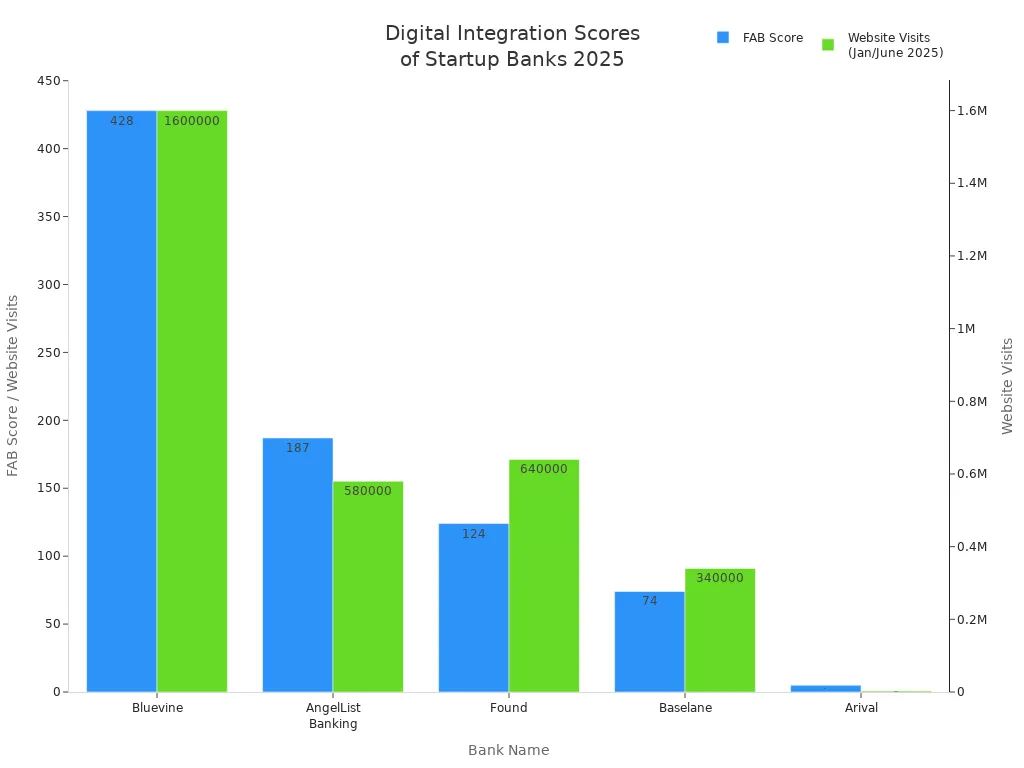
You can see from the chart that Bluevine, AngelList Banking, and Found lead in digital presence and fintech attention. These business bank accounts for start-ups offer some of the most advanced digital integrations. If you want a business banking platform that keeps up with your growth, these are strong choices.
When you pick from the best business bank accounts, think about your cash needs, digital tools, and how you want to grow. The right business bank account can make startup banking simple and help your start-up succeed.
Account Reviews
Chase
Chase stands out as one of the most recognized financial institutions for business bank accounts. If you want a mix of in-person banking and digital tools, Chase gives you both. You get access to thousands of branches and ATMs across the United States, which makes it easy to handle cash or get help when you need it.
| Feature/Aspect | Details/Description |
|---|---|
| Monthly Fee | $15 per month, waived with $2,000 minimum daily balance, $2,000 monthly Chase Ink® card spend, or $2,000 deposits via Chase QuickAccept® or eligible payment solutions; $0 minimum opening deposit |
| Transaction Limits | Unlimited digital transactions; 20 free teller/paper transactions per month, then $0.40 per extra transaction |
| Cash Deposit Allowance | $5,000 free monthly cash deposit limit; $2.50 fee per $1,000 for extra cash deposits |
| Branch & ATM Network | Access in 48 states; no fees at Chase ATMs; $3 fee at non-Chase US ATMs; $5 fee at non-Chase international ATMs |
| Mobile App Features | Mobile check deposit, bill pay, QuickPay with Zelle®, Chase QuickDeposit℠, Chase QuickAccept®, real-time alerts, credit score access, card controls, secure messaging |
| Pros | Flexible fee waivers, large branch and ATM network, integrated payment acceptance, higher cash deposit limits, strong mobile app |
| Cons | $15 monthly fee if you do not meet waiver conditions, fees for extra teller transactions, ATM fees for non-Chase ATMs, some customer support issues and unexpected account closures |
| Recommended For | Startups that want nationwide access, cash handling, and integrated payment solutions; less ideal if you want low or no fees |
You might like Chase if you want to visit a branch or need to deposit cash often. Many users praise the mobile app, which scores 4.8/5 on the App Store and 4.4/5 on Google Play. However, some reviews mention low interest rates and fees if you do not meet the waiver requirements. Trustpilot ratings are low, and some customers report issues with support and account closures. If you value stability and branch access, Chase is a strong choice for your business bank account.
Mercury
Mercury is a digital-first business banking platform built for tech-focused startups. You can open free business checking and business savings accounts with no monthly fees or minimums. Mercury offers a smooth online experience and tools that help you manage your money with ease.
- Main Features:
- Business checking and savings accounts with no monthly fees
- High-yield savings options
- Transparent pricing and no overdraft fees
- Venture debt for startups
- User-friendly digital banking platform
- Cash management tools and startup perks
- FDIC insurance coverage up to $5 million via sweep networks
- Pros:
- No monthly fees or minimums
- Competitive interest rates on savings
- Simple, transparent pricing
- Venture debt options for startups
- Intuitive digital experience
- Startup discounts
- Cons:
- No cash deposit or paper check options
- Industry restrictions (e.g., gambling, marijuana)
- No accounts for sole proprietorships
- Limited customer support
- Fees for certain transactions after free limits
Mercury works best for tech startups that want free business checking and a digital experience. Customers like the cost savings and easy banking. Some users mention delays in account approval and occasional communication issues. If you need to deposit cash or want in-person service, Mercury may not fit your needs.
Brex
Brex offers a business banking platform designed for fast-growing startups. You get business checking accounts, corporate cards, and automation tools that help you manage expenses and payments.
- Main Features:
- Automated expense management
- Corporate credit cards with no personal guarantees
- Real-time transaction monitoring
- Integrations with QuickBooks, Xero, and more
- Mobile receipt capture and customizable spending controls
- Workflow automation and detailed reporting
- Pros:
- No personal guarantees for corporate cards
- Streamlined financial operations
- Strong security and fraud monitoring
- Instant spending insights
- Vendor payment simplification
- Startup-friendly credit underwriting
- Cons:
- Limited customer support on lower-tier plans
- Extra fees for advanced features
- Possible unexpected credit limit changes
- Learning curve for advanced reporting
- Not ideal for bootstrapped startups
Brex is a great fit if your start-up is VC-backed and you want automation and free business checking. Many users enjoy how Brex simplifies cash flow and daily banking. Some users find the rewards program complex and wish for better support on basic plans. If you want a modern business bank account with lots of integrations, Brex is a strong choice.
Bluevine
Bluevine gives you a digital-first business bank account with high-yield checking and no monthly fees. You can open an account quickly and manage your money online or through the mobile app.
| Aspect | Details |
|---|---|
| Main Features | - High-yield checking with up to 3.7% APY depending on plan- No monthly fees- Flexible line of credit ($6,000 to $250,000)- Digital-first banking with mobile app and web portal- Multi-user access- Vendor and invoice management- FDIC insurance up to $3 million- Integrations with Stripe, PayPal, Square, Shopify- Workflow automation via Zapier |
| Pros | - Competitive interest rates- No fees or minimum balance- Fast account setup- Flexible line of credit- Modern digital experience- Multi-user access- Strong security |
| Cons | - No physical branches- Cash deposits only via Green Dot with fees- No Zelle or instant transfers- No joint accounts- No savings accounts or credit cards- Customer service limited to weekdays- Cash deposit method inconvenient for cash-heavy businesses |
| Ideal For | - Tech-savvy startups and digital-first companies- Freelancers, independent contractors, small businesses, and LLCs |
| Not Ideal For | - Businesses needing frequent cash deposits or in-person banking- Larger companies needing treasury management or corporate credit cards |
Bluevine is perfect if you want free business checking and high interest. You can manage your account online and connect with popular payment platforms. If you need to deposit cash often or want in-person help, Bluevine may not be the best fit.
Rho
Rho is a business banking platform that combines banking, expense management, and automation. You get a unified dashboard to track spending, manage cards, and automate payments.
| Category | Details |
|---|---|
| Main Features | Real-time transaction insights; advanced security; seamless accounting integration; mobile accessibility; automation of expense management; corporate card management; workflow automation; digital receipt capture; APIs for integration; offline mobile functionality. |
| Pros | Unified platform; real-time tracking; automated invoice processing; instant card issuance; flexible spending permissions; advanced security; seamless accounting sync; scalable and easy to use. |
| Cons | Limited customization; basic mobile app; weak automation for complex tasks; restricted third-party integrations; limited advanced reporting; variable customer support; U.S.-focused payment processing; may not suit larger enterprises. |
| Suitability for Startups | Well-suited for startups due to scalability, integrated control, ease of use, and automation. Not ideal for larger companies needing deep customization. |
| Pricing | No public pricing; contact vendor. |
Rho is best if you want a digital-first business bank account with automation and no monthly fees. Customers like the ease of use and transparency. Some users wish for more customization and better support. If you want to handle cash or need a physical branch, Rho may not be right for you.
American Express
American Express offers a business bank account that blends online convenience with strong rewards and lending options. You can earn interest and rewards while managing your account through a user-friendly app.
| Aspect | Details |
|---|---|
| Fees | No monthly fees; No minimum opening deposit; No online transaction fees; Free use of MoneyPass ATMs; $3 fee for out-of-network ATM use; No cash deposit support |
| Interest Rate | 1.30% APY on balances up to $500,000 |
| Lending | Easy loan approval for lines of credit up to $250,000 via Kabbage Funding; No prepayment charges; Simple application process; Available with FICO score as low as 640 |
| Main Features | Free Amex Business Debit Card with rewards; No monthly fees or minimum balance; 1.3% APY interest; Access to 37,000 MoneyPass ATMs; Business Blueprint mobile app; QuickBooks integration; 24/7 customer service; 30,000 membership reward points sign-up bonus |
| Pros | Earn interest and rewards; No overdraft fees; 24/7 support; Easy online account opening; Access to business lines of credit |
| Cons | No cash deposits; Mobile check deposits only on iOS; Only available to Amex customers; Foreign transaction fees; Some negative reviews about account freezes or credit limit reductions |
| Aspect | Details |
|---|---|
| Overall Customer Rating | 4.5/5 |
| APY | 1.30% on balances up to $500,000 |
| Monthly Fees | None |
| Mobile App Ratings | 4.8 (App Store), 4.7 (Google Play) |
| Customer Support | 24/7 US-based support |
| Rewards Integration | Earn and redeem Membership Rewards points via Amex Business Card integration |
| Pros | High APY, zero fees, rewards integration, 24/7 support |
| Cons | No cash deposits, no physical branches, no overdraft protection, no international wire transfers |
| Ideal For | Digital-first startups, freelancers, e-commerce sellers who do not require cash handling or international wires |
| Bonuses | 30,000 Membership Rewards points bonus with qualifying deposits and transactions |
You might choose American Express if you want free business checking, high interest, and rewards. The account is best for digital-first startups and e-commerce businesses. If you need to deposit cash or send international wires, you may want to look at other business bank accounts for start-ups.
How to Choose the Best Business Bank Account
Key Criteria
When you pick a business bank account for your start-up, you want to make sure it fits your needs. Here are some things you should look for:
- Keep your business money separate from your personal funds. This helps you stay legit and avoid tax problems.
- Check if the bank’s services match your business goals.
- Look for free business checking and simple account setup.
- Make sure the account can grow with your start-up.
- Decide if you want a traditional bank for stability or an online bank for cool tools and easy software integration.
- See if you need borrowing options like business credit cards or loans.
- Find features like no hidden fees, no minimum balances, and sub-accounts to organize your money.
- Make sure you can add team members or investors to your account.
Tip: Always choose a business banking platform that makes your life easier, not harder.
Fees & Costs
You want to keep costs low, so always check the fees before you open a business bank account. Many banks offer free business checking, but some have monthly fees that you can avoid if you meet certain rules. Here’s a quick look at how fees work:
| Account Type | Monthly Fee | Fee Waiver Conditions | Extra Features |
|---|---|---|---|
| Business Advantage Fundamentals™ | $16 or $0 | Keep a set balance or spend $500 with your debit card | Digital tools, fraud protection, QuickBooks integration |
| Business Advantage Relationship | $29.95 or $0 | Keep a higher balance or join Preferred Rewards for Business | Free wires, stop payments, more account options |
You can often skip fees by keeping a certain balance or joining a rewards program. Always read the fine print so you don’t get surprised.
Integrations
A good business bank account should work with the tools you already use. Free business checking that connects with QuickBooks, Stripe, or Shopify saves you time. Look for business checking accounts that let you add payment and accounting software. Some accounts even let you set up sub-accounts or give access to your bookkeeper.
Support & Service
You want help when you need it. Pick a business banking platform with strong customer support. Some banks offer 24/7 chat or phone help. Others have dedicated specialists for start-ups. Fast support can save you time and stress.
Security
Your money needs to stay safe. Top business bank accounts offer FDIC insurance, card controls, and fraud protection. You can freeze or unfreeze cards, set spending limits, and add team members with different roles. Secure payment tools like Zelle for Business help you send money safely.
Opening Process
Opening a business bank account is easier than ever. Here’s what you can expect:
- Pick the best business bank account for your start-up.
- Gather your business info, like your business name, type, and who owns it.
- Show your ID and proof of address.
- Complete the bank’s checks, which may include a quick video or photo.
- Tell the bank how you plan to use the account and where your first deposit comes from.
- Set up who can use the account.
- Get your online banking details and start using your free business checking.
Most start-ups can open a business bank account in just a few days. If you follow these steps, you’ll be ready to manage your money and grow your business.
Best Banks for Startups: What to Consider

Image Source: pexels
Startup Banking Needs
When you look for a bank, you want it to fit your start-up’s daily needs. Every start-up is different, but most need a few key things from their bank:
- Access to credit, like loans or lines, even if your credit score is not perfect.
- Low fees and interest rates, with some banks offering special deals for new businesses.
- Easy ways to bank, whether you like visiting a branch or doing everything online.
- Payment services that let you send wires, pay bills, and accept card payments.
- Payroll tools, such as direct deposit and help with taxes.
- Multi-currency support if you plan to work with customers in other countries.
- A digital platform that works with tools like QuickBooks or Stripe.
You want a bank that helps you manage money, pay your team, and grow your business. The best banks for startups make these tasks simple and fast.
Digital vs. Traditional
You have a big choice to make: digital or traditional banking. Here’s a quick look at how they compare:
| Aspect | Digital Business Bank Accounts | Traditional Bank Accounts |
|---|---|---|
| Fees | Low or no monthly fees, unlimited free transactions | Monthly fees, balance requirements, transaction limits |
| Features | High-yield options, software integrations, automation | Full lending products, cash handling, in-person services |
| Access & Convenience | 24/7 online/mobile, no branches needed | Physical branches, in-person help |
| Scalability | Easy upgrades, great for tech-focused startups | Large loans, relationship perks |
| Customer Service | 24/7 chat or email, fast digital support | In-person and phone support |
| Ideal For | Startups, freelancers, tech companies | Cash-heavy businesses, those needing loans |
If you want fast, easy startup banking with lots of tech features, digital banks are a strong pick. If you need to deposit cash or want to talk to someone face-to-face, a traditional bank might work better. Think about how your business runs and what you need most.
Tip: Match your banking style to your business style. Digital banks work well for online businesses, while traditional banks help if you handle cash or need big loans.
Switching Accounts
Switching to a business bank account can feel like a big step, but it brings real benefits. Many start-ups move from personal to business accounts as they grow. You get better financial organization, fraud protection, and tools that help your business look more professional.
- You build trust with clients and vendors.
- You keep your business and personal money separate, which helps at tax time.
- You get access to features like digital tools, better security, and support for growth.
- You protect your business with fraud prevention and legal safeguards.
Some challenges come up, like finding a bank that understands your needs or setting up your EIN. Still, most start-ups find the switch worth it. You gain more control and set your business up for success.
Business Bank Accounts for Start-Ups: Trends for 2025
Digital-First Solutions
You want banking that keeps up with your fast-moving start-up. In 2025, digital-first banks lead the way. These banks give you easy online access, fast account setup, and tools built for your business. You can see how some of the top digital-first banks compare:
| Bank Name | Key Features & Services | Target Audience | Notable Highlights |
|---|---|---|---|
| Grasshopper Bank | Banking-as-a-Service, API banking, SBA lending, commercial real estate lending | Startups, small businesses | Built for start-ups; $1.4B assets; relationship-driven service |
| Bluevine | High-yield checking, accounts payable, debit/credit cards, loans, lines of credit | Entrepreneurs, small businesses | Largest small business banking platform in the U.S.; $14B loans delivered; Xero partnership |
| TAB Bank | Deposit and lending, equipment financing, BaaS API integrations | Small businesses | Technology-driven; strong risk management; broad lending suite |
| First Internet Bank | Online-only banking, loans, SBA lending, treasury management | Small businesses, startups | First state-chartered online bank; $6B assets; real-time ACH dashboard |
| WeBank | Mobile lending, digital wealth management, blockchain platform | MSMEs, underserved populations | China’s first digital-only bank; 320M+ users; innovation-driven |
You get more than just a place to store money. These banks offer features like API banking, high-yield checking, and easy lending. You can open accounts online and manage everything from your phone or laptop.
Multi-Currency & Global Access
Start-ups today often work with clients and partners around the world. You need a bank that makes global business easy. Many digital banks now offer multi-currency accounts and global payment tools. Here’s a quick look at how some providers stack up:
| Provider | Multi-Currency Support | Global Access Features | Key Features | Pricing Highlights |
|---|---|---|---|---|
| Wise Business | Over 40 currencies; local account details in 9 currencies | International payments at mid-market exchange rates | No minimum balance or monthly fees; batch payments; accounting integration | Low-cost; competitive exchange rates |
| Payoneer | Multi-currency accounts | Pay remote workers and suppliers worldwide | Marketplace integrations; multi-currency cards | Annual fee $29.95; payment fees 1%-3% |
| Revolut | Multiple currencies; interbank rates | International transfers; API integrations | Expense tracking; security features | Free tier; fees after certain limits |
| Traditional Banks (e.g., Chase, Lili) | Not emphasized | Limited or no global access | Standard business banking features | Standard fees apply |
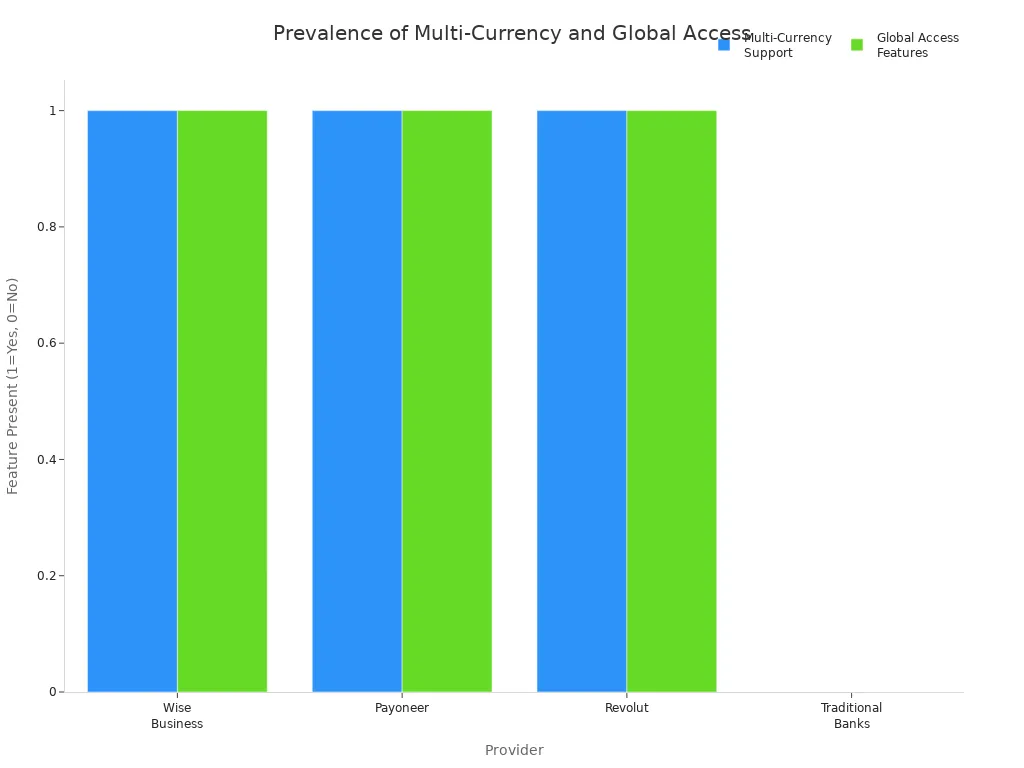
You can see that fintech banks like Wise, Payoneer, and Revolut focus on global access and multi-currency support. Traditional banks usually do not offer these features. If you want to send or receive money worldwide, a digital-first bank may be your best choice.
Automation & Integrations
You want your banking to save you time and reduce mistakes. In 2025, automation and smart integrations are changing how you manage money. Here are some of the biggest trends you will see:
- AI and automation help with compliance, fraud detection, and risk management.
- Open banking lets you connect your bank with other apps for a smoother experience.
- Robotic Process Automation (RPA) speeds up tasks like payments and bookkeeping.
- RegTech uses AI to make following rules easier and cheaper.
- Banking-as-a-Service (BaaS) and embedded finance let you add banking features to your own apps.
- Real-time payments and instant alerts help you stay on top of your cash flow.
- AI-driven analytics and biometric security keep your money safe.
- Partnerships between banks and fintechs bring you more features and better service.
You can expect your business bank account to work with your favorite tools, automate boring tasks, and keep your money secure. This means you spend less time on banking and more time growing your start-up.
You have many strong options for your startup’s banking. Each provider offers unique features, from digital tools to easy lending. Think about what matters most for your business. Review the comparison tables and account reviews above. When you feel ready, gather your documents and open your new account. The right choice can help your business grow faster.
FAQ
What documents do you need to open a business bank account for your start-up?
You usually need your business name, your ID, and proof of your business address. Some financial institutions may ask for your EIN or business license. Always check the requirements before you start the process.
Can you get free business checking with most business bank accounts for start-ups?
Yes, many of the best business bank accounts offer free business checking. You can find options with no monthly fees and no minimum balance. Look for a business banking platform that fits your needs and helps you save money.
How do you choose between digital and traditional business bank accounts for start-ups?
Think about how you run your business. If you want easy online access and fast tools, digital bank accounts for startups work well. If you need to deposit cash or visit a branch, traditional banks might be better for your start-up.
What features should you look for in the best banks for startups?
You should look for low fees, strong customer support, and easy software integrations. The best startup banks also offer business savings accounts, business checking accounts, and startup-focused advice. Pick a business banking platform that helps your business grow.
As your startup grows, banking alone may not cover your global needs. Whether you’re paying overseas suppliers or receiving funds from clients abroad, hidden fees and slow transfers can hurt your cash flow. BiyaPay supports real-time exchange rate checks and conversions, with remittance fees as low as 0.5%. You can easily convert between multiple fiat and digital currencies, send to most countries worldwide, and enjoy same-day exchange with same-day arrival — a real advantage when speed matters.
Give your business a smarter way to move money. Register with BiyaPay today and experience transparent, fast, and reliable cross-border transfers.
*This article is provided for general information purposes and does not constitute legal, tax or other professional advice from BiyaPay or its subsidiaries and its affiliates, and it is not intended as a substitute for obtaining advice from a financial advisor or any other professional.
We make no representations, warranties or warranties, express or implied, as to the accuracy, completeness or timeliness of the contents of this publication.
Related Blogs of

Logic of Money Laundering Conviction: How Ordinary People Ensure Their Crypto Asset Cash-Out Activities Never Cross the Red Line


Never Trust Any 'Acquaintance Currency Exchange': Real Cases of Crypto Assets Stolen via Acquaintance Scams During the World Cup

Investing in Japanese Real Estate for Rental Yield: How to Convert JPY Rent to USD and Trade US Stocks Using the Same App?


Funds Frozen for Half a Year? Administrative Reconsideration After 'Involved Account' and Cross-Border Multi-Currency Account Backup Solutions

Choose Country or Region to Read Local Blog
 Australia
 Austria
 Belgium
 Canada
 Cyprus
 Czech Republic
 Denmark
 Estonia
 Finland
 France
 Germany
 Greece
 Hong Kong
 India
India Indonesia
 Ireland
 Italy
Italy Japan
Japan Latvia
 Lithuania
 Luxembourg
 Malaysia
 Malta
Malta Morocco
 Nepal
Nepal Netherlands
 New Zealand
 Norway
 Pakistan
 Philippines
 Poland
 Portugal
 Romania
 Singapore
 Slovakia
 Slovenia
 South Africa
 South Korea
 Spain
Spain Sweden
 Thailand
 The United States
 Turkey
 United Arab Emirates
 United Kingdom
 Vietnam
Contact Us




BIYA GLOBAL LLC is registered with the Financial Crimes Enforcement Network (FinCEN), an agency under the U.S. Department of the Treasury, as a Money Services Business (MSB), with registration number 31000218637349, and regulated by the Financial Crimes Enforcement Network (FinCEN).
BIYA GLOBAL LIMITED is a registered Financial Service Provider (FSP) in New Zealand, with registration number FSP1007221, and is also a registered member of the Financial Services Complaints Limited (FSCL), an independent dispute resolution scheme in New Zealand.