Choosing Between Xoom and PayPal for Cheaper International Payments




Image Source: unsplash
When you compare Xoom vs PayPal for international money transfer, you often find that Xoom charges lower fees for many payment methods, while PayPal usually adds a 5% fee for sending money internationally. Both services add a markup to the exchange rate, but Xoom’s markup can range from 4% to 6%. For example, if you send money through Xoom, you might pay $0.39 to $0.99 with a debit card or up to $4.49 with a credit card. PayPal’s fees go from $0.99 to $4.99, plus its exchange rate spread. Here’s a quick comparison:
| Service | Fee Details | Exchange Rate Markup |
|---|---|---|
| Xoom | Bank account: $0; Debit card: $0.39–$0.99; Credit card: $2.99–$4.49 | 4–6% markup |
| PayPal | 5% fee (min $0.99, max $4.99) | Markup via exchange rate spread |
Both Xoom and PayPal belong to the same company, but each has different strengths for cross-border payments and international money transfers. If you want to send money internationally, knowing these differences helps you make the best choice for sending money.
Key Takeaways
- Xoom usually offers faster transfers and lower fees for large bank-funded payments, making it a good choice for sending big amounts internationally.
- PayPal is convenient for small transfers and online payments, especially if your recipient already has a PayPal account, but it often charges higher fees and exchange rate markups.
- Both services add extra costs through exchange rate markups, so always check the total cost including fees and rates before sending money.
- Using a bank account or PayPal balance to pay usually costs less than using credit or debit cards, which have higher fees.
- Plan your transfers by sending larger amounts less often and paying in the recipient’s local currency to save money on fees and conversion charges.
Xoom vs PayPal: Quick Comparison

Image Source: unsplash
Key Differences
When you look at xoom vs paypal, you notice some big differences in how they handle international transfers. Xoom focuses on quick money transfers to over 160 countries. You can send money for cash pickup, bank deposit, or even pay bills and reload mobile phones. PayPal works in more than 200 countries and lets you send money to other PayPal users, shop online, and pay for services.
Here are some things you should know:
- Xoom usually completes transfers in minutes, especially if you use a card. Bank transfers might take longer.
- PayPal transfers between PayPal accounts are fast, but sending money to a bank in another country can take 3-5 business days.
- Xoom offers a new feature where people outside the U.S. can request money, pay bills, or reload phones. This makes it easier for your friends or family to get what they need.
- PayPal is more widely known and accepted for online shopping and business payments.
- Both services use strong security, like encryption and two-factor authentication, to keep your money safe.
Tip: If you want to compare costs, always check the fee comparison for your specific transfer amount and destination. Both xoom and paypal add a markup to the exchange rate, which can affect the total cost.
Summary Table
Here’s a quick table to help you see the main points in the xoom vs paypal debate:
| Aspect | Xoom | PayPal |
|---|---|---|
| Fee Structures | Fees vary by country, payment method, and amount; exchange rate markup; often cheaper for remittances | 5% fee (min $0.99, max $4.99) plus exchange rate markup |
| Transfer Speed | Most transfers complete in minutes; bank transfers may take longer | Instant within PayPal; 3-5 days for international bank transfers |
| Supported Countries | Over 160 countries; strong for remittances and bill payments | Over 200 countries; supports shopping, business, and money transfers |
| User Experience | Request feature for recipients; easy for cash pickup or bill pay | Widely accepted; easy for online payments and transfers |
| Security | High security, regulated, 24/7 fraud monitoring | High security, trusted, regulated |
| Customer Satisfaction | Lower TrustPilot score (1.9/5); some complaints about transparency | Known for reliability and ease of use |
You can see that both xoom and paypal have strengths. Xoom is great for fast, simple money transfers to family or friends. PayPal is better if you want to shop online or send money to someone who already uses PayPal. Always check the total cost before you make a transfer.
Xoom and PayPal: Service Overview
How Xoom Works
Xoom is a money transfer platform that helps you send money to friends or family in over 160 countries. You can use Xoom to send money for bank deposits, cash pickups, or even reload mobile wallets. Many people like Xoom because it offers fast delivery and several ways for your recipient to get the money.
Here’s how you use Xoom for international transfers:
- Create your Xoom account on the website or app. You can also log in with your PayPal account.
- Pick the country where you want to send money.
- Choose how your recipient will get the money. You can pick bank deposit, cash pickup, mobile wallet, or even home delivery in some places.
- Enter your recipient’s details, like their full name and bank account information if needed.
- Review the exchange rate and fees. Xoom shows you these before you send the money.
- Confirm everything and send the money. You get a tracking number so you can see when the money arrives.
Xoom partners with banks and agents in places like India, China, Mexico, the Philippines, South America, Eastern Europe, and Africa. This makes it easy for your recipient to pick up cash or get a bank deposit quickly.
Note: Xoom is part of PayPal, so you can use your PayPal account to pay for transfers. This makes it simple if you already use PayPal for other digital money transfer needs.
How PayPal Works
PayPal is one of the most popular money transfer services in the world. It works in over 200 countries and supports more than 100 currencies. You can use PayPal to send money to anyone with a PayPal account, shop online, or pay for services.
Here’s how you send money internationally with PayPal:
- Log in to your PayPal account on the website or app.
- Go to “Send and Request.”
- Enter your recipient’s name, email, or phone number.
- Type in the amount and pick the currency. PayPal shows you the exchange rate.
- Choose how you want to pay, like with your PayPal balance, bank account, or card.
- Review the details and send the payment.
If your recipient does not have a PayPal account, you can use Xoom to send money directly to their bank or for cash pickup. PayPal lets you track your transfer and uses strong security to keep your money safe.
Tip: Not all features are available in every country. Always check if your recipient can use PayPal or if you need to use Xoom for the transfer.
Here’s a quick table to show the global reach of both services:
| Service | Supported Countries | Delivery Options | Notes |
|---|---|---|---|
| Xoom | 130+ countries | Bank deposit, cash pickup, cash delivery, mobile reload | Great for remittances and fast transfers |
| PayPal | 200+ countries | PayPal account transfers | Supports 100+ currencies, good for shopping and business |
Both Xoom and PayPal give you flexible ways to send money. You can pick the service that fits your needs best, whether you want speed, convenience, or a wide choice of delivery options.
International Transfer Fees
Image Source: pexels
Xoom Fees
When you use Xoom for international transfers, you will notice that the transfer fees depend on several things. These include the country you send money to, the amount, and the payment method you choose. Xoom fees can be as low as $0 if you pay from your bank account. If you use a debit card, the transaction fee usually ranges from $0.39 to $0.99. Paying with a credit card costs more, with fees between $2.99 and $4.49 per transfer.
You also need to watch out for the exchange rate markup. Xoom adds a margin of about 4% to 6% on top of the real exchange rate. This means you pay more than the mid-market rate when you send money. The total cost of your international transfer includes both the visible transaction fee and the hidden cost in the exchange rate.
Here’s a quick look at typical Xoom fees:
| Payment Method | Transfer Fee (USD) | Exchange Rate Markup |
|---|---|---|
| Bank Account | $0 | 4%–6% |
| Debit Card | $0.39–$0.99 | 4%–6% |
| Credit Card | $2.99–$4.49 | 4%–6% |
Tip: Always check the total fees and exchange rates before you confirm your transfer. The final amount your recipient gets can change based on these costs.
PayPal Fees
PayPal uses a different fee structure for international transfers. If you send money to someone in another country using your PayPal balance or a linked bank account, you pay a 5% fee. This fee has a minimum of $0.99 and a maximum of $4.99 per transaction. If you fund the transfer with a credit or debit card, PayPal adds an extra 2.9% plus a fixed fee of about $0.30 USD.
PayPal also charges a currency conversion fee. This fee is usually around 4% above the mid-market exchange rate. For business or commercial payments, the fees can be even higher. You might see a commercial transaction fee of about 4.4%, plus a fixed fee based on the currency, and a currency conversion fee of 3% to 4%.
Here’s a table to help you see how PayPal’s international transfer fees work:
| Scenario | Percentage Fee(s) | Fixed Fee (USD) | Currency Conversion Fee |
|---|---|---|---|
| Sending personal payment (balance/bank) | 5% (min $0.99, max $4.99) | N/A | ~4% (if currency conversion) |
| Sending personal payment (card funded) | 5% + 2.9% | ~$0.30 | ~4% (if currency conversion) |
| Receiving commercial international payment | ~2.2% to 5% (varies by account type) | ~$0.49 | ~3% (business currency conversion) |
| Sending commercial payment (business) | Often no fee if funded by balance/bank | N/A | ~3% (if currency conversion) |
Note: PayPal’s international transfer fees can add up quickly, especially if you use a card or send business payments. Always review the fees and exchange rates before you send money.
Additional Charges
Besides the main transfer fees, both Xoom and PayPal may have extra fees and charges that affect your total cost. These can include intermediary bank fees, credit card fees, and exchange rate markups.
- Intermediary Bank Fees: Sometimes, banks in the SWIFT network process your transfer. These banks may charge extra fees that you do not see before you send the money. For example, if you send money to a Hong Kong bank, the receiving bank or an intermediary might deduct a fee from the amount your recipient gets.
- Credit Card Fees: If you use a credit card to fund your transfer, your card issuer may charge extra fees or interest. This can make your international transfer more expensive.
- Exchange Rate Markup: Both Xoom and PayPal add a margin to the exchange rate. This hidden cost can be 3% to 6% above the real rate, depending on the service and payment type.
Here’s a table to show some of these extra fees:
| Fee Type | Description |
|---|---|
| Intermediary Bank Fees | Extra charges by banks in the payment chain, often unknown before the transfer is sent |
| Credit Card Fees | Additional fees or interest from your card issuer when you use a credit card for payment |
| Exchange Rate Markup | Margin added to the exchange rate, increasing the total cost of your international transfer |
Callout: Always check for hidden fees and charges before you send money. The total cost of international transfers is not just the visible transaction fee. You need to look at the exchange rate and any possible extra charges from banks or card issuers.
When you compare Xoom and PayPal, you see that both services have different international transfer fees and exchange rate markups. Xoom fees are often lower for bank-funded transfers, but the exchange rate markup can still make a big difference. PayPal’s fees can be higher, especially for card payments and business transactions. Always review all fees and charges before you choose a service for your next international transfer.
Exchange Rates and Markups
Xoom Exchange Rates
When you use Xoom for international transfers, you notice that the exchange rate is not the same as the one you see on Google or finance websites. Xoom adds a markup to the mid-market rate. This means you get a less favorable rate, and your recipient receives less money. The markup usually ranges from 4% to 6%. If you compare Xoom to other providers, you see some clear differences:
| Provider | Exchange Rate Characteristics |
|---|---|
| Xoom | Includes a markup over mid-market rates, leading to higher costs due to fees and markups. |
| Wise | Uses the real mid-market rate with low, transparent fees, so you get better value. |
| OFX | Adds a smaller markup than Xoom. |
| Xe | Offers competitive rates with a small margin, sometimes no fees on large transfers. |
| Remitly, TorFX, WorldRemit | Markups similar to Xoom, but rates and fees vary by provider and destination. |
You might think Xoom is fast and easy, but the exchange rate markup can make your international transfers more expensive. If you send $1,000, the difference in rates can mean your recipient gets $30 to $60 less.
PayPal Exchange Rates
PayPal also adds a margin to the exchange rate when you send money internationally. This margin can be up to 5%. You pay more than the mid-market rate, and your recipient gets less. PayPal’s fees and exchange rates are less transparent, so it can be hard to know the real cost until you finish the transfer.
- PayPal usually adds a margin to the exchange rate, making it less favorable than the mid-market rate.
- Wise uses the mid-market rate with no markup, so you see exactly what you pay.
- PayPal’s fee structure can change based on the country and payment method, and it often includes a currency conversion fee.
- Wise charges a small, upfront fee and does not hide extra costs in the exchange rate.
- Many customers prefer Wise for its predictable and competitive exchange rates and higher satisfaction ratings.
- PayPal is convenient and accepted almost everywhere, but its exchange rates for international transfers are usually not as good as Wise.
Impact on Total Cost
The exchange rate markup has a big impact on the total cost of your international transfer. Even if the transfer fee looks low, the hidden cost in the exchange rate can add up fast. Let’s look at a real example:
| Payment Method | Total Cost with Wise | Total Cost with Xoom | Cheaper Option |
|---|---|---|---|
| Bank Account | $1,103.45 | $1,108.40 | Wise |
| Debit Card | $1,113.35 | $1,141.89 | Wise |
| Credit Card | $1,141.45 | $1,141.89 | Wise |
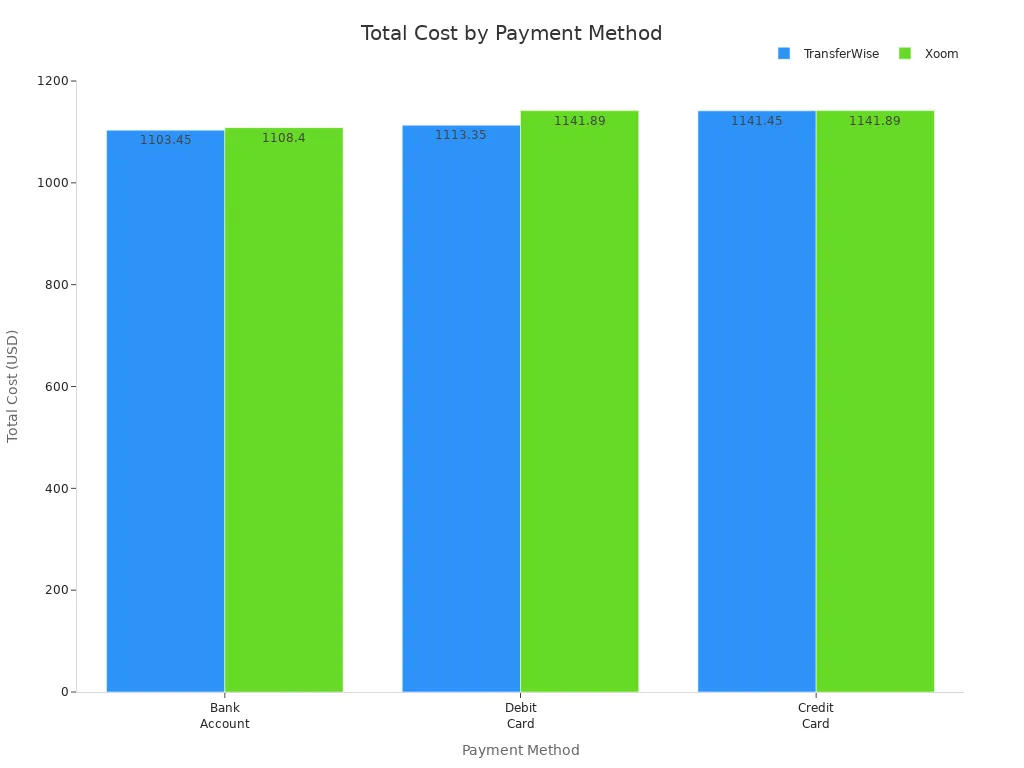
If you use Xoom, you pay more because of both the transfer fees and the exchange rate markup. For example, if the mid-market rate is 1.00, Xoom might offer 0.97. That 0.03 difference means you lose $30 for every $1,000 you send. PayPal works the same way. It adds a currency conversion fee, often around 4%, which lowers the amount your recipient gets. When you compare fees and exchange rates, always look at the total cost, not just the upfront fee. This helps you choose the best option for your international payments.
Transfer Speed and Limits
Xoom Speed and Limits
When you use Xoom, you can expect most money transfers to arrive within minutes. This makes Xoom a popular choice if you want fast international transfer capabilities. Sometimes, transfers take longer. The speed depends on a few things:
- The payment method you choose. Transfers funded by credit or debit card often arrive faster, but you might pay higher fees.
- Bank account payments can take several business days.
- Xoom checks every transfer for security. If your transfer needs extra approval, it might take more time.
- The time of day, banking hours, and even the recipient’s location can affect how quickly your money arrives.
You can send money transfers to over 160 countries with Xoom. The service gives you many delivery options, like bank deposit or cash pickup. Xoom does not list a specific maximum or minimum transfer amount. Limits change based on where you live, how you pay, and the rules of the payment partner. If you plan on sending or receiving money often, you should check your account for your personal limits.
Tip: Always review your transfer details before you send. This helps you avoid delays and surprises.
PayPal Speed and Limits
PayPal also offers strong international transfer capabilities. If you send money to another PayPal account, the transfer is usually instant. This is helpful when you need to send money quickly. If you want to move money from PayPal to a bank in another country, it can take three to five business days.
PayPal lets verified users send up to $60,000 per transfer, but this limit may not apply to every country. The minimum transfer amount is not clearly stated. You can use PayPal for sending or receiving money in over 200 countries. The speed and limits can change based on your account status and the country you choose.
Here’s a quick table to compare:
| Service | Typical Transfer Speed | Maximum Transfer Limit | Supported Countries |
|---|---|---|---|
| Xoom | Minutes to a few days | Varies by user | 160+ |
| PayPal | Instant to 5 days | Up to $60,000 | 200+ |
If you need fast money transfers, both Xoom and PayPal can help. Always check the details for your transfer before you send.
Xoom and PayPal Costs: Pros and Cons
Xoom Pros and Cons
When you look at xoom, you see a service that tries to make sending money easy and fast. You get clear fee information before you send money. This means you always know the exact transfer fees, exchange rates, and how long the transfer will take. Xoom supports many payout options, like bank deposits, cash pickups, and mobile reloads. You can pay with a bank account, debit card, credit card, or even your PayPal balance.
Here’s a quick table to help you see the main advantages and disadvantages:
| Aspect | Advantages | Disadvantages |
|---|---|---|
| Cost | Transparent fee display before transfer | Higher fees for credit/debit card payments |
| Markup on exchange rates increases overall cost | ||
| Speed | Transfers often completed within minutes | Some transfers can take a few days |
| Convenience | Wide coverage (130+ countries), multiple payout options, user-friendly platform | Transfer limits based on verification, not all options everywhere |
Note: Xoom gives you flexibility and speed, but you need to watch out for higher fees if you use a card. The exchange rate markup can also make your transfer more expensive. Always check the total xoom and paypal costs before you send money.
PayPal Pros and Cons
PayPal is a name you probably know. It lets you send money to over 200 countries. You can send money to someone’s email or phone number, and the transfer is usually instant if both people use PayPal. You do not need to share your bank details with anyone. PayPal also offers strong security and buyer protection.
But there are some downsides. PayPal charges high transfer fees for international payments. You pay a 5% fee, plus a currency conversion fee of 3-4%. If you want to withdraw money to your bank, it can take 3-5 business days unless you pay extra for instant transfer. The person you send money to must have a PayPal account.
Here’s a table to break it down:
| Aspect | Pros | Cons |
|---|---|---|
| Cost | Free to open account, no fee for USD payments | High international fees: 3-4% currency conversion + transfer fees |
| Speed | Instant PayPal-to-PayPal transfers | Slow withdrawals to bank accounts unless you pay extra |
| Convenience | Easy to use, works in 200+ countries, no need to share bank info | Recipient must have PayPal account, possible account freezes |
| Security | Strong encryption, buyer/seller protection |
Tip: If you use PayPal for international transfers, always check the total fees and exchange rates. The real cost can be higher than you expect, especially for large amounts.
Real-World Cost Scenarios
Typical Transfer Amounts
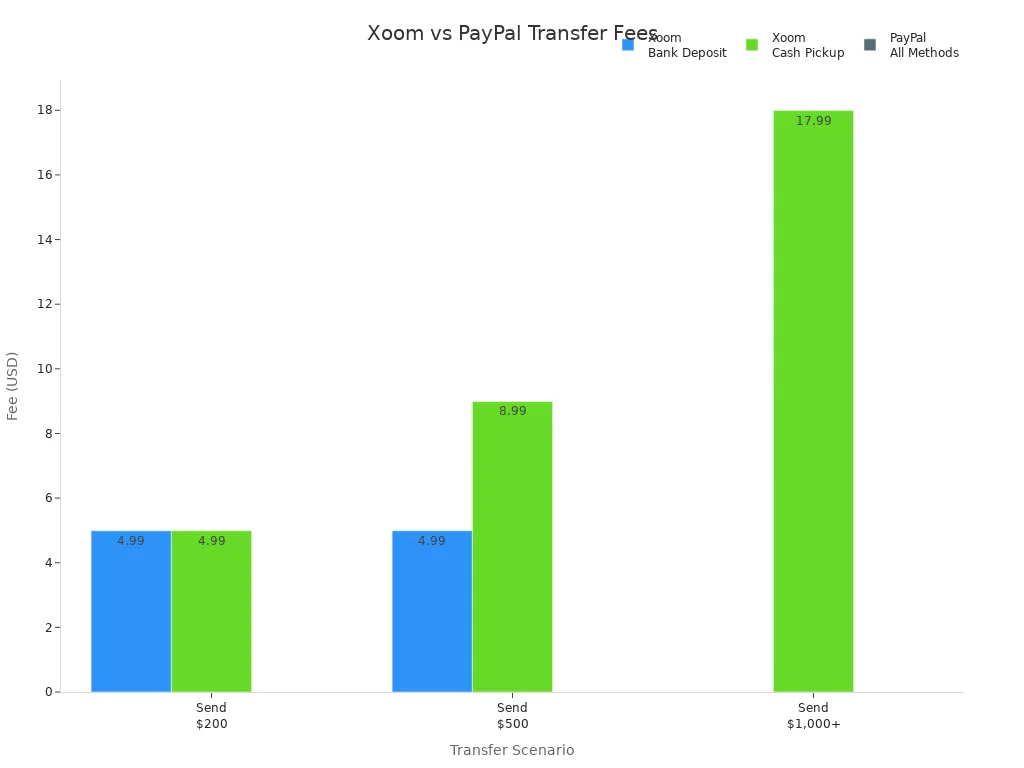
You probably want to know how much it really costs to send money with xoom or paypal. Let’s look at two common amounts: $500 and $2,000. These examples help you see the real fees and exchange rates you might face.
| Amount Sent | Xoom Fee (Bank Deposit) | Xoom Fee (Cash Pickup) | PayPal Fee (All Methods) |
|---|---|---|---|
| $500 | $4.99 | $8.99 | 5% fee (min $0.99, max $4.99) + 4% currency conversion |
| $2,000 | $0.00 | $17.99 | 5% fee (max $4.99) + 4% currency conversion |
You can see that xoom charges a flat fee for bank deposits, but the fee drops to zero for amounts over $1,000. Paypal always charges a percentage plus a currency conversion fee, no matter how much you send.
When Xoom Is Cheaper
If you plan to send $1,000 or more using a bank deposit, xoom often becomes the cheaper choice. You pay no transfer fee, and the exchange rate markup is usually a bit lower than paypal’s. For example, sending $2,000 with xoom by bank deposit means you avoid the 5% fee that paypal charges. This can save you up to $100 or more on large transfers.
Tip: Choose xoom for big transfers funded by your bank account, especially if your recipient wants a bank deposit.
When PayPal Is Cheaper
Paypal can be a better deal for small transfers, especially if you send less than $500 and your recipient already uses paypal. The minimum fee is low, and you avoid extra steps. However, if you use a card or need currency conversion, the total cost can rise quickly. Xoom’s cash pickup fees are higher, so paypal may win if you need fast, small transfers to another paypal account.
Note: Always check the total cost, including exchange rates, before you send money. The best choice depends on your amount, payment method, and how your recipient wants to get the money.
Choosing the Best Option
Factors to Consider
When you pick between Xoom and PayPal, you want to look at more than just the fee. Each service has different options for how you send and receive money. Think about these points before you choose:
- Transfer Amount: Some services charge less for bigger transfers. If you send $2,000, Xoom may cost less than PayPal.
- Payment Method: Using a bank account or PayPal balance often means lower fees. Credit cards usually cost more.
- How Fast You Need It: Xoom can send money in minutes. PayPal is fast between PayPal accounts, but bank transfers can take days.
- Where Your Recipient Is: Xoom works in over 160 countries. PayPal covers more than 200. Check if your recipient can use the service you pick.
- How Your Recipient Gets the Money: Xoom lets you send to a bank, for cash pickup, or even reload a mobile wallet. PayPal sends money to a PayPal account.
Tip: Always check the total cost, including the exchange rate, before you send. The lowest fee does not always mean the cheapest transfer.
Tips to Save on Transfers
You can save money if you plan your transfer. Here are some low-cost ways to transfer money using these money transfer services:
- Use a linked bank account or PayPal balance instead of a credit card. This helps you avoid extra fees.
- Send larger amounts less often. Fewer transfers mean fewer fees.
- Pay in the recipient’s local currency. This can help you skip extra currency conversion charges.
- Compare all options for your country and amount. For example, in the UK, paying with a bank account for amounts under $3,000 lets you use debit card or cash pickup with lower fees. In the US, paying with PYUSD gives you all receive options.
- If you run a business and send many transfers, talk to PayPal about a custom fee structure. This can lower your costs.
| Service | Best Payment Option | Best Receive Option | When to Use |
|---|---|---|---|
| Xoom | Bank account or PayPal balance | Bank deposit or cash pickup | Large transfers, fast delivery |
| PayPal | Linked bank account | PayPal account | Small transfers, online payments |
Note: Always review the details for your transfer. Picking the right options can help you save money and get your transfer where it needs to go.
Choosing between Xoom and PayPal depends on your needs. Xoom often costs less for large bank transfers, while PayPal can be better for small amounts or if your recipient uses PayPal. Always compare total costs, including fees and exchange rates, since these change often. You can find the latest updates on each service’s policy page. Think about how fast you need the money to arrive, how your recipient wants to get it, and which payout options work best for them.
- Xoom and PayPal update fees and rates as needed, so check their official policy pages for the latest info.
- Your recipient can get money by bank deposit, cash pickup, or even door-to-door delivery, depending on the country.
| Service | User Rating | Speed | Payout Options |
|---|---|---|---|
| Xoom | 4/5 | Minutes to hours | Bank, cash pickup, delivery |
| PayPal | 3.9/5 | 1-3 days | PayPal account, bank |
Tip: Sending money in your recipient’s local currency can help you avoid extra conversion fees. Always review all details before you send.
FAQ
Can you use Xoom without a PayPal account?
Yes, you can use Xoom without a PayPal account. You just need to sign up with your email address. If you already have PayPal, you can log in with that for extra convenience.
Which is faster for sending money: Xoom or PayPal?
Xoom usually sends money in minutes, especially for cash pickup or card payments. PayPal transfers between PayPal accounts are instant. If you move money from PayPal to a bank, it may take up to five days.
Are there hidden fees with Xoom or PayPal?
Both services show main fees upfront. However, you may pay extra due to exchange rate markups or charges from banks. Always check the total cost before you send money.
What payment methods can you use with Xoom and PayPal?
| Service | Bank Account | Debit Card | Credit Card | PayPal Balance |
|---|---|---|---|---|
| Xoom | ✓ | ✓ | ✓ | ✓ |
| PayPal | ✓ | ✓ | ✓ | ✓ |
You can use all these methods, but fees may change based on your choice.
When choosing between Xoom and PayPal for international payments, currency conversion costs can play a significant role. BiyaPay offers an efficient alternative with real-time exchange rate queries and conversions, supporting over 30 fiat currencies and 200+ digital currencies, remittance fees as low as 0.5%, and coverage across over 200 countries and regions with same-day remittance delivery. Its quick registration, no-overseas-account-needed US/HK stock investment features, and the launched Easy Card service (enabling easy global payments) provide added convenience for your cross-border needs. Experience these benefits now to enhance your international transfer experience! Whether you opt for Xoom or PayPal, BiyaPay helps you manage your finances at a lower cost.
*This article is provided for general information purposes and does not constitute legal, tax or other professional advice from BiyaPay or its subsidiaries and its affiliates, and it is not intended as a substitute for obtaining advice from a financial advisor or any other professional.
We make no representations, warranties or warranties, express or implied, as to the accuracy, completeness or timeliness of the contents of this publication.
Related Blogs of
International Students Returning Home After Graduation: How to Most Conveniently and Cost-Effectively Bring Back the Few Thousand USD Left in Your US Bank Card?


Cross-Border Merchants' Dilemma: Received Crypto Payments Containing Gray Assets — How to Clean and Comply Through a Compliant Platform?


Logic of Money Laundering Conviction: How Ordinary People Ensure Their Crypto Asset Cash-Out Activities Never Cross the Red Line

Investing in Japanese Real Estate for Rental Yield: How to Convert JPY Rent to USD and Trade US Stocks Using the Same App?
Choose Country or Region to Read Local Blog
 Australia
 Austria
 Belgium
 Canada
 Cyprus
 Czech Republic
 Denmark
 Estonia
 Finland
 France
 Germany
 Greece
 Hong Kong
 India
India Indonesia
 Ireland
 Italy
Italy Japan
Japan Latvia
 Lithuania
 Luxembourg
 Malaysia
 Malta
Malta Morocco
 Nepal
Nepal Netherlands
 New Zealand
 Norway
 Pakistan
 Philippines
 Poland
 Portugal
 Romania
 Singapore
 Slovakia
 Slovenia
 South Africa
 South Korea
 Spain
Spain Sweden
 Thailand
 The United States
 Turkey
 United Arab Emirates
 United Kingdom
 Vietnam
Contact Us




BIYA GLOBAL LLC is registered with the Financial Crimes Enforcement Network (FinCEN), an agency under the U.S. Department of the Treasury, as a Money Services Business (MSB), with registration number 31000218637349, and regulated by the Financial Crimes Enforcement Network (FinCEN).
BIYA GLOBAL LIMITED is a registered Financial Service Provider (FSP) in New Zealand, with registration number FSP1007221, and is also a registered member of the Financial Services Complaints Limited (FSCL), an independent dispute resolution scheme in New Zealand.