Things You Need to Know Before Choosing MoneyGram for Online Remittance



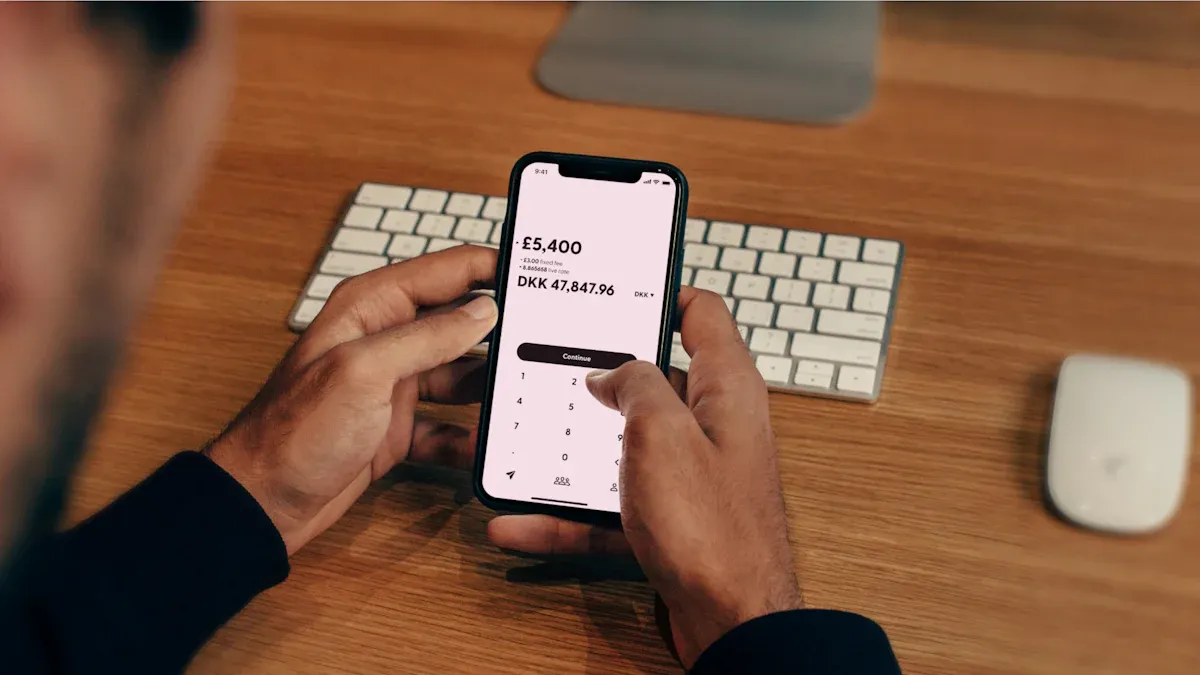
Image Source: unsplash
When conducting online international remittances, choosing a reliable platform is crucial. Digital channels are rapidly becoming the mainstream choice, making it even more necessary to understand platform operations.
Did you know?
- By 2025, nearly 80% of global remittance transactions are expected to be conducted digitally.
- MoneyGram operates in over 200 countries worldwide with approximately 350,000 retail locations, while also providing convenient online services.
This guide will serve as a practical handbook, breaking down every key aspect of MoneyGram online remittances in detail to help you complete each transfer with confidence.
Key Takeaways
- Before remitting, the sender needs to prepare personal information and valid identification, while the receiver must provide an accurate name and receipt method.
- MoneyGram offers multiple payment and receipt options, such as credit cards, debit cards, bank accounts, and cash pickup, allowing you to choose based on your needs.
- The remittance process includes logging in, selecting the destination, filling in receiver information, choosing a payment method, and final confirmation—be sure to carefully verify the receiver’s name.
- MoneyGram ensures fund security through encryption technology and real-time fraud detection; remittance fees include service charges and exchange rate margins, which you can check on the official website.
- After remitting, you can use the reference number to track the remittance status; if cancellation is needed, contact customer service immediately, but note that cancellations have time limits and fee regulations.
Essential Preparations Before Remittance
As the saying goes, to do a good job, one must first sharpen one’s tools. Thorough preparation before starting the remittance operation is key to ensuring funds arrive safely and quickly. This can help you avoid unnecessary delays due to insufficient materials.
What the Sender Needs to Prepare
As the sender, you first need to create an account. The platform will require you to provide some basic personal information to verify your identity. Please prepare the following materials:
- Your legal full name
- Current residential address (cannot be a PO box)
- Valid phone number
- Date of birth
- Government-issued valid ID (such as a passport)
- When remitting from the United States, a Social Security Number (SSN) may also be required
Requirements the Receiver Must Meet
The receiver’s information is equally important. If the receiver chooses cash pickup, they need to go to a MoneyGram agent location and provide:
- Remittance reference number
- Government-issued valid photo ID (such as a passport or national ID card)
Important Tip
The spelling of the name on the receiver’s ID must exactly match the receiver information you filled in; otherwise, it may result in failed withdrawal.
If choosing direct deposit to a bank account, the receiver needs to provide their bank account information.
Prepare Valid Payment Methods
You can use multiple methods to fund your remittance. MoneyGram typically accepts the following payment methods:
- Credit Card: Visa, MasterCard
- Debit Card: Visa, MasterCard
- Bank Account: Pay directly from your checking or savings account
Please note that your payment method may affect the maximum amount per remittance. Bank accounts, credit cards, or debit cards may also have their own transaction limits.
Choose the Appropriate Receipt Method
Different receipt methods affect the speed of fund arrival.
- Cash Pickup: This is usually the fastest method. With MoneyGram’s extensive agent network, funds are often ready in minutes in many cases, making it ideal for urgent situations.
- Bank Deposit: Funds are deposited directly into the receiver’s bank account.
- Mobile Wallet: In some countries, you can send funds directly to the receiver’s mobile wallet, such as in Kenya, Tanzania, and Zimbabwe.
The Process of Completing a MoneyGram Online Remittance
Image Source: unsplash
Once you have all materials ready, you can begin the actual operation. MoneyGram’s online platform is designed to be very intuitive; you can easily complete the remittance by following the instructions.
Step-by-Step Guide from Registration to Transfer
Completing a full MoneyGram online remittance typically follows these core steps. You can operate via the official website or the official App.
- Log In or Register an Account: First, log in to your MoneyGram profile. If you are a new user, you need to complete registration and identity verification first.
- Select Remittance Destination: After logging in, navigate to the “Send” function. Enter the amount you wish to remit and select the country where the receiver is located.
- Choose Receipt Method: Based on the receiver’s convenience, select how they will receive the funds. This can be “Cash Pickup” or “Bank Account Deposit,” etc.
- Fill in Receiver Information: This is a critical step. You need to accurately fill in the receiver’s legal full name, address, and contact phone number. If choosing bank deposit, also provide their bank account information.
Important Tip
Please double-check the spelling of the receiver’s name. The name must exactly match the information on their ID. Any minor discrepancy can lead to failed receipt or severe delays.
- Choose Your Payment Method: You can choose to pay with a credit card, debit card, or directly from your bank account. Different payment methods may affect the speed of fund arrival. Generally, card payments process faster than bank transfers.
- Review and Send: In the final step, the system will display a summary of all remittance information, including amount, fees, exchange rate, and receiver details. Carefully review and confirm everything is correct before sending.
Bank Account Support and Limits
Using a bank account for payment or receipt is a common choice, but you need to understand the related support and restrictions.
First, not all banks support MoneyGram’s direct transfer service. Before operating, confirm whether your bank is on MoneyGram’s supported list.
Second, there are limits on transaction amounts. These limits are determined jointly by the MoneyGram platform and your bank. Understanding these caps can help you better plan your remittance.
| Transaction Type | Maximum Limit per 30 Calendar Days | Notes |
|---|---|---|
| International Remittance | 10,000 USD | This is the general limit for remittances sent via online platform or App from the US, UK, and most other countries. |
| Online Bill Payment | 3,000 USD | This limit applies if you use the platform to pay bills. |
Please Note
Your personal bank account may also have its own daily or per-transaction transfer limits. For example, some licensed banks in Hong Kong may set daily online transaction caps below 10,000 USD. Before conducting large MoneyGram online remittances, it is recommended to confirm the relevant regulations with your bank.
Security Measures and Fee Structure
Image Source: unsplash
When conducting online remittances, fund security and fee transparency are the two most concerning issues. Understanding the platform’s security measures and fee composition can make you feel more at ease during remittance.
MoneyGram’s Security Measures
Fund security is the top priority in remittances. MoneyGram employs multiple technologies and strict compliance programs to protect your transactions and personal information.
- Advanced Encryption Technology: The platform encrypts your sensitive information. This includes your bank account details and personal data, ensuring it is not stolen during transmission and storage.
- Multi-Factor Authentication (MFA): When logging into your account or initiating a remittance, the system requires additional verification steps. This extra layer of protection effectively prevents unauthorized access.
- Real-Time Fraud Detection: MoneyGram’s system continuously monitors transaction activity. It can identify abnormal transaction patterns and promptly flag potential fraud risks to prevent identity theft.
- Industry Standard Compliance: The platform strictly adheres to the Payment Card Industry Data Security Standard (PCI DSS). This means it follows globally recognized security norms when handling your credit or debit card information.
What should you do if you suspect fraud?
Taking immediate action is crucial. If you believe you are a victim of fraud or notice any suspicious activity, do not proceed with the transaction. You can report to MoneyGram in the following ways:
- Phone Report: Customers in the US can call
1-800-926-9400.- Online Report: Visit the MoneyGram official website, fill out and submit the fraud report form.
Additionally, reporting to your local law enforcement agency is also a necessary step.
Breakdown of Service Fees and Exchange Rate Margins
The total cost of completing a MoneyGram online remittance typically consists of two parts: service fees and exchange rate margins. Clearly understanding these two can help you estimate the final cost.
- Service Fee (Transfer Fee): This is the direct fee you pay for using the remittance service. This fee is not fixed; it varies based on the following factors:
- Remittance Amount: Generally, the higher the amount, the higher the fee may be.
- Destination Country: Fee standards differ by country.
- Payment and Receipt Methods: Fees for credit card payments may differ from bank account transfers; cash pickup and bank deposit fees may also vary.
- Exchange Rate Margin: When converting one currency (such as USD) to another, the exchange rate provided by MoneyGram differs from the market standard rate (the rate you see on Google). This difference is one of the platform’s profit sources and also constitutes part of your remittance cost.
How to accurately check fees?
The most reliable method is to use the fee calculator built into the official website or App. It will display the most accurate cost based on the real-time information you input. The steps are as follows:
- Log in to your MoneyGram account.
- Select “Send Money” or a similar option.
- Enter the amount you wish to send and the destination country.
- Choose your payment method (such as debit card) and the receiver’s receipt method (such as cash pickup).
- The system will automatically display the service fee, exchange rate, and the amount the receiver will ultimately receive.
Depending on the destination and payment method, the total fee (service fee plus exchange rate margin) as a percentage of the remittance amount may vary significantly, sometimes between 8% and 14%. However, this is only a rough reference; you must rely on the real-time results shown by the official calculator.
While estimating, you can also keep the “compare → estimate → execute” loop in one place to reduce tool-switching slippage. Start with BiyaPay’s rate comparison & calculator to benchmark the mid-market level and preview the net amount; if a bank or third-party quote shows a material spread, compare it side-by-side with MoneyGram online and traditional wires on total cost and ETA, then choose based on your amount and urgency.
For repeat transfers, register to save beneficiaries and risk alerts, and when it’s clearly better, initiate a cross-border remittance in the same domain.
Key Operations and Issue Handling After Remittance
After successfully sending the remittance, your work is not entirely complete. Knowing how to track funds and handle issues when necessary gives you greater control over the entire process.
How to Track Your Remittance in Real Time
After sending the remittance, you will receive a reference number (Reference Number). This number is key to tracking the remittance status. You can easily check via the MoneyGram website or App.
Step-by-Step Guide to Tracking a Remittance
- Visit the MoneyGram official website or open the App, and find the “Track a Transfer” function.
- Enter your reference number in the designated field.
- Enter your last name (as the sender).
- Click the “Track Transfer” button, and the system will display the latest remittance status.
Specific Process for Canceling a Remittance
If you discover an error in the filled information or need to cancel the remittance for other reasons, you must act immediately. The most direct way is to contact MoneyGram’s customer service team.
You can call customer service at 800-666-3947, which is the best channel for handling various issues, including canceling transfers. Additionally, you can submit your cancellation request by sending an email to customerservice@moneygram.com or filling out an online form on the official website.
Time Limits and Fees for Canceling a Remittance
The feasibility of canceling a remittance is closely tied to the timing.
As long as the receiver has not yet picked up the cash or the funds have not been deposited into their bank account, you can apply to cancel the remittance.
Regarding refunds, you need to understand the following points:
- Fee Refund: If canceled within 1 hour after payment, you will receive a full refund (including the service fee). If canceled after 1 hour but within 180 days, the platform will only refund your principal remittance amount, and the service fee will not be refunded.
- Refund Time: After a successful online cancellation, MoneyGram typically returns the funds to your issuing institution within 10 business days. However, it may take longer for the funds to appear in your bank account or on your credit card. If you cancel at an agent location, you will receive a cash refund directly.
Now, you have mastered the complete process from preparation to tracking. MoneyGram maintains stable ratings across major platforms, proving the reliability of its services.
Please Remember
Carefully verifying information is crucial. Many transfer failures are simply due to minor errors such as incorrect bank card information.
It is recommended to use this article as a checklist. Refer to it before each MoneyGram online remittance to ensure a smooth and worry-free process.
FAQ
Can I increase my remittance limit?
Yes. You can contact MoneyGram customer service to apply for a limit increase. They will require additional identity verification documents. Once approved, your per-transaction or monthly remittance limit may be increased.
What if I filled in the receiver’s name incorrectly?
You need to contact customer service immediately. If the funds have not yet been claimed, they can help you modify the information.
Please Note
Name spelling errors are one of the most common reasons for failed withdrawals. Please double-check before remitting.
Why was my remittance rejected?
Remittances are rejected usually for several reasons:
- Your bank card information is incorrect or has insufficient balance.
- The transaction triggered the platform’s security alert.
- The identity information you provided failed verification.
How long does it take for the remittance to arrive?
Arrival time depends on the receipt method. Cash pickup is usually completed within minutes. Bank deposits take 1 to 3 business days, with the specific time affected by the receiving country’s bank processing speed.
Are there any special requirements for remitting to mainland China?
When remitting to mainland China, the receiver may need to provide a “personal foreign exchange settlement segmentation” number. It is best to confirm with the receiver in advance to ensure they understand the specific requirements of the local bank and avoid delays.
*This article is provided for general information purposes and does not constitute legal, tax or other professional advice from BiyaPay or its subsidiaries and its affiliates, and it is not intended as a substitute for obtaining advice from a financial advisor or any other professional.
We make no representations, warranties or warranties, express or implied, as to the accuracy, completeness or timeliness of the contents of this publication.
Related Blogs of
Understand the Core Differences Between the Nasdaq Composite Index and Nasdaq 100 Index in One Article


The Relationship Between Fed Rate Cuts and New York Stock Market Fluctuations Is No Longer a Simple Cause-and-Effect


Say Goodbye to Panic: Master the Winning Rules for Stock Investing in a Bear Market

After Over 100 Billion in Buybacks, Has Tencent's Long-Term Investment Logic Changed?

Choose Country or Region to Read Local Blog
 Australia
 Austria
 Belgium
 Canada
 Cyprus
 Czech Republic
 Denmark
 Estonia
 Finland
 France
 Germany
 Greece
 Hong Kong
 India
India Indonesia
 Ireland
 Italy
Italy Japan
Japan Latvia
 Lithuania
 Luxembourg
 Malaysia
 Malta
Malta Morocco
 Nepal
Nepal Netherlands
 New Zealand
 Norway
 Pakistan
 Philippines
 Poland
 Portugal
 Romania
 Singapore
 Slovakia
 Slovenia
 South Africa
 South Korea
 Spain
Spain Sweden
 Thailand
 The United States
 Turkey
 United Arab Emirates
 United Kingdom
 Vietnam
Contact Us




BIYA GLOBAL LLC is a licensed entity registered with the U.S. Securities and Exchange Commission (SEC No.: 802-127417); a certified member of the Financial Industry Regulatory Authority (FINRA) (Central Registration Depository CRD No.: 325027); regulated by the Financial Industry Regulatory Authority (FINRA) and the U.S. Securities and Exchange Commission (SEC).
BIYA GLOBAL LLC is registered with the Financial Crimes Enforcement Network (FinCEN), an agency under the U.S. Department of the Treasury, as a Money Services Business (MSB), with registration number 31000218637349, and regulated by the Financial Crimes Enforcement Network (FinCEN).
BIYA GLOBAL LIMITED is a registered Financial Service Provider (FSP) in New Zealand, with registration number FSP1007221, and is also a registered member of the Financial Services Complaints Limited (FSCL), an independent dispute resolution scheme in New Zealand.